
1. Introduzione
Thank you for choosing the BEVA 1080P HD Endoscopic Inspection Camera. This device is designed for detailed visual inspection in hard-to-reach areas, offering high-definition imaging and versatile compatibility. This manual provides essential information for the safe and effective use of your endoscope, including setup, operation, maintenance, and troubleshooting.
2. Prodotto finitoview
Caratteristiche principali:
- Risoluzione HD 1080P: Provides clear images and videos for detailed inspections.
- 8mm Probe Diameter: Compact and portable for accessing narrow spaces.
- 8 luci LED regolabili: Ensures clear visibility even in dark environments.
- Grado di impermeabilità IP68: Adatto per l'uso in ambienti umidi eamp condizioni.
- Batteria da 2600 mAh: Offers 4-5 hours of long standby time.
- Ampia compatibilità: Connects to iOS and Android smartphones via included adapters.
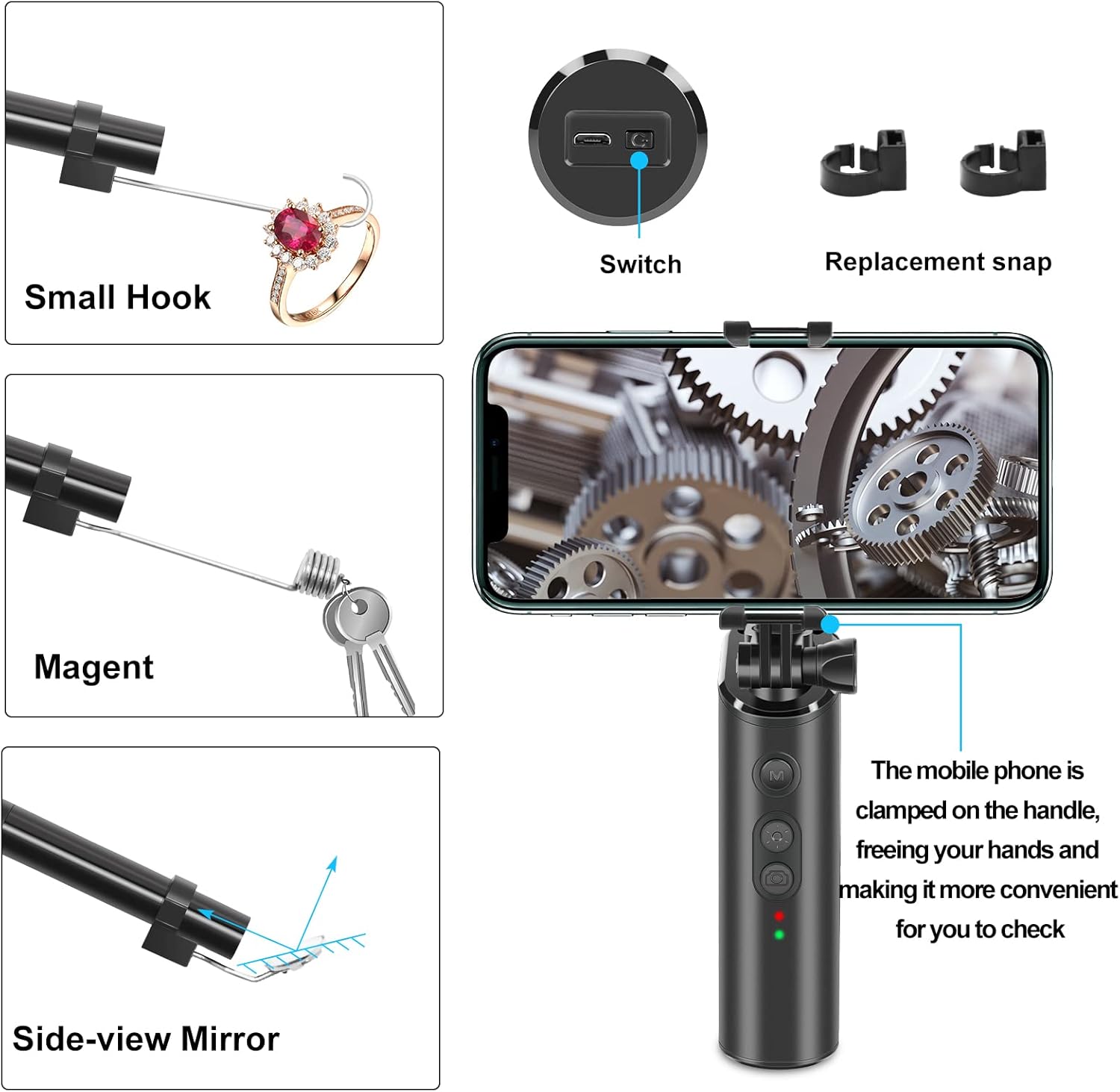
- Accessori inclusi: Small hook, magnet, and side-view mirror for enhanced functionality.
Componenti e Accessori:
The BEVA Endoscopic Camera comes with several components and accessories to assist with various inspection tasks.


3. Impostazione
3.1 Ricarica del dispositivo:
- Connect the endoscope to a standard USB power adapter (not included) using the provided charging cable.
- The charging indicator light will illuminate. A full charge typically takes a few hours.
- Una volta completata la carica, la spia luminosa potrebbe cambiare colore o spegnersi, a seconda del modello.
3.2 Connecting to Your Smartphone:
- Scarica l'App: Cercare the recommended endoscope application in your smartphone's app store (e.g., App Store for iOS, Google Play Store for Android). Refer to the packaging or a small QR code on the device for the specific app name.
- Accensione: Press and hold the power button on the endoscope handle to turn it on. The indicator light will show it's active.
- Collegare l'adattatore: Plug the appropriate adapter (iPhone or Micro USB) into your smartphone's charging port.
- Connect Endoscope: Connect the endoscope's USB cable to the adapter.
- Apri l'app: Launch the downloaded endoscope application. The camera feed should appear on your screen. If not, check your phone's settings for camera permissions or try restarting the app and device.
4. Istruzioni per l'uso
4.1 Funzionamento di base:
- Accensione/spegnimento: Premere e tenere premuto il pulsante di accensione sull'impugnatura.
- Regola la luminosità del LED: Use the dedicated button on the handle to cycle through different brightness levels for the 8 LED lights.
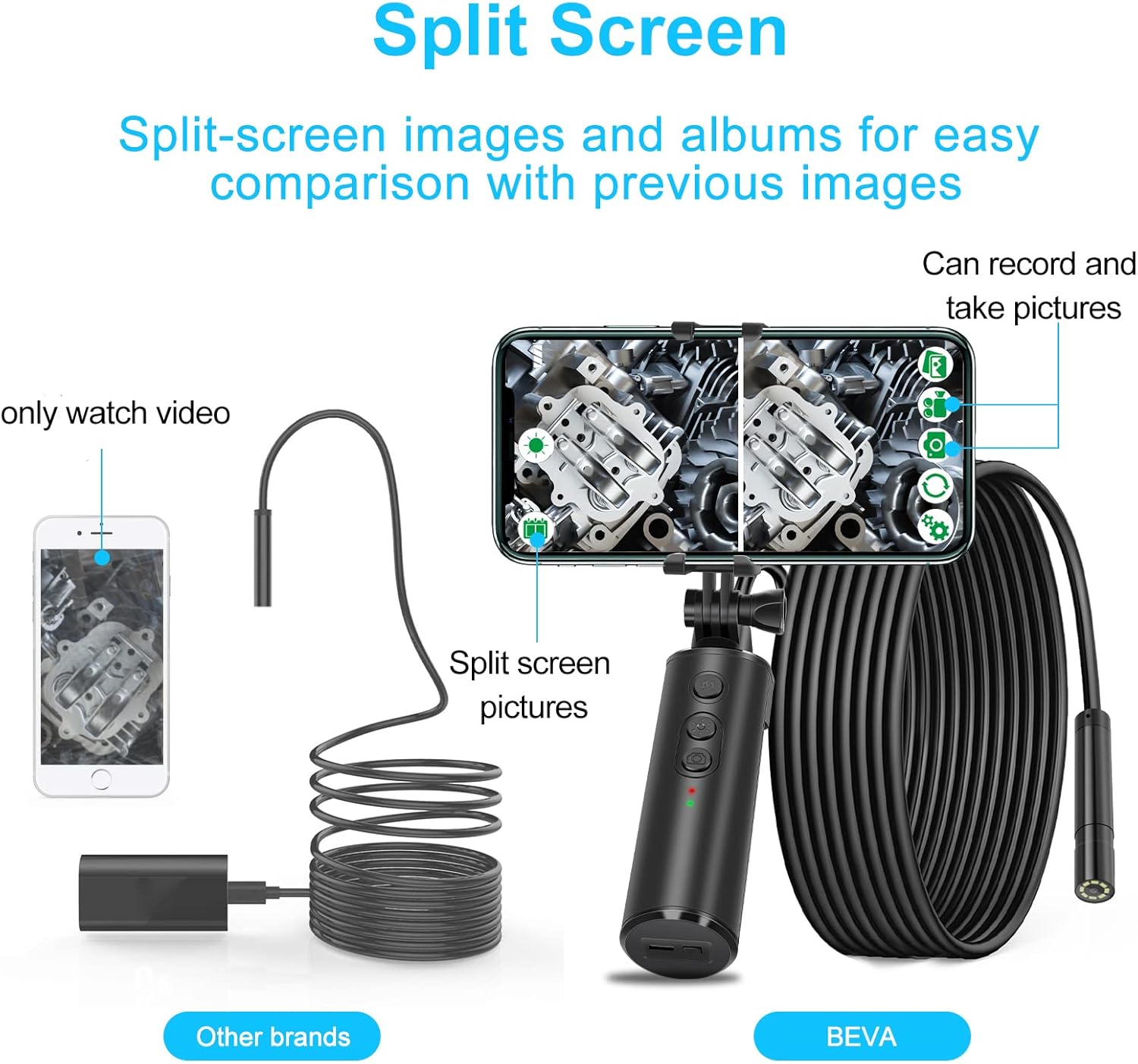
- Scattare foto: Press the camera button on the handle or within the app to capture still images.
- Registrazione di video: Press the video button on the handle or within the app to start/stop video recording.
4.2 Using Accessories:
- Small Hook: Attach the hook to the endoscope probe to retrieve small objects from tight spaces.
- Magnete: Use the magnet accessory to pick up metallic items.
- Lato-view Specchio: Attach the mirror to the probe for inspecting areas at a 90-degree angle.
4.3 Funzionalità avanzate:
- Schermo diviso: If supported by the app, utilize the split-screen function to compare live footage with previously captured images or view più angolazioni contemporaneamente.
- Rotazione dell'immagine: The app may offer options to rotate the image for optimal vieworientamento.
5. Manutenzione
5.1 Pulizia:
- After each use, especially in dirty or wet environments, gently wipe the camera lens and probe with a soft, dry cloth.
- Per lo sporco ostinato utilizzare una spugna leggermente damp panno e asciugare accuratamente. Non utilizzare prodotti chimici aggressivi o detergenti abrasivi.
- Ensure the USB port is clean and dry before charging or connecting to a device.
5.2 Conservazione:
- Conservare l'endoscopio in un luogo fresco e asciutto, lontano dalla luce solare diretta e da temperature estreme.
- Keep the protective cap on the camera lens when not in use to prevent scratches.
- Se si prevede di non utilizzarla per un periodo prolungato, assicurarsi che la batteria sia parzialmente carica (circa il 50%) per prolungarne la durata.
6. Risoluzione Dei Problemi
If you encounter issues with your BEVA Endoscopic Camera, please refer to the following common problems and solutions:
| Problema | Possibile causa | Soluzione |
|---|---|---|
| No image on phone screen | Device not powered on; Loose connection; App not open or permissions denied; Low battery. | Ensure device is powered on; Reconnect cable firmly; Open app and grant camera permissions; Charge the device. |
| Scarsa qualità dell'immagine | Insufficient lighting; Dirty lens; Incorrect focal distance. | Adjust LED brightness; Clean the camera lens; Adjust distance to object (optimal focal length is 8mm). |
| Dispositivo non in carica | Faulty cable or adapter; Dirty USB port. | Try a different USB cable and power adapter; Clean the USB port on the device. |
| L'app si blocca o si arresta in modo anomalo | App software issue; Phone system overload. | Restart the app and your phone; Check for app updates; Ensure your phone has sufficient memory. |
7. Specifiche
| Caratteristica | Specificazione |
|---|---|
| Marca | Bevanda |
| Numero di modello | 5 (280) |
| Risoluzione video | Formato: 1080p |
| Diametro della sonda | 8 millimetri |
| Lunghezza focale | 8 millimetri |
| Capacità della batteria | 2600 mAh agli ioni di litio |
| Lunghezza del cavo | 5 metri |
| Grado di impermeabilità | Grado di protezione IP68 |
| Luci LED | 8 LED regolabili |
| Compatibilità | iOS, Android (via iPhone/Micro USB adapter) |
| Componenti inclusi | Protective caps, magnets, hook, side-view specchio |
| Dimensioni (confezione) | Dimensioni: 18.2 x 17.5 x 4.8 cm |
| Peso (confezione) | 390 grammi |
8. Garanzia e supporto
BEVA offers comprehensive customer service and a strong warranty to ensure confidence in product quality. For specific warranty details, including coverage period and terms, please refer to the documentation provided with your purchase or contact your retailer.
Assistenza clienti:
If you require further assistance, have questions not covered in this manual, or need to report a product issue, please contact BEVA customer support through the following channels:
- Refer to the contact information provided on the product packaging or the official BEVA websito.
- Contact the seller directly through the platform where the product was purchased.
Please have your product model number (Model 5 / F280) and purchase details ready when contacting support.