
Introduzione
This manual provides detailed instructions for the ZORNHER ZH870 Wireless Gaming Mechanical Keyboard. Please read this guide thoroughly to ensure proper setup, operation, and maintenance of your device. The ZH870 features an 80% layout, IMD PC keycaps, creamy linear switches, hot-swappable design, RGB backlighting, and triple connectivity options.
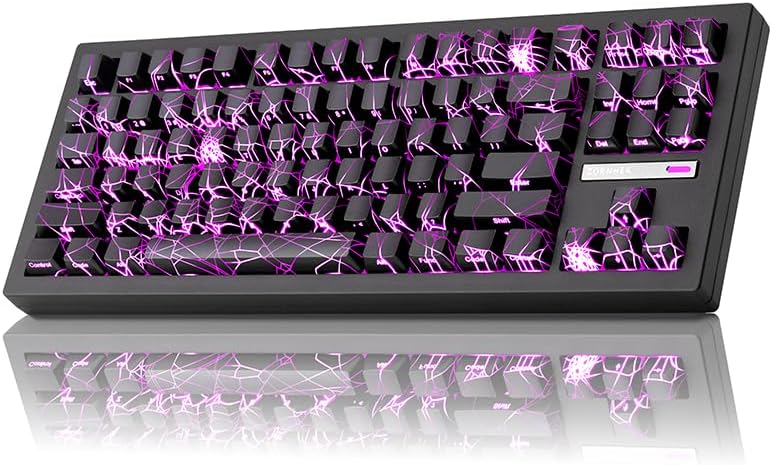
Image: ZORNHER ZH870 Wireless Gaming Mechanical Keyboard with its distinctive spider web pattern and purple RGB backlighting.
Contenuto della confezione
Verify that all items are present in your ZORNHER ZH870 package:
- 1 x corpo tastiera meccanica completamente assemblato
- 3 interruttori di ricambio
- 1 x Estrattore per tasti
- 1 x 2.4GHz Receiver (USB Dongle)
- 1 x USB-C Cable (1.8m nylon)
- 1 x parapolvere
- 1 x Manuale di istruzioni

Image: A visual representation of the ZORNHER ZH870 package contents, including the keyboard, USB-C cable, 2.4GHz receiver, replacement switches, keycap puller, and instruction manual.
Impostare
Carica iniziale
Before first use, it is recommended to fully charge the keyboard. Connect the provided USB-C cable to the keyboard's USB-C port and the other end to a powered USB port (e.g., computer, wall adapter). The keyboard features a 4000mAh battery.
Opzioni di connettività
The ZORNHER ZH870 supports three connection modes: 2.4GHz wireless, Bluetooth 5.0, and USB-C wired. You can connect up to 5 devices simultaneously.

Image: An illustration detailing the keyboard's triple connection capabilities, including 2.4GHz wireless, Bluetooth 5.0, and USB-C wired, along with examples of compatible devices such as Switch, Xbox, PlayStation, PC, Laptop, Tablet, and Phone.
Connessione wireless 2.4GHz
- Locate the 2.4GHz USB receiver in the package.
- Collega il ricevitore a una porta USB disponibile sul tuo computer.
- On the keyboard, switch the mode selector to 2.4GHz. The keyboard should automatically connect.
Connessione Bluetooth 5.0
- On the keyboard, switch the mode selector to Bluetooth.
- Press and hold the Fn key + a designated Bluetooth channel key (e.g., Fn + 1, Fn + 2, Fn + 3) for 3-5 seconds until the indicator light flashes, indicating pairing mode.
- On your device (PC, Mac, tablet, phone), go to Bluetooth settings and select "ZORNHER ZH870" to pair.
- Una volta effettuata l'associazione, la spia luminosa diventerà fissa.
Connessione cablata USB-C
- Collegare il cavo USB-C in dotazione alla porta USB-C della tastiera.
- Collegare l'altra estremità del cavo USB-C a una porta USB disponibile sul computer.
- La tastiera passerà automaticamente alla modalità cablata e inizierà a caricarsi.
Istruzioni per l'uso
Passaggio da una modalità all'altra
Use the physical switch located on the keyboard to select between 2.4GHz, Bluetooth, and Wired (USB-C) modes.
Controlli di illuminazione RGB
The ZH870 features 22 preset RGB lighting effects, including side-glow and south-facing LEDs. Use the following key combinations to control the lighting:
- Fn + Shift: Cambia colore della retroilluminazione
- Fn + Code: Change Backlight Effect (Cycle through 22 modes)
- Fn + Backspace: Accendi/spegni le luci
- Fn + ↑: Aumentare la luminosità
- Fn + ↓: Diminuire la luminosità
- Fn+←: Speed Up Light Change Rate
- Fn + →: Speed Down Light Change Rate

Image: A visual guide illustrating the function key combinations for adjusting RGB backlight color, effects, brightness, and speed on the ZORNHER ZH870 keyboard.
Video: Una breve dimostrazione mostraasing various RGB lighting effects and color changes on the ZORNHER ZH870 mechanical keyboard.
Personalizzazione e software
The ZORNHER ZH870 is fully customizable with driver support. You can remap keys, set macros, and personalize lighting modes to fit your gaming or workflow style. Refer to the official ZORNHER website for driver downloads and detailed software instructions.

Image: A screenshot of the ZORNHER software interface, demonstrating options for RGB lighting effects, macro recording, and profile customization for the ZH870 keyboard.
Manutenzione
Pulizia
To clean your keyboard, disconnect it from power. Use a soft, dry cloth to wipe the keycaps and chassis. For deeper cleaning, use the provided keycap puller to remove keycaps and a soft brush or compressed air to remove dust and debris from beneath them.
Sostituzione dell'interruttore (sostituibile a caldo)
The ZH870 features a hot-swappable PCB, compatible with both 3-pin and 5-pin mechanical switches. No soldering is required for switch replacement.
- Using a switch puller (not included, but often comes with replacement switches), carefully grip the switch and pull it straight up to remove it.
- Allineare i pin del nuovo interruttore con i fori sul PCB.
- Premere delicatamente il nuovo interruttore in posizione finché non scatta in posizione. Assicurarsi che i perni non siano piegati.
- Test the new switch to confirm functionality.

Immagine: Un dettaglio view of the ZORNHER ZH870's hot-swappable PCB, showing the switch sockets and a switch puller tool, highlighting compatibility with 3-pin and 5-pin switches.
Risoluzione dei problemi
- La tastiera non risponde: Ensure the keyboard is charged. Check the connection mode (2.4GHz, Bluetooth, or USB-C) and ensure it matches your device's connection. For wireless modes, verify the receiver is properly plugged in or Bluetooth is paired. Try restarting the keyboard or your device.
- Le luci RGB non funzionano: Ensure the lights are not turned off (Fn + Backspace). Check brightness levels (Fn + ↑/↓). If using software, verify settings.
- Problemi di connettività: For 2.4GHz, try a different USB port for the receiver. For Bluetooth, unpair and re-pair the device. Ensure no other wireless devices are causing interference. For wired, try a different USB-C cable or port.
- Chiavi non registrate: If a specific key is not working, it might be a faulty switch. Utilize the hot-swappable feature to replace the switch with one of the provided spares.
- La batteria si scarica rapidamente: Reduce RGB brightness or turn off lighting when not needed. Ensure the keyboard is fully charged. If the issue persists, contact support.
Specifiche
| Caratteristica | Dettaglio |
|---|---|
| Modello | ZH870 |
| Disposizione | 80% (88 Keys Compact) |
| keycaps | IMD PC Keycaps with Shine-Through Legends |
| Interruttori | Creamy Linear Switches (Factory-Lubed, Hot-Swappable 3-pin/5-pin) |
| Stile di montaggio | Guarnizione di montaggio |
| Connettività | 2.4GHz Wireless, Bluetooth 5.0, USB-C Wired (Supports up to 5 devices) |
| Capacità della batteria | 4000mAh agli ioni di litio |
| Retroilluminazione | RGB (22 Modes, South-Facing & Side Lighting) |
| Dispositivi compatibili | Laptop, Mac, PC, Tablet |
| Supporto del sistema operativo | Windows e macOS |
| Dimensioni del prodotto | 16.65 cm L x 7.99 cm P x 2.75 cm A |
| Peso dell'articolo | 3.8 libbre |
Garanzia e supporto
The ZORNHER ZH870 Wireless Gaming Mechanical Keyboard comes with a Garanzia di 2 anno from the date of purchase, covering manufacturing defects. For warranty claims, technical assistance, or any product-related inquiries, please contact ZORNHER customer support through the official websito o sui canali di supporto del tuo rivenditore.
Conservare la prova d'acquisto per la convalida della garanzia.