Introduzione
The RSH Android Smart Tag is a compact and efficient device designed to help you locate your valuable items using the Google Find My Device app. This manual provides comprehensive instructions to ensure you get the most out of your Smart Tag.

Image: Four RSH Android Smart Tags, mostraasing their design and quantity in the pack.
Impostare
1. Accensione e spegnimento
The RSH Android Smart Tag features a function button for basic operations. Refer to the diagram below for the button's location.
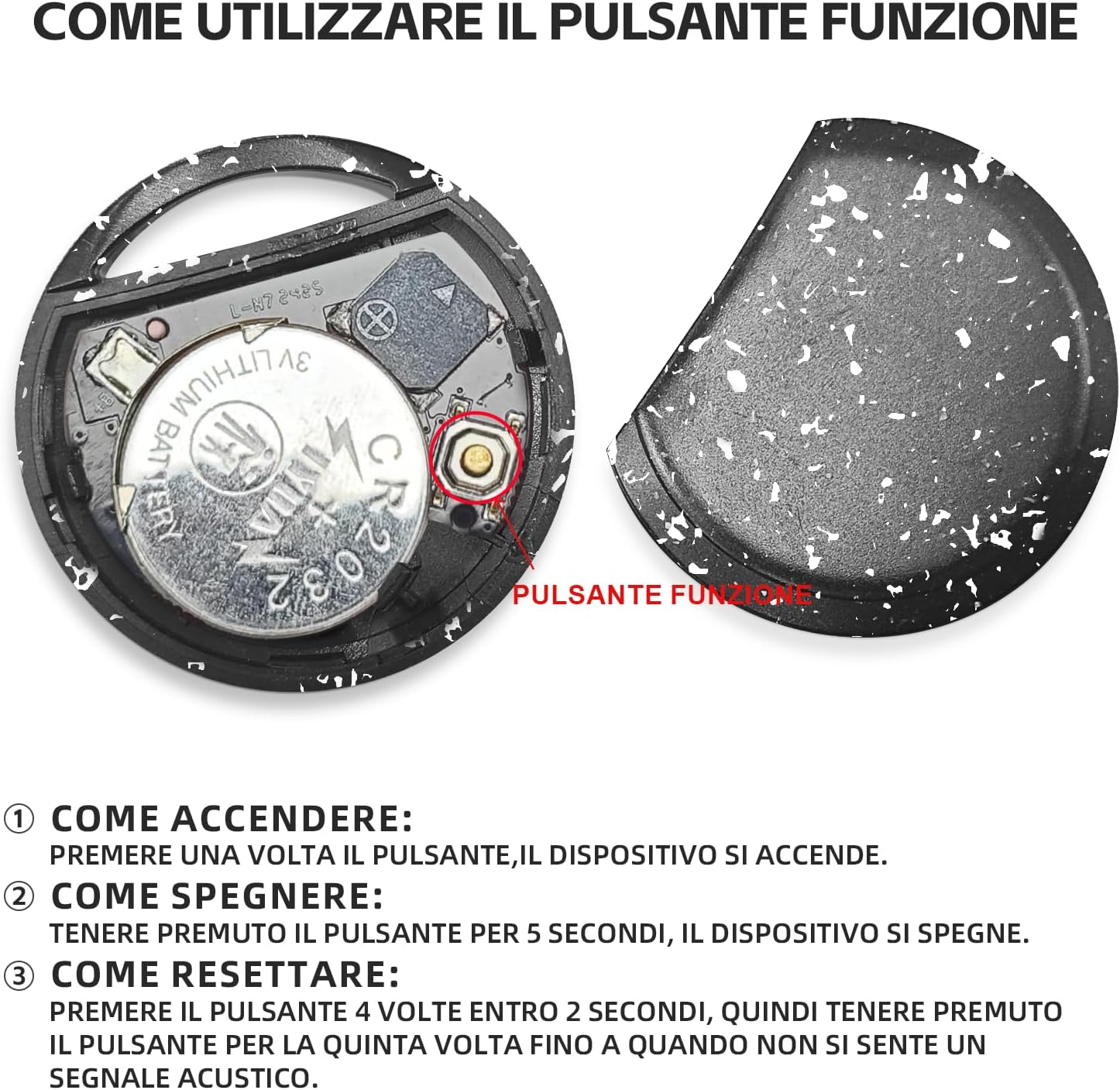
Immagine: Interna view dell'Astuto Tag, illustrating the battery and function button.
- Come accendere: Press the function button once. The device will turn on.
- Come disattivare: Press and hold the function button for 5 seconds. The device will turn off.
2. Fast Pairing with Android Devices
Lo Smart Tag is designed for quick and seamless pairing with your Android smartphone.
- Assicurati che il Bluetooth del tuo telefono Android sia abilitato.
- Bring the RSH Android Smart Tag vicino al tuo telefono.
- A connection invitation will automatically appear on your phone's screen. Follow the on-screen prompts to complete the pairing process.

Immagine: rappresentazione visiva dello Smart Tag's compatibility with a wide range of Android devices.
Istruzioni per l'uso
1. Tracking and Item Search
Utilize the Google Find My Device app to locate your RSH Android Smart Tag.
- Within Bluetooth Range: Open the Google Find My Device app. If the tag is within Bluetooth range, you can activate its built-in speaker to emit an audible signal, helping you pinpoint its exact location.
- Out of Bluetooth Range: Se il tag is outside Bluetooth range, the app will display its last known location on a map, leveraging the Google Find My Device network.

Image: Demonstration of the 'Play sound' feature within the Google Find My Device app.

Immagine: The Smart Tag attached to a backpack, illustrating its use for tracking items.

Immagine: The Smart Tag attached to luggage, emphasizing its utility for travel.
2. Loss Mode
Activate Loss Mode in the Google Find My Device app if your item is missing. This feature leverages the vast network of billions of Android devices to help locate your lost item.
3. Sharing Items
You can share access to your Smart Tag with others through the Google Find My Device app. This allows multiple users to view the item's location on the map.

Image: Various use cases for the Smart Tag, demonstrating its versatility for tracking different items.
Manutenzione
1. Sostituzione della batteria
The RSH Android Smart Tag uses a replaceable CR2032 battery, which typically lasts up to 1 year. To replace the battery:
- Carefully open the Smart Tag casing.
- Rimuovere la vecchia batteria CR2032.
- Inserire una nuova batteria CR2032, garantendo la corretta polarità.
- Chiudete il casing in modo sicuro.
2. Resistenza all'acqua
Il MiTag tracker is IP67 certified, meaning it is protected from dust and can withstand immersion in 1 meter of water for up to 30 minutes. While it is water-resistant, it is not recommended for prolonged submersion or use during swimming.
Risoluzione dei problemi
Ripristino del dispositivo
If you experience connectivity issues or unusual behavior, you may need to reset your RSH Android Smart Tag:
- Press the function button 4 times within 2 seconds.
- Immediately after the fourth press, press and hold the function button for the fifth time until you hear an audible signal. This indicates the device has been reset.
Specifiche
| Caratteristica | Dettaglio |
|---|---|
| Marca | RSH |
| Materiale | Plastica |
| Dimensioni del prodotto | 36L x 36W x 8Th millimetres |
| Peso dell'articolo | 7.6 grammi |
| Dispositivi compatibili | Smartphone (Android Only) |
| Metodo di controllo | App (Google Trova il mio dispositivo) |
| Tipo di batteria | 1 CR2032 (inclusa, sostituibile) |
| Resistenza all'acqua | Certificato IP67 |
Garanzia e supporto
Information regarding product warranty and customer support is not provided in the available data. Please refer to the product packaging or the seller's websito per i dettagli sulla copertura della garanzia e su come contattare l'assistenza clienti.