
Introduzione
Thank you for choosing the zelotes T80 Ergonomic Gaming Mouse. This wired optical mouse is designed for both gaming and office use, offering adjustable DPI, customizable LED lighting, and a comfortable ergonomic design for extended use. Please read this manual carefully to ensure proper setup and operation of your new mouse.
Caratteristiche del prodotto
- 7 Buttons & Quick Fire Button: Includes forward, backward, and a rapid fire (double click) button for enhanced control in gaming and productivity.
- 5 livelli DPI regolabili: Easily switch between 1000/1600/2400/3200/7200 DPI to match your speed and precision needs.
- 7 LED Backlit Modes: Personalize your setup with various lighting effects.
- Design ergonomico: Crafted for comfort with skin-friendly material, sweat-resistant, and anti-slip features to prevent fatigue during long sessions.
- Ampia compatibilità: Compatible with Windows 11/10/8/7 and Mac OS, suitable for various applications including MMD, FPS games, and office tasks.
Contenuto della confezione
- 1 x zelotes T80 Wired Gaming Mouse
- 1 x Manuale di istruzioni
Impostare
- Disimballare: Estrarre con cautela il mouse e i relativi accessori dalla confezione.
- Rimuovere la pellicola protettiva: Before use, please remove the protective film from the mouse's foot pads.
- Collegare: Plug the USB cable of the zelotes T80 Gaming Mouse into an available USB port on your computer (PC or Laptop).
- Installazione del driver: The mouse is plug-and-play. Your operating system will automatically detect and install the necessary drivers. No additional software installation is typically required for basic functionality.
Istruzioni per l'uso
Spiegazioni dei pulsanti
The zelotes T80 mouse features 7 buttons for versatile control:
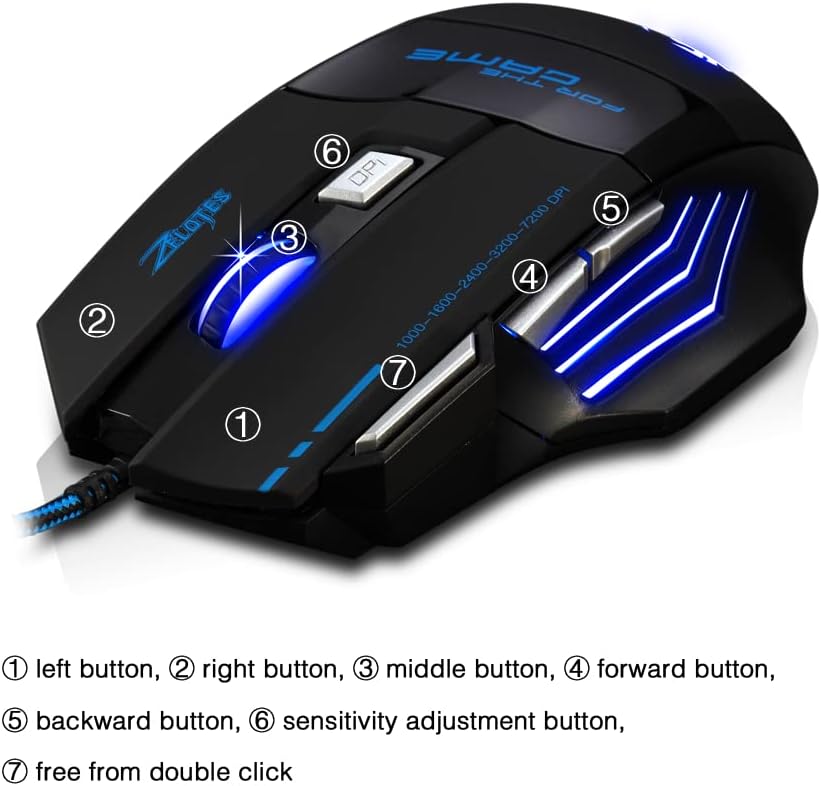
- Pulsante sinistro (1): Funzione standard del clic sinistro.
- Pulsante destro (2): Funzione standard del clic destro.
- Middle Button / Scroll Wheel (3): Scrolls up/down. Pressing it acts as a middle-click.
- Pulsante Avanti (4): Naviga in avanti in web browser o file esploratori.
- Pulsante Indietro (5): Naviga indietro in web browser o file esploratori.
- Pulsante DPI (6): Adjusts mouse sensitivity (DPI) and changes LED colors.
- Rapid Fire Button (7): Functions as a double-click of the left button, useful for continuous firing in games.
Regolazione DPI
The mouse offers 5 adjustable DPI levels to suit different tasks and preferences:
- 1000 DPI
- 1600 DPI
- 2400 DPI
- 3200 DPI
- 7200 DPI
Premere il tasto Pulsante DPI (6) to cycle through these sensitivity levels. Each change will be indicated by a corresponding LED color change.
Controllo dell'illuminazione a LED
The mouse features 7 LED lighting modes. To change the LED color, long press the DPI button (6). The LED will flash rapidly 7 times and then remain constant on the selected color.

Manutenzione
- Pulizia: Utilizzare un panno morbido e asciutto per pulire la superficie del mouse. Per lo sporco ostinato, un panno leggermenteamp è possibile utilizzare un panno, assicurandosi che nessun liquido entri nel mouse.
- Cura del cavo: Per evitare danni, evitare di piegare bruscamente o tirare eccessivamente il cavo USB.
- Magazzinaggio: Conservare il mouse in un luogo fresco e asciutto, lontano dalla luce solare diretta e da temperature estreme.
Risoluzione dei problemi
Il mouse non risponde
- Assicurarsi che il cavo USB sia collegato saldamente a una porta USB funzionante.
- Prova a collegare il mouse a una porta USB diversa del computer.
- Prova il mouse su un altro computer per determinare se il problema riguarda il mouse o il computer.
LED Lights Not Working/Changing
- Verify the mouse is properly connected to the computer.
- Ensure you are long-pressing the DPI button to cycle through colors. A short press changes DPI.
DPI non cambia
- Ensure you are short-pressing the DPI button to cycle through DPI levels.
- If the issue persists, try reconnecting the mouse.
Specifiche
| Caratteristica | Dettaglio |
|---|---|
| Numero di modello | T80 |
| Pulsanti | 7 (with scroll wheel) |
| DPI regolabile | 1000/1600/2400/3200/7200 DPI |
| Illuminazione a LED | 7 modalità di illuminazione |
| Connettività | USB cablato |
| Sistema di tracciamento | Ottico |
| Design ergonomico | SÌ |
| Cambia vita | 5 milioni di cicli |
| Dimensioni | Dimensioni: 130x105x45mm |
| Peso | 160 ± 5 g |
| Lunghezza del cavo USB | 1.5 metri |
| Compatibilità | Win11, Win10, Win8, Win7, Mac OS |
Garanzia e supporto
For warranty information and technical support, please refer to the product packaging or contact zelotes customer service through the retailer where the product was purchased. Keep your purchase receipt for warranty claims.