
1. Introduzione
Thank you for choosing the JUNJIEUNVO Q16 PRO Wireless Translation Earbuds. These earbuds are designed to provide a versatile audio experience, featuring real-time language translation, high-definition sound, and an open-ear design for comfort. This manual provides essential information for setting up, operating, and maintaining your device.
2. Contenuto della confezione
- JUNJIEUNVO Q16 PRO Wireless Translation Earbuds (Left and Right)
- Charging Case with Smart Touch Screen
- Manuale d'uso
- Cavo di ricarica (USB-C)
3. Prodotto finitoview

Figura 3.1: JUNJIEUNVO Q16 PRO Wireless Translation Earbuds and Charging Case. This image displays the white and silver earbuds with their unique ear-hook design, alongside the charging case which features a digital display showing time and battery levels.
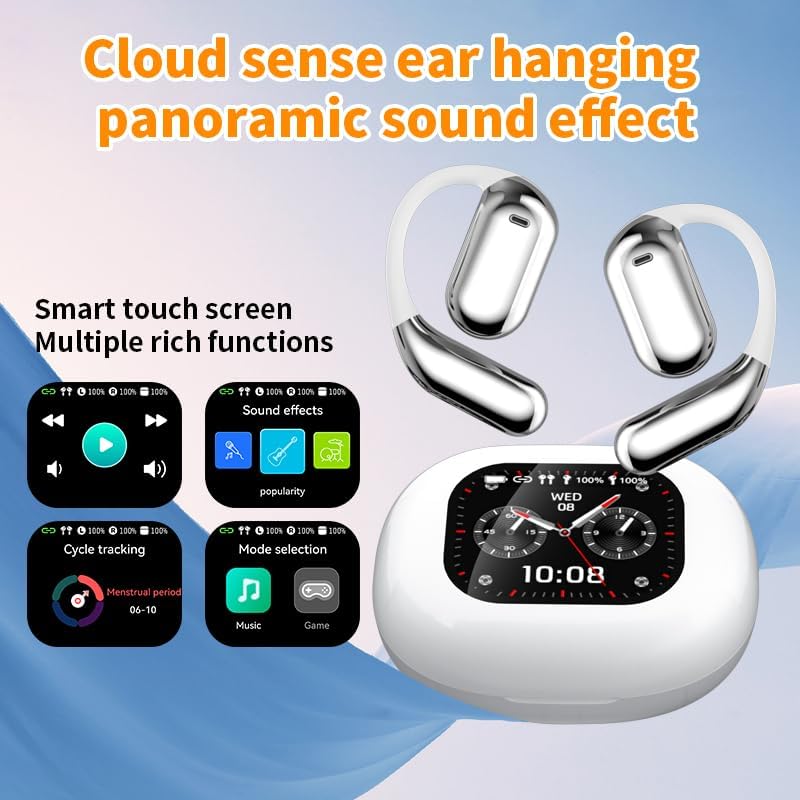
Figura 3.2: Smart Touch Screen Functions. This image highlights the charging case's smart touch screen, illustrating various functions such as media playback controls, sound effects, cycle tracking, and mode selection (music/game).

Figura 3.3: Environmental Noise Cancellation (ENC). This image depicts a person wearing the earbuds, with an overlay illustrating how the ENC technology reduces ambient noise by up to 99.44%, providing a clearer audio experience.

Figura 3.4: Open-Ear Design for Comfort. This image shows a person wearing the earbuds, emphasizing the open-ear design that offers comfort and allows for awareness of external sounds, protecting ear canal health.

Figura 3.5: Multiple Sound Adjustment Modes. This image displays the charging case's screen showing "Sound effects" with options for various music genres, indicating the ability to customize audio preferences.

Figura 3.6: Extended Battery Life and Rich Functions. This image showcases the earbuds and charging case, highlighting a 40-hour endurance with a 500mAh charging case capacity, along with a mention of multiple functions.

Figura 3.7: Earbuds and Charging Case (Open View). A detailed view of both earbuds and the open charging case, showing the internal design and charging contacts.

Figura 3.8: Earbuds in Charging Case. This image shows the earbuds securely placed within their charging case, ready for charging or storage.

Figura 3.9: Earbuds and Charging Case (Angled View). Another perspective of the earbuds and charging case, emphasizing their sleek design and compact form factor.
4. Impostazione
4.1 Ricarica degli auricolari e della custodia
Prima del primo utilizzo, caricare completamente gli auricolari e la custodia di ricarica.
- Inserisci gli auricolari nella custodia di ricarica. Assicurati che siano correttamente inseriti nei rispettivi alloggiamenti (L per sinistro, R per destro).
- Connect the charging cable to the USB-C port on the charging case and to a power source.
- Il display digitale sulla custodia di ricarica indicherà lo stato di carica.
A full charge for the earbuds takes approximately 1.5 hours. The charging case has a 500mAh battery, providing extended use.
4.2 Associazione con un dispositivo
Gli auricolari utilizzano il Bluetooth 5.4 per una connessione stabile fino a 10 metri.
- Aprire la custodia di ricarica. Gli auricolari entreranno automaticamente in modalità di associazione.
- Sul tuo dispositivo (smartphone, tablet, ecc.), attiva il Bluetooth.
- Cercare available Bluetooth devices and select "Q16 PRO" from the list.
- Once connected, the earbuds will indicate successful pairing, and the device will show them as connected.
Se il Bluetooth è abilitato sul dispositivo, gli auricolari si riconnetteranno automaticamente all'ultimo dispositivo associato quando vengono rimossi dalla custodia.
5. Istruzioni per l'uso
5.1 Funzioni dello schermo touch intelligente
The charging case features a smart touch screen for easy control of various functions. Navigate through options by swiping or tapping on the screen.
- Riproduzione multimediale: Control music (play, pause, skip tracks) directly from the screen.
- Effetti sonori: Select from various sound modes.
- Selezione della modalità: Passa dalla modalità musica a quella gioco.
- Monitoraggio del ciclo: Access additional features if supported by the connected application.
5.2 Controlli touch (auricolari)
The earbuds themselves also feature touch-sensitive areas for basic controls:
- Singolo tocco: Riproduci/Metti in pausa la musica, Rispondi/Termina chiamata.
- Doppio tocco (sinistra): Traccia precedente.
- Doppio tocco (a destra): Traccia successiva.
- Premere a lungo: Attiva l'assistente vocale, Rifiuta chiamata.
5.3 Funzione di traduzione
The Q16 PRO earbuds support real-time translation for up to 144 languages. This feature typically requires a dedicated application on your connected smartphone.
- Download and install the companion translation application (refer to the app store or product packaging for details).
- Open the application and follow the on-screen instructions to connect your earbuds.
- Select the desired source and target languages within the application.
- Use the earbuds as instructed by the application for real-time translation during conversations or audio playback.
5.4 Sound Adjustment Modes
Customize your audio experience through the charging case's smart touch screen. Available sound modes include:
- Normale
- Pop
- Roccia
- Jazz
- Classico
- Popolare
- Custom (user-defined equalizer settings)
5.5 Grado di impermeabilità IPX5
The earbuds are rated IPX5 waterproof, meaning they are resistant to splashes and sweat. They are suitable for sports and outdoor activities but should not be submerged in water.
6. Manutenzione
- Pulizia: Utilizzare un panno morbido e asciutto per pulire gli auricolari e la custodia di ricarica. Evitare l'uso di materiali abrasivi o sostanze chimiche aggressive.
- Magazzinaggio: Conserva gli auricolari nella custodia di ricarica quando non vengono utilizzati per proteggerli e mantenerli carichi.
- Evitare temperature estreme: Do not expose the device to extreme heat or cold, as this can damage the battery and internal components.
- Esposizione all'acqua: While IPX5 rated, avoid prolonged exposure to water or high humidity. Ensure the charging port is dry before charging.
7. Risoluzione Dei Problemi
| Problema | Possibile soluzione |
|---|---|
| Gli auricolari non si accoppiano | Ensure earbuds are charged. Turn off and on Bluetooth on your device. Forget "Q16 PRO" from your device's Bluetooth list and re-pair. |
| Nessun suono da un auricolare | Check battery level of both earbuds. Place both earbuds back in the case, close it, then reopen to reset. Re-pair with your device. |
| La custodia di ricarica non si ricarica | Ensure the charging cable is securely connected. Try a different USB-C cable and power adapter. |
| La funzione di traduzione non funziona | Ensure the companion app is installed and updated. Check app permissions (microphone, internet). Verify a stable internet connection. |
| Scarsa qualità del suono | Ensure earbuds are clean. Check the distance to your device (within 10m). Avoid obstacles between earbuds and device. |
8. Specifiche
| Caratteristica | Dettaglio |
|---|---|
| Nome del modello | YYK-Q16 PRO |
| Versione Bluetooth | V5.4 + EDR |
| Chip | Blue Flood |
| Protocolli supportati | AVRCP V1.6, A2DP V1.3, HFP V1.7, Simultaneous LE and BR / EDR |
| Usage/Playback Time | Circa 8 ore (al 80% del volume) |
| Tempo di standby | 80 ore |
| Tempo di ricarica | Circa 1.5 ore |
| Distanza senza fili | 10 metri |
| Capacità della batteria degli auricolari | 40 mAh (ogni auricolare) |
| Capacità della batteria della custodia di ricarica | 500mAh |
| Grado di impermeabilità | Grado di protezione IPX5 |
| Peso dell'articolo | 6.4 once (totale) |
| Codice UPC | 884613749637 |
| Produttore | UNVO |
| Colore | White+Silver |
| Posizionamento dell'orecchio | On Ear (Open-wear design) |
| Fattore di forma | Vero wireless |
9. Garanzia e supporto
For warranty information and customer support, please refer to the documentation included with your purchase or contact the retailer/manufacturer directly. Keep your proof of purchase for any warranty claims.