
HiBy R1
Manuale utente del lettore MP3 HiFi HiBy R1
Modello: R1
1. Introduzione
The HiBy R1 is a compact and versatile HiFi MP3 player designed for high-resolution audio playback. It features a built-in CS43131 DAC chip, supporting DSD 256 native and PCM 384kHz audio formats. With Bluetooth 5.1, Wi-Fi connectivity, and a 3-inch touchscreen, the R1 offers a comprehensive portable music experience, including streaming from services like Tidal and Qobuz.

Immagine: Frontale view of the HiBy R1 MP3 player showing its touchscreen interface during music playback.

Immagine: Oltreview of the HiBy R1 in various colors, highlighting its compact design and key features like Hi-Res certification, Tidal/Qobuz support, DSD/PCM, and Bluetooth 5.1.
2. Guida all'installazione
2.1. Disimballaggio e contenuto della confezione
Carefully unbox your HiBy R1 player. Verify that all components are present:
- HiBy R1 Player
- USB2.0 data cable
- Sacchetto
- Cinghia
- Needle (for SIM tray/reset)
- Manuale d'uso
- Scheda di garanzia
- Certificato
- Pellicola protettiva
Note: The 'Set Version' may include additional accessories such as a 32GB Micro SD Card, Yves Earphones, and ear-tips.

Image: Comparison of package contents for the Standard and Set versions of the HiBy R1, showing the player, cables, pouch, and additional accessories for the Set version.
2.2. Ricarica iniziale
Before first use, fully charge the HiBy R1 using the provided USB cable and a compatible USB power adapter (not included). The charging indicator will show progress and turn off when fully charged.
2.3. Accensione/Spegnimento
- Per accendere: Tenere premuto il pulsante di accensione finché lo schermo non si illumina.
- Per spegnere: Tenere premuto il pulsante di accensione, quindi selezionare "Spegni" sullo schermo.
2.4. Installazione della scheda Micro SD
The HiBy R1 supports TF cards (Micro SD) up to 2TB in FAT32, NTFS, and EXFAT formats. Locate the Micro SD card slot on the device. Insert the card gently until it clicks into place. To remove, push the card in slightly until it springs out.
2.5. Aggiornamento del firmware
It is highly recommended to update the firmware before initial use to ensure optimal performance, bug fixes, and enhanced features.
Connect the HiBy R1 to a Wi-Fi network. Navigate to 'Settings' > 'About device' > 'System update' to check for and install the latest firmware.
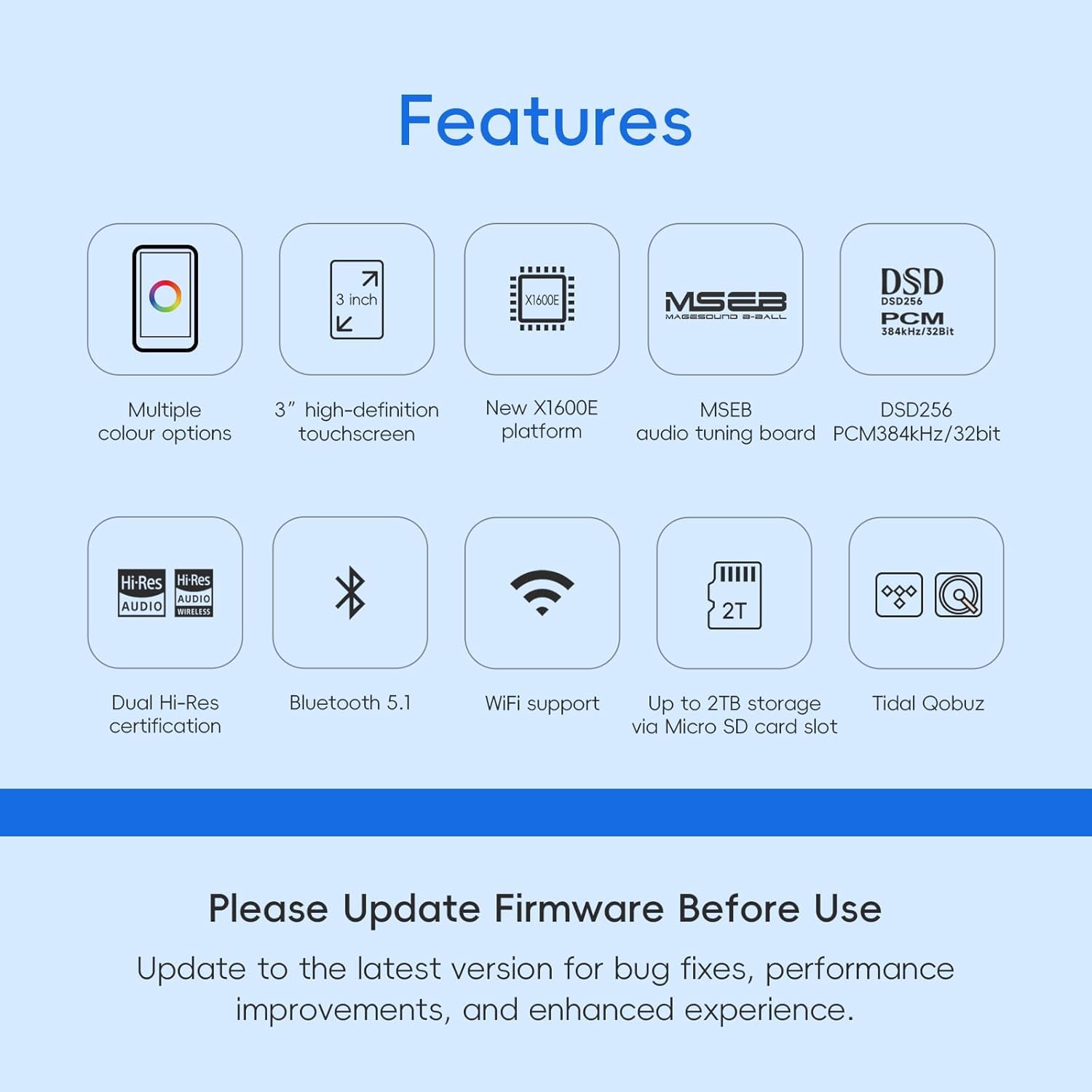
Immagine: Un overview of the HiBy R1's key features, including a prominent reminder to update firmware before use for bug fixes and performance improvements.
3. Istruzioni per l'uso
3.1. Navigazione di base
The HiBy R1 features a 3-inch HD touchscreen with 800x480 resolution. Navigate the interface by tapping, swiping, and using the physical control buttons on the side of the device.

Image: Close-up of the HiBy R1's 3-inch IPS touchscreen, highlighting its 800x480 resolution.
3.2. Riproduzione di musica
The R1 supports a wide range of high-resolution lossless audio formats, including MP3, WAV, APE, FLAC, DSF, DFF, ISO, CUE, WMA, OGG, AAC, Opus, and AIFF. After inserting a Micro SD card with music files, the device will scan and organize your library.

Image: Diagram illustrating the HiFi DAC CS43131 chip and the various audio formats it supports, including DSD256 native and PCM 384kHz/32bit.
3.3. Connettività Bluetooth
The HiBy R1 features Bluetooth 5.1 with support for LDAC, aptX, AAC, and SBC codecs, ensuring high-quality wireless audio output. It holds dual certifications for Hi-Res AUDIO and Hi-Res AUDIO WIRELESS.
- Abbinamento: Go to 'Settings' > 'Bluetooth', turn Bluetooth on, and select your desired device from the list to pair.

Image: The HiBy R1 player demonstrating its Bluetooth 5.1 and Wi-Fi music transfer capabilities, showing various Bluetooth codecs like LDAC, aptX, AAC, and SBC.
3.4. Wi-Fi Connectivity and Streaming
The R1 supports Wi-Fi for music transfer and streaming services. The HiByOS player, powered by the X1600E CPU, allows direct streaming from Tidal and Qobuz, as well as internet radio playback.
- Connessione al Wi-Fi: Go to 'Settings' > 'Wi-Fi', turn Wi-Fi on, and select your network.
- Streaming: Access Tidal or Qobuz applications directly from the player's interface.
- Wi-Fi Music Transfer: Transfer songs to the device over Wi-Fi without needing a cable.

Image: The HiBy R1 screen displaying options for streaming music from Tidal and Qobuz.
3.5. MSEB Tuning
The HiBy R1 features an MSEB (MageSound 8-Ball) mixer for easy sound tuning. This allows users to adjust various audio parameters to customize their listening experience.
- Accessing MSEB: Navigate through the HiByOS interface to find the MSEB settings.
- Regolazioni: Modify parameters such as 'Overall Temperature' (Cool/Bright to Warm/Dark), 'Bass extension', 'Bass texture', 'Note thickness', 'Vocals', 'Recessed/Crisp', 'Female overtones', 'Sibilance', and 'Detox/Vivid'.

Image: The HiBy R1 displaying its MSEB (MageSound 8-Ball) audio tuning interface, alongside options for streaming services like Tidal and Qobuz.
3.6. USB DAC Output
The HiBy R1 can function as a USB DAC, allowing it to process audio from a computer or other compatible device and output it through its 3.5mm port.
- Connect the R1 to your computer using the USB-C cable.
- Select the USB DAC mode on the R1 if prompted.
- Select the HiBy R1 as the audio output device on your computer.
4. Manutenzione
4.1. Cura della batteria
- Evitare di scaricare completamente la batteria frequentemente.
- Per preservare la salute della batteria, caricare regolarmente il dispositivo, anche quando non lo si utilizza.
- Se non utilizzato per lunghi periodi, conservare il dispositivo in un luogo fresco e asciutto.
4.2. Pulizia
- Per pulire lo schermo e il corpo del lettore, utilizzare un panno morbido, asciutto e privo di lanugine.
- Non utilizzare detergenti abrasivi, alcol o solventi chimici.
- Mantenere le porte libere da polvere e detriti.
4.3. Conservazione
When not in use, store the HiBy R1 in its pouch to protect it from scratches and dust. Avoid exposing the device to extreme temperatures, direct sunlight, or high humidity.
5. Risoluzione Dei Problemi
5.1. Il dispositivo non si accende
- Assicurarsi che la batteria sia carica. Collegare il lettore a una fonte di alimentazione per almeno 30 minuti.
- Per eseguire un riavvio forzato, tenere premuto il pulsante di accensione per 10-15 secondi.
5.2. Nessuna uscita audio
- Controllare il livello del volume sul dispositivo e sulle cuffie/altoparlanti collegati.
- Ensure headphones are properly plugged into the 3.5mm port.
- If using Bluetooth, ensure the device is correctly paired and connected. Try re-pairing.
- Prova con cuffie o audio diversi files.
5.3. Problemi di connettività (Bluetooth/Wi-Fi)
- Ensure Bluetooth/Wi-Fi is enabled in settings.
- Avvicinati al router Wi-Fi o al dispositivo Bluetooth.
- Dimentica la rete/il dispositivo e prova a riconnetterti.
- Restart the HiBy R1 and the other device.
5.4. Scheda Micro SD non riconosciuta
- Assicurarsi che la scheda sia inserita correttamente e completamente.
- Check if the card is formatted to FAT32, NTFS, or EXFAT.
- Prova una scheda Micro SD diversa per escludere problemi con la scheda stessa.
- Riavviare il dispositivo.
6. Specifiche
| Caratteristica | Dettaglio |
|---|---|
| Nome del modello | R1 |
| Chip DAC | CS43131 |
| Formati audio supportati | MP3, WAV, APE, FLAC, DSF, DFF, ISO, CUE, WMA, OGG, AAC, Opus, AIFF |
| Risoluzione massima | DSD 256 native, PCM 384kHz/32bit |
| Versione Bluetooth | 5.1 |
| Codec Bluetooth | LDAC, aptX, AAC, SBC |
| Display | Touchscreen IPS da 3 pollici |
| Risoluzione dello schermo | 800x480 |
| processore | X1600E |
| Capacità di archiviazione della memoria | Supports up to 2TB via Micro SD card |
| Batteria | 1150mAh agli ioni di litio (inclusi) |
| Tempo di riproduzione della musica | Circa 15 ore |
| Tempo di standby | ca. 400+ ore |
| Tecnologia di connettività | Bluetooth, Wi-Fi, USB-C |
| Peso dell'articolo | 2.47 once |
| Dimensioni del pacco | 6 x 4 x 2 pollici |
7. Garanzia e supporto
For warranty information and technical support, please refer to the warranty card included in your package or visit the official HiBy websito. Puoi anche trovare ulteriore supporto e informazioni sul prodotto sul Negozio HiBy su Amazon.
HiBy is dedicated to providing excellent customer service. If you have any questions or require assistance with your HiBy R1, please do not hesitate to contact their support team.
Ask a question about this manual
Ask about setup, troubleshooting, compatibility, parts, safety, or missing instructions. Manuals+ will review the question and use this page’s manual context to help answer it.