
WAVLINK WNT100X3
WAVLINK AX3000 Travel Router User Manual
Model: WNT100X3
1. Introduzione
The WAVLINK AX3000 Travel Router (Model: WNT100X3) is a portable Wi-Fi 6 router designed for business travel, vacations, and mobile use. It provides high-speed dual-band Wi-Fi connectivity, robust security features including VPN support, and versatile connection options to ensure a secure and stable internet experience wherever you go.

Immagine 1.1: anteriore view of the WAVLINK AX3000 Travel Router with its antennas extended.
2. Contenuto della confezione
Si prega di verificare che tutti gli articoli siano presenti nel pacco:
- 1 x WAVLINK AX3000 Travel WiFi Router
- 1 x cavo Ethernet
- 1 cavo di alimentazione USB-C
- 1 x adattatore di alimentazione
- 1 x Guida rapida

Image 2.1: All items included in the WAVLINK AX3000 Travel Router package.
3. Prodotto finitoview
Familiarize yourself with the various components and ports of your WAVLINK AX3000 Travel Router.

Image 3.1: Diagram illustrating the components and ports of the WAVLINK AX3000 Travel Router.
Descrizioni dei componenti:
- antenne: Two 3dBi 2.4G & 5G omnidirectional antennas for wireless signal transmission and reception.
- Toggle Switch (Customized Function): A programmable switch for quick access to specific functions, such as VPN on/off.
- Indicatore LED: Displays the operational status of the router.
- Porta USB 3.0: For connecting external storage devices to create network storage.
- Porta LAN: Gigabit Ethernet port for connecting wired devices to the local network.
- Porta WAN: Gigabit Ethernet port for connecting to an internet source (e.g., modem, hotel Ethernet).
- Power Port (Type-C 5V/3A): Connects to the power adapter for device power.
- Pulsante di reset: Utilizzato per ripristinare il router alle impostazioni predefinite di fabbrica.
4. Guida all'installazione
4.1 Accensione iniziale
- Connect the provided USB-C power cable to the router's Power port.
- Plug the other end of the USB-C cable into the power adapter, and then plug the adapter into a power outlet.
- Wait for the LED indicator to stabilize, indicating the router is ready for configuration.
4.2 Connessione a Internet
The WAVLINK AX3000 offers multiple ways to connect to the internet:

Image 4.1: Visual representation of the various internet connection methods supported by the router.
- Wireless Repeater Connection (Wi-Fi to Travel Router):
Connect the travel router to an existing public Wi-Fi network (e.g., hotel Wi-Fi) and extend that Wi-Fi signal as your private network. This mode is ideal for securing your devices on public networks.
- Ethernet Cable Connection (Ethernet to Travel Router):
Connect the router's WAN port to an Ethernet port (e.g., in a hotel room or office) using the provided Ethernet cable. This provides a stable wired internet connection.
- USB Tethering (Hotspot to Travel Router):
Connect your smartphone to the router via the USB port to share your phone's mobile data connection. This is useful when no Wi-Fi or Ethernet is available.
4.3 Configurazione iniziale (Web Interfaccia)
- Connect your device (laptop, smartphone) to the router's default Wi-Fi network (SSID and password usually found on a sticker on the router or in the Quick Start Guide).
- Aprire un web browser and enter the default IP address (e.g., 192.168.1.1) into the address bar.
- Follow the on-screen instructions to set up your internet connection, change Wi-Fi name (SSID) and password, and configure administrator credentials.
5. Modalità operative e caratteristiche
5.1 Dual-Band Wi-Fi 6 Performance
The AX3000 supports IEEE 802.11ax/ac/a/n/g/b standards, offering high-speed dual-band connectivity:
- Banda da 2.4 GHz: Up to 574Mbps, suitable for basic internet use and wider coverage.
- Banda da 5 GHz: Up to 2402Mbps, ideal for high-bandwidth activities like HD streaming and online gaming.
The total bandwidth is up to 2976Mbps, supporting multiple devices simultaneously.

Image 5.1: Illustration of the router's dual-band Wi-Fi 6 capabilities and high speeds.
5.2 Built-in VPN Client & Server
The router supports multiple VPN protocols, including WireGuard and OpenVPN, allowing for secure access to your home or office network from anywhere. This protects your privacy and data, especially when using public Wi-Fi networks.

Immagine 5.2: Passoview of the router's security features, including WPA3, IPv6, Website Block, DoH, DoT, WireGuard, and OpenVPN.
5.3 USB 3.0 for Network Storage
Utilize the USB 3.0 port to connect external storage devices (e.g., USB flash drives, external hard drives) and share files across your network, creating a personal cloud or media server.

Image 5.3: Demonstrates the use of the USB 3.0 port for connecting external storage and enabling network storage capabilities.
5.4 Scenari di utilizzo
The compact and portable design makes the AX3000 ideal for various environments:
- Alberghi: Create a private, secure Wi-Fi network from a hotel's wired or wireless connection.
- Cruise Ships: Securely access the internet provided by the ship.
- RVs/Airplanes: Share a mobile hotspot connection with multiple devices.
- Business Travel: Ensure data privacy and secure access to corporate resources.

Immagine 5.4: Es.amples of where the WAVLINK AX3000 Travel Router can be used, including airports, coffee shops, during travel, and in hotels.
6. Manutenzione
6.1 Aggiornamenti firmware
Controllare regolarmente e installare gli aggiornamenti del firmware tramite il router web interface. Firmware updates provide performance improvements, new features, and security enhancements.
6.2 Pulizia e cura
Keep the router clean and free from dust. Use a soft, dry cloth for cleaning. Ensure proper ventilation to prevent overheating. The router features built-in cooling for efficient heat dissipation.
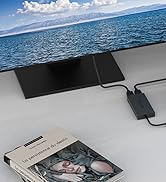
Image 6.1: Illustration showing the router's internal cooling system for effective heat dissipation.
7. Risoluzione Dei Problemi
7.1 Nessun accesso a Internet
- Check all cable connections (WAN port, power).
- Verify that the internet source (modem, hotel network) is active and providing a connection.
- Accedi al router web interface and check the WAN status. Reconfigure if necessary.
- Riavvia il router e i dispositivi collegati.
7.2 Problemi di connessione Wi-Fi
- Assicurati che il tuo dispositivo si trovi nel raggio di azione del Wi-Fi del router.
- Verifica di utilizzare la password Wi-Fi corretta.
- Check the router's LED indicator for Wi-Fi status.
- Try changing the Wi-Fi channel in the router's settings to avoid interference.
7.3 Forgetting Login Password
If you forget the administrator password for the web interface, you can perform a factory reset:
- With the router powered on, use a paperclip or a thin object to press and hold the Reset button for approximately 10 seconds.
- Release the button when the LED indicators flash or change behavior.
- The router will restart with factory default settings. You can then log in using the default credentials (usually found on a sticker or in the Quick Start Guide).
8. Specifiche
Detailed technical specifications for the WAVLINK AX3000 Travel Router.

Image 8.1: Dimensions of the WAVLINK AX3000 Travel Router.
| Caratteristica | Descrizione |
|---|---|
| Nome del modello | AX3000 Travel Router |
| Numero modello articolo | WNT100X3 |
| standard wireless | 802.11ax (Wi-Fi 6) |
| Classe di banda di frequenza | Doppia banda (2.4 GHz e 5 GHz) |
| Velocità di trasferimento dati | Up to 2.4GHz 574Mbps, 5GHz 2402Mbps (Total 2976Mbps) |
| Porti | 1 x Gigabit LAN, 1 x Gigabit WAN, 1 x USB 3.0, 1 x Type-C Power (5V/3A) |
| Antenne | 2 x 3dBi Omnidirectional |
| Caratteristiche speciali | Beamforming, Internet Security, LED Indicator, USB Print Server, Built-in VPN (WireGuard/OpenVPN), 160MHz Bandwidth, 2x2 MU-MIMO |
| Dimensioni del prodotto | 6.54 x 5.28 x 2.24 pollici (circa 16.6 x 13.4 x 5.7 cm) |
| Peso dell'articolo | 13.7 once (circa 388 grammi) |
| Dispositivi compatibili | Console di gioco, Personal computer, Smartphone, Tablet |
9. Informazioni sulla garanzia
WAVLINK products are designed and manufactured to the highest quality standards. For detailed warranty information, please refer to the warranty card included in your product package or visit the official WAVLINK webluogo. Conserva la ricevuta di acquisto per eventuali richieste di garanzia.
10. Assistenza clienti
If you encounter any issues or have questions regarding your WAVLINK AX3000 Travel Router, please contact our customer support team:
- E-mail: Contact@wavlink.com
- Telefono: +1 8889730883 (UTC -5) dal lunedì al venerdì dalle 9:00 alle 18:00
- Websito: Visita il sito ufficiale WAVLINK websito per FAQ, driver e risorse di supporto aggiuntive.
Image 10.1: WAVLINK customer support details, including phone and email.
Ask a question about this manual
Ask about setup, troubleshooting, compatibility, parts, safety, or missing instructions. Manuals+ will review the question and use this page’s manual context to help answer it.