
1. Introduzione
Thank you for choosing the JUNJIEUNVO Q16 Wireless Translation Earbuds. These open-ear design earbuds offer a comfortable listening experience, advanced Bluetooth 5.4 connectivity, IPX5 waterproof rating, and support for real-time language translation across over 100 countries. This manual provides detailed instructions on how to set up, operate, and maintain your earbuds to ensure optimal performance.
2. Contenuto della confezione
Si prega di controllare la confezione per verificare la presenza dei seguenti elementi:
- JUNJIEUNVO Q16 Wireless Translation Earbuds (Left and Right)
- Custodia di ricarica
- Manuale d'uso
- Charging Cable (USB-C, not always included, please check packaging)
3. Prodotto finitoview
The Q16 earbuds feature an open-ear design for comfort and situational awareness, housed in a compact charging case. The case includes a digital display for battery status.

Figura 3.1: Q16 Earbuds in their charging case, showing the left (L) and right (R) indicators along with the digital battery display.

Figura 3.2: The open-ear design of the Q16 earbuds, emphasizing comfort and awareness of surroundings.

Figura 3.3: Diagram illustrating the directional sound transmission technology, designed to protect privacy and reduce sound leakage.
4. Impostazione
4.1 Ricarica degli auricolari e della custodia
Before first use, fully charge the earbuds and the charging case. The charging case has a 500mAh battery, and each earbud has a 40mAh battery. A full charge takes approximately 1.5 hours.
- Connect the charging cable (typically USB-C) to the charging port on the case and to a USB power source.
- The digital display on the charging case will show the charging progress.
- Place the earbuds into the charging case. Ensure they are correctly seated; the case will indicate if they are charging.
4.2 Associazione Bluetooth
The Q16 earbuds use Bluetooth 5.4 for a stable and efficient connection. The pairing process is automatic upon opening the case.
- Ensure your smartphone or device's Bluetooth is turned on.
- Aprire il coperchio della custodia di ricarica. Gli auricolari entreranno automaticamente in modalità di associazione.
- Sul tuo dispositivo, cerca i dispositivi Bluetooth e seleziona "Q16" dall'elenco.
- Una volta effettuata la connessione, sentirai un tono di conferma e gli auricolari saranno pronti per l'uso.
- For subsequent connections, simply open the charging case, and the earbuds will automatically reconnect to the last paired device.
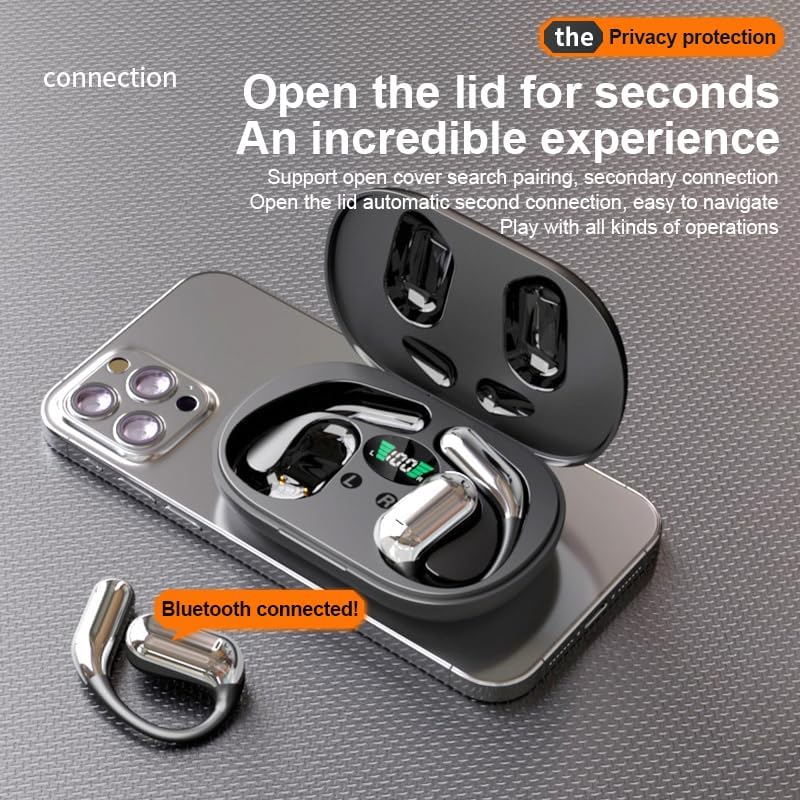
Figura 4.1: The Q16 earbuds connected to a smartphone, indicating successful Bluetooth pairing.
5. Istruzioni per l'uso
5.1 Accensione/spegnimento
- Accensione: Aprire il coperchio della custodia di ricarica e gli auricolari si accenderanno automaticamente.
- Spegni: Riponi gli auricolari nella custodia di ricarica e chiudi il coperchio. Si spegneranno automaticamente e inizieranno a caricarsi.
5.2 Riproduzione di musica
(Specific touch controls are not detailed in the provided product data. The following are common gestures; refer to the manufacturer's official app or website for precise controls.)
- Riproduci/Pausa: Tocca uno degli auricolari una volta.
- Traccia successiva: Tocca due volte l'auricolare destro.
- Traccia precedente: Tocca due volte l'auricolare sinistro.
- Controllo del volume: (Typically a long press or triple tap, specific action not provided. Adjust via your connected device if not available on earbuds.)

Figura 5.1: Illustration of the panoramic stereo surround sound feature, enhancing the audio experience.
5.3 Gestione delle chiamate
- Rispondi/Termina chiamata: Tocca uno degli auricolari una volta.
- Rifiuta chiamata: Premi a lungo uno degli auricolari per 2 secondi.
5.4 Language Translation Function
The Q16 earbuds support real-time translation for over 100 languages. This feature typically requires a dedicated translation application on your paired smartphone.
- Download and install the recommended translation app (refer to product packaging or manufacturer's website for app details) on your smartphone.
- Assicurati che gli auricolari siano connessi allo smartphone tramite Bluetooth.
- Open the translation app and follow its instructions to initiate real-time translation. The earbuds will act as your audio input/output device for the translation.
5.5 Grado di impermeabilità IPX5
The earbuds are rated IPX5 waterproof, meaning they are resistant to splashing water from any direction. This makes them suitable for sports and outdoor activities. Note: The charging case is not waterproof. Avoid exposing the charging case to water.
6. Manutenzione e cura
- Pulizia: Pulisci delicatamente gli auricolari e la custodia di ricarica con un panno morbido, asciutto e privo di lanugine. Non utilizzare prodotti chimici aggressivi o materiali abrasivi.
- Magazzinaggio: Quando non li usi, riponi gli auricolari nella loro custodia di ricarica per proteggerli e mantenerli carichi. Conservali in un luogo fresco e asciutto, lontano da temperature estreme.
- Evitare l'acqua: While the earbuds are IPX5 waterproof, avoid submerging them in water. The charging case is not waterproof.
- Cura della batteria: Per prolungare la durata della batteria, evitare di scaricare completamente gli auricolari e la custodia di ricarica frequentemente. Ricaricarli regolarmente, anche se non vengono utilizzati costantemente.
7. Risoluzione Dei Problemi
| Problema | Soluzione |
|---|---|
| Gli auricolari non si associano al dispositivo. |
|
| Nessun suono dagli auricolari. |
|
| Gli auricolari non si caricano. |
|
| La funzione di traduzione non funziona. |
|
8. Specifiche
| Caratteristica | Dettaglio |
|---|---|
| Nome del modello | YYK-Q16 |
| Versione Bluetooth | Versione 5.4+EDR |
| Chip | Blue Flood |
| Protocolli supportati | AVRCP V1.6, A2DP V1.3, HFP V1.7 (Simultaneous LE and BR / EDR) |
| Usage/Playback Time | Circa 8 ore (al 80% del volume) |
| Tempo di standby | 80 ore |
| Tempo di ricarica | Circa 1.5 ore |
| Distanza senza fili | 10 metri |
| Capacità della batteria degli auricolari | 40 mAh (ciascuno) |
| Capacità della batteria della custodia di ricarica | 500mAh |
| Grado di impermeabilità | IPX5 (solo auricolari) |
| Supporto alla traduzione | Over 100 languages |
| Posizionamento dell'orecchio | On Ear (Open-ear design) |
| Impedenza | 32 Ohm |
| Peso netto | 84 g (totale) |
9. Garanzia e supporto
For warranty information and customer support, please refer to the documentation included with your purchase or visit the official JUNJIEUNVO websito. Se riscontri problemi non trattati in questo manuale, contatta il nostro servizio clienti per ricevere assistenza.
Produttore: UNVO
Marca: JUNJIEUNVO