
1. Prodotto finitoview
The zelotes C-12 Professional Wired Gaming Mouse is designed for high-performance gaming and office use. It features an ergonomic design, 12 programmable buttons, adjustable DPI settings, multi-modes RGB backlighting, and a customizable weight system.

Image 1.1: The zelotes C-12 Professional Wired Gaming Mouse, showcasing its ergonomic shape and customizable RGB lighting.
Contenuto della confezione:
- 1 x zelotes C-12 Gaming Mouse
- 1 x Manuale di istruzioni
- 1 x CD del software
- 1 x Foot Pad Set
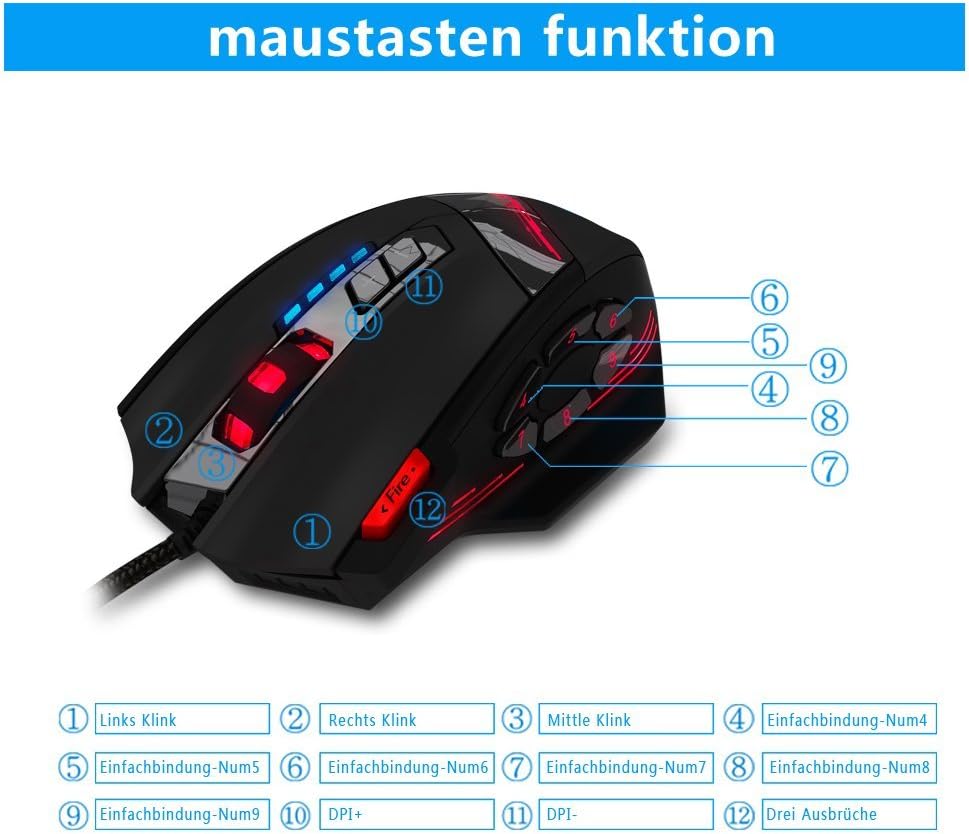
Image 1.2: The complete package contents of the zelotes C-12 Gaming Mouse.
2. Impostazione
2.1 Collegamento del mouse
Connect the USB cable of the zelotes C-12 Gaming Mouse to an available USB port on your computer. The mouse is plug-and-play for basic functionality.
2.2 Installazione del software (facoltativa)
For full customization of buttons, DPI, and lighting, install the provided software from the included CD. Insert the CD into your computer's optical drive and follow the on-screen instructions. If your computer does not have an optical drive, please visit the official zelotes website to download the latest software driver.
Note: The programming software is not fully compatible with Mac operating systems.
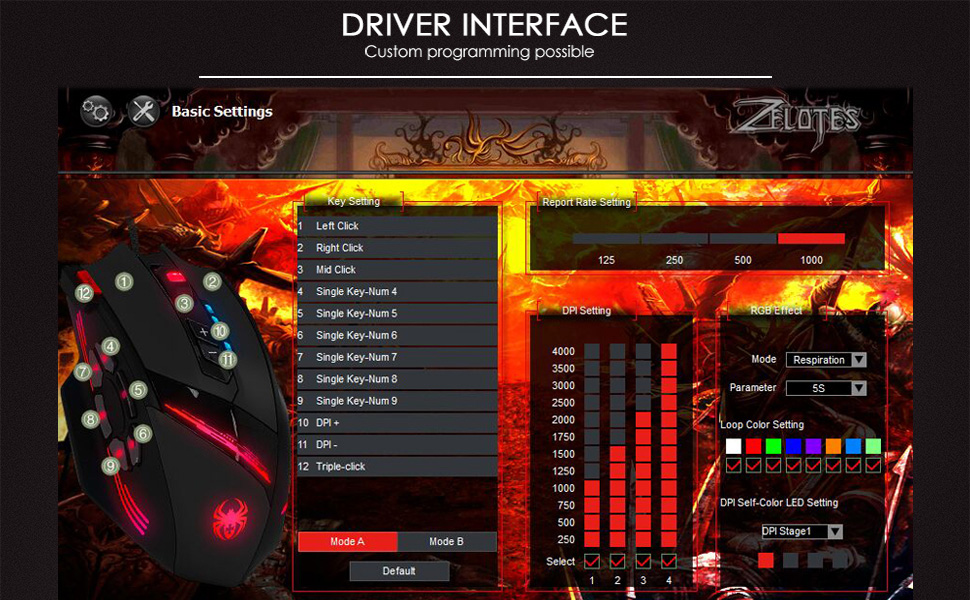
Image 2.1: The software interface for customizing the zelotes C-12 Gaming Mouse.
2.3 Weight Tuning
The mouse includes 8 removable weight blocks, each weighing 2.5 grams, located in a compartment on the underside of the mouse. To adjust the mouse's weight:
- Ruotare delicatamente e rimuovere il coperchio circolare nella parte inferiore del mouse.
- Add or remove the 2.5g weight blocks as desired to achieve your preferred mouse feel.
- Replace the circular cover by twisting it back into place.
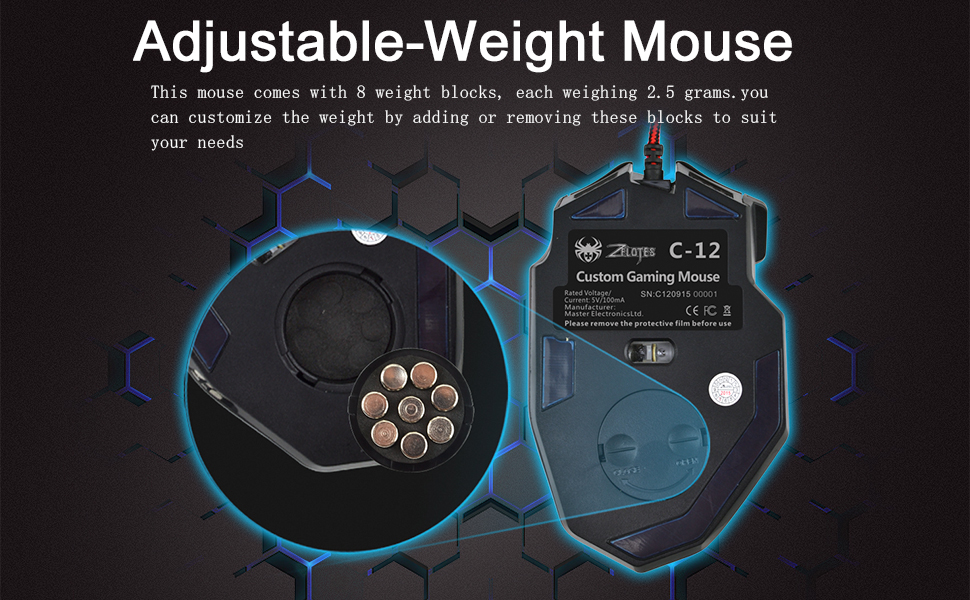
Image 2.2: Adjusting the weight of the zelotes C-12 mouse by adding or removing the 2.5g blocks.
Video 2.1: A demonstration of the weight tuning feature and programmable buttons on the zelotes C-12 Gaming Mouse.
3. Istruzioni per l'uso
3.1 Funzioni dei pulsanti
The zelotes C-12 mouse features 12 programmable buttons. The default functions are:
- Clic sinistro (Pulsante 1)
- Fare clic con il tasto destro (Pulsante 2)
- Clic centrale/rotella di scorrimento (Pulsante 3)
- Pulsanti laterali (Buttons 4-9): Default to various functions, customizable via software.
- DPI+ (Button 10): Increases DPI sensitivity.
- DPI- (Button 11): Decreases DPI sensitivity.
- Pulsante di fuoco (Button 12): Default to triple-click, customizable via software.

Image 3.1: Labeled diagram of the zelotes C-12 mouse buttons.
3.2 Regolazione DPI
The mouse offers 4 default DPI levels: 1000/1500/2000/4000 DPI. You can cycle through these levels using the dedicated DPI+ and DPI- buttons. For finer control and to reach up to 8000 DPI, use the included software.
3.3 Illuminazione RGB
The mouse features multi-modes RGB backlighting, including 7-color cycle breathing and monochromatic constant bright modes. Lighting effects can be customized through the software to match your preferences.
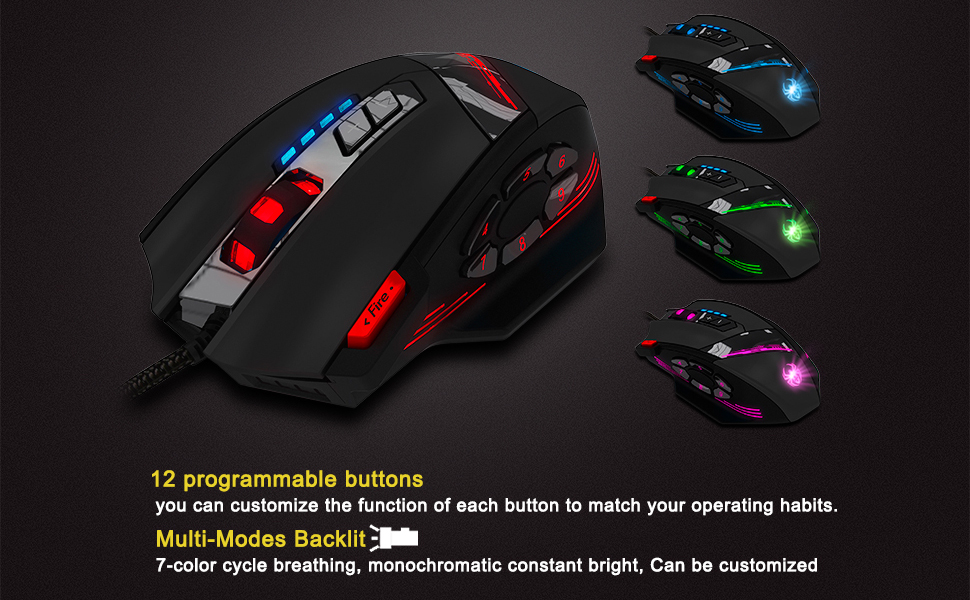
Image 3.2: The zelotes C-12 mouse showcasing its multi-color RGB lighting options.
3.4 Design ergonomico
The mouse is designed for comfort during extended use, featuring a sweat-resistant and anti-slip rubber surface. Its ergonomic shape helps prevent wrist fatigue.

Image 3.3: The ergonomic design of the zelotes C-12 mouse provides a comfortable grip.
4. Manutenzione
To ensure the longevity and optimal performance of your zelotes C-12 Gaming Mouse, follow these maintenance guidelines:
- Pulizia: Utilizzare un panno morbido e asciutto per pulire la superficie del mouse. Per lo sporco ostinato, leggermente dampPulire il panno con acqua o una soluzione detergente delicata. Evitare prodotti chimici aggressivi o materiali abrasivi.
- Cura del sensore: Mantenere pulito e privo di polvere o detriti il sensore ottico sul lato inferiore del mouse. Se necessario, utilizzare un cotton fioc o aria compressa.
- Gestione dei cavi: Per evitare danni, evitare di piegare bruscamente o tirare eccessivamente il cavo USB.
- Magazzinaggio: Quando non lo si utilizza, conservare il mouse in un ambiente pulito e asciutto, lontano da temperature estreme.
5. Risoluzione Dei Problemi
5.1 Il mouse non risponde
- Assicurati che il cavo USB sia collegato saldamente al computer.
- Prova a collegare il mouse a una porta USB diversa.
- Test the mouse on another computer to rule out a computer-specific issue.
- Riavvia il computer.
5.2 DPI or Button Settings Not Changing
- Ensure the zelotes C-12 software is correctly installed and running.
- Check if the settings are saved within the software after making changes.
- For Mac users, note that the programming software has limited compatibility. Basic DPI changes via mouse buttons should still function.
5.3 Illuminazione RGB non funzionante o errata
- Verify lighting settings within the zelotes C-12 software.
- Assicurarsi che il mouse sia collegato correttamente e che riceva alimentazione.
5.4 Mouse Movement Is Erratic
- Pulisci il sensore ottico nella parte inferiore del mouse.
- Assicurati di utilizzare il mouse su una superficie adatta (ad esempio un tappetino per mouse). Evita superfici altamente riflettenti o trasparenti.
6. Specifiche
| Caratteristica | Descrizione |
|---|---|
| Marca | zeloti |
| Nome del modello | C-12 |
| Tecnologia di connettività | USB cablato |
| Tecnologia di rilevamento del movimento | Optical (A3050 Gaming Chip) |
| Impostazioni DPI | 1000/1500/2000/4000 (Adjustable up to 8000 DPI via software) |
| Quantità del pulsante | 12 pulsanti programmabili |
| Regolazione del peso | 8 x 2.5g removable weights |
| Orientamento della mano | Destro |
| Compatibilità del sistema operativo | Win11, Win10, Win8, Win7, Mac OS (limited software compatibility for Mac) |
| Dimensioni (L x P x A) | Dimensioni: 130 mm x 81.5 mm x 39.8 mm |
| Tasso di sondaggio | Frequenza |
| Lunghezza del cavo | 1.8 metri |
| Materiale | Plastica (finitura opaca) |

Image 6.1: Detailed technical specifications and dimensions of the zelotes C-12 Gaming Mouse.
7. Informazioni sulla garanzia
The zelotes C-12 Professional Wired Gaming Mouse comes with a Garanzia del produttore di 1 anno dalla data di acquisto. La presente garanzia copre i difetti di materiali e di fabbricazione in condizioni di normale utilizzo. Non copre i danni causati da uso improprio, incidenti, modifiche non autorizzate o cause esterne.
Conservare la prova d'acquisto per eventuali richieste di garanzia.
8. Supporto
For further assistance, technical support, or warranty inquiries, please refer to the contact information provided with your product packaging or visit the official zelotes websito.