1. Introduzione
Thank you for choosing the MOVA P50 Ultra Robot Vacuum and Mop Cleaner. This advanced cleaning device is designed to provide a fully automated and efficient cleaning experience for your home. With powerful suction, intelligent navigation, and self-maintenance features, the P50 Ultra simplifies your daily cleaning routine.
This manual provides essential information on setting up, operating, maintaining, and troubleshooting your MOVA P50 Ultra. Please read it thoroughly before first use and keep it for future reference.
2. Informazioni sulla sicurezza
To reduce the risk of injury or damage, read these safety instructions carefully and keep them handy when setting up, using, and maintaining the robot.
- Il robot è destinato esclusivamente all'uso in ambienti interni. Non utilizzarlo all'aperto o su superfici commerciali.
- Do not allow children or pets to play with the robot. Supervise children when the robot is operating.
- Assicurarsi che la stazione di ricarica sia posizionata su una superficie piana contro una parete, con sufficiente spazio libero attorno.
- Tenere capelli, abiti larghi, dita e tutte le parti del corpo lontano dalle aperture e dalle parti mobili.
- Non raccogliere nulla che stia bruciando o che stia producendo fumo, come sigarette, fiammiferi o cenere calda.
- Non utilizzare il robot per raccogliere detriti di grandi dimensioni, oggetti appuntiti o liquidi.
- Spegnere il robot e scollegare la stazione di ricarica prima di pulirlo o di eseguire la manutenzione.
- Utilizzare solo la batteria e la stazione di ricarica originali fornite dal produttore.
- Non utilizzare il robot in aree con prese elettriche esposte o acqua stagnante.
3. Prodotto finitoview
The MOVA P50 Ultra combines powerful vacuuming with flexible mopping, featuring a fully automated base station for hands-free maintenance.
3.1. componenti

Figure 3.1: MOVA P50 Ultra Robot Vacuum and Mop Cleaner with its Base Station and App Interface.

Figure 3.2: Box Contents of the MOVA P50 Ultra.
- Robot aspirapolvere: The main cleaning unit with sensors, brushes, and mop pads.
- All-in-One Base Station: Automatically collects dust, washes mop pads with 75°C hot water, dries mop pads, and refills water for mopping.
- Sacchetto antipolvere: For automatic dust collection (pre-installed in base station).
- Panni per mocio: Two rotating mop pads for effective floor scrubbing (pre-installed).
- Spazzola laterale: Extends to clean edges and corners.
- Cleaning Brush/Tool: For manual maintenance.
- Cavo di alimentazione: To connect the base station to power.
3.2. Caratteristiche principali
- Pulizia completamente automatizzata: The base station handles dust collection for up to 75 days, washes mops with 75°C hot water, and dries them to prevent odors.
- Aspirazione potente: Delivers 19,000 Pa suction power to effectively remove dust, pet hair, and debris from various surfaces.
- Pulizia di bordi e angoli: Features an extendable side brush and mop to reach tight corners and edges, ensuring thorough cleaning.
- Lavaggio personalizzabile: Dual rotating mop pads with 32 adjustable water levels for tailored cleaning based on floor type and conditions.
- Carpet Protection (CleanLift): Automatically lifts mop pads and side brush when detecting carpets, preventing them from getting wet.
- Navigazione intelligente: Precise multi-level mapping and obstacle avoidance for efficient and safe movement throughout your home.
- App Integration & Voice Control: Control the robot, set schedules, define cleaning zones, and interact via voice commands (Amazon Echo, Google Home compatible).
4. Impostazione
4.1. Disimballaggio
Rimuovere con cautela tutti i componenti dall'imballaggio. Assicurarsi che tutti gli articoli elencati nella Sezione 3.1 siano presenti e integri.
4.2. Posizionamento della stazione di ricarica
Place the all-in-one base station on a hard, level surface against a wall. Ensure there is at least 0.5 meters (1.6 feet) of clear space on both sides and 1.5 meters (4.9 feet) in front of the station for optimal robot navigation.
- Avoid placing the station in direct sunlight or near heat sources.
- Plug the power cord into the station and then into a wall outlet.
4.3. Ricarica iniziale
Place the robot onto the charging station. Ensure the charging contacts on the robot align with those on the station. The robot will automatically begin charging. For first use, it is recommended to fully charge the robot before starting a cleaning cycle.
4.4. Installazione e connessione dell'app
Download the official MOVA app from your smartphone's app store (iOS or Android). Follow the in-app instructions to create an account and connect your MOVA P50 Ultra robot. This typically involves:
- Turning on the robot.
- Selecting your robot model in the app.
- Connecting to your home Wi-Fi network (2.4GHz recommended).
- Following prompts to pair the robot.
4.5. Mappatura iniziale
Once connected, initiate a mapping run through the app. The robot will explore your home to create an accurate map, which is crucial for efficient cleaning and setting up custom zones.
5. Istruzioni per l'uso
5.1. Avvio e arresto della pulizia
- Inizio: Press the power button on the robot or tap 'Start Cleaning' in the app. The robot will begin cleaning from its base station.
- Pausa: Press the power button during cleaning or tap 'Pause' in the app.
- Ritorno alla base: Press the home button on the robot or tap 'Return to Base' in the app. The robot will return to the charging station.
5.2. Modalità di pulizia
Select desired cleaning modes via the MOVA app:
- Solo vuoto: Per la raccolta di detriti secchi.
- Solo mocio: Per la pulizia a umido (assicurarsi che il serbatoio dell'acqua sia pieno).
- Aspirapolvere e lavapavimenti: Aspirazione e lavaggio simultanei.
5.3. Customizing Cleaning (App Features)
The MOVA app offers extensive customization options:
- Pulizia delle zone: Draw specific areas on the map for the robot to clean.
- Zone vietate/Muri virtuali: Definisci le aree che il robot deve evitare.
- Pianificazione: Impostare orari specifici per i cicli di pulizia.
- Regolazione della potenza di aspirazione: Choose from multiple suction levels (e.g., Quiet, Standard, Strong, Max).
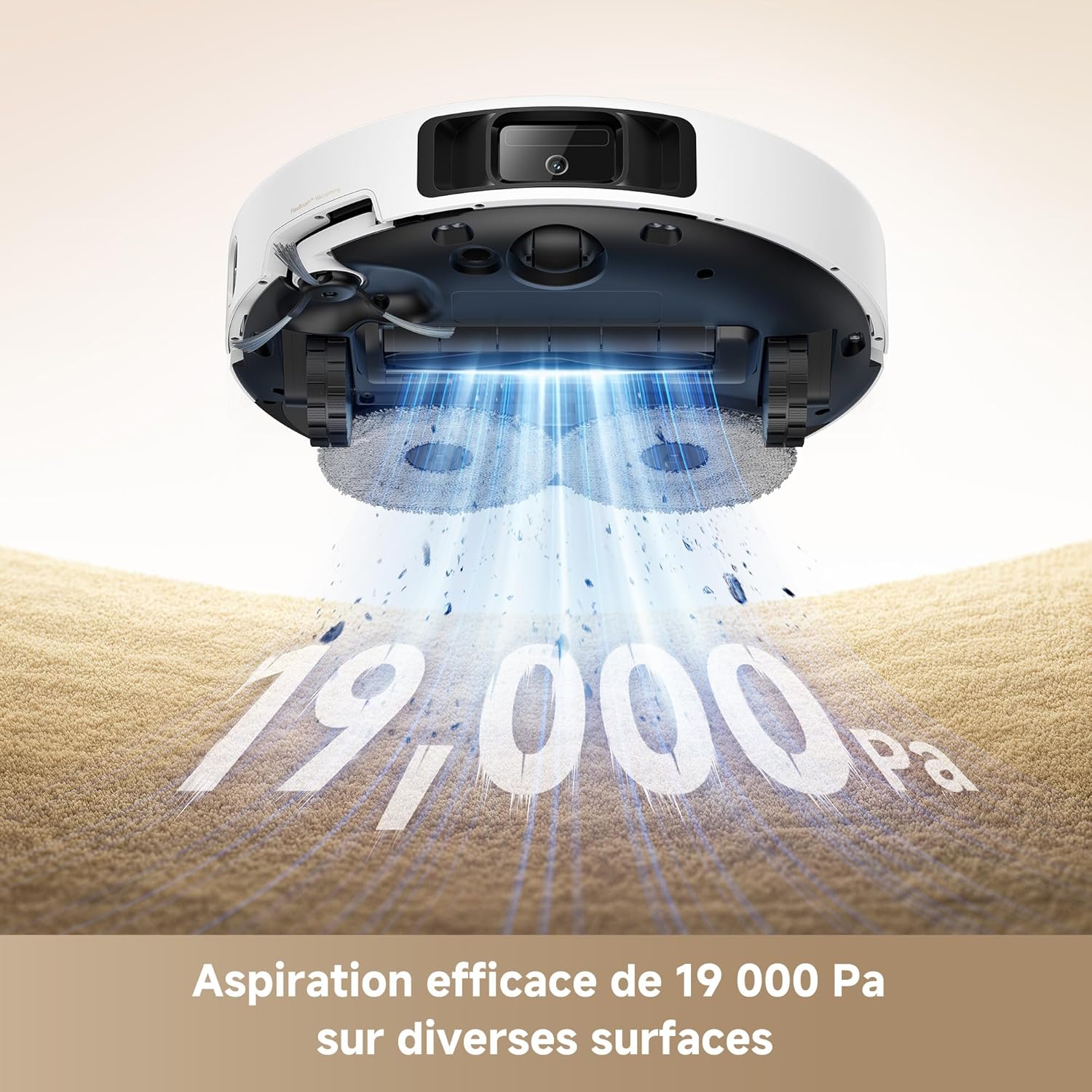
Figure 5.1: MOVA P50 Ultra's 19,000 Pa Suction Power.
- Regolazione del livello dell'acqua: Control the amount of water used for mopping (32 levels available).

Figure 5.2: Customizable Water Levels for Mopping.
- Mop Washing Frequency: Adjust how often the robot returns to the base to wash its mop pads.
5.4. Pulizia di bordi e angoli
The P50 Ultra is designed for superior edge and corner cleaning. Its extendable side brush and mop ensure thorough coverage even in tight spaces.

Figure 5.3: Precise Corner and Edge Cleaning.
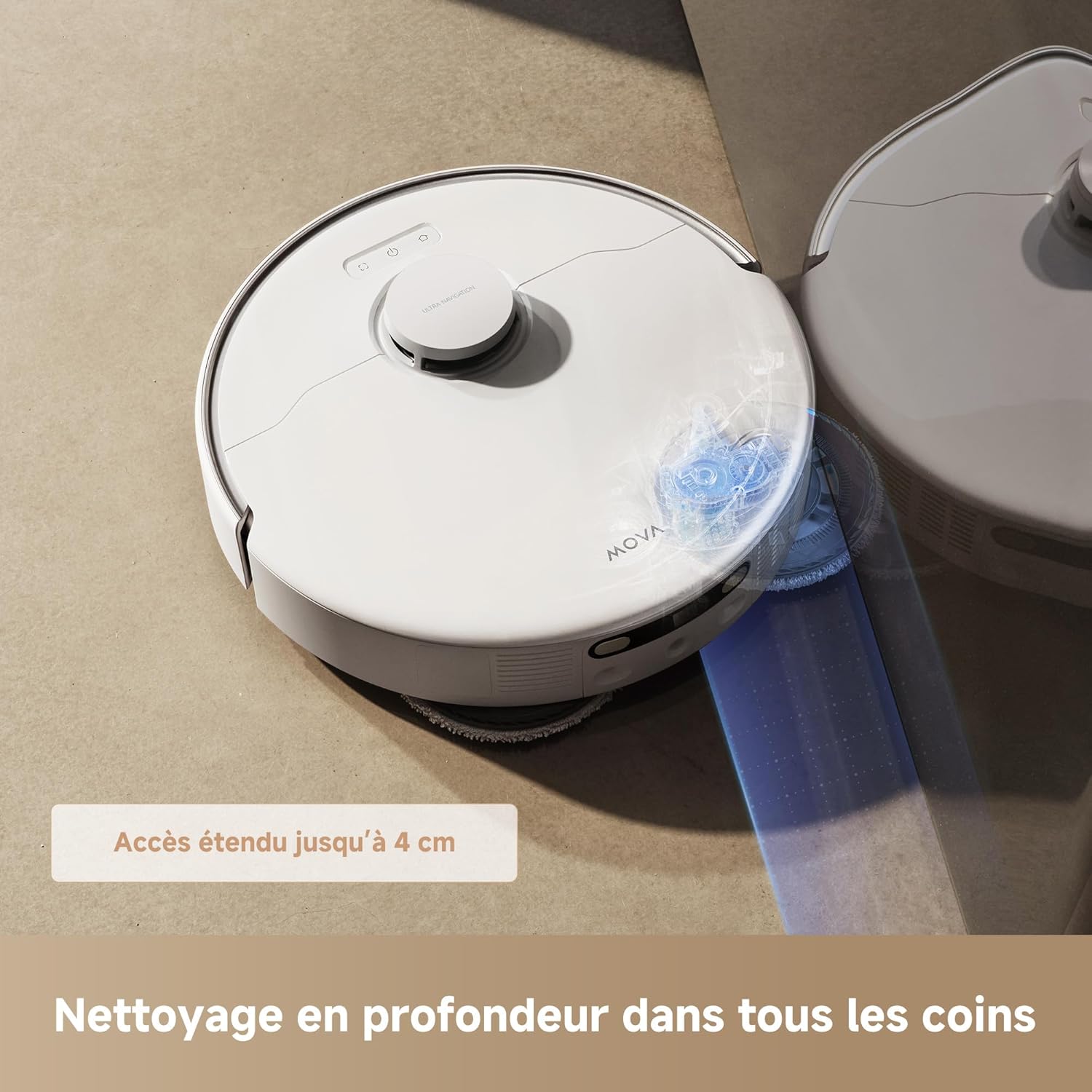
Figure 5.4: Extended Mop Reach for Deep Corner Cleaning.
5.5. Carpet Cleaning (CleanLift System)
The robot intelligently detects carpets and automatically lifts its mop pads and side brush by 10.5mm and 10mm respectively to prevent wetting the carpet while vacuuming.
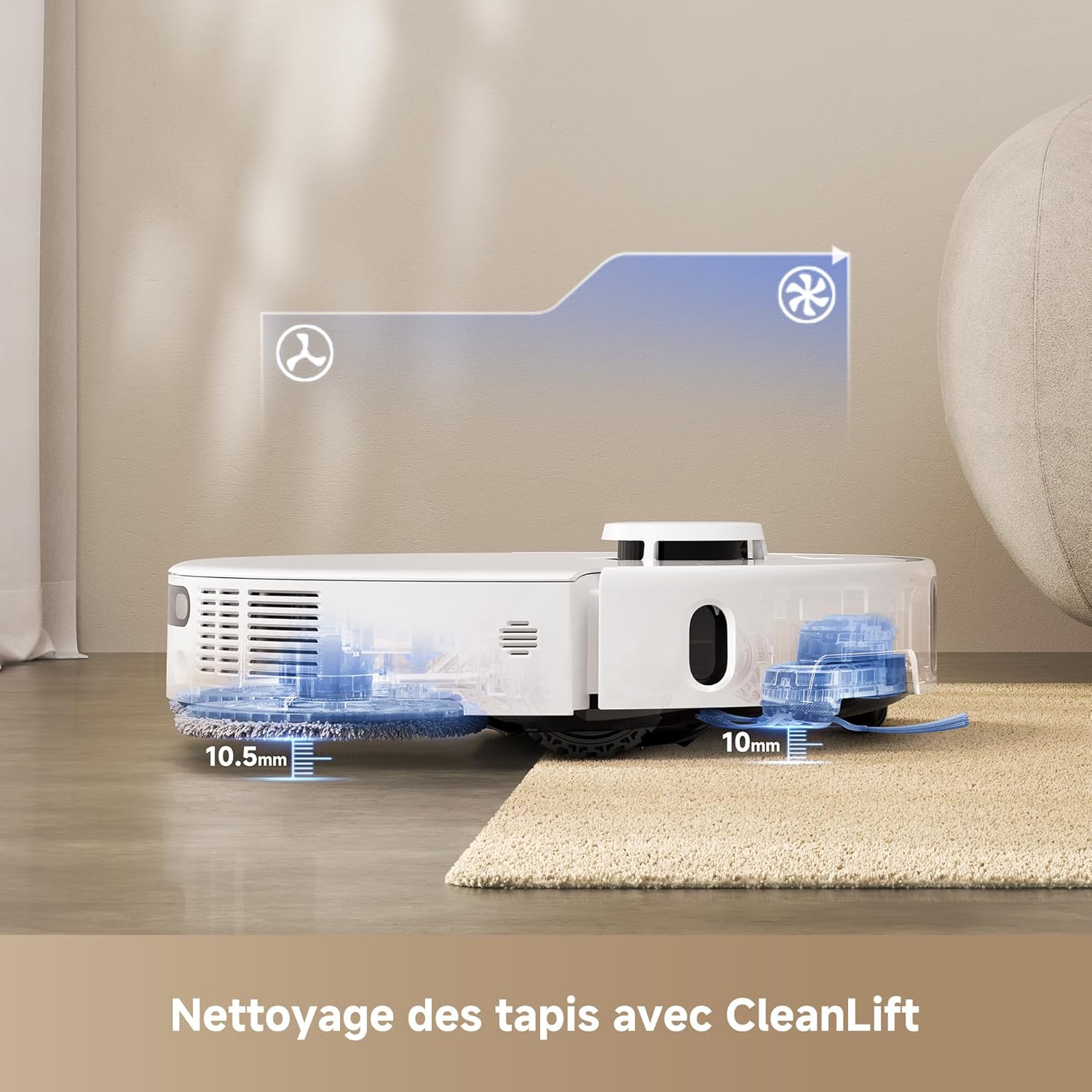
Figure 5.5: CleanLift System for Carpet Protection.
5.6. Navigazione ed evitamento degli ostacoli
The P50 Ultra uses advanced sensors for precise mapping and navigation, avoiding obstacles and creating efficient cleaning paths.

Figure 5.6: Intelligent Navigation and Obstacle Avoidance.
5.7. Controllo vocale
The MOVA P50 Ultra is compatible with Amazon Echo and Google Home. Link your robot to your smart home assistant to control it with voice commands, such as "Start cleaning," "Return to base," or "Clean the kitchen."
6. Manutenzione
Regular maintenance ensures optimal performance and extends the lifespan of your MOVA P50 Ultra.
6.1. Automatic Maintenance (Base Station)

Figure 6.1: Automatic Maintenance Functions of the Base Station.
- Raccolta della polvere: The base station automatically empties the robot's dustbin into a 3.2L dust bag, requiring replacement approximately every 75 days depending on usage.

Figure 6.2: Automatic Dust Emptying.
- Lavaggio del panno per mocio: The base station washes the mop pads with 75°C hot water during and after cleaning cycles.

Figure 6.3: Hot Water Mop Washing.
- Asciugatura del panno per mocio: After washing, the base station dries the mop pads with hot air (45°C) to prevent mildew and odors.
- Ricarica del serbatoio dell'acqua: The base station automatically refills the robot's internal water tank for mopping.
- Base Freshness: 20 spray nozzles ensure even water distribution for mop cleaning and maintain base freshness.

Figure 6.4: Base Freshness System.
6.2. Manual Maintenance
- Serbatoi di acqua pulita/sporca: Regularly empty the dirty water tank and refill the clean water tank in the base station.
- Spazzola principale: Remove the main brush and clean any tangled hair or debris using the provided cleaning tool. Check weekly.
- Spazzola laterale: Check for tangled hair or debris and clean as needed. Replace if bristles are worn.
- Panni per mocio: While the base station washes them, occasionally remove and hand-wash the mop pads for a deeper clean. Replace every 1-3 months depending on usage.
- Filtri: Tap out dust from the robot's filter after each use. Wash the filter with water every 2-4 weeks and let it air dry completely before reinserting. Replace every 3-6 months.
- Sensori: Wipe all sensors (cliff sensors, wall sensor, charging contacts) on the robot and base station with a clean, dry cloth.
7. Risoluzione Dei Problemi
If you encounter issues with your MOVA P50 Ultra, refer to the following common problems and solutions:
| Problema | Possibile causa | Soluzione |
|---|---|---|
| Il robot non si accende | Batteria scarica; il pulsante di accensione non è stato premuto abbastanza a lungo | Posizionare il robot sulla stazione di ricarica; tenere premuto il pulsante di accensione per 3 secondi. |
| Il robot non può caricare | Charging contacts dirty; Base station unplugged | Clean charging contacts; Ensure base station is plugged in. |
| Scarse prestazioni di aspirazione | Contenitore della polvere pieno; Filtro intasato; Spazzola principale aggrovigliata | Svuotare il contenitore della polvere; pulire/sostituire il filtro; pulire la spazzola principale. |
| Il mocio non pulisce efficacemente | Water tank empty; Mop pads dirty/worn; Water level too low | Refill water tank; Clean/replace mop pads; Adjust water level in app. |
| Il robot si blocca spesso | Troppi ostacoli; sensori sporchi | Clear obstacles; Clean all sensors. |
| Problemi di connessione dell'app | Password Wi-Fi errata; Router troppo lontano; Robot offline | Reinserisci la password Wi-Fi; Avvicina il router; Riavvia il robot e l'app. |
For more complex issues or if the problem persists, please contact MOVA customer support.
8. Specifiche
| Caratteristica | Specificazione |
|---|---|
| Marca | Mova |
| Nome del modello | P50 Ultra |
| Numero di modello | Modello RLP23SE |
| Colore | Bianco |
| Dimensioni (L x P x A) | 45.8 x 42 x 47 cm (Robot + Base) |
| Peso | 20.8 chilogrammi |
| Potenza di aspirazione | 19,000 anni |
| Tipo di batteria | Ioni di litio (5200 mAh) |
| Durata della batteria | Fino a 4 ore (a seconda della modalità) |
| Water Level Settings | 32 livelli |
| Temperatura di lavaggio del mocio | 75°C |
| Temperatura di asciugatura del mocio | 45°C |
| Capacità del sacchetto per la polvere | 3.2 litri (fino a 75 giorni) |
| Metodo di controllo | Application, Voice Control |
| Compatibilità | Amazon Echo, Google Home, Smartphone |
| Tipi di pavimento applicabili | Tile, Laminate, Carpet, Hard Floors |
9. Garanzia e supporto
The MOVA P50 Ultra comes with a 3-year warranty. Please refer to the official MOVA website for detailed warranty terms and conditions, as certain products and parts may not be applicable.
For technical support, warranty claims, or spare parts inquiries, please contact MOVA customer service through the official website or the contact information provided in the MOVA app.
Please note that information regarding the availability of spare parts is currently unavailable through standard product listings. It is recommended to check the official MOVA channels for the most up-to-date information.