
Introduzione
Thank you for choosing the Gawfolk GF270K 27-inch Curved 180Hz Gaming Monitor. This manual provides essential information for setting up, operating, maintaining, and troubleshooting your new monitor. Please read it carefully before use and keep it for future reference.
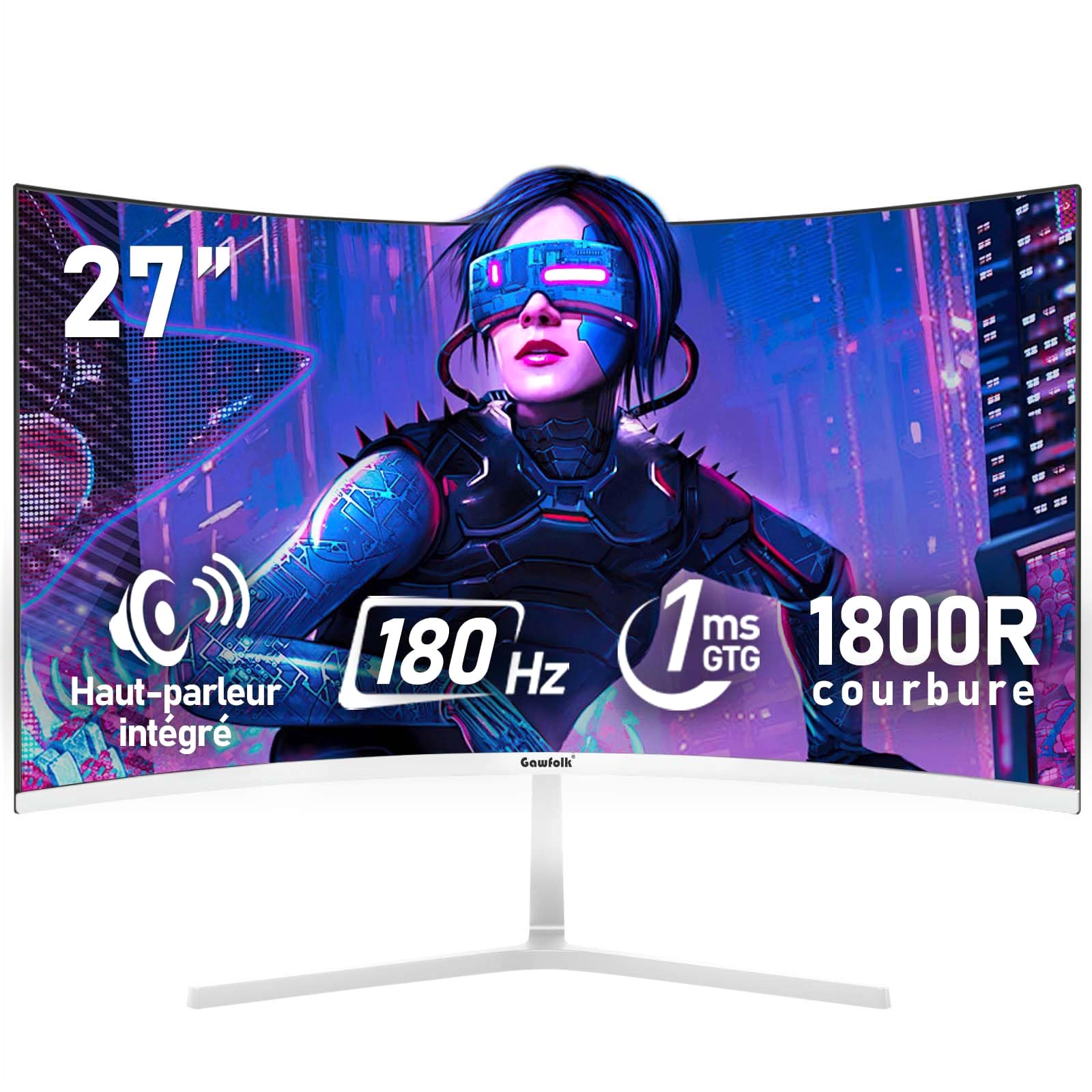
Immagine: Frontale view of the Gawfolk GF270K 27-inch curved gaming monitor.
Informazioni importanti sulla sicurezza
- Prima di pulire il monitor, scollegare sempre il cavo di alimentazione dalla presa elettrica.
- Non esporre il monitor alla pioggia o all'umidità per evitare rischi di incendio o scosse elettriche.
- Non aprire il monitor casing. All'interno non sono presenti parti riparabili dall'utente. Per qualsiasi intervento di assistenza, rivolgersi a personale qualificato.
- Posizionare il monitor su una superficie stabile e piana per evitare che cada.
- Assicurare una ventilazione adeguata attorno al monitor. Non ostruire le aperture di ventilazione.
- Utilizzare solo l'adattatore di alimentazione e i cavi forniti con il monitor.
Contenuto della confezione
Si prega di controllare il contenuto della confezione all'apertura. Se qualche articolo risulta mancante o danneggiato, contattare l'assistenza clienti.
- Gawfolk GF270K Monitor
- Supporto per monitor (base e collo)
- Adattatore di alimentazione
- Cavo HDMI
- Manuale d'uso
Istruzioni di installazione
1. Assemblaggio del supporto
Carefully remove the monitor from its packaging. Attach the stand neck to the monitor panel, then secure the base to the neck. Ensure all screws are tightened securely.

Immagine: Posteriore view of the monitor, illustrating the stand attachment area and VESA mounting points.
The monitor stand allows for a tilt adjustment range of -5° to 15°.
2. Montaggio a parete VESA (opzionale)
The monitor is compatible with a 100x100mm VESA wall mount. Remove the stand before attaching a VESA mount. Ensure the wall mount can support the monitor's weight (3.3 kg).

Image: Detailed diagram of the monitor's rear, showing dimensions, VESA 100x100mm compatibility, and port locations.
3. Connessione a un computer
Connect the monitor to your computer using the provided HDMI cable or a VGA cable (not included). Ensure the cables are securely plugged into both the monitor and your computer's graphics card.
- HDMI: For optimal performance, use the HDMI 2.0 port to achieve up to 180Hz refresh rate.
- VGA: Supporta una frequenza di aggiornamento fino a 60 Hz.
- Uscita audio: Collegare altoparlanti esterni o cuffie al jack audio da 3.5 mm.
Image: Illustration of multiple interfaces (HDMI, VGA, Audio) and their connection to various devices.
4. Collegamento elettrico
Connect the power adapter to the monitor's DC input port, then plug the power adapter into a wall outlet.
Istruzioni per l'uso
1. Accensione/Spegnimento
Press the power button, usually located on the back or bottom right of the monitor, to turn it on or off. The power indicator light will illuminate when the monitor is on.
2. Menu OSD (On-Screen Display).
The OSD menu allows you to adjust various monitor settings. Typically, buttons on the back or bottom of the monitor are used to navigate and select options within the OSD. Common settings include:
- Luminosità/Contrasto: Regola la luminanza dell'immagine.
- Impostazioni colore: Modifica la temperatura del colore, la gamma e la saturazione.
- Sorgente di input: Manually select HDMI or VGA input.
- Modalità Immagine: Select preset modes for gaming, movies, or standard use.
- Audio: Adjust volume for integrated speakers or connected headphones.
3. Caratteristiche principali
- Frequenza di aggiornamento 180 Hz e tempo di risposta 1 ms: Experience smooth, fluid visuals with minimal motion blur, crucial for fast-paced gaming.

Image: Visual comparison demonstrating the difference between 60Hz and 180Hz refresh rates in motion clarity.
- Tecnologia FreeSync: Synchronizes the monitor's refresh rate with your GPU's frame rate to eliminate screen tearing and stuttering, providing a seamless gaming experience. Supports G-Sync compatibility.

Image: Side-by-side comparison illustrating the effect of FreeSync technology on screen tearing.
- Display curvo 1800R: La curvatura 1800R offre un'esperienza immersiva viewing experience, drawing you into the content and making the virtual world feel more realistic.

Image: Diagram explaining the 1800R curvature and its benefit for immersive viewing.
- Risoluzione FHD 1080p: Enjoy crisp and clear visuals with a Full HD (1920x1080) resolution, making details stand out.

Image: A gaming scene displayed on the monitor, emphasizing the clarity of FHD resolution.
- Rich Colors & High Contrast: With 98% sRGB color gamut and a 4000:1 contrast ratio, the monitor delivers vibrant colors and deep blacks for a lifelike image.

Image: Visual representation of the monitor's rich color capabilities with 98% sRGB.

Image: Comparison demonstrating the enhanced detail and depth provided by a 4000:1 contrast ratio.
- Bassa luce blu e senza sfarfallio: DC dimming technology and a low blue light mode reduce eye strain during prolonged use, ensuring comfortable viewing.

Image: Visual explanation of flicker-free technology and low blue light mode for eye protection.
- Altoparlanti integrati: The monitor includes built-in speakers for basic audio output. For higher quality audio, external speakers or headphones are recommended via the 3.5mm audio jack.

Immagine: Frontale view of the monitor, highlighting the integrated speakers and their sound output.
Manutenzione
- Pulizia dello schermo: Pulire delicatamente lo schermo con un panno morbido e privo di lanugine. Per macchie ostinate, dampInumidire leggermente il panno con acqua o con un detergente specifico per schermi. Non spruzzare mai il liquido direttamente sullo schermo.
- Pulizia del Casing: Utilizzare un panno morbido e asciutto per pulire il monitor casing. Evitare detergenti abrasivi o solventi.
- Magazzinaggio: If storing the monitor for an extended period, disconnect it from power, pack it in its original packaging if possible, and store it in a cool, dry place.
Risoluzione dei problemi
| Problema | Possibile causa | Soluzione |
|---|---|---|
| Nessun potere | Cavo di alimentazione non collegato; presa di corrente non funzionante. | Assicurarsi che il cavo di alimentazione sia collegato saldamente. Testare la presa con un altro dispositivo. |
| Nessun segnale | Cavo video non collegato; è stata selezionata una sorgente di ingresso errata. | Check video cable connections (HDMI/VGA). Use the OSD menu to select the correct input source. |
| Immagine tremolante o distorta | Loose video cable; Incorrect resolution/refresh rate; Graphics card issue. | Ensure video cable is secure. Adjust display settings on your computer to match monitor's native resolution (1920x1080) and refresh rate (180Hz for HDMI). Update graphics drivers. |
| No sound from integrated speakers | Volume troppo basso; Disattivato; Uscita audio selezionata in modo errato sul computer. | Adjust monitor volume via OSD. Check computer's audio settings to ensure monitor is selected as output device. |
Specifiche del prodotto
| Marca | Gente di Gawfolk |
| Numero di modello | GF270K |
| Dimensioni dello schermo | 27 pollici |
| Risoluzione | FHD 1080p (1920 x 1080 pixel) |
| Proporzioni | 16:9 |
| Curvatura | 1800R |
| Tipo di pannello | VA |
| Frequenza di aggiornamento | 180 Hz (HDMI), 60 Hz (VGA) |
| Tempo di risposta | 1ms (GTG) |
| Rapporto di contrasto | 4000:1 |
| Luminosità | 300 cd/m² |
| Gamma di colori | 98% sRGB |
| Viewangolo di ing | 178° |
| Sincronizzazione adattiva | FreeSync (G-Sync Compatible) |
| Connettività | 1x HDMI 2.0, 1x VGA, 1x 3.5mm Audio Out |
| Compatibilità VESA | 100 x 100 millimetri |
| Dimensioni (P x L x A) | Dimensioni: 18.3 x 61.3 x 47.3 cm |
| Peso | 3.3 chilogrammi |
| Colore | Bianco |
Garanzia e supporto
This Gawfolk monitor comes with a Garanzia di assistenza post-vendita di 1 anni. If you encounter any problems during the use of your monitor, please do not hesitate to contact our customer support team for assistance.
For support, please refer to the contact information provided with your purchase or visit the official Gawfolk websito.