
Introduzione
The BAOFENG K6 is a high-power tri-band two-way radio designed for reliable communication across various frequency bands including VHF, UHF, FM, and Airband. This manual provides essential information for the proper setup, operation, and maintenance of your device, ensuring optimal performance and longevity.
Contenuto della confezione
Verifica che tutti gli articoli elencati di seguito siano inclusi nel tuo pacchetto:
- 1 x BAOFENG K6 Walkie-Talkie
- 1 x 2600 mAh Li-Ion Battery
- 1 antenna standard
- 1 x 39 cm High-Gain Antenna
- 1 x Caricabatteria da tavolo
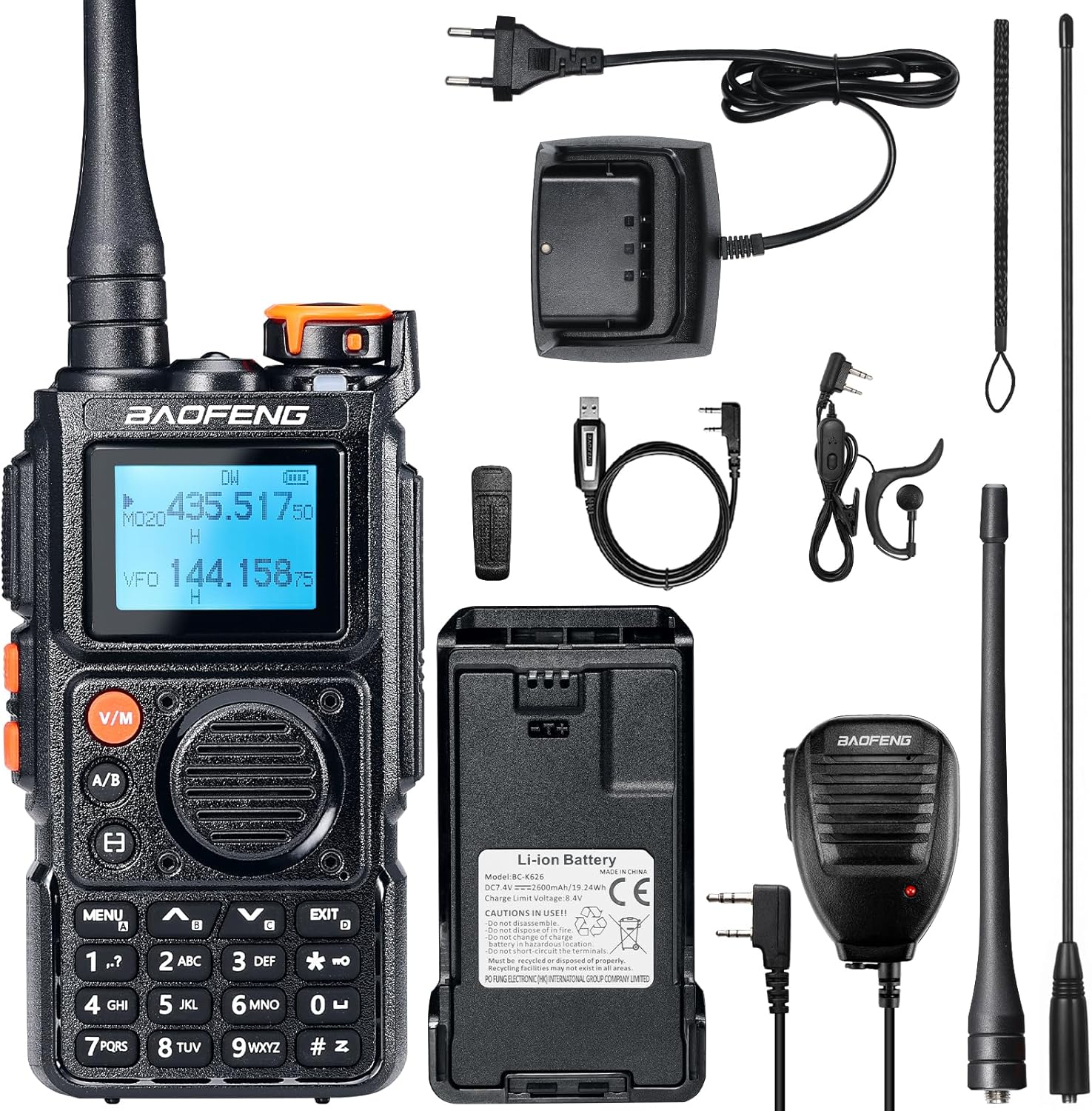
Image: BAOFENG K6 Walkie-Talkie and included accessories.
Prodotto finitoview
Familiarize yourself with the main components and controls of your BAOFENG K6 radio:
- Display: LCD screen for frequency, channel, and status information.
- tastiera: Full alphanumeric keypad for direct frequency input and menu navigation.
- Pulsanti laterali: Two programmable side buttons for quick access to user-defined functions.
- Manopola superiore: Serves as the Power/Volume control and Channel selector.
- Pulsante PTT: Push-to-Talk button, located on the side, for initiating transmission.
- Porta dell'antenna: Connector on top for attaching the antenna.
- Porta di ricarica: USB-C port for direct battery charging.

Image: BAOFENG K6 dimensions and key features.
Impostare
- Installazione e ricarica della batteria:
Insert the 2600 mAh Li-Ion battery into the compartment on the back of the radio. Ensure it clicks securely into place. Charge the battery using either the provided desktop charger or a USB-C cable (not included) connected directly to the radio's USB-C port. The charging indicator will illuminate to show charging status.

Image: Two methods for charging the BAOFENG K6 battery.
- Attacco dell'antenna:
Screw either the standard antenna or the 39 cm high-gain antenna clockwise into the antenna connector on top of the radio until it is hand-tight and secure.

Image: Standard and high-gain antennas for the BAOFENG K6.
- Accensione/spegnimento:
Rotate the top knob clockwise to power on the radio. Rotate it counter-clockwise until it clicks to power off the device.
- Initial Frequency Programming:
The radio supports direct frequency input via the alphanumeric keypad. For quick setup, you can utilize the one-key frequency copy function to replicate frequencies from another compatible radio.
Istruzioni per l'uso
- Comunicazione di base (PTT):
Select the desired frequency or channel. Press and hold the PTT button on the side of the radio to transmit. Speak clearly into the microphone. Release the PTT button to receive.
- Selezione canale:
Use the up/down arrow keys or rotate the top knob to navigate through the 999 available memory channels.

Image: BAOFENG K6 displaying 999 memory channels.
- Ingresso di frequenza:
Enter frequencies directly using the alphanumeric keypad for precise control.

Image: Full keypad input for frequencies on the BAOFENG K6.
- Modalità di monitoraggio:
The radio offers single-band monitoring, single watch, and dual watch modes. Refer to the on-screen indicators for the active monitoring mode.

Image: BAOFENG K6 monitoring modes.
- FM Radio Listening:
Activate the FM radio function to listen to broadcast FM stations. The anti-interruption feature allows the radio to automatically switch to communication mode if a signal is detected on your programmed frequencies, ensuring you don't miss important transmissions.

Image: FM listening with anti-interruption feature.
Funzionalità avanzate
- Copia di frequenza con una chiave:
Quickly and easily copy frequencies from another radio with a single button press, streamlining setup for multiple devices.

Image: One-key frequency copy in action.
- Tasti laterali personalizzabili:
Assign frequently used functions to the two programmable side buttons for personalized convenience and quick access.

Image: Customizable side keys on the BAOFENG K6.
- One-Key Repeater Frequency Reversal:
Easily reverse repeater frequencies with a single action, simplifying operation when working with repeaters.

Image: One-key repeater frequency reversal.
- Password di accensione:
Set a password to secure your device from unauthorized use, enhancing privacy and security.

Image: Power-on password feature.
- Display personalizzabile:
Personalize the radio's display with predefined logos, custom text, or real-time voltage information to suit your preferences.
Manutenzione
- Cura della batteria: Per prolungare la durata della batteria, evitare di sovraccaricarla e di scaricarla completamente. Conservare la batteria in un luogo fresco e asciutto quando non in uso.
- Pulizia: Pulisci l'esterno della radio con un panno morbido eamp panno. Non utilizzare prodotti chimici aggressivi, detergenti abrasivi o solventi, poiché potrebbero danneggiare il dispositivo.
- Antenna: Ensure the antenna is securely attached. Avoid bending or stressing the antenna, as this can affect performance and cause damage.
- Magazzinaggio: Se si conserva la radio per periodi prolungati, rimuovere la batteria e conservare il dispositivo in un ambiente asciutto e privo di polvere.
Risoluzione dei problemi
| Problema | Possibile causa | Soluzione |
|---|---|---|
| Nessun potere | Batteria scarica o installata in modo non corretto. | Check battery charge level and ensure it is correctly installed. Charge the battery if necessary. |
| No Signal / Poor Reception | Antenna loose, incorrect frequency, or out of range. | Verify antenna connection. Check frequency settings and ensure you are within the operational range of the other radio or repeater. |
| Scarsa qualità audio | Volume too low/high, microphone/speaker obstructed. | Adjust volume. Check microphone and speaker for any obstructions. Ensure proper speaking distance from the microphone. |
| Radio Not Responding | Problema temporaneo del software. | Try powering the radio off and then on again. If issues persist, a factory reset may be necessary (consult advanced user guide for specific procedure). |
Specifiche
| Caratteristica | Dettaglio |
|---|---|
| Marca | Baofeng |
| Numero di modello | K6 |
| Colore | Nero |
| Numero di canali | 999 |
| Caratteristica speciale | Tri-band, Rechargeable |
| Gamma di frequenza | 144–146 MHz (VHF), 430–440 MHz (UHF), FM, Airband, 1.25M, 1M |
| Portata massima | 10 chilometri (dipende dal terreno e dalle condizioni) |
| Livello di resistenza all'acqua | Non impermeabile |
| Batteria | 1 x 2600 mAh Li-Ion (included) |
| Potenza in uscita | 6W |
Garanzia e supporto
Garanzia: This BAOFENG K6 Walkie-Talkie is covered by an 18-month warranty from the date of purchase. This warranty covers manufacturing defects and material faults under normal use. Please retain your proof of purchase for warranty claims.
Supporto: For technical assistance, troubleshooting beyond the scope of this manual, or to inquire about warranty claims, please contact your authorized retailer or visit the official BaoFeng website for further support resources. Detailed contact information can typically be found on the product packaging or the retailer's websito.