
Introduzione
Welcome to your new eSynic Magnifying Glass with Light and Stand. This manual provides detailed instructions for the safe and efficient use of your device. Please read it thoroughly before operation.
Prodotto finitoview
The eSynic Magnifying Glass with Light and Stand is designed to provide enhanced magnification and illumination for various tasks, including reading, hobbies, and detailed work. It features a large optical glass lens, adjustable LED lighting, and versatile mounting options.

This diagram illustrates the key dimensions and flexible metal arm design of the magnifying lamp, highlighting its 360-degree rotation capabilities and USB power input. The lens measures 17.1cm (6.7in) in length and 12.3cm (4.8in) in width, with a smaller auxiliary lens of 8.1cm (3.2in). The flexible arm extends up to 40cm (15.75in), and the power cable is 150cm (59in) long. The base measures 28cm (11in) by 18cm (7in). An interchangeable clamp is also shown, capable of attaching to surfaces up to 2.1 inches thick.
This video demonstrates the eSynic 10X Magnification Desk Magnifier Lamp in use, showcasing its features such as adjustable brightness and color temperature, and its flexible arm. It highlights the clarity of the 10X optical glass lens for detailed tasks like reading and crafting.
Impostare
Disimballaggio
- Rimuovere con attenzione tutti i componenti dalla confezione.
- Verify all parts are present: Magnifying lamp head with flexible arm, heavy-duty base, and clamp attaccamento.
Opzioni di montaggio
Your eSynic Magnifying Glass offers two primary mounting methods: a stable desktop base and a secure clamp-on style.

This image displays the two versatile mounting options for the eSynic Magnifying Glass. The 'Base Style' shows the lamp securely placed on its heavy-duty metal base, suitable for desktop use. The 'Clamp-On Style' illustrates the lamp attached to a table edge using the included clamp, providing flexibility for various workspaces. The clamp can accommodate surfaces up to 5.5 cm thick.
Installazione Base Desktop
Insert the flexible arm's stem into the designated hole on the heavy-duty metal base. Tighten the screw on the side of the base to secure the arm.

This image highlights the stable, large, heavy-duty pure metal base of the magnifying lamp. The base is designed to be anti-slip and flat, providing a secure workstation. It is recommended to use the clamp-on desk type for sideways stretching to ensure greater safety and stability.
Clamp-On Installation
Allega il clamp to a sturdy surface, such as a desk or workbench, ensuring it is tightened securely. Insert the flexible arm's stem into the clamp's opening and tighten the screw. The clamp can accommodate surfaces up to 6.5 cm (2.5 inches) thick.
Collegamento di potenza
Connect the USB-C cable from the magnifying lamp to a compatible USB power source (e.g., computer, wall adapter, power bank). The lamp is USB-C rechargeable and includes a 400mAh battery for portable use.
Istruzioni per l'uso
Accensione/spegnimento
Locate the power button on the top of the magnifying lamp head. Press it once to turn the light on or off.

Questa immagine fornisce un primo piano view of the control buttons located on the head of the magnifying lamp. These 'Head Control Buttons' include power on/off, brightness adjustment (+/-), and color temperature switch. This design offers convenient access to controls, unlike some other models with in-line switches.
Regolazione della luminosità
Il lamp features 10 adjustable brightness levels. Use the '+' and '-' buttons on the lamp head to increase or decrease the light intensity.
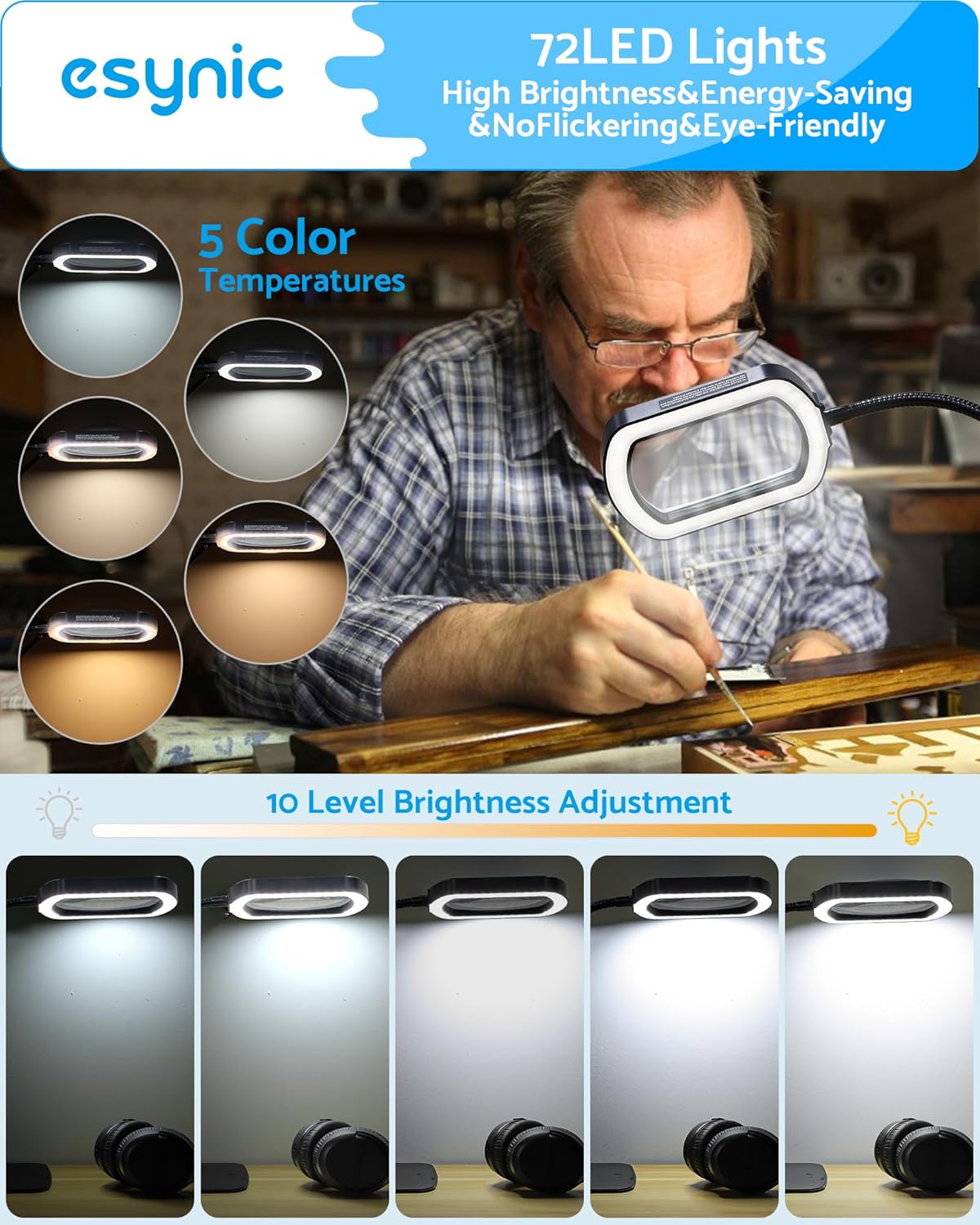
This image demonstrates the 72 energy-efficient LED lights, offering 5 color temperatures and 10 levels of brightness adjustment. The top row shows different color temperatures (e.g., warm to cool white), while the bottom row illustrates the range of brightness from dim to maximum intensity. This allows for optimal lighting conditions for various tasks.
Modifica della temperatura del colore
Select from 5 different color temperatures to suit your preference and task requirements. Press the sun icon button to cycle through the available color modes.
Usando il Magnifier
Il lamp features a large 110mm (4.3-inch) optical glass lens with 5X primary magnification and a 10X auxiliary mirror magnification. Position the flexible arm to bring the lens over your work area for clear, distortion-free viewing.

This image shows a user engaged in detailed sewing work, utilizing the magnifying lamp to clearly view intricate stitches and fabric patterns. It demonstrates the practical application of the magnification feature for hobbies and crafts.
Flexible Arm Adjustment
The 360° high flexibility gooseneck arm allows you to position the magnifying head precisely where needed. Adjust the arm carefully to avoid damage to the light panel.
Manutenzione
Pulizia della lente
Gently wipe the optical glass lens with a soft, lint-free cloth (e.g., microfiber cloth) to remove dust or smudges. Avoid using abrasive cleaners or harsh chemicals, as these can scratch the lens or damage coatings.
Pulizia del corpo
Utilizzare un morbido, damp panno per pulire il lamp's body and base. Ensure the device is unplugged before cleaning. Do not immerse any part of the lamp nell'acqua.
Magazzinaggio
When not in use, store the magnifying lamp in un luogo pulito e asciutto, lontano dalla luce solare diretta e da temperature estreme.
Risoluzione dei problemi
La luce non si accende
- Controllare la connessione di alimentazione: Assicurarsi che il cavo USB-C sia collegato saldamente a entrambi i dispositivi.amp and a functional power source.
- Verificare la fonte di alimentazione: Prova a collegare lamp into a different USB port or wall adapter to rule out a faulty power source.
- Carica della batteria: If using the internal battery, ensure it is charged. Connect the lamp to power and allow it to charge for at least 30 minutes before attempting to turn it on again.
Luce tremolante o fioca
- Fonte di energia: A weak power source might cause flickering. Try a different USB port or a higher-wattage adattatore.
- Livello di luminosità: Adjust the brightness using the '+' button to ensure it's not set to the lowest level.
Magnification Unclear or Distorted
- Lente pulita: Ensure the lens is clean and free of dust, fingerprints, or smudges. Refer to the "Cleaning the Lens" section.
- Distanza ottimale: Regolare la distanza tra la lente e l'oggetto da riprendere viewed to find the optimal focal point for clear magnification.
Lamp Not Holding Position
- Base/Clamp Sicurezza: Ensure the flexible arm is securely tightened into either the desktop base or the clamp. Per il clamp, verify it is firmly attached to the surface.
- Posizione del braccio: While the arm is flexible, avoid over-extending it in extreme angles, especially when using the desktop base, to maintain stability.
Specifiche
| Caratteristica | Dettaglio |
|---|---|
| Marca | eSynic |
| Numero di modello | ESYGK234 |
| Colore | Black-glass Lense |
| Materiale della lente | Acrilico |
| Forza di ingrandimento | 10 volte |
| Larghezza della lente | 5*3 Inches (110mm) |
| Luci LED | 72 LED |
| Livelli di luminosità | 10 |
| Temperature di colore | 5 |
| Fonte di alimentazione | USB-C ricaricabile |
| Capacità della batteria | 400mAh |
| Peso dell'articolo | 4.62 libbre (2.1 chilogrammi) |
| Dimensioni del prodotto | 5 x 3 x 0.04 pollici |
Garanzia e supporto
For warranty information or technical support, please contact eSynic customer service through their official website or the retailer where the product was purchased. Please have your model number (ESYGK234) and purchase details ready.