1. Introduzione
The Carpuride W702BS PRO is an advanced 7-inch waterproof GPS navigation screen designed specifically for BMW motorcycles. It integrates wireless Apple CarPlay and Android Auto functionalities, dual Bluetooth connectivity for music sharing and intercom, and supports native BMW Wonder Wheel control for seamless interaction with your motorcycle's data and features.
This manual provides detailed instructions for the proper installation, operation, and maintenance of your Carpuride W702BS PRO device.
2. Informazioni sulla sicurezza
- Always prioritize safety while riding. Do not operate the device in a manner that distracts you from the road.
- Ensure the device is securely mounted to prevent detachment during operation.
- Avoid exposing the device to extreme temperatures outside its specified operating range.
- Non tentare di smontare o riparare il dispositivo da soli. Rivolgersi a personale qualificato.
- Mantenere lo schermo pulito e libero da ostruzioni per una visibilità ottimale.
3. Contenuto della confezione
Verifica che tutti gli articoli siano presenti nel tuo pacco:
- 1x Carpuride W702BS PRO Motorcycle Stereo Unit
4. Configurazione e installazione
The Carpuride W702BS PRO is designed for plug-and-play installation on compatible BMW motorcycles equipped with an original BMW navigation base and a 4-pin connector. No complex wiring is required.
4.1 Compatibilità
This device is suited for BMW R1200GS, BMW R1300GS, BMW S1000XR, and BMW R1250GS (excluding 2019 version). Ensure your motorcycle has an original BMW navigation base.
4.2 Passaggi di installazione
- Ensure your BMW motorcycle has an original BMW navigation base.
- Align the 16-pin connector on the back of the W702BS PRO device with the corresponding port on your motorcycle's navigation base.
- Gently slide the device onto the base until it clicks securely into place. A firm press may be required to ensure the snap mechanism engages fully, indicating a secure connection.
- Once installed, the device should power on automatically with the motorcycle's ignition.


4.3 Guida video all'installazione
For a visual guide on installation and entering/exiting NAV mode, please refer to the video below:
Video 4.1: W702/W502 BS Pro Installation Tutorial, Entering TFT/NAV Mode. This video demonstrates the physical installation of the device and how to switch between the motorcycle's TFT display and the device's navigation mode using the Wonder Wheel.
5. Istruzioni per l'uso
5.1 Native Wonder Wheel Control
The W702BS PRO seamlessly integrates with your BMW's Wonder Wheel, allowing you to control the device's display and access various motorcycle data without taking your hands off the handlebars. This includes viewing TPMS, fuel levels, engine RPM, mileage, and more. Ensure you are using an original BMW bracket for compatibility.

5.2 CarPlay wireless e Android Auto
Connect your smartphone wirelessly to the W702BS PRO for access to navigation, calls, music, and messaging via Siri or Google Assistant. Compatible with iOS 6+ and Android 11+.
5.2.1 Collegamento di Apple CarPlay
- On the W702BS PRO, open the 'i-Play' application.
- On your iPhone, search for the device's Bluetooth name (e.g., 'carpuride-xxxx') and pair.
- Confirm the pairing request on both devices and click 'Allow' and 'Use CarPlay' on your iPhone.
- The connection should now be successful.
5.2.2 Connessione di Android Auto
- On the W702BS PRO, open the 'A-Auto' application.
- Sul tuo telefono Android, trova i dispositivi connessi nelle impostazioni Bluetooth.
- Add a new device (e.g., 'carpuride-xxxx') and click 'Pair'.
- The connection should now be successful.

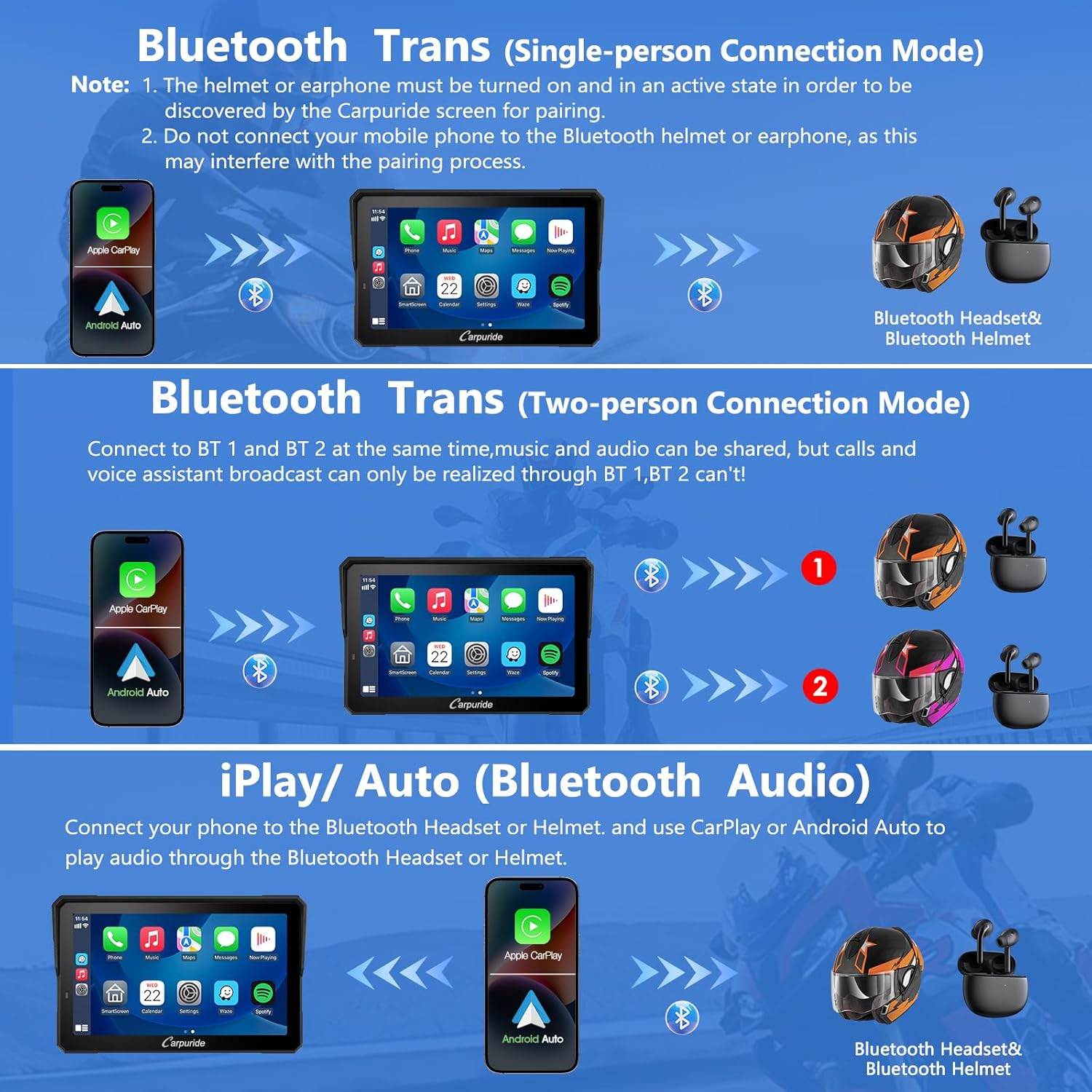
5.3 Music Sharing & Intercom (Dual Bluetooth)
The W702BS PRO features upgraded dual Bluetooth technology, allowing two Bluetooth helmets to connect simultaneously via its BT Trans function. This enables both rider and passenger to share music and use the intercom function.
- In BT Trans mode, voice assistant commands and phone call audio are transmitted to Bluetooth 1. It is recommended that the primary rider connects to Bluetooth 1.
- The effective Bluetooth range for intercom is approximately 10 meters.
5.4 Effetto sensore luce ed equalizzatore
The built-in light sensor automatically adjusts screen brightness based on ambient light conditions, protecting your eyes and ensuring clear visibility during both day and night riding. The device also includes an EQ function for customizing audio output.
5.5 Data Reading (Compass & Barometer)
The W702BS PRO includes a compass for directional guidance and a barometer to monitor real-time altitude changes, enhancing safety and awareness, especially in varied terrains.

5.6 Funzionalità di visualizzazione
The 7-inch high-definition IPS touch screen features a resolution of 1024*600, vibrant 65K colors, and up to 1000nit peak brightness for excellent visibility even in direct sunlight.

6. Manutenzione
- Pulizia: Utilizzare un panno morbido e privo di lanugine per pulire lo schermo. Per i segni ostinati, strofinare leggermenteampLavare il panno con acqua. Evitare prodotti chimici aggressivi o materiali abrasivi.
- Magazzinaggio: Quando non viene utilizzato per lunghi periodi, conservare il dispositivo in un luogo fresco e asciutto, lontano dalla luce solare diretta.
- Aggiornamenti software: For software updates, use a small capacity TF card (4GB, 8GB, 16GB, or 32GB). A 64GB TF card does not support software upgrades; it is only for storing music and videos for local playback.
6.1 Software Update Video Guide
For instructions on updating the device's logo, refer to the video below:
Video 6.1: W702/W502 BS Pro Logo Upgrade Steps. This video provides a guide on how to upgrade the device's logo, which is part of the software update process.
7. Risoluzione Dei Problemi
| Problema | Possibile causa | Soluzione |
|---|---|---|
| Il dispositivo non si accende. | Not properly seated on navigation base; motorcycle ignition off. | Ensure device is fully clicked into place. Turn on motorcycle ignition. |
| CarPlay/Android Auto non si connette in modalità wireless. | Phone OS not compatible; Bluetooth/Wi-Fi off; phone not supported. | Check phone OS (iOS 6+, Android 11+). Ensure Bluetooth and Wi-Fi are enabled. Refer to compatibility list. |
| Wonder Wheel control not working. | Non-original BMW bracket; motorcycle model not supported. | Use original BMW bracket. Confirm motorcycle model compatibility (R1250RT after 2021, 2019 R1250GS, 2019 R1250RT are not compatible). |
| TPMS not operational. | Motorcycle lacks pre-installed TPMS system. | The device requires a pre-installed TPMS system on your BMW motorcycle to function. |
| Screen too bright/dim. | Light sensor issue or manual adjustment needed. | Ensure light sensor is not obstructed. Adjust brightness manually if automatic adjustment is insufficient. |
8. Specifiche
| Caratteristica | Descrizione |
|---|---|
| Marca | Carpururo |
| Modello | W702BS PRO |
| Dimensioni dello schermo | 7 pollici |
| Risoluzione | 1024*600 |
| Luminosità | Luminosità massima fino a 1000 nit |
| Grado di impermeabilità | Grado di protezione IP67 |
| Connettività | Doppio Bluetooth, CarPlay wireless, Android Auto wireless |
| Caratteristiche speciali | GPS Navigation, Native Wonder Wheel Control, TPMS (requires pre-installed system), Light Sensor, Music Sharing, Intercom, Compass, Barometer |
| Compatibilità del sistema operativo | iOS (6+), Android (11+) |
| Modalità di uscita audio | Stereo |
| Tipo di montaggio | Handlebar Mount (for BMW original navigation base) |
9. Garanzia e supporto
Per informazioni sulla garanzia e supporto tecnico, fare riferimento al sito ufficiale Carpuride webo contattare direttamente il servizio clienti. Conservare la ricevuta d'acquisto come prova d'acquisto per eventuali reclami in garanzia.
Supporto online: Visit the Carpuride official websito per FAQ, download di software e informazioni di contatto.
Assistenza clienti: Refer to the contact details provided with your product packaging or on the official websito per assistenza diretta.


