
Introduzione
The 1Mii SafeFly Pro is a versatile Bluetooth 5.3 audio adapter designed to transmit and receive audio wirelessly. It features an OLED screen for clear status display and supports advanced audio codecs for high-quality sound. This device allows you to connect your wireless headphones to non-Bluetooth audio sources or stream audio from your Bluetooth-enabled devices to wired audio systems.
Cosa c'è nella scatola

This image displays all items included in the 1Mii SafeFly Pro package. You will find the SafeFly Pro Bluetooth Audio Adapter, a USB-C Charging Cable, a 3.5mm Female to Female Audio Adapter, and a Keychain.
- Adattatore audio Bluetooth SafeFly Pro
- Cavo di ricarica USB-C
- Adattatore audio da femmina a femmina da 3.5 mm
- Portachiavi
- Manuale dell'utente (questo documento)
Prodotto finitoview

Questa immagine fornisce una descrizione dettagliata view of the 1Mii SafeFly Pro, highlighting its key components. These include the flexible audio cable with a 3.5mm audio connection, an audio plug protector, the OLED display screen, the 'M' key, the 'OK' key, the TX/RX sliding switch, a one-click reset button, and the USB-C charging port.
Componenti e funzioni:
- Connessione audio da 3.5 mm: Si collega alla sorgente audio (modalità TX) o al ricevitore audio (modalità RX).
- Protezione per spina audio: Protects the 3.5mm audio plug when not in use.
- Schermo OLED: Shows battery level, volume, paired device names, and active audio codecs.
- Tasto 'M': In pairing mode, press once to select the connected device. In TX mode, press twice to switch the Bluetooth decoding format.
- Tasto 'OK': Power ON/OFF (long press for 1 second). Long press for 2 seconds to enter pairing mode. Also functions as Play/Pause.
- Interruttore scorrevole TX/RX: Selects Transmitter (TX) or Receiver (RX) mode.
- Pulsante di reset: Premere a lungo per 3 secondi per ripristinare il dispositivo.
- Porta di ricarica USB-C: Per caricare la batteria interna.
Impostare
1. Carica del dispositivo
Before first use, fully charge the SafeFly Pro using the provided USB-C charging cable. Connect the cable to the USB-C port on the device and a standard USB power adapter (not included). The OLED screen will indicate charging status.
2. Accensione/Spegnimento
- Per accendere: Long press the 'OK' button for 1 second.
- Per spegnere: Long press the 'OK' button for 1 second.
3. Selezione della modalità operativa (TX/RX)
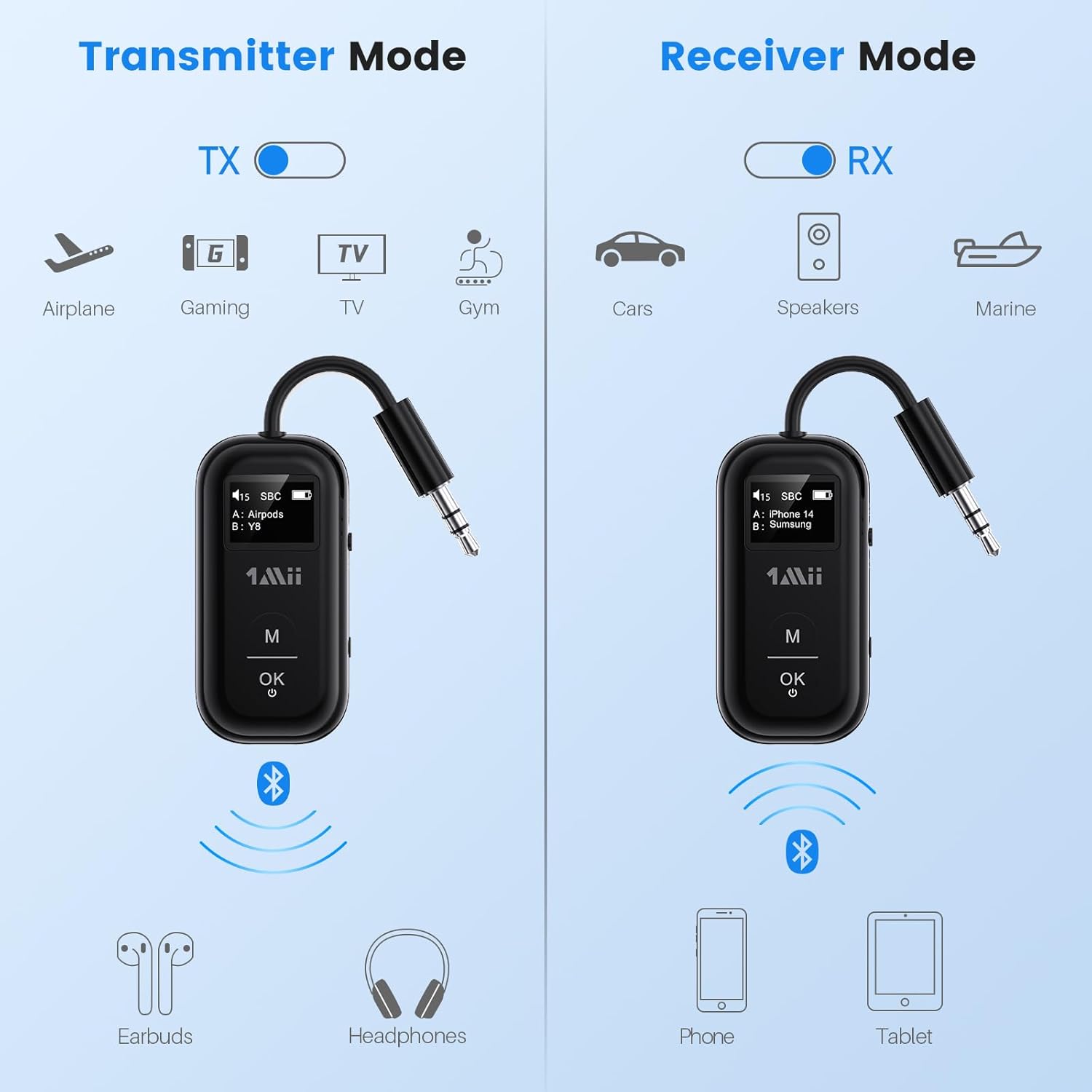
This image illustrates the two operating modes: Transmitter (TX) and Receiver (RX). TX mode is used for devices like airplanes, gaming consoles, TVs, and gym equipment to transmit audio to earbuds or headphones. RX mode is used for cars, speakers, and marine systems to receive audio from phones or tablets.
Use the TX/RX sliding switch on the side of the device to select the desired mode:
- Modalità TX (trasmettitore): For sending audio from non-Bluetooth devices (e.g., airplane entertainment, TV, gym equipment) to Bluetooth headphones or speakers.
- Modalità RX (ricevitore): For receiving audio from Bluetooth-enabled devices (e.g., smartphones, tablets) to wired audio systems (e.g., car stereo, home speakers).
4. Pairing in TX Mode (Connecting to Headphones)

- Set the SafeFly Pro to TX mode using the sliding switch.
- Plug the 3.5mm audio connection into your audio source (e.g., airplane entertainment system, TV headphone jack). If needed, use the dual-prong airplane adapter.
- Long press the 'OK' button on the SafeFly Pro for 2 seconds to enter pairing mode. The screen will display "Searching".
- Put your Bluetooth headphones or speakers into pairing mode. Refer to your headphone's manual for specific instructions.
- SafeFly Pro cercherà e si connetterà automaticamente ai dispositivi Bluetooth nelle vicinanze. Una volta connesso, il nome del dispositivo apparirà sullo schermo OLED.
- To connect a second pair of headphones: After the first device is connected, long press the 'OK' button again for 2 seconds to enter pairing mode for the second device. Put the second pair of headphones into pairing mode. Both devices will then be connected simultaneously.

This image shows the 1Mii SafeFly Pro connected to an airplane's in-flight entertainment system, enabling wireless audio streaming to a user's Bluetooth headphones.
5. Pairing in RX Mode (Connecting to Smartphones/Tablets)
- Set the SafeFly Pro to RX mode using the sliding switch.
- Plug the 3.5mm audio connection into your wired audio system's AUX input (e.g., car stereo, home speaker).
- Long press the 'OK' button on the SafeFly Pro for 2 seconds to enter pairing mode. The screen will display "Searching".
- On your smartphone or tablet, go to Bluetooth settings and select "1Mii SafeFly Pro" from the list of available devices to connect.
- Una volta connesso, il nome del dispositivo apparirà sullo schermo OLED.
- To connect a second smartphone/tablet: After the first device is connected, long press the 'OK' button again for 2 seconds to enter pairing mode for the second device. Connect the second smartphone/tablet via its Bluetooth settings.

This image shows the 1Mii SafeFly Pro in RX mode, connected to a car's audio system, receiving audio wirelessly from a smartphone.
Istruzioni per l'uso
Schermo OLED

Questa immagine fornisce un primo piano view of the OLED screen, indicating the power status, audio format (e.g., SBC), volume level, battery level, and the names of the two currently paired devices (A and B).
Lo schermo OLED fornisce informazioni in tempo reale:
- Livello della batteria: Indica la carica residua della batteria.
- Livello del volume: Displays the current audio output volume.
- Dispositivo associato: Shows the name(s) of the connected Bluetooth headphones or smartphones.
- Codec audio: Displays the active audio codec (e.g., aptX LL, aptX HD, aptX Adaptive, aptX, AAC, SBC).
Funzioni dei pulsanti
- Pulsante 'OK': Short press to Play/Pause audio.
- Pulsante 'M': In TX mode, press twice to cycle through available audio codecs (aptX LL, aptX HD, aptX Adaptive, AAC, SBC) if supported by your connected headphones.
Manutenzione
Per garantire la longevità e le prestazioni ottimali del tuo 1Mii SafeFly Pro, segui queste linee guida per la manutenzione:
- Pulizia: Pulire il dispositivo con un panno morbido e asciutto. Non utilizzare detergenti liquidi o materiali abrasivi.
- Magazzinaggio: Conservare il dispositivo in un luogo fresco e asciutto, lontano dalla luce solare diretta e da temperature estreme.
- Cura della batteria: Evitare di scaricare completamente la batteria frequentemente. Caricare regolarmente il dispositivo, anche se non in uso, per preservare la salute della batteria.
- Gestione: Maneggiare il dispositivo con cura. Evitare di farlo cadere o di sottoporlo a forti urti.
Risoluzione dei problemi
If you encounter issues with your SafeFly Pro, try the following steps:
- Il dispositivo non si accende: Assicurati che il dispositivo sia completamente carico. Collegalo a una fonte di alimentazione tramite il cavo USB-C.
- Impossibile associare:
- Assicurarsi che SafeFly Pro sia nella modalità TX o RX corretta.
- Make sure both the SafeFly Pro and your target Bluetooth device are in pairing mode.
- Avvicinare i dispositivi tra loro.
- Spegni e riaccendi entrambi i dispositivi, quindi riprova ad associarli.
- Nessun audio/Qualità audio scarsa:
- Check that the 3.5mm audio cable is securely connected to both the SafeFly Pro and the audio source/receiver.
- Ensure the volume on both the SafeFly Pro and the connected device is turned up.
- Verify that the correct audio codec is selected (in TX mode, press 'M' twice to cycle).
- Test with a different audio cable or source/receiver if possible.
- Device Frozen/Unresponsive: Long press the Reset Button (small hole on the side) for 3 seconds using a thin object (e.g., paperclip) to restart the device.
Specifiche
| Dimensioni del prodotto | 2.24 x 1.18 x 0.51 pollici |
| Peso dell'articolo | 0.64 once |
| Numero modello articolo | SafeFly Pro |
| Batterie | 1 batteria ai polimeri di litio (inclusa) |
| Tecnologia di connettività | AUX, Bluetooth 5.3 |
| Fonte di alimentazione | Alimentato a batteria |
| Materiale | Acrilonitrile Butadiene Stirene (ABS) |
| Caratteristiche speciali | AptX LL/HD/Adaptive, Bluetooth Transmitter & Receiver, Built-in Battery, Connect 2 Devices, with Screen |
Informazioni sulla sicurezza
Si prega di leggere e seguire queste linee guida di sicurezza per evitare danni al dispositivo o lesioni personali:
- Avoid exposure to extreme temperatures (hot or cold).
- Handle the battery with care. Do not puncture, disassemble, or expose to fire.
- Be aware of potential interference with other wireless devices.
- Tenere il dispositivo lontano dall'acqua e da altri liquidi.
- Non tentare di riparare o modificare il dispositivo autonomamente. Contattare l'assistenza clienti per ricevere assistenza.
Garanzia e supporto
1Mii products are designed for reliability and performance. For warranty information, technical support, or customer service inquiries, please refer to the official 1Mii website or contact their customer support team directly. Keep your purchase receipt as proof of purchase for warranty claims.