

1. Prodotto finitoview
The OWON HDS241 is a versatile 3-in-1 handheld device integrating a single-channel oscilloscope, a 24000-count digital multimeter, and a 100kHz signal generator. Designed for both outdoor and indoor use, it offers a compact form factor with powerful measurement capabilities for various electrical and electronic applications.

Image 1.1: The OWON HDS241 device, highlighting its oscilloscope, multimeter, and signal generator functions.
2. Informazioni sulla sicurezza
Before using the OWON HDS241, please read and understand all safety instructions to prevent electric shock, injury, or damage to the device. Keep this manual for future reference.
- Sicurezza generale: Utilizzare sempre il dispositivo entro il volume specificatotage and current limits. Do not operate the device in wet or damp condizioni.
- Sicurezza della sonda: Ensure probes are correctly connected and rated for the measurement being performed. Avoid touching exposed wiring or components when the device is powered on.
- Sicurezza della batteria: Use only the specified battery type. Do not disassemble, crush, or expose the battery to extreme temperatures.
- Manutenzione: Affidare qualsiasi intervento di assistenza a personale qualificato. Non tentare di riparare il dispositivo da soli.
3. Caratteristiche principali
- Multimetro digitale: 4 1/2 digit True RMS digital multimeter for measuring AC/DC voltage/current, resistance, diode, capacitance, and continuity. Maximum input voltage is AC 750V, DC 1000V.
- Signal Waveform Generator: 1-channel 100 kHz generator supporting sine, square, ramp, and pulse wave outputs. Maximum output amplitude is 2.5 Vpp.
- Oscilloscopio: Waveform refresh rate up to 10,000 wfms/s, 40MHz bandwidth, and real-time sampling rate up to 250MSa/s. Features auto-setup, multiple measurement functions, 8K record length, cursor measurement, and slow scan mode for long-term signal monitoring.
- Design compatto: Portable form factor with a 3.5-inch high-definition color LCD screen, suitable for various environments.
- Batteria a lunga durata: Low-power design with a 2000 mAh high-capacity lithium battery and standard Type-C port for charging and power bank compatibility.
4. Contenuto della confezione
The standard package for the OWON HDS241 includes:
- OWON HDS241 Handheld Oscilloscope Unit
- Cavi di prova per multimetro
- Sonda per oscilloscopio
- Cavo USB di tipo C.
- Manuale dell'utente (questo documento)
Note: Additional accessories such as a BNC-to-alligator clip cable or carrying case may need to be purchased separately.
5. Layout e controlli del dispositivo
Familiarize yourself with the physical components and controls of the HDS241.

Immagine 5.1: Fronte e lato view of the OWON HDS241 with key controls and ports labeled. Labels include: signal input connector, display area, multifunction keys, channel key, mode switching key, system settings, save settings, power button, relative value/activation menu key, multimeter input port, horizontal time base setting/signal adjustment, return key, range switch/measurement menu key, arrow keys, auto range/auto setting key, hold value/Stop/Run key, probe compensation output (2.5V/1kHz square wave or signal generator output), USB charging/communication interface, approximate weight (0.6 kg host, excluding battery), gross weight (1.2 kg).
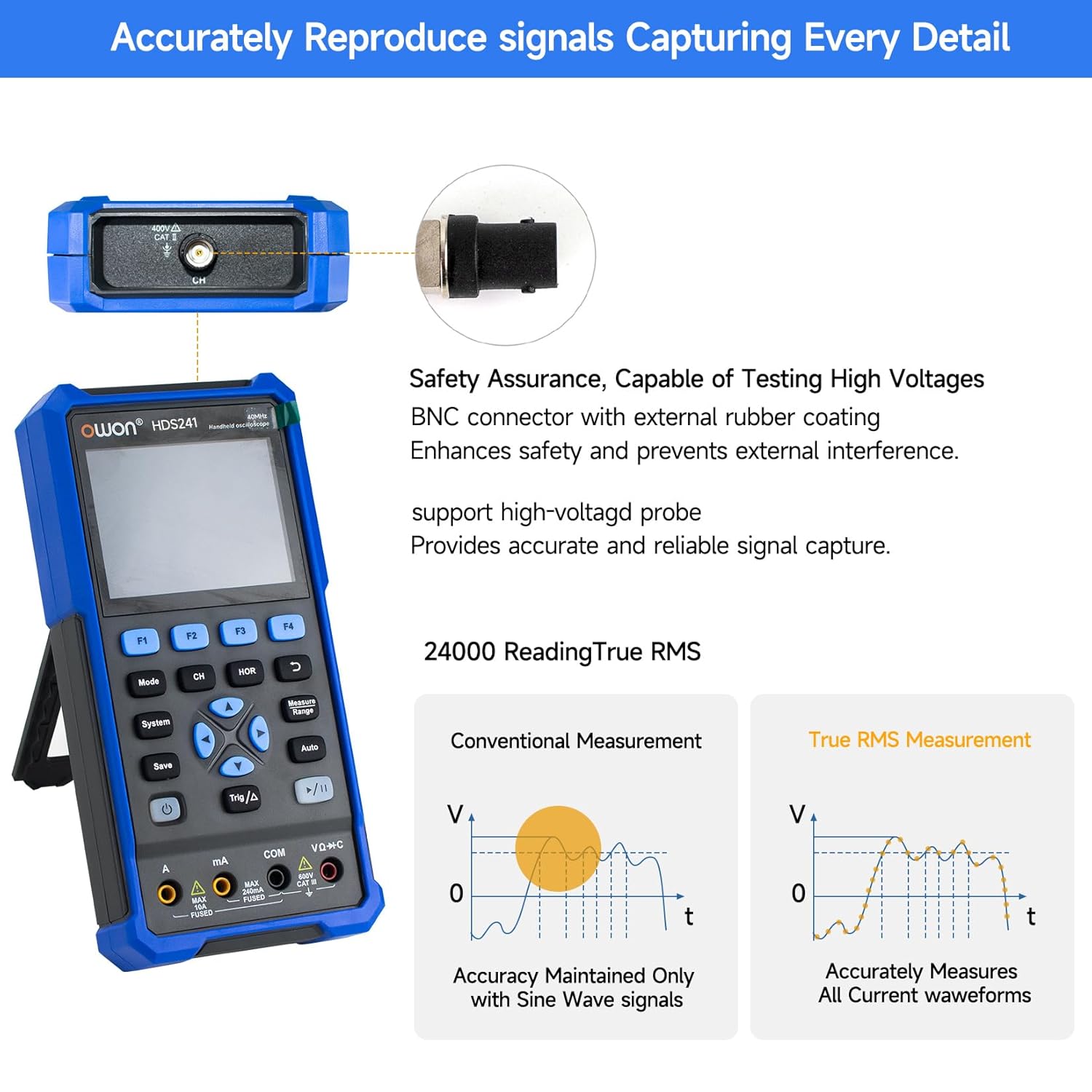
Image 5.2: Detail of the BNC connector, designed for safety and signal integrity, with external rubber coating.
6. Configurazione iniziale
6.1 Ricarica del dispositivo
The HDS241 is equipped with a built-in 2000 mAh lithium battery. Before first use, fully charge the device using the provided USB Type-C cable and a compatible power adapter (not included) or a computer USB port.
- Connect the USB Type-C cable to the device's Type-C port.
- Collegare l'altra estremità del cavo a una fonte di alimentazione USB.
- L'indicatore di carica mostrerà lo stato di carica.

Image 6.1: The USB Type-C charging port and internal battery compartment, emphasizing long-lasting performance.
6.2 Accensione/Spegnimento
Premere e tenere premuto il tasto Energia pulsante per accendere o spegnere il dispositivo.
7. Modalità operative
The HDS241 features three primary operating modes: Oscilloscope, Multimeter, and Signal Generator. Press the Modalità pulsante per passare da una funzione all'altra.
7.1 Modalità oscilloscopio
In Oscilloscope mode, the device displays real-time waveforms, allowing for detailed analysis of electrical signals. Connect the oscilloscope probe to the BNC connector on the top of the device.
- Configurazione automatica: Premere il tasto Auto pulsante per il ridimensionamento e il posizionamento automatici della forma d'onda.
- Misure: Utilizzare il Misura menu (accessed via F1) to select automatic measurements like Frequency, Period, Amplitude, Max, Min, Peak-to-Peak, and RMS.
- Misure del cursore: Activate cursor measurements (accessed via F2) to manually measure voltage (ΔV) and time (ΔT) differences between points on the waveform.
- Impostazioni di attivazione: Adjust trigger type, level, and mode using the Trigonometria/Δ pulsante.
- Horizontal/Vertical Controls: Use the navigation arrows to adjust time base (horizontal) and voltage scale (vertical).

Immagine 7.1.1: Es.amples of oscilloscope display features including dual sampling mode, high refresh rate, 8 types of auto-measurements, and cursor measurements.

Immagine 7.1.2: Es.amples of actual measured waveforms, demonstrating the oscilloscope's signal capture capabilities for different signal types.
7.2 Modalità multimetro
In Multimeter mode, the HDS241 functions as a digital multimeter. Connect the test leads to the appropriate input ports (VΩ+C, COM, A, mA) at the bottom of the device.
- Selezione della funzione: Utilizzare il Modalità button to cycle through measurement types (Voltage, Current, Resistance, Capacitance, Diode, Continuity).
- Gamma automatica: The device supports auto-ranging for convenient measurement.
- Data Hold: Utilizzare il Salva button or a dedicated hold function (if available) to freeze the current reading.
7.3 Modalità generatore di segnale
The Signal Generator mode allows the device to output various waveforms. Connect the output to the circuit under test using the appropriate cable (e.g., BNC to alligator clips, not included).
- Selezione della forma d'onda: Use the F-keys to select sine, square, ramp, or pulse waveforms.
- Regolazione dei parametri: Adjust frequency and amplitude using the navigation arrows. The maximum output amplitude is 2.5 Vpp.
8. Gestione dei dati
The HDS241 supports data transfer to a computer via its USB Type-C port for further analysis and record-keeping.
- Collegamento al PC: Utilizzare il cavo USB Type-C in dotazione per collegare il dispositivo al computer.
- Software: Fare riferimento all'OWON website for any necessary drivers or software to facilitate data transfer and analysis.
- Salvataggio dei dati: Utilizzare il Salva button to store waveform images, settings, or measurement data directly on the device.
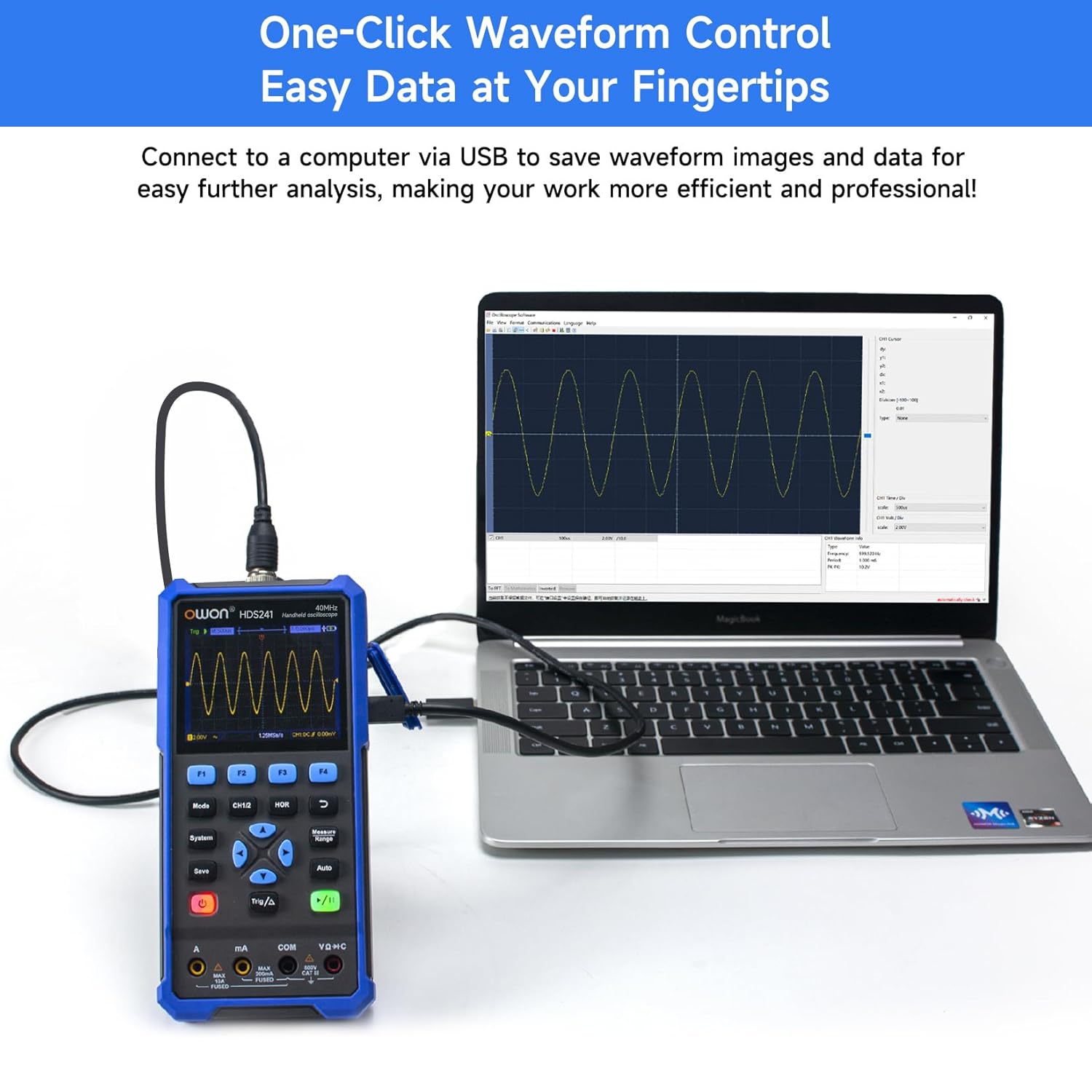
Image 8.1: The OWON HDS241 connected to a computer for data transfer and analysis, enabling easy waveform control.
9. Manutenzione
- Pulizia: Pulire il dispositivo con un panno morbido e asciutto. Non utilizzare detergenti abrasivi o solventi.
- Magazzinaggio: Conservare il dispositivo in un luogo fresco e asciutto, lontano dalla luce solare diretta e da temperature estreme.
- Cura della batteria: Per la conservazione a lungo termine, assicurarsi che la batteria sia parzialmente carica (circa il 50%) e ricaricarla ogni pochi mesi per mantenerla in buone condizioni.
- Calibrazione della sonda: Periodically calibrate the oscilloscope probe using the dedicated probe compensation output to ensure accurate measurements.
10. Risoluzione Dei Problemi
| Problema | Possibile causa | Soluzione |
|---|---|---|
| Il dispositivo non si accende. | Batteria scarica o scarica. | Connect the device to a power source using the USB Type-C cable and allow it to charge. |
| Nessuna forma d'onda visualizzata in modalità oscilloscopio. | Probe not connected correctly; signal too small or too large; incorrect time base or voltage scala. | Ensure probe is securely connected. Press Auto for automatic setup. Adjust vertical and horizontal scales manually. Check trigger settings. |
| Le letture del multimetro sono imprecise. | Test leads not properly connected; incorrect measurement function selected; external interference. | Verify test lead connections. Ensure the correct measurement mode (voltage, current, resistance) is selected. Minimize external electrical noise. |
| L'uscita del generatore di segnale non è quella prevista. | Incorrect waveform type, frequency, or amplitude set. | Controllare la forma d'onda selezionata, la frequenza e amplitude settings in the signal generator menu. |
11. Specifiche tecniche
Specifiche dell'oscilloscopio:
| Parametro | Valore |
|---|---|
| Larghezza di banda | 40 MHz |
| Canale | 1 |
| Samptasso di ling | 250MSa / s |
| Modalità di acquisizione | Sample, Rilevamento picco |
| Lunghezza del record | Massimo 8K |
| Display | LCD da 3.5 pollici |
| Frequenza di aggiornamento della forma d'onda | 10,000 WFM/s |
| Ingresso Accoppiamento | CC, CA, Terra |
| Impedenza di ingresso | 1 MΩ±2%, in parallelo con 16 pF±10 pF |
| Attenuazione della sonda | 1X, 10X, 100X, 1000X |
| Volume massimo in ingressotage | 400V (DC + AC, PK-PK) |
| Sensibilità Risoluzione | 10mV/div-10V/div |
| Risoluzione verticale | 8 bit |
| Scala orizzontale | 5ns/div-1000s/div, step 1-2-5 |
| Tipo di trigger | Bordo |
| Modalità di attivazione | Auto, Normale, Singolo |
| Misurazione automatica | Periodo, Frequenza, Media, PK-PK, Max, Min, Amplitude, RMS |
| Misurazione del cursore | ΔV, ΔT |

Image 11.1: Detailed oscilloscope specifications.
Digital Multimeter Specifications:
| Parametro | Valore |
|---|---|
| Conteggio display | 4½ digits (max 24000 counts) |
| Modalità di prova | Voltage, Corrente, Resistenza, Capacità, Diodo, Continuità |
| Volume massimo in ingressotage | CA 750 V, CC 1000 V |
| Corrente di ingresso massima | CA 10 A, CC 10 A |
| Auto Range | SÌ |
| Vero RMS | SÌ |

Image 11.2: Detailed digital multimeter specifications.
Signal Waveform Generator Specifications:
| Parametro | Valore |
|---|---|
| Forme d'onda | Seno, Quadrato, Ramp, Impulso |
| Frequenza di uscita | Da 10 Hz a 100 kHz |
| Amplitudine | 2Vpp-2.5Vpp |

Image 11.3: Detailed signal waveform generator specifications.
Specifiche generali:
- Dimensioni: Dimensioni: 9.6 x 3.8 x 19.8 cm
- Peso dell'articolo: 1.2 chilogrammi
- Fonte di energia: Alimentato a batteria (batteria al litio da 2000 mAh)
- Colore: Blu
- Certificazioni: CE, True RMS
12. Garanzia e supporto
OWON products are designed for reliability and performance. For warranty information, technical support, or service inquiries, please refer to the official OWON websito o contattare il distributore locale.
- Periodo di garanzia: Standard manufacturer's warranty applies. Please check your purchase documentation for specific terms and duration.
- Supporto tecnico: Visit the OWON official website for FAQs, software downloads, and contact information for technical assistance.
- Resi: Refer to the retailer's return policy for details on product returns and exchanges.