
1. Introduzione
Thank you for choosing the JAGJOG Walking Pad with Incline. This portable under desk treadmill is designed to provide a convenient and effective way to incorporate walking and light jogging into your daily routine, whether at home or in the office. Please read this manual thoroughly before initial use to ensure proper setup, safe operation, and optimal performance of your device. Keep this manual for future reference.
2. Istruzioni di sicurezza
Your safety is paramount. Adhere to all warnings and instructions to reduce the risk of injury or damage to the equipment.
2.1 Sicurezza generale
- Posizionare sempre il tapis roulant su una superficie piana e stabile.
- Assicurarsi che vi sia uno spazio libero adeguato (almeno 2 metri dietro e 0.6 metri su ciascun lato) attorno al tapis roulant durante il funzionamento.
- Non permettere ai bambini o agli animali domestici di avvicinarsi al tapis roulant mentre è in uso.
- La capacità massima di carico di questo tapis roulant è di 265 libbre (circa 120 kg). Non superare questo limite.
- Durante l'uso, indossare calzature sportive adatte.
- Se avverti vertigini, nausea, dolore al petto o altri sintomi anomali, interrompi immediatamente l'allenamento e consulta un medico.
- Non utilizzare il tapis roulant se è danneggiato o non funziona correttamente.
- Tenere mani e piedi lontani da tutte le parti in movimento.
2.2 Sicurezza elettrica
- Collegare il tapis roulant a una presa elettrica dotata di messa a terra.
- Non utilizzare prolunghe o adattatori.
- Scollegare il tapis roulant dalla fonte di alimentazione prima di pulirlo, sottoporlo a manutenzione o spostarlo.
- Tenere il cavo di alimentazione lontano da superfici calde.
- Non utilizzare il tapis roulant se il cavo di alimentazione o la spina sono danneggiati.
3. Contenuto della confezione
Verificare che tutti gli articoli siano presenti nel pacco:
- Treadmill (Fully Assembled) x1
- Manuale utente x1
- Telecomando x1
- Lubrificante x1
- Tool Kit (L-shaped wrench with Cross Screwdriver) x1
- Front Foot Cushion x2

Image: All components included in the JAGJOG Walking Pad package.
4. Impostazione
4.1 Disimballaggio e posizionamento
- Estrarre con cautela il tapis roulant e tutti gli accessori dalla confezione.
- Place the treadmill on a firm, level surface, ensuring sufficient clearance around the unit.
- The treadmill is designed for easy movement and storage. It can be stored flat under furniture when not in use.

Image: The JAGJOG Walking Pad in use, demonstrating its compact design and suitability for various environments.
4.2 Regolazione dell'inclinazione
The walking pad features a manual 15° incline adjustment. To activate the incline, locate the adjustable feet at the front of the treadmill and extend them. This will elevate the front of the running surface, simulating an uphill walk.

Image: Demonstrating the manual 15° incline adjustment for increased workout intensity.
4.3 Accoppiamento telecomando
The treadmill operates via a wireless remote control. Ensure the battery is correctly inserted. The remote is typically pre-paired. If not, refer to the specific pairing instructions in the included user manual for your model.
5. Caratteristiche del prodotto
5.1 Adjustable Incline
Elevate your workout with the manual 15° incline adjustment. This feature allows for a true hill-training effect, targeting leg muscles more effectively and increasing cardio intensity. Simply adjust the incline feet for an instant boost to your exercise.
5.2 Self-Aligning Treadmill Belt
The innovative auto-align technology keeps the running belt centered during workouts, eliminating the need for frequent manual adjustments. The wide 40” x 15.3” anti-slip surface is designed to absorb shock, providing a smooth and joint-friendly experience for walking, jogging, or climbing.
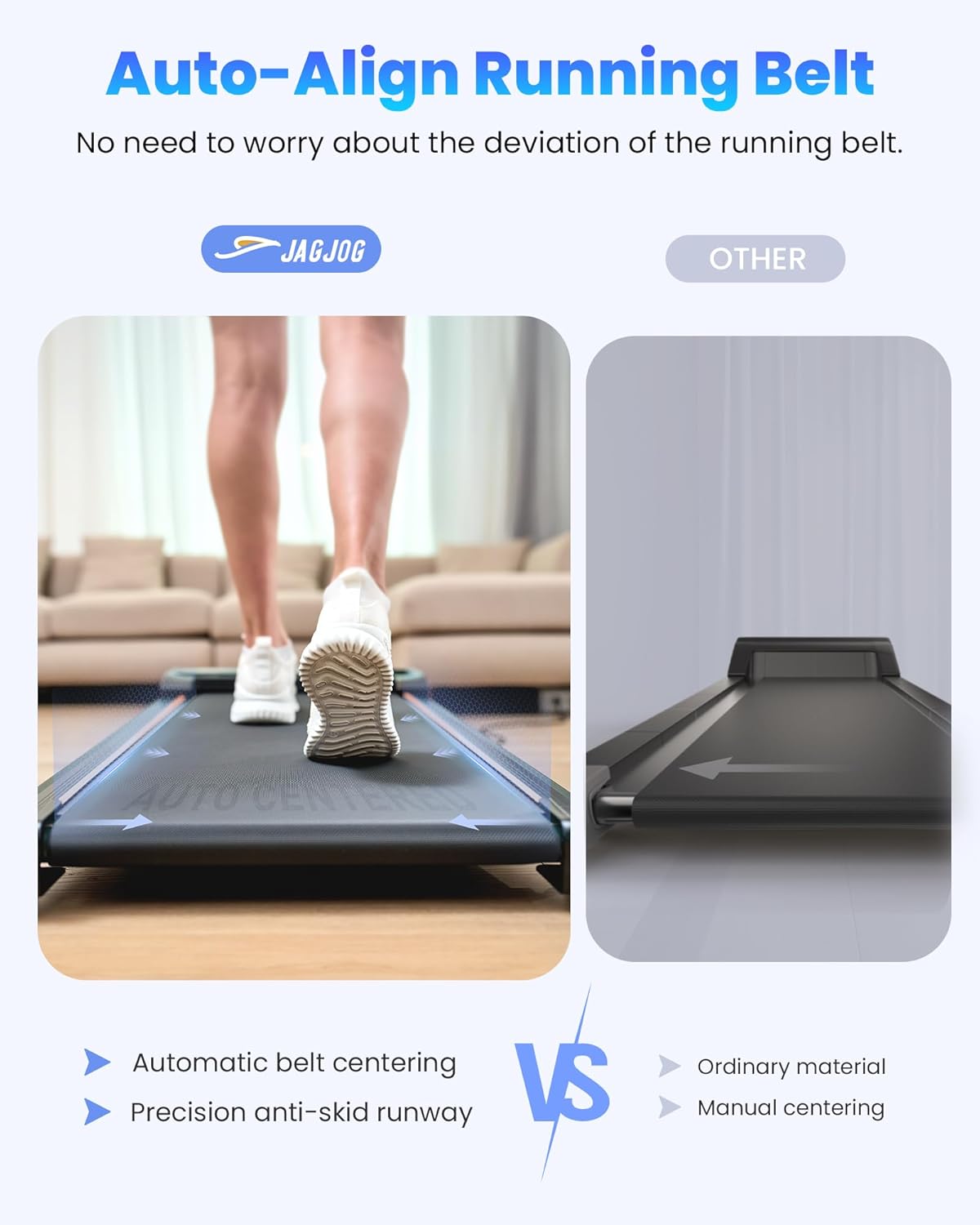
Image: Illustration of the self-aligning running belt technology.
5.3 4-in-1 Smart Modes
This under desk treadmill offers versatile modes to suit various fitness goals:
- Modalità di lavoro: 0.6-1.5 MPH for low-intensity movement while working.
- Modalità camminata: 0.6-1.8 MPH for a steady walking pace.
- Modalità Jog: 2.5-3.8 MPH for increased cardiovascular activity.
- Climb Mode: Utilizes the 15° incline for hill-style intensity.

Image: Visual representation of the four available operating modes.
5.4 Powerful & Quiet Motor
Equipped with a 2.5 HP motor, the treadmill supports users up to 265 lbs while operating quietly (below 45 dB). Its steel frame and multi-layer belt minimize vibrations, making it suitable for use in quiet environments like apartments or offices.

Immagine: Interna view of the 2.5 HP motor and its specifications.
5.5 Remote Control & LED Display
The included remote control allows for easy adjustment of speed and instant stopping during your workout. The integrated LED display tracks essential fitness data in real-time, including speed, distance, time, and calories burned.

Image: The LED display and remote control for tracking workout data.
5.6 Deep Shock Absorption
Designed for knee joint protection, the treadmill features 8 silicone shock-absorbers, a shock absorption running board, and a 5-layer non-slip running belt. This multi-layer system reduces impact on your joints, providing a comfortable and safe exercise experience.

Image: Components of the deep shock absorption system.
6. Istruzioni per l'uso
6.1 Accensione/spegnimento
- Collegare il cavo di alimentazione a una presa con messa a terra.
- Locate the main power switch (usually at the front or rear of the treadmill) and turn it to the 'ON' position.
- Il display LED si illuminerà.
- To turn off, press the 'STOP' button on the remote, then turn off the main power switch and unplug the unit.
6.2 Regolazione della velocità
Utilizzare i pulsanti '+' e '-' sul telecomando per aumentare o diminuire la velocità. L'intervallo di velocità è compreso tra 0.6 e 3.8 miglia orarie.
6.3 Selezione della modalità
Press the 'M' button on the remote control to cycle through the available modes (Work, Walk, Jog, Climb). Each mode has a predefined speed range or incline setting.
6.4 Monitoraggio dei progressi
The LED display automatically cycles through Time, Distance, Calories, and Speed, allowing you to monitor your workout progress in real-time.
7. Manutenzione
Una manutenzione regolare garantisce la longevità e il funzionamento regolare del tapis roulant.
7.1 Lubrificazione
The running belt requires periodic lubrication to reduce friction and extend its lifespan. Use the provided silicone lubricant. Refer to the detailed instructions in the included user manual for the correct application procedure and frequency.
7.2 Pulizia
Pulisci la superficie del tapis roulant con un pannoamp Dopo ogni utilizzo, pulire con un panno per rimuovere sudore e polvere. Non utilizzare detergenti abrasivi o solventi.
7.3 Regolazione della cinghia
While the treadmill features auto-align technology, occasional manual belt adjustment may be necessary if the belt starts to drift or slip. Use the provided tool kit and follow the specific instructions in the included user manual for proper adjustment.
8. Risoluzione Dei Problemi
If you encounter issues with your treadmill, consult the following common troubleshooting tips:
- Il tapis roulant non si accende: Ensure the power cord is securely plugged in and the main power switch is 'ON'. Check the circuit breaker.
- La cinghia non si muove: Ensure the safety key (if applicable, though not explicitly mentioned for this model, it's a common treadmill feature) is in place. Check if the remote control battery needs replacement.
- Rumori insoliti: Inspect the running belt for debris. Ensure the treadmill is on a level surface. Lubricate the belt if necessary.
- Codice errore E07: This error code has been reported by some users. If you encounter E07, it typically indicates a motor or sensor issue. Please contact customer support for assistance.
- Belt slipping or drifting: Perform belt adjustment as described in Section 7.3.
For issues not covered here, please contact JAGJOG customer support.
9. Specifiche
| Caratteristica | Specificazione |
|---|---|
| Dimensioni del prodotto | Dimensioni: 106 x 48.5 x 10.6 cm |
| Peso dell'articolo | 17 kg |
| Colore | Black With Incline |
| Tipo di visualizzazione | GUIDATO |
| Materiale del telaio | Acciaio al carbonio |
| Materiale della cintura da corsa | Alloy Steel (Base), Multi-layer (Belt) |
| Potenza | 2.5 CV |
| Display del misuratore | Calorie bruciate, distanza, velocità, tempo |
| Fonte di alimentazione | Elettrico con cavo |
| Caratteristiche speciali | Lightweight, Manual 15° Incline, Under desk design, Portable, Shock Absorbent, Running Belt Automatic Correction |
| Velocità massima | 6.12 chilometri all'ora (circa 3.8 miglia orarie) |
| Percentuale di inclinazione massimatage | 15° |
| Assemblaggio richiesto | NO |
10. Garanzia e supporto
JAGJOG products are manufactured to high-quality standards. For warranty information, technical support, or any questions regarding your Walking Pad, please refer to the contact details provided in the included warranty card or visit the official JAGJOG websito. Conservare la prova d'acquisto per eventuali reclami in garanzia.