1. Impostazione
The Acer ODK390 9-in-1 USB C Hub is designed for plug-and-play functionality with most compatible devices. Follow these steps to connect your hub and peripherals.
1.1 Collegamento dell'hub al dispositivo
Connect the integrated USB-C cable from the hub to an available USB-C port on your laptop, tablet, or smartphone. Ensure your device supports USB Type-C DP Alt Mode for video transmission functions.
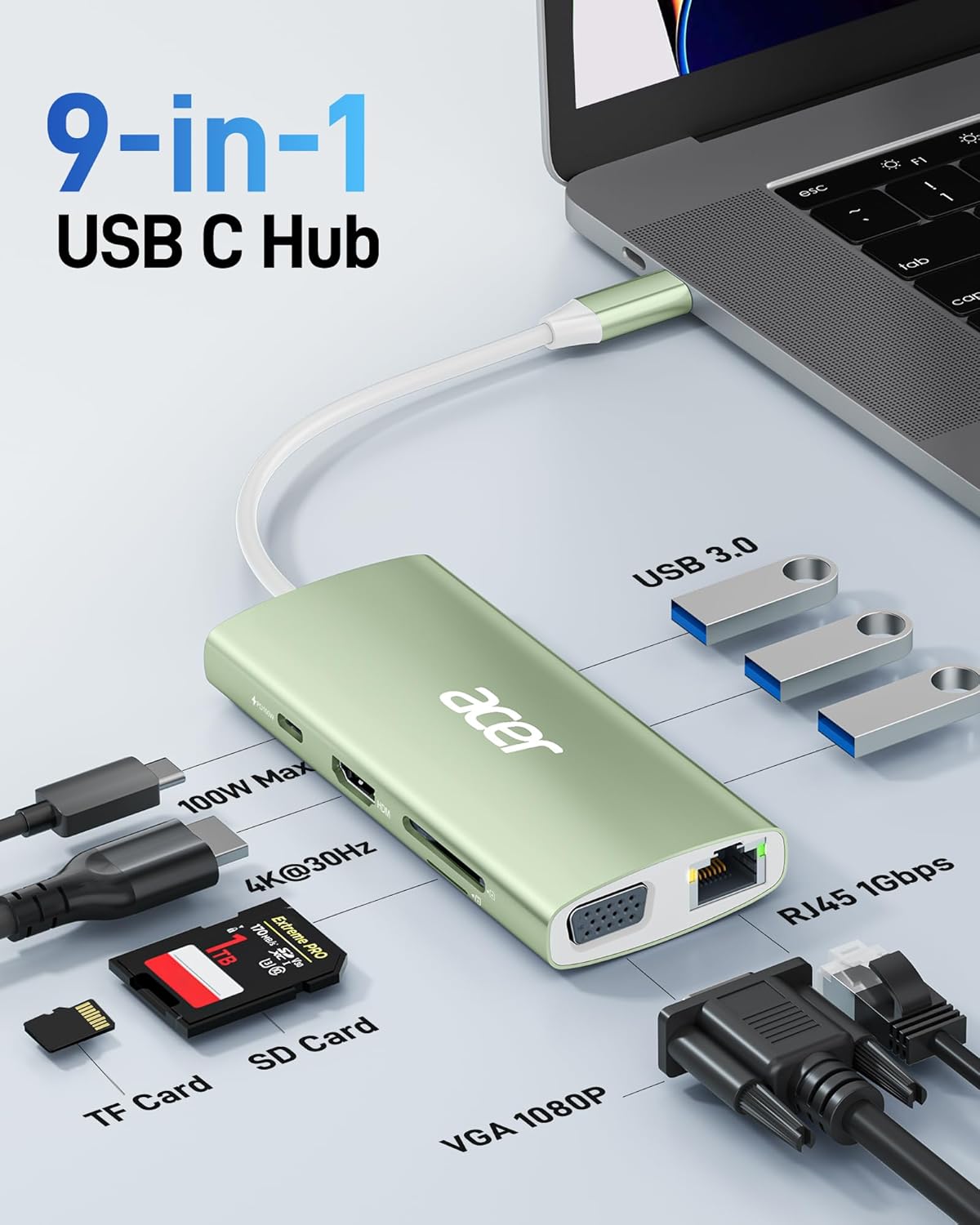
Image: Acer ODK390 USB C Hub connected to a laptop, illustrating the primary USB-C connection.
1.2 Collegamento delle periferiche
- Dispositivi USB 3.0: Plug your USB-A 3.0 devices (e.g., external hard drives, keyboards, mice, printers) into the available USB 3.0 ports on the hub. These ports support data transfer speeds of up to 5 Gbps.
- Schermo HDMI: Connect an HDMI cable from your monitor or TV to the HDMI port on the hub for 4K@30Hz video output.
- Schermo VGA: Connect a VGA cable from your monitor or projector to the VGA port on the hub for video output.
- Rete Ethernet: For a stable and fast wired internet connection, plug an Ethernet cable (CAT6 or higher recommended for 1Gbps speeds) into the RJ45 Ethernet port.
- Schede SD/TF: Insert your SD or TF (Micro SD) memory cards into the corresponding slots for data access. The hub supports cards up to 1TB capacity.
- Erogazione di potenza (PD 100W): To charge your host device (laptop, tablet, smartphone) while using the hub, connect your USB-C power adapter to the PD 100W USB-C input port on the hub. Note: This port is for charging input only and does not support data transfer.

Immagine: Un overview of the Acer ODK390 USB C Hub, highlighting its various ports including USB 3.0, 100W PD, 4K@30Hz HDMI, TF Card, SD Card, VGA 1080P, and RJ45 1Gbps Ethernet.
2. Istruzioni per l'uso
The Acer ODK390 hub extends your device's connectivity and display capabilities. Ensure all connections are secure for optimal performance.
2.1 Video Output (HDMI & VGA)
- Uscita HDMI 4K: Connect an HDMI-enabled display to the HDMI port. The hub supports 4K resolution at 30Hz, providing high-definition video.
- Uscita VGA: Connect a VGA-enabled display to the VGA port. This supports up to 1080P resolution.
- Doppia modalità di visualizzazione:
- Modalità specchio: Duplicate your laptop's screen onto external monitors.
- Modalità estesa: Estendi il tuo desktop su più schermi per avere più spazio di lavoro.
Note: When connecting two monitors via both HDMI and VGA in Extend Mode, the two external screens will display the same content.

Image: A laptop connected to an external 4K monitor through the Acer ODK390 USB C Hub, demonstrating 4K@30Hz screen casting.
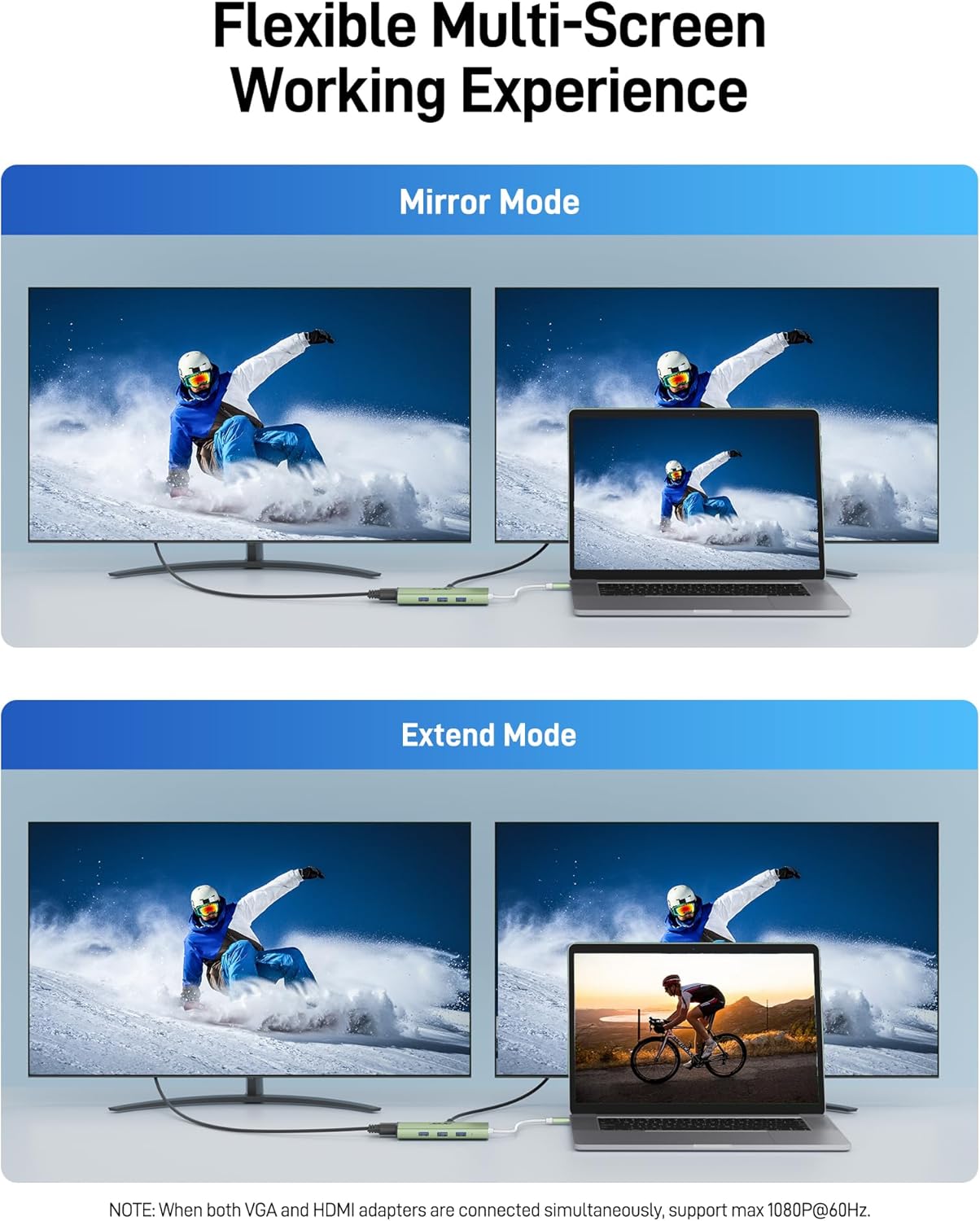
Image: A visual representation of a laptop connected to two external monitors, illustrating both Mirror Mode (displaying identical content) and Extend Mode (extending the desktop across screens) using the Acer ODK390 USB C Hub.
2.2 Connettività di rete
The Gigabit Ethernet port provides a stable and high-speed wired network connection (10/100/1000Mbps). This is ideal for online gaming, video conferencing, and large file trasferimenti.

Image: A laptop connected to an Ethernet cable through the Acer ODK390 USB C Hub, indicating a 1000Mbps high-speed connection.
2.3 Trasferimento dati
- Porte USB: 3.0 Utilize the three USB 3.0 ports for connecting various USB devices and transferring data at speeds up to 5 Gbps.
- Lettore di schede SD/TF: Access photos, videos, and other files directly from your SD or TF cards.

Image: The Acer ODK390 USB C Hub with multiple USB 3.0 ports connected to flash drives, illustrating 10x faster data transfer than USB 2.0.

Image: The Acer ODK390 USB C Hub with SD and TF cards inserted, showing its card reader functionality.
2.4 Erogazione di potenza
The PD 100W USB-C port allows for rapid charging of compatible devices, ensuring your laptop, tablet, or smartphone remains powered during use.

Image: The Acer ODK390 USB C Hub connected to a power adapter and a laptop, illustrating 100W Power Delivery pass-through charging.
3. Manutenzione
To ensure the longevity and optimal performance of your Acer ODK390 USB C Hub, follow these maintenance guidelines:
- Pulizia: Use a soft, dry cloth to gently wipe the aluminum housing. Avoid liquid cleaners or abrasive materials that could damage the finish.
- Magazzinaggio: Conservare l'hub in un luogo fresco e asciutto, lontano dalla luce solare diretta e da temperature estreme.
- Gestione: Avoid dropping the device or subjecting it to strong impacts. The aluminum housing provides durability and aids in heat dissipation, but excessive force can cause damage.
- Cura del cavo: Do not excessively bend or twist the integrated USB-C cable to prevent internal wire damage.
4. Risoluzione Dei Problemi
If you encounter issues with your Acer ODK390 USB C Hub, refer to the following common solutions:
- No Video Output via HDMI/VGA:
- Ensure your USB-C device supports USB Type-C DP Alt Mode (Video transmission function).
- Check all cable connections (USB-C to host, HDMI/VGA to display) are secure.
- If using both HDMI and VGA in Extend Mode, note that the two external screens will display identical content.
- Velocità Ethernet lenta:
- Verify you are using a CAT6 or higher Ethernet cable to achieve 1Gbps speeds.
- Ensure your network infrastructure (router, modem) supports Gigabit Ethernet.
- Device Not Charging via PD Port:
- Confirm your USB-C power adapter is connected to the PD 100W port on the hub.
- Ensure your host device supports USB-C Power Delivery.
- Remember that the USB-C PD port on the hub is for charging input only and does not support data transfer.
- Scheda SD/TF non riconosciuta:
- Assicurarsi che la scheda sia inserita completamente nello slot corretto.
- Try the card in another device to confirm it is not damaged.
- Windows 7 or XP Driver Installation:
- For Windows 7 or Windows XP systems, you may need to install a driver for the network port to function correctly. Refer to the "Installation Manual (PDF)" available in the product guides and documents section for instructions.
- Samsung DeX Mode:
- If using with a Samsung Galaxy Tablet, ensure Samsung DeX Mode is turned on before connecting the hub.
5. Specifiche
| Caratteristica | Dettaglio |
|---|---|
| Marca | acero |
| Numero di modello | ODK390 |
| Colore | Verde |
| Interfaccia Hardware | Ethernet, HDMI, MicroSD, USB Type C |
| Caratteristiche speciali | 4K HDMI Output, 5Gbps Fast Data Transfer, Gigabit Ethernet, PD 100W Fast Charging, VGA, SD/TF Card Reader |
| Dispositivi compatibili | Desktop, laptop, smartphone, tablet |
| Porte USB totali | 3 (USB-A 3.0) |
| Velocità di trasferimento dati | 5 Gigabit al secondo (USB 3.0) |
| Numero di porte | 9 |
| Compatibilità del sistema operativo | Chrome OS, Linux, Windows, Mac OS, Android |
| Materiale di recinzione | Alluminio |
| Dimensioni articolo (L x P x A) | 4.33 cm L x 1.97 cm P x 0.67 cm A |
| Peso dell'articolo | 2.88 once |
6. Garanzia
The Acer ODK390 9-in-1 USB C Hub comes with a Garanzia del produttore di 1 anni. Please retain your proof of purchase for any warranty claims. For more details, visit www.acer.com.
7. Supporto
For further assistance, technical support, or to explore other Acer products, please visit the official Acer websito o contattare il servizio clienti.
- Negozio ufficiale Acer: Visit the Acer Store on Amazon
- Product Guides and Documents: Additional resources, including the "Installation Manual (PDF)" for specific driver installations, can be found on the product's Amazon page.
8. Video di prodotto
Watch these official product videos for visual guides and demonstrations.
Acer USB C Hub 9-in-1 Overview
Questo video fornisce una panoramica completaview of the Acer USB C Hub 9-in-1, showcasing its features and functionality. It demonstrates how the hub can expand connectivity for various devices.
Acer ODK390/UC906 USB-C Docking Station: Review and Thoughts
This video offers a detailed review and personal thoughts on the Acer ODK390/UC906 USB-C Docking Station, covering its performance and user experience.
Acer USB C Hub - Fair Testing and Review!
This video conducts fair testing and provides a review of the Acer USB C Hub, evaluating its capabilities and performance in real-world scenarios.
Acer the brand you can TRUST!!!!
This video highlights Acer as a trustworthy brand, showcasing the reliability and quality of their products, including the USB C Hub.