
Introduzione
The Neoteck ZT-FS1 Anemometer Wind Meter is a multifunctional digital instrument designed for measuring wind speed, air volume, temperature, and humidity. It is suitable for various applications including HVAC system testing, outdoor activities, and environmental monitoring. This manual provides detailed instructions for the proper use and maintenance of your device.
Cosa c'è nella scatola
- 1 x Neoteck ZT-FS1 Wind Speed Gauge
- 2 batterie AAA
- 1 x Manuale utente
- 1 x Cacciavite
Prodotto finitoview
Familiarize yourself with the components and controls of your Neoteck ZT-FS1 Anemometer.

Figura 1: Fronte e retro View of the Neoteck ZT-FS1 Anemometer with labeled components.
- Pale del ventilatore: Rotates to measure wind speed and airflow.
- Sensore di temperatura e umidità: Detects ambient temperature and relative humidity.
- Design antiscivolo: Garantisce una presa sicura.
- Schermo LCD: Displays measurement readings and unit indicators.
- Pulsante di accensione (U): Accende o spegne il dispositivo.
- Pulsante di retroilluminazione (BL): Attiva o disattiva la retroilluminazione LCD.
- Pulsante UNITÀ: Cycles through different measurement units.
- HOLD MAX/MIN Button: Toggles between data hold, maximum value, and minimum value display.
- VEL FLOW/AREA Button: Switches between wind speed (VEL) and air volume (FLOW/AREA) measurement modes.
- Coperchio della batteria: Protegge il vano batteria.
Impostare
Installazione della batteria
- Individuare il coperchio della batteria sul retro del dispositivo.
- Utilizzare il cacciavite in dotazione per aprire il coperchio della batteria.
- Inserire due batterie AAA, assicurandosi della corretta polarità (+/-).
- Riposizionare il coperchio della batteria e fissarlo con la vite.
Istruzioni per l'uso
Accensione/spegnimento e retroilluminazione
- Premere il tasto Power Button (U) per accendere il dispositivo.
- Premere e tenere premuto il tasto Power Button (U) per spegnere il dispositivo.
- Premere il tasto Backlight Button (BL) to activate the LCD backlight for low-light conditions. Press again to turn it off.

Figure 2: The backlit LCD screen provides clear readings in various lighting conditions.
Misurazione della velocità del vento
To measure wind speed:
- Assicurati che il dispositivo sia acceso.
- Premere il tasto VEL FLUSSO/AREA button until 'VEL' is displayed on the screen, indicating wind speed mode.
- Point the fan blades directly into the wind. The display will show the current wind speed.
- Premere il tasto UNITÀ button to cycle through the available wind speed units: Knots, km/h, mph, m/s, ft/s, ft/min.
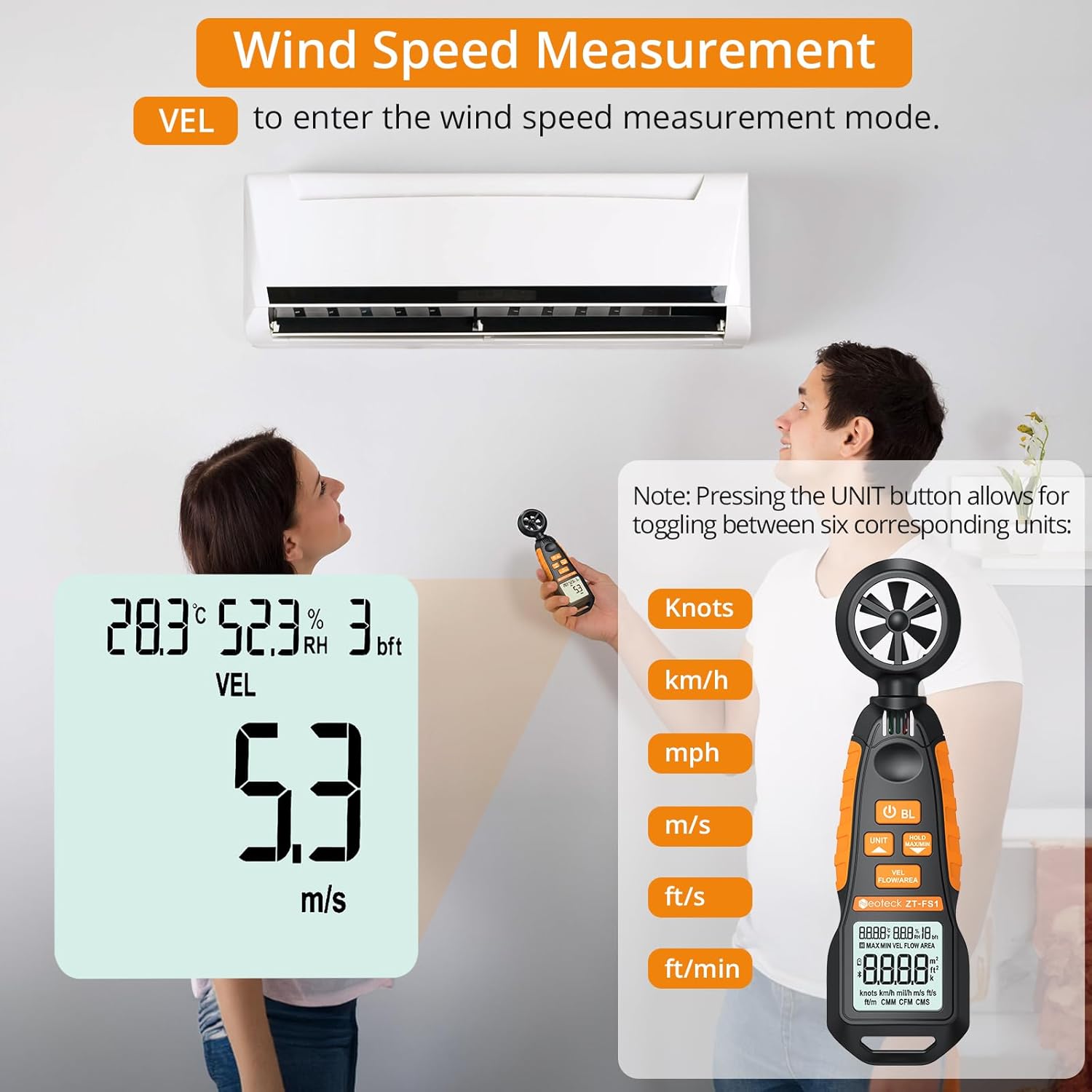
Figure 3: Measuring wind speed with the anemometer. The display shows current speed and unit options.
Air Volume Measurement (CFM/CMM/CMS)
To measure air volume:
- Assicurati che il dispositivo sia acceso.
- Premere il tasto VEL FLUSSO/AREA button until 'FLOW' is displayed on the screen, indicating air volume mode.
- Before measurement, you must input the cross-sectional area of the duct or vent. Refer to the full manual for detailed instructions on entering area values.
- Align the fan of the instrument vertically with the air outlet. The display will show the air volume.
- Premere il tasto UNITÀ button to cycle through the available air volume units: CMM (Cubic meter/minute), CFM (Cubic inch/minute), CMS (Cubic meter per second).
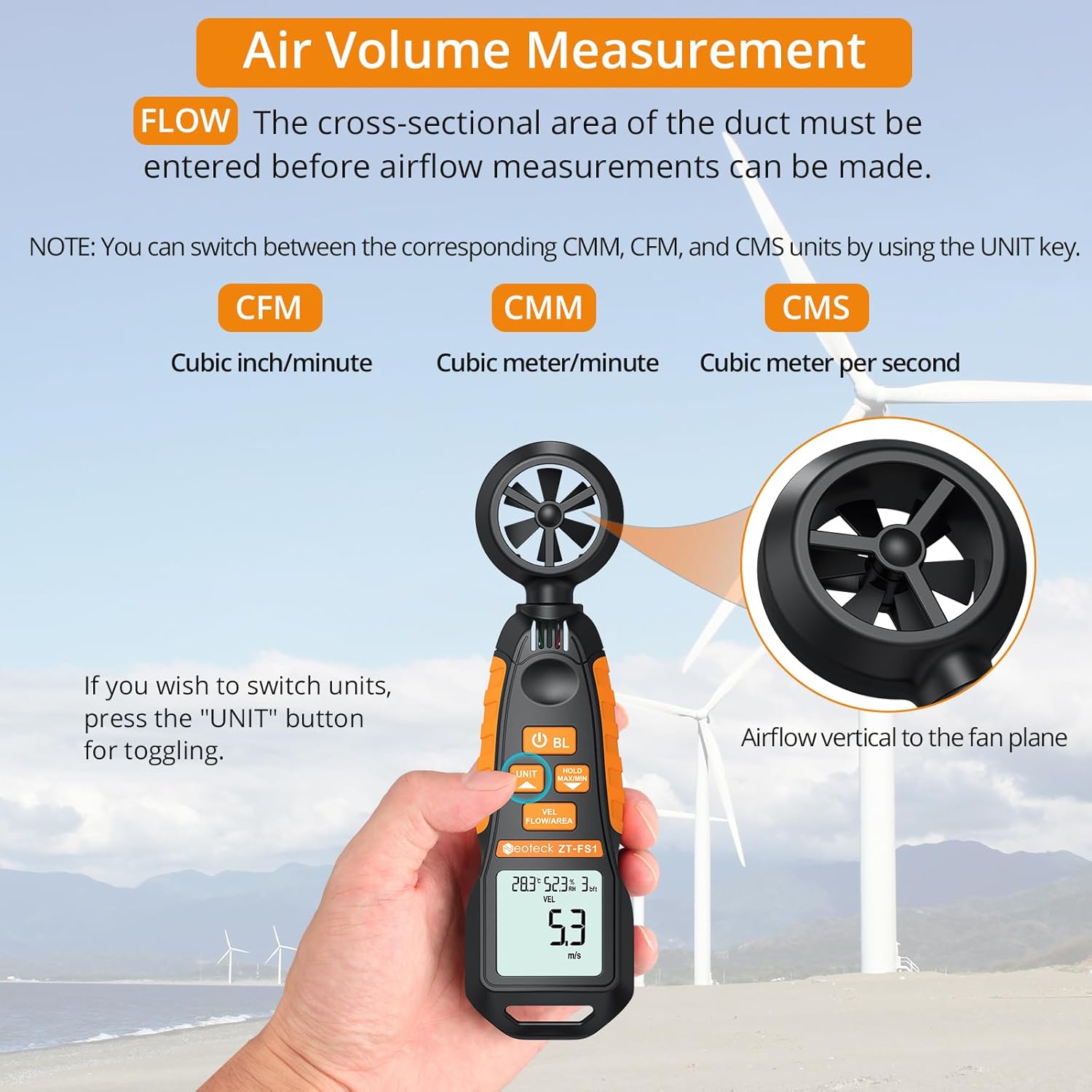
Figure 4: Measuring air volume from a duct. Ensure the cross-sectional area is correctly entered.
Misurazione della temperatura e dell'umidità
The device continuously measures ambient temperature and relative humidity. These readings are displayed on the upper part of the LCD screen. Note that the temperature and humidity sensor may require at least 30 minutes to adapt to a new environment for accurate readings.
Data Hold and Max/Min Functions
- Premere il tasto TENERE MASSIMO/MINIMO button once to activate the Data Hold function. The current reading will be frozen on the display. Press again to exit.
- Premere e tenere premuto il tasto TENERE MASSIMO/MINIMO button for more than 2 seconds to enter the Maximum/Minimum measurement mode. The display will cycle between the maximum (MAX) and minimum (MIN) values recorded since entering this mode. Press and hold again to exit.
Auto-Shutdown Function
The device features an auto-shutdown function to conserve battery power. If no button is pressed for a certain period (typically 15 minutes), the device will automatically turn off.
- To disable auto-shutdown: While the device is off, hold the TENERE MASSIMO/MINIMO pulsante e quindi premere il Power Button (U) for 2 or more seconds. Five beeps will confirm that auto-shutdown is disabled.
Risorse multimediali
Video ufficiale del prodotto
Video 1: An official product video demonstrating the Neoteck Anemometer's functions for testing wind speed and airflow.
Specifiche
| Caratteristica | Dettaglio |
|---|---|
| Marca | neotecnologico |
| Numero di modello | Codice NTK259 |
| Materiale | Vetro, Metallo, Plastica |
| Dimensioni (L x P x A) | 6.97 x 1.97 x 1.18 pollici |
| Peso dell'articolo | 85 grammi (3 once) |
| Gamma di velocità del vento | 0.4-30 m/s (0.895-67.11 mph) |
| Precisione della velocità del vento | ± 2% |
| Risoluzione della velocità del vento | 0.1 metri al secondo |
| Intervallo di temperatura | -20.0℃ a 60.0℃ |
| Precisione della temperatura | ± 2℃ |
| Umidità ambiente | 0.0% al 99.9% di umidità relativa |
| Precisione dell'umidità | ± 2% di umidità relativa |
| Samptasso di ling | Ogni 5 secondi |
| Fonte di alimentazione | 2 batterie AAA (incluse) |
| Display | LCD con retroilluminazione |
| Spegnimento automatico | Sì (può essere disabilitato) |
Manutenzione
- Mantenere il dispositivo pulito e asciutto. Utilizzare un morbido, damp panno per la pulizia. Non utilizzare detergenti o solventi abrasivi.
- Avoid exposing the device to extreme temperatures, humidity, or direct sunlight for prolonged periods.
- Se il dispositivo non verrà utilizzato per un periodo prolungato, rimuovere le batterie per evitare perdite.
- Handle the fan blades carefully to prevent damage, as this can affect measurement accuracy.
Risoluzione dei problemi
- Il dispositivo non si accende: Controllare che le batterie siano installate correttamente e abbiano una carica sufficiente. Sostituirle se necessario.
- Letture imprecise: Ensure the fan blades are clean and unobstructed. Allow the temperature/humidity sensor sufficient time (approx. 30 minutes) to adapt to the environment.
- Il display è scuro o tremolante: Sostituire le batterie.
- Auto-shutdown occurs too quickly: Verify if the auto-shutdown feature is enabled or disabled as desired (refer to Auto-Shutdown Function section).
Garanzia e supporto
For warranty information, technical support, or service inquiries, please refer to the product packaging or contact Neoteck customer service directly. Contact details can typically be found on the manufacturer's official websito.