
1. Introduzione
The WANLUTECH multi-function OTDR is a handheld device designed for evaluating FTTx and access network construction and maintenance. It identifies fiber breakpoints, measures cable length, and calculates relative optical power losses. This device displays the power of the returned signal related to distance, providing crucial information to confirm the transmission quality of a fiber optic link. It is widely used in the maintenance, construction, and monitoring of cable lines, capable of measuring optical fiber length, transmission attenuation, splice attenuation, and failure locations.
2. Informazioni sulla sicurezza
Si prega di leggere attentamente tutte le istruzioni di sicurezza prima di utilizzare il dispositivo. Il mancato rispetto di queste istruzioni può causare lesioni o danni al dispositivo.
- Sicurezza laser: This device contains a laser. Do not stare directly into the optical output ports or expose eyes to the laser light. Always use appropriate eye protection when working with fiber optic equipment.
- Sicurezza della batteria: Use only the specified battery type and charger. Do not disassemble, crush, or expose the battery to extreme temperatures.
- Condizioni ambientali: Operate the device within the specified temperature and humidity ranges. Avoid exposure to dust, moisture, and corrosive substances.
- Manutenzione: Affidare qualsiasi intervento di assistenza a personale qualificato. Non tentare di riparare il dispositivo da soli.
3. Impostazione
3.1 Preparazione iniziale della batteria
Before using the tester for the first time, open the battery cover and remove the paper piece isolating the battery. This ensures proper electrical contact and allows the device to power on.
3.2 Dispositivo suview
Familiarize yourself with the ports and controls of the WANLUTECH MOT-65 OTDR Fiber Tester.

Figura 3.2.1: Front and Back Panel Layout of the WANLUTECH MOT-65 OTDR Fiber Tester. The top panel includes the DC5V/2A power output, LED lamp, Network testing port, PSE/PoE voltage measurement port, OTDR/LS port, VFL port, OPM port, and Power button. The bottom panel includes the 12V1A input, Reset button, and UTP/Cable tracer port.
Top Panel Features:
- DC5V/2A Power Output: Provides power to external devices.
- LED lamp: Sorgente luminosa integrata per l'illuminazione.
- Network Testing Port (LAN/RJ45 TDR): Used for network cable tests.
- PSE/PoE Voltage Measurement (PSE IN): Measures Power over Ethernet (PoE) switch or PSE power supply voltage.
- OTDR/LS Port: Optical Time Domain Reflectometer and Light Source output.
- Porto VFL: Uscita Visual Fault Locator.
- Porta OPM: Ingresso del misuratore di potenza ottica.
- Pulsante di accensione: Accende/spegne il dispositivo.
Bottom Panel Features:
- 12V1A Input: Ingresso di alimentazione per la ricarica del dispositivo.
- Pulsante di reset: Reimposta il dispositivo.
- UTP / Cable Tracer Port: Used for UTP cable testing and cable tracing functions.
4. Istruzioni per l'uso
4.1 Test OTDR
The OTDR function is used to characterize optical fibers. The MOT-65 supports a 1610nm wavelength with a 28dB dynamic range and live testing at 1310/1490/1550/1577nm.

Figura 4.1.1: OTDR Quick Setup, Parameters Set Mode, and Event Map Interface. The Quick Setup allows for rapid configuration of wavelength, distance range, pulse width, and measurement duration. The Parameters Set mode offers advanced control over various testing parameters for more precise results.
4.1.1 Quick Setup Mode
This mode allows for quick configuration of essential OTDR parameters:
- Set wavelength.
- Define distance range.
- Adjust pulse width.
- Specify measurement duration.
4.1.2 Parameters Set Mode
For professional technicians requiring precise control, this mode allows setting:
- Wavelength (e.g., 1610nm).
- Distance range.
- Pulse width.
- Modalità di misurazione.
- IOR (Index of Refraction).
- Non-reflection threshold.
- End threshold.
4.2 Mappa degli eventi
The Event Map visualizes the results of fiber optic link inspections, presenting information such as link length, connector type, fusion points, or breakpoints in a graphical format for easier understanding.
Figura 4.2.1: Event Map Display. This interface shows a simplified view of fiber events along the link. Icons represent different event types.
Event Map Icons:
- Evento iniziale: Represents the starting point of the link.
- Evento di riflessione: Indicates a connector or reflection event, shown as a peak signal.
- Evento di non riflessione: Denotes a fusion point or optical fiber bending, shown as a drop of optical power.
- Fine evento: Marks the terminal of the fiber, with reflection peak indicating a normal end.
- End Event (Fracture): Indicates an optical fiber bending or fracture at the end of the link.
The Event Blind Zone is ≤1.6m, and the Attenuation Blind Zone is ≤8m.
4.3 Misuratore di potenza ottica (OPM)
The OPM measures the optical power of a fiber optic signal. Connect the measured fiber to the OPM port. The device supports calibrated wavelengths of 850/1300/1310/1490/1550/1625nm with a measurement range of -70 to +10 dBm.

Figura 4.3.1: Optical Power Meter (OPM) Interface. This screen displays the measured optical power in dBm and allows selection of calibrated wavelengths.
4.4 Localizzatore visivo di guasti (VFL)
The VFL is used to determine fiber continuity and locate faults. It emits a visible red laser light (650nm wavelength) with a maximum test range of 8 KM. Connect the fiber to the VFL port.
Figura 4.4.1: Visual Fault Locator (VFL) Interface. This screen shows the VFL status and allows activation of steady or blinking modes.
4.5 Light Source (LS)
The Light Source function connects to the OTDR/LS port and is used for engineering and maintenance of optical fiber communication and CATV. It supports CW (Continuous Wave) mode and modulated frequencies of 270 Hz, 330 Hz, 1 kHz, and 2 kHz.
Figura 4.5.1: Light Source (LS) Interface. This screen allows selection of wavelength, mode (CW or modulated frequencies), and power level.
4.6 Optical Loss Test (OLS)
The OLS function is used to test the insertion loss of optical passive devices. Calibrate the OTDR/LS port and OPM port with a short fiber optic patch cable, then proceed with the test.
Figura 4.6.1: Optical Loss Test (OLS) Interface. This screen displays the optical power meter readings and allows for parameter setting and connection diagram viewing.
4.7 Network Test Tools
The device includes built-in professional network testing tools.

Figura 4.7.1: Network Test Tools Interface. This section provides access to various network diagnostic functions including Ping, IP Scan, DHCP Server, PPPOE, Trace Route, Port Flash, LLDP, and Link Monitor.
4.7.1 Prova ping
Verifies connectivity to a host on an IP network.
4.7.2 IP Scan
Scans for active IP addresses within a specified range.
4.7.3 FTP File Gestione
Consente di file transfer and management using FTP. To use, ensure an SD card is inserted and enter the tester's FTP address in a computer's browser.
Figura 4.7.2: Indirizzo FTP File Management Interface. This screen shows options for anonymous login, using an external SD card, and the FTP server address for accessing files.
4.7.4 Rilevamento PoE
Measures PoE switch or PSE power supply voltage and cable connection status. Connect the PoE source to the PSE IN port of the OTDR tester.
Figura 4.7.3: PoE Detection Interface. This screen displays the detected PoE voltage and cable connection status, indicating which pairs are carrying power.
4.7.5 WiFi Analyzer
Supports analyzing WiFi signal strength, channel quality, and creating WiFi hotspots. Built-in 2.4G WiFi with speeds up to 150Mbps.
Figura 4.7.4: WiFi Analyzer Interface. This screen shows detected WiFi networks, their signal strength, channel information, and security details.
4.8 Test dei cavi
The device offers various cable testing functionalities.
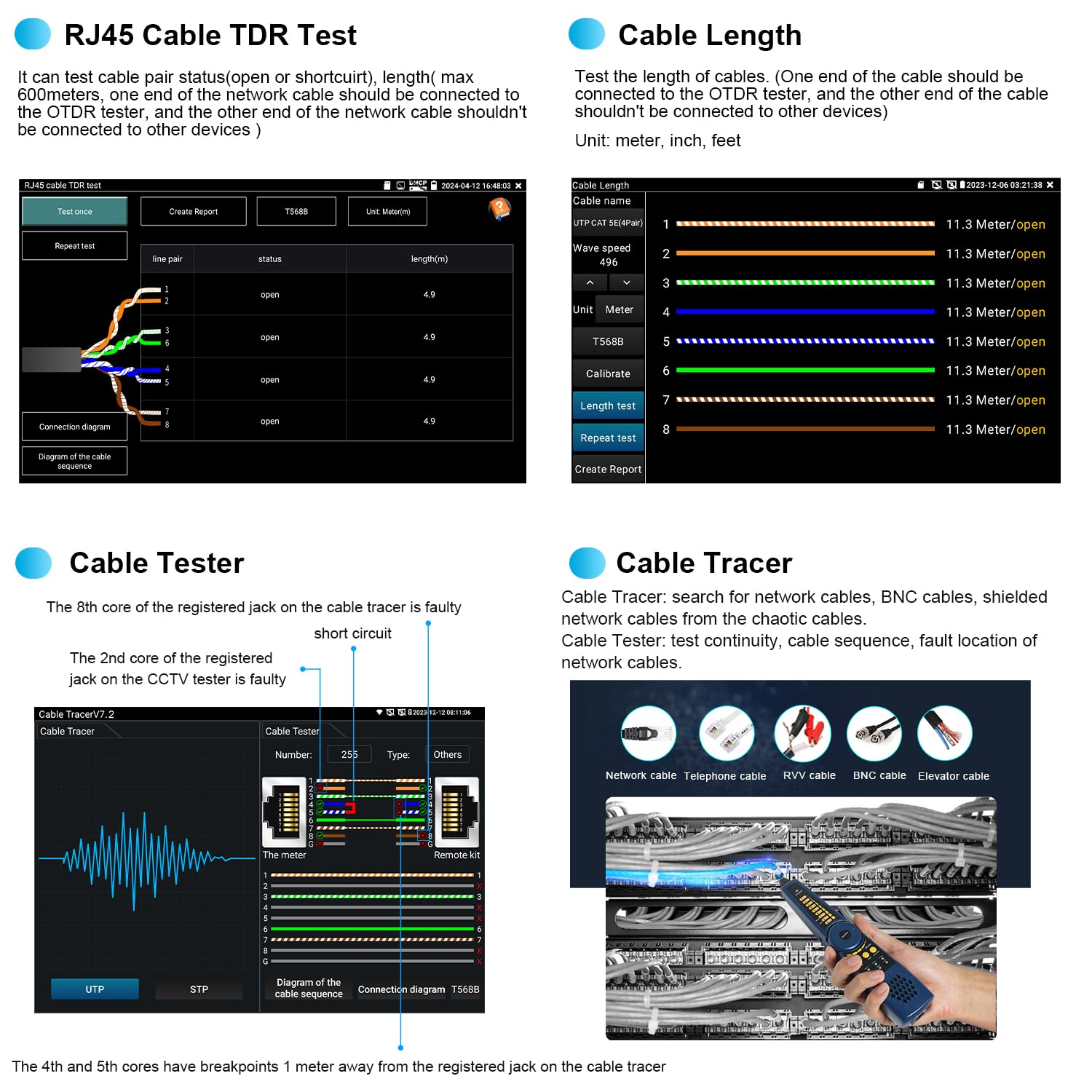
Figura 4.8.1: Cable Testing Interfaces. This image displays the RJ45 Cable TDR Test, Cable Length measurement, Cable Tester, and Cable Tracer functions.
4.8.1 RJ45 Cable TDR Test
Tests the status of cable pairs (open or short circuit) and measures length up to 600 meters. The cable pair status and length are displayed on the screen.
4.8.2 Misurazione della lunghezza del cavo
Tests the length of cables. The other end of the cable should be connected to the OTDR tester, and the other end of the cable should not be connected to other devices. Unit can be set to meter, inch, or feet.
4.8.3 Tester per cavi UTP
Tests the connection status of UTP cables and displays results on the screen. It supports detection of near-end, mid-end, and far-end fault points of the RJ45 cable plug.
4.8.4 Digital Cable Tracer
Searches for BNC, network, and telephone cables from cluttered bundles. It can also search shielded cables.
4.9 Gestione dei dati
The device provides tools for managing test data and reports.

Figura 4.9.1: Data Management Interfaces. This image shows the Test Report, File Setting, and File Management screens.
4.9.1 Rapporto di prova
Save one or more curve trajectories and a list of events, parameters, fiber chains, and rulers corresponding to the curves. Test reports are available in EXCEL and PDF formats. The SOR standard file formato è supportato.
4.9.2 File Collocamento
Enable or disable automatic file naming. Select the file format (OTDR or SOR) and file name type.
4.9.3 File Gestione
Open selected curve files. Up to 4 curve files can be simultaneously selected for viewing and analysis. Supports zoom and move curves, and viewdettagli.
5. Manutenzione
Proper maintenance ensures the longevity and accuracy of your WANLUTECH MOT-65 OTDR Fiber Tester.
- Pulizia: Regularly clean the device's screen and exterior with a soft, dry cloth. For optical ports, use specialized fiber optic cleaning tools and procedures to prevent contamination.
- Magazzinaggio: Store the device in a cool, dry place away from direct sunlight and extreme temperatures. Use the provided tool bag for protection during transport and storage.
- Cura della batteria: Charge the built-in 7.4V 5200mAh battery regularly, even if not in use, to maintain its health. Avoid fully discharging the battery for extended periods.
- Cura del connettore: Always keep optical connectors clean and capped when not in use to prevent dust and debris from affecting measurements.
6. Risoluzione Dei Problemi
This section addresses common issues you might encounter with the WANLUTECH MOT-65 OTDR Fiber Tester.
| Problema | Possibile causa | Soluzione |
|---|---|---|
| Il dispositivo non si accende. | Battery not charged; battery isolation paper not removed; device fault. | Ensure battery isolation paper is removed. Charge the battery. If issue persists, contact support. |
| Slow boot-up time. | Normal operation for complex devices. | This is generally normal and not indicative of a fault. Allow the device to complete its startup sequence. |
| Inaccurate OTDR readings. | Dirty optical connectors; incorrect test parameters; fiber damage. | Clean all optical connectors. Verify test parameters (wavelength, IOR, pulse width). Inspect fiber for damage. |
| VFL light not visible or weak. | Dirty VFL port; fiber not properly connected; VFL module fault. | Clean the VFL port. Ensure fiber is securely connected. If issue persists, contact support. |
| Network test fails. | Incorrect cable connection; network configuration issues. | Verify cable connections. Check network settings (IP, gateway, DNS). |
7. Specifiche
Key technical specifications for the WANLUTECH MOT-65 OTDR Fiber Tester.
| Caratteristica | Specificazione |
|---|---|
| Modello | MOT-65 |
| OTDR Wavelength | 1610nm (supports 1310/1490/1550/1577nm live test) |
| OTDR Dynamic Range | 28 dB |
| Zona cieca dell'evento | ≤1.6m |
| Attenuazione zona cieca | ≤8m |
| Display | Touchscreen IPS da 5.4 pollici |
| Optical Power Meter (OPM) Wavelengths | 850/1300/1310/1490/1550/1625nm |
| OPM Measurement Range | -70~+10 dBm |
| Visual Fault Locator (VFL) Wavelength | 650 nm |
| VFL Max Test Range | 8 km |
| Light Source (LS) Modes | CW/270 Hz/330 Hz/1 kHz/2 kHz |
| RJ45 Cable TDR Test Length | Massimo 600 metri |
| Batteria | 7.4 V 5200 mAh integrato |
| Potenza in ingresso | DC12V/1A |
| Potenza in uscita | DC5V/2A |
| Porta Ethernet | One Gigabit Ethernet port, 10/100/1000Mbps adaptive |
| Wifi | Built-in 2.4G WIFI, speeds 150M |
| Connettori inclusi | 1*SC/UPC, 1*FC/UPC, 1*ST/UPC, 1*LC/UPC adapter, 1*FC male-FC female adapter, 1*FC male-SC female adapter, 1*FC(male)- LC(female) adapter, 1*SC/UPC(Male)-SC/APC(Female) adapter, 1*Patch Cord(FC/UPC-FC/APC) |
| Standard di sicurezza rispettati | UL 61010-1, IEC 61010-2-030 |
8. Garanzia e supporto
For any questions or technical assistance regarding your WANLUTECH MOT-65 OTDR Fiber Tester, please contact the manufacturer directly. We are committed to providing support and will respond to inquiries within 12 hours.
Per i termini e le condizioni di garanzia specifici, fare riferimento alla documentazione di acquisto.