
Introduzione
This manual provides comprehensive instructions for the setup, operation, maintenance, and troubleshooting of your HUAYU RM-DS909 Replacement TV Remote Control. Designed for seamless compatibility with DSTV LCD/LED televisions, this remote offers intuitive control and reliable performance. Please read this manual carefully to ensure optimal use of your new remote control.
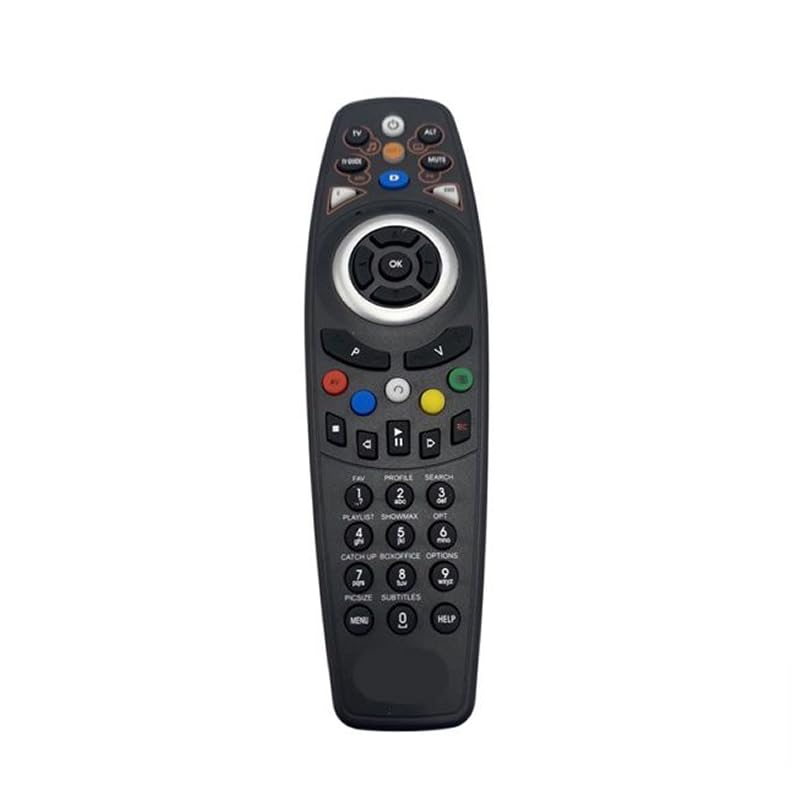
Immagine: Frontale view of the HUAYU RM-DS909 Replacement TV Remote Control.
Impostare
1. Installazione della batteria
- Individuare il vano batterie sul retro del telecomando.
- Far scorrere verso il basso il coperchio del vano batteria e rimuoverlo.
- Inserire due (2) batterie AAA (non incluse) nel vano, assicurandosi che i terminali positivo (+) e negativo (-) siano allineati correttamente con gli indicatori all'interno.
- Richiudere il coperchio del vano batteria facendolo scorrere in posizione finché non scatta in posizione.

Image: Battery compartment with cover removed, showing AAA battery slots.
2. Utilizzo iniziale
The HUAYU RM-DS909 remote control is designed for direct use with compatible DSTV LCD/LED televisions. No complex programming or pairing is required. Once batteries are installed, the remote is ready to operate your television.
Istruzioni per l'uso
This remote control provides access to all standard functions of your DSTV LCD/LED television. Below is a general guide to common button functions:
- Pulsante di accensione: Accende o spegne la TV.
- Canale su/giù: Cambia il canale televisivo.
- Volume su/giù: Regola il volume dell'audio.
- Tasto muto: Disattiva o ripristina l'audio.
- Pulsanti di navigazione (freccia) e OK: Utilizzato per navigare nei menu e confermare le selezioni.
- Pulsante Menu/Home: Accede al menu principale del televisore o alle funzioni intelligenti.
- Pulsante Guida TV: Visualizza la guida elettronica ai programmi.
- Pulsanti colorati (rosso, verde, giallo, blu): These buttons typically correspond to specific functions within menus or interactive services, as indicated on your TV screen.
- Controlli di riproduzione (Riproduzione, Pausa, Arresto, Riavvolgimento, Avanzamento rapido, Registrazione): Used for media playback functions, often with PVR or connected devices.
- Tastierino numerico (0-9): Per l'ingresso diretto del canale.
For specific functions related to your DSTV decoder or TV model, refer to your television's or decoder's user manual.
Manutenzione
- Pulizia: Pulisci il telecomando con un panno morbido e asciutto. Non utilizzare detergenti liquidi o materiali abrasivi, poiché potrebbero danneggiare la superficie o i componenti interni.
- Sostituzione della batteria: Sostituisci le batterie quando la risposta del telecomando diventa lenta o smette di funzionare. Sostituisci sempre entrambe le batterie contemporaneamente con batterie AAA nuove. Non mischiare batterie vecchie e nuove o tipi diversi di batterie.
- Magazzinaggio: Se il telecomando non viene utilizzato per un periodo prolungato, rimuovere le batterie per evitare perdite e potenziali danni. Conservare il telecomando in un luogo fresco e asciutto, lontano dalla luce solare diretta e da temperature estreme.
Risoluzione dei problemi
- Il telecomando non risponde:
- Assicurarsi che le batterie siano inserite correttamente, rispettando la polarità corretta.
- Sostituisci le vecchie batterie con nuove batterie AAA.
- Controllare che non vi siano ostacoli tra il telecomando e il sensore a infrarossi del televisore.
- Ensure you are within the effective operating range and pointing the remote towards the TV.
- Raggio operativo limitato:
- Weak batteries can reduce the remote's range. Replace them if necessary.
- Bright light sources (e.g., direct sunlight, fluorescent lights) can interfere with the infrared signal.
- Pulsanti specifici non funzionanti:
- Ensure the remote is clean and there is no debris obstructing the buttons.
- Se solo alcuni pulsanti non funzionano, potrebbe essere segno di danni interni. Valutare la possibilità di sostituire il telecomando.
Specifiche
| Numero di modello | RM-DS909 (Internal Model: 930) |
| Marca | HUAYU |
| Tecnologia di connettività | Infrarossi (IR) |
| Dispositivi compatibili | DSTV LCD/LED Televisions |
| Tipo di batteria | 2 x AAA (non incluso) |
| Materiale | addominali |
| Colore | Nero |
| Caratteristica speciale | Funzionalità intelligente |
| Numero massimo di dispositivi supportati | 1 |
Garanzia e supporto
Garanzia del produttore
This HUAYU remote control comes with a Garanzia del produttore di 1 anno from the date of purchase. This warranty covers defects in materials and workmanship under normal use. It does not cover damage caused by misuse, accidents, unauthorized modifications, or battery leakage.
Assistenza clienti
For further assistance, troubleshooting not covered in this manual, or warranty claims, please contact your retailer or the point of purchase. Please have your purchase receipt and product model number (RM-DS909) available when seeking support.