
Introduzione
The XSDTS F8 Smart Digital Door Lock offers advanced security and convenience for your home or office. This intelligent lock integrates multiple unlocking methods and smart features, providing flexible access control and enhanced monitoring capabilities. Designed for durability and ease of use, it is suitable for various door types.
This manual provides detailed instructions for installation, operation, and maintenance of your XSDTS F8 Smart Digital Door Lock. Please read it thoroughly before use to ensure proper functionality and safety.
Prodotto finitoview

Figura 1: Sopraview of the XSDTS F8 Smart Digital Door Lock, showing the front and back panels, and the mortise lock mechanism.

Figura 2: Detailed diagram labeling the various components of the XSDTS F8 Smart Digital Door Lock, including the HD screen, camera, fingerprint sensor, and USB port.
Caratteristiche principali:
- Metodi di sblocco multipli: Supports fingerprint, password, RFID card, Tuya app, and physical key access.
- Accesso remoto: Unlock the door from anywhere using the free mobile application.
- Temporary Access Granting: Conveniently provide time-limited access permissions, ideal for guests or service providers.
- Telecamera spioncino integrata: Monitor the exterior of your door and receive images on your mobile app when the doorbell is pressed.
- Manico regolabile: Universal design allows for left or right-hand door configurations.
- Blocco di sicurezza per bambini: Prevents accidental opening by children or pets.
- Avviso di batteria scarica: Automatic audio alert for low battery levels.
- Potenza di emergenza: Type-C port for emergency charging in case of complete battery depletion.
- Lingua del sistema: Arabo.
Guida all'installazione
Proper installation is crucial for the optimal performance and security of your smart lock. Please follow these steps carefully.
1. Pre-Installation Measurements:
Prima dell'acquistoasing and installing, ensure your door meets the following specifications. The lock is suitable for doors with a thickness between 30mm and 75mm.

Figura 3: Essential door measurements required before installation, including door thickness, guide piece dimensions, and handle center distance.
- Measure the thickness of the door frame.
- Measure the length of the guide piece.
- Measure the width of the guide piece.
- Measure the distance from the door edge to the handle center.
- Measure the screw hole distance of the rear panel.

Figura 4: Mortise lock dimensions (22mm x 240mm) and backset measurements (50mm and 85mm) for compatibility.
2. Component Checklist:
Prima di iniziare l'installazione, assicurarsi che tutti i componenti siano presenti:
- Pannello frontale (x1)
- Pannello posteriore (x1)
- Mortise Lock (x1, optional)
- Smart Cards (x4)
- Mechanical Keys (x2)
- Screw Set (x1)
Nota: Per il funzionamento sono necessarie 4 batterie AA, non incluse nella confezione.
3. Passaggi di installazione:
Detailed installation steps are typically provided in a separate installation template or video. Please refer to the included installation template for precise drilling and mounting instructions. General steps include:
- Prepare the door by drilling necessary holes according to the template.
- Installare la serratura a mortaio nel bordo della porta.
- Mount the front and rear panels, ensuring cables are properly connected.
- Fissare la serratura con le viti in dotazione.
- Install 4 AA batteries into the battery compartment on the rear panel.
- Test the lock's functionality with a mechanical key before programming.
Istruzioni per l'uso
The XSDTS F8 Smart Digital Door Lock offers multiple convenient ways to unlock your door.
1. Metodi di sblocco:

Figura 5: Visual representation of the six available unlocking methods for the smart lock.
- Sblocco delle impronte digitali:
Place your registered fingerprint on the sensor located on the handle. The lock will unlock in approximately 0.5 seconds if the fingerprint is recognized. Ensure your finger covers the entire sensor for accurate reading.

Figura 6: The fingerprint sensor provides fast and accurate recognition, with a low false recognition rate.
- Sblocco password:
Enter your registered password on the keypad. Press the '#' key to confirm. You can also set temporary passwords for one-time or limited-time access.
- Sblocco della carta RFID:
Present a registered RFID card to the card reader area on the lock's front panel. The lock will unlock automatically.
- Tuya App Unlock (Remote & Local):
Download the Tuya Smart app from your mobile app store. Follow the in-app instructions to pair your lock. Once paired, you can:
- Sblocco remoto: Unlock the door from anywhere with an internet connection.
- Concedere l'accesso temporaneo: Generate and send time-limited access codes to guests.
- View Registri di accesso: Check who entered and when.
- Ricevi notifiche: Get alerts for doorbell presses or other events.

Figura 7: The Tuya Smart app provides comprehensive remote control and monitoring capabilities for your lock.
- Sblocco con chiave meccanica:
In case of emergency or battery depletion, insert the mechanical key into the keyhole and turn to unlock the door manually.
2. Peephole Camera and Doorbell Function:
The integrated peephole camera allows you to see who is at your door. When a visitor presses the doorbell button on the lock, the camera captures an image of the person outside and sends it to your paired mobile app. This feature enhances security and convenience, allowing you to screen visitors remotely.

Figura 8: The camera features automatic light adjustment and a wide-angle lens for clear visibility.
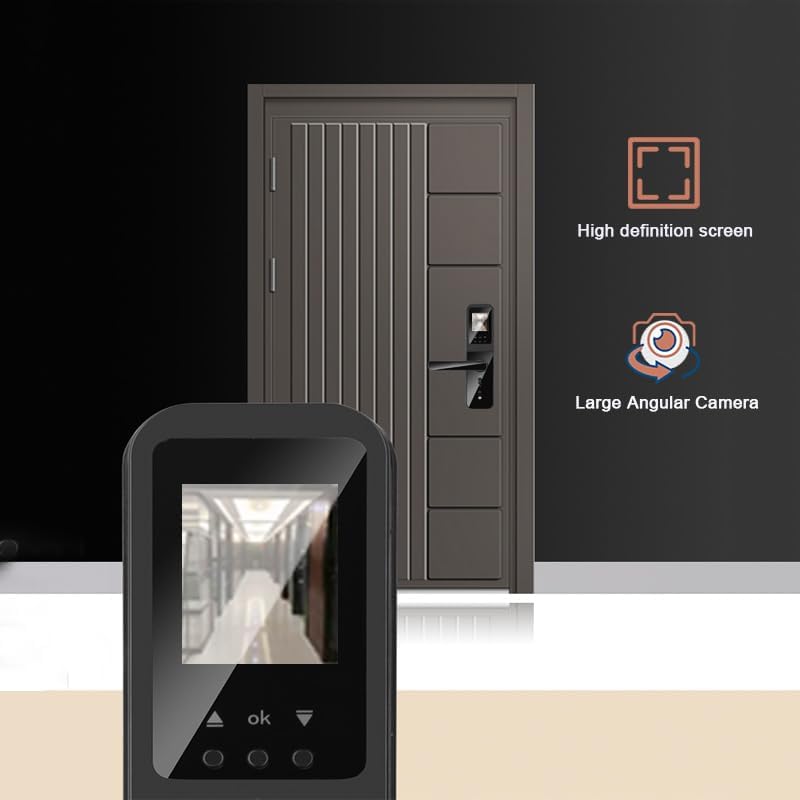
Figura 9: The high-definition screen provides a clear view from the large angular camera.
3. Blocco di sicurezza per bambini:
To prevent accidental unlocking from the inside by children or pets, engage the child safety lock switch located on the rear panel. This feature adds an extra layer of security for families.
Figura 10: The child safety lock switch is clearly marked on the internal panel of the lock.
Manutenzione
1. Sostituzione della batteria:
The lock requires 4 AA batteries (not included). The estimated battery life is 2-4 months, depending on usage. When the battery level is low, the lock will emit an automatic audio warning. Replace all four batteries promptly when this warning occurs to ensure continuous operation.
2. Alimentazione di emergenza:
In the event of complete battery depletion, you can provide emergency power to the lock using a Type-C cable connected to a power bank or adapter. The Type-C port is located on the bottom edge of the front panel. This will allow you to unlock the door using any registered method.
3. Pulizia:
Wipe the lock's surface with a soft, dry cloth. Avoid using abrasive cleaners or solvents, as these can damage the finish and electronic components.
Risoluzione dei problemi
| Problema | Possibile causa | Soluzione |
|---|---|---|
| Il blocco non risponde. | Batterie scariche. | Replace all 4 AA batteries. Use the Type-C emergency power port if needed. |
| Impronta digitale non riconosciuta. | Dito non posizionato correttamente; impronta digitale non registrata; sensore sporco. | Ensure finger covers the sensor completely. Re-register fingerprint if necessary. Clean the sensor with a soft cloth. |
| La password non funziona. | Password inserita non corretta; password non registrata. | Verify the password. Re-register the password through the app or lock interface. |
| Impossibile connettersi all'app Tuya. | Wi-Fi issue; incorrect pairing process. | Ensure your Wi-Fi network is stable. Follow the app's pairing instructions carefully. Restart the lock and your router if necessary. |
| Doorbell image not received on app. | App notification settings; internet connectivity. | Check app notification permissions on your phone. Ensure both the lock and your phone have stable internet access. |
Specifiche
| Caratteristica | Dettaglio |
|---|---|
| Produttore | XSDTS |
| Numero di modello | F8 |
| Numero di parte | F8-Nero |
| Peso dell'articolo | 2 chilogrammi |
| Dimensioni del prodotto | Dimensioni: 36 x 13 x 20 cm |
| Misurare | 5085-22*240 |
| Colore | Nero |
| Stile | Moderno |
| Tipo di finitura | Lucido |
| Materiale | Alluminio |
| Forma | Girare |
| Numero di unità | 1 |
| Numero di pezzi | 1 |
| Caratteristiche speciali | Resettable, Fingerprint, Scratch Resistant, Password Unlock, One Touch Lock |
| Componenti inclusi | Front Panel (x1), Rear Panel (x1), Mortise Lock (x1, optional), Smart Card (x4), Mechanical Key (x2), Screw Set (x1) |
| Batterie richieste | No (4 AA batteries are required for operation, not included) |
| Tipo di blocco | Biometrico |
| Usi consigliati | Ideal for families, Airbnb, rentals, offices, and business sections. |
| Paese di origine | Cina |
Garanzia e supporto
XSDTS provides unlimited technical consultations for this product. For any questions, issues, or technical assistance, please contact our support team. Refer to the product packaging or the official XSDTS websito per le informazioni di contatto.