
Introduzione
Thank you for choosing the KLIM K7 Cassette Tape Player and MP3 Converter. This device allows you to enjoy your classic cassette tapes and convert them into digital MP3 files for modern playback. It features a built-in microphone for recording, an integrated speaker, and a rechargeable battery for portability. This manual provides detailed instructions for setup, operation, and maintenance of your KLIM K7.
Prodotto finitoview
Caratteristiche principali
- Cassette to MP3 Converter: Effortlessly convert cassette tapes to digital MP3 files directly onto an SD card.
- Design portatile: Lightweight and compact for on-the-go listening.
- Microfono incorporato: Record audio directly to the SD card.
- Altoparlante incorporato: Share your audio without external devices.
- Batteria ricaricabile: Integrated 1000mAh battery provides extended playback.
- SD Card Player: Riproduci MP3 fileè memorizzato sulla scheda SD.
- Jack per auricolari da 3.5 mm: Per l'ascolto privato con gli auricolari inclusi.
Componenti e controlli del dispositivo
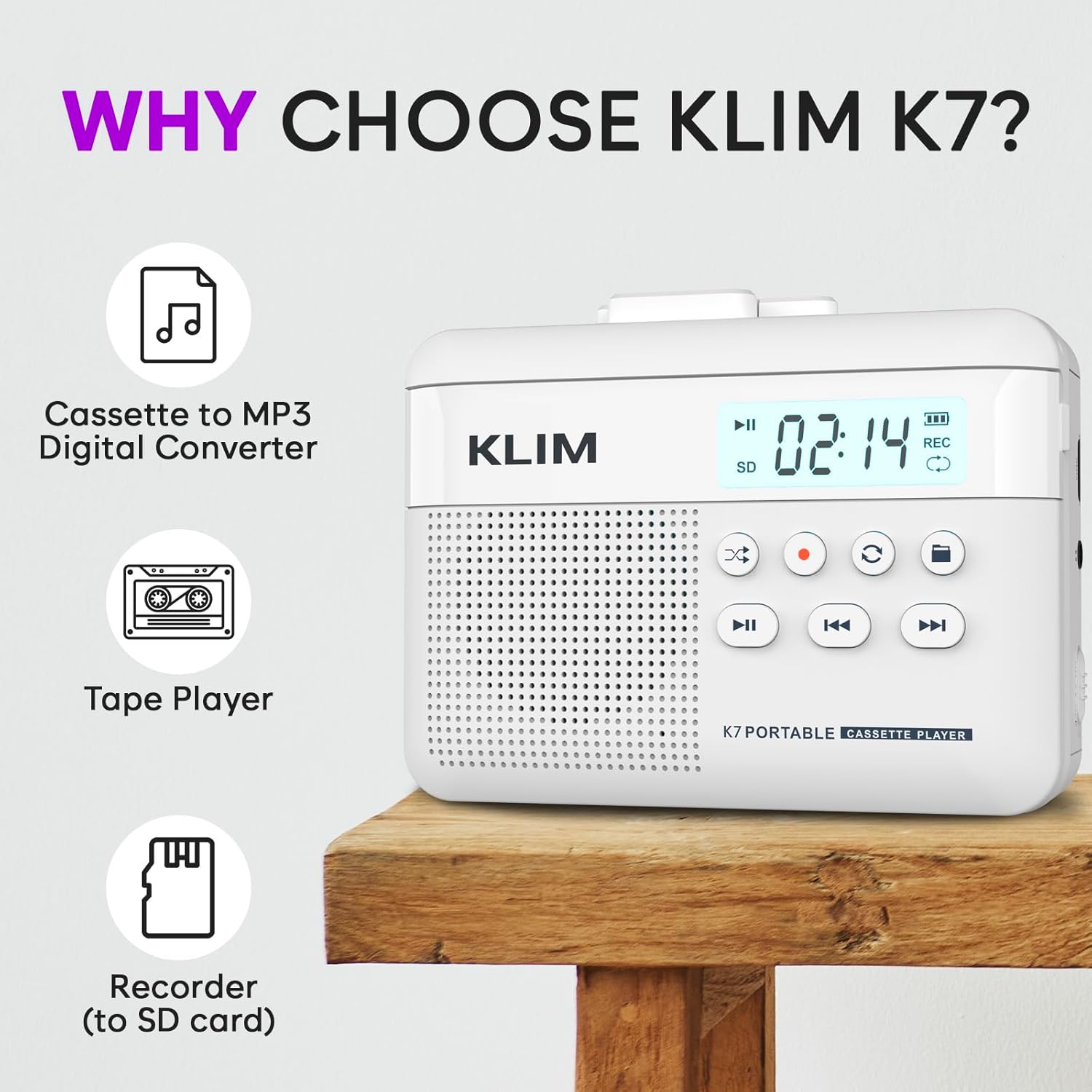
Figura 1: Davanti view of the KLIM K7 Cassette Player, showing the speaker grille, LCD display, and control buttons (Play/Pause, Rewind, Fast Forward, Stop, Record, Mode, Folder, Loop).
- Schermo LCD: Mostra il numero della traccia, lo stato della registrazione e il livello della batteria.
- Oratore: Altoparlante integrato per la riproduzione audio.
- Pulsante Riproduci/Pausa (►▮): Avvia o mette in pausa la riproduzione.
- Rewind Button (◀◀): Rewinds the cassette tape or navigates backward through MP3 tracks.
- Fast Forward Button (►►): Fast forwards the cassette tape or navigates forward through MP3 tracks.
- Pulsante di arresto (■): Interrompe la riproduzione o la registrazione.
- Record Button (●): Avvia o interrompe la registrazione.
- Mode Button (↻): Switches between cassette playback and SD card MP3 playback.
- Folder Button (🖿): Navigates through folders on the SD card.
- Loop Button (⟳): Ripete la traccia corrente o tutte le tracce.

Figura 2: Lato view of the KLIM K7 Cassette Player, highlighting the SD card slot, 3.5mm headphone jack, and On/Off switch.
- Slot per scheda SD: Insert your Micro SD card here for recording and MP3 playback.
- Jack per cuffie da 3.5 mm: Connect the included earphones or other standard headphones.
- Interruttore On/Off: Accende o spegne il dispositivo.
- Controllo del volume: Regola il livello di uscita audio.

Figura 3: Superiore view of the KLIM K7 Cassette Player with the cassette compartment open, showing the tape mechanism.
- Scomparto per cassetta: Insert your cassette tapes here.
- Cassette Door Release: Opens the cassette compartment.
Impostare
1. Carica della batteria
Before first use, fully charge the KLIM K7. The device comes with a 1000mAh rechargeable battery.
- Locate the Type-C USB charging port on the side of the device.
- Connect the included Type-C USB cable to the charging port and the other end to a USB power adapter (not included) or a computer's USB port.
- The charging indicator on the LCD display will show charging status. A full charge typically takes approximately 2 hours.

Figura 4: The KLIM K7 connected to a Type-C USB cable for charging.
2. Inserimento di una scheda SD
An SD card (16GB included) is required for converting tapes to MP3 and for recording with the built-in microphone.
- Individuare lo slot per la scheda SD sul lato del dispositivo (fare riferimento alla Figura 2).
- Inserire delicatamente la scheda Micro SD nello slot con i contatti dorati rivolti verso il basso finché non scatta in posizione.
- To remove, push the SD card inward until it clicks, then release, and it will eject.

Figura 5: Inserting the Micro SD card into the KLIM K7.
3. Inserimento di una cassetta
- Press the Cassette Door Release button to open the cassette compartment.
- Insert your cassette tape with the open side facing upwards and the tape reels aligned with the player's mechanism.
- Chiudere saldamente lo sportello del vano cassetta finché non scatta in posizione.
Istruzioni per l'uso
1. Riproduzione di cassette
- Ensure the device is powered on using the On/Off switch.
- Inserire una cassetta come descritto nella sezione Configurazione.
- Premere il tasto Riproduci/Pausa (►▮) pulsante per avviare la riproduzione.
- Regolare il volume utilizzando il controllo del volume.
- Utilizzare il Riavvolgi (◀◀) E Avanti veloce (►►) pulsanti per navigare nel nastro.
- Premere il tasto Fermare) pulsante per terminare la riproduzione.
2. Conversione di cassette in MP3
KLIM K7 consente la conversione diretta dell'audio della cassetta in MP3 files on the inserted SD card, without needing a computer or additional software.
- Assicurarsi che sia inserita una scheda SD e che il dispositivo sia acceso.
- Inserire la cassetta che si desidera convertire.
- Premere il tasto Riproduci/Pausa (►▮) button to start playing the tape.
- Premere a lungo IL Registra (●) button. The 'REC' indicator on the LCD display will illuminate, indicating that recording has started.
- Per interrompere la registrazione, premere il pulsante Registra (●) button again. The 'REC' indicator will turn off. The recorded audio will be saved as an MP3 file sulla scheda SD.
- You can then remove the SD card and use the included SD card reader to transfer the MP3 files to a computer or other device.

Figura 6: Visual guide for converting cassette audio to MP3 files.
3. Using the Built-in Microphone for Recording
The KLIM K7 can also record audio directly from its built-in microphone to the SD card.
- Assicurarsi che sia inserita una scheda SD e che il dispositivo sia acceso.
- Premere il tasto Mode (↻) button until the device is in SD card mode (no cassette playing).
- Premere a lungo IL Registra (●) button. The 'REC' indicator will light up, and the device will start recording audio from its microphone.
- Per interrompere la registrazione, premere il pulsante Registra (●) button again. The 'REC' indicator will turn off, and the recording will be saved as an MP3 file.

Figura 7: Using the KLIM K7's built-in microphone for recording.
4. Riproduzione di MP3 Files from SD Card
- Assicurati di avere una scheda SD con MP3 files è inserito e il dispositivo è acceso.
- Premere il tasto Mode (↻) button to switch to SD card playback mode. The LCD display will show track information.
- Premere il tasto Riproduci/Pausa (►▮) pulsante per avviare la riproduzione.
- Utilizzare il Riavvolgi (◀◀) E Avanti veloce (►►) pulsanti per saltare le tracce.
- IL Folder (🖿) button allows navigation through different folders on the SD card.
- IL Loop (⟳) button can be used to repeat the current track or all tracks.
- Regolare il volume utilizzando il controllo del volume.
- Premere il tasto Fermare) pulsante per terminare la riproduzione.

Figura 8: Enjoying audio with the KLIM K7 and included earphones.
Manutenzione
Proper maintenance ensures the longevity and optimal performance of your KLIM K7.
- Pulizia: Utilizzare un panno morbido e asciutto per pulire l'esterno del dispositivo. Non utilizzare detergenti liquidi o solventi.
- Scomparto per cassetta: Pulire periodicamente le testine del nastro e i rulli di pressione con un batuffolo di cotone leggermente dampened with isopropyl alcohol to prevent audio quality degradation. Ensure the device is off and dry before use.
- Magazzinaggio: Conservare il dispositivo in un luogo fresco e asciutto, lontano dalla luce solare diretta e da temperature estreme.
- Cura della batteria: Per una conservazione a lungo termine, caricare la batteria a circa il 50% ogni pochi mesi per mantenerla in buone condizioni.
Risoluzione dei problemi
If you encounter any issues with your KLIM K7, please refer to the following common solutions:
| Problema | Possibile causa | Soluzione |
|---|---|---|
| Il dispositivo non si accende. | La batteria è scarica. | Caricare il dispositivo utilizzando il cavo USB Type-C in dotazione. |
| Nessun suono durante la riproduzione della cassetta. | Volume is too low or headphones are not connected properly. | Increase the volume. Ensure headphones are fully plugged into the 3.5mm jack. |
| Recording to MP3 fails or produces no file. | SD card is full, not inserted correctly, or corrupted. | Check SD card insertion. Ensure sufficient space on the SD card. Try reformatting the SD card (this will erase all data). |
| Poor audio quality from cassette. | Dirty tape heads or worn-out cassette tape. | Clean the tape heads and pinch rollers. Try a different cassette tape to determine if the issue is with the tape itself. |
| Il dispositivo si blocca o non risponde più. | Problema temporaneo del software. | Turn the device off and then on again. If the issue persists, allow the battery to fully discharge and then recharge. |
Specifiche
- Dimensioni del prodotto: 4.76 x 3.61 x 1.56 pollici
- Peso dell'articolo: 9.9 once
- Batteria: 1 batteria agli ioni di litio (inclusa), 1000 mAh
- Tempo di ricarica: Circa 2 ore
- Magazzinaggio: Supporta la scheda Micro SD (inclusa da 16 GB)
- Uscita audio: Altoparlante integrato, jack per cuffie da 3.5 mm
- Formato di registrazione: MP3

Figura 9: Dimensions of the KLIM K7 Cassette Player.
Garanzia e supporto
KLIM is committed to producing quality electronics. The KLIM K7 Cassette Tape Player comes with a Garanzia di 5 anno. If you encounter any problems with your device, please contact KLIM customer support for assistance.
Potrebbero essere disponibili per l'acquisto ulteriori piani di protezione:
- Piano di protezione biennale: $ 3.99 (una tantum)
- Piano di protezione biennale: $ 5.99 (una tantum)
- NEW Complete Protect: $16.99 (monthly)
Per ulteriore supporto, visita il Negozio KLIM su Amazon.