
1. Introduzione
This user manual provides comprehensive instructions for the Brondi Amico Speciale 4G Senior Dual SIM Mobile Phone. It covers essential information regarding the device's features, setup, operation, and maintenance to ensure optimal use. The Amico Speciale 4G is designed with ease of use in mind, featuring large keys, an active flip design, and dedicated emergency functions.
Le caratteristiche principali includono:
- Telecomando: Allows family members to manage certain phone functions remotely.
- Capovolgimento attivo: Answer and end calls by simply opening and closing the flip.
- Grandi tasti retroilluminati: Enhanced visibility and tactile feedback for easy dialing and navigation.
- Pulsante SOS: Sends emergency SMS messages and automatically calls pre-stored numbers.
- Quick Dial Memories: 11 direct memories for rapid calling of frequently used contacts.
- 3 Quick Keys: Dedicated buttons for Camera, Messages, and Torch.
- Doppia SIM 4G: Supporta due schede Nano SIM per un utilizzo flessibile della rete.
- Multimedia: Includes a 2 MP camera with LED flash, FM radio, and MicroSD slot for expandable memory up to 64 GB.
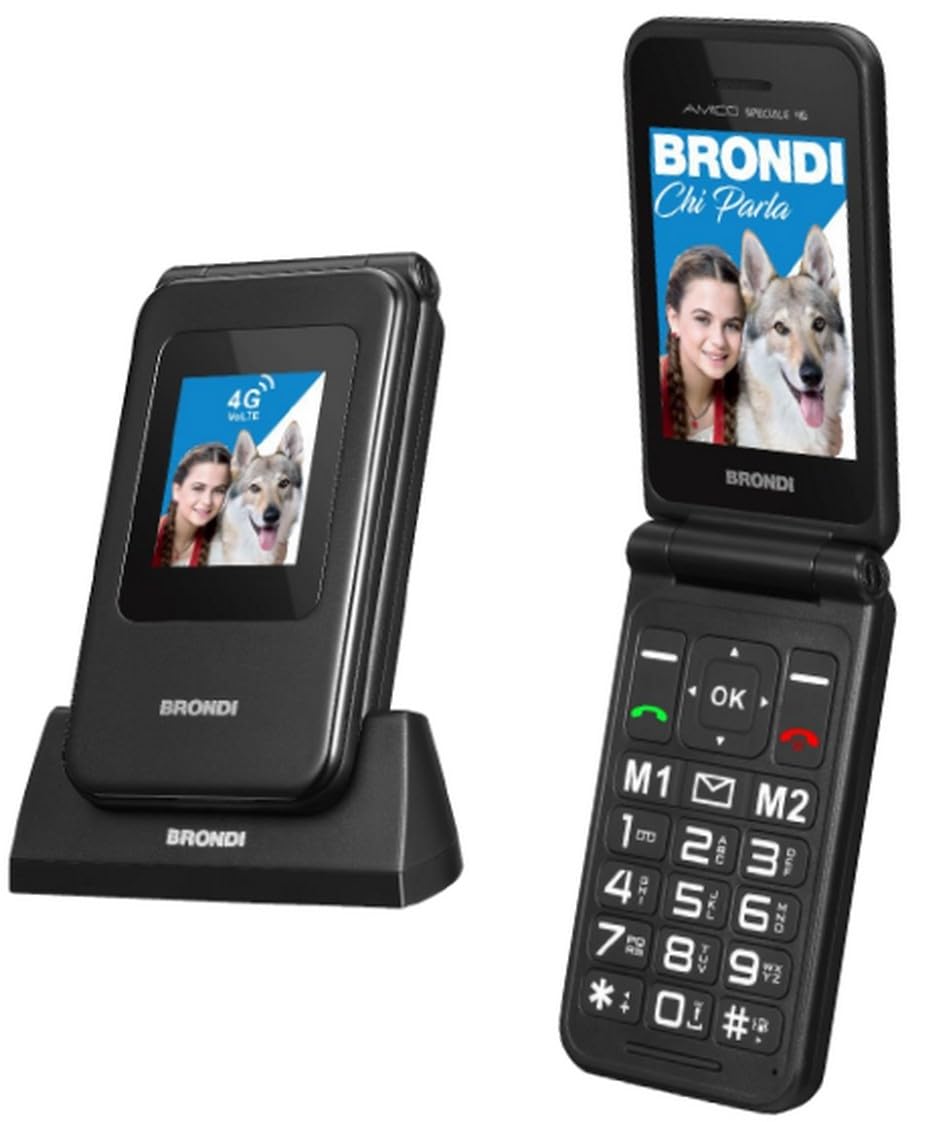
Figure 1: Brondi Amico Speciale 4G Senior Dual SIM Mobile Phone (Black Metal). This image shows the phone in its closed flip state, highlighting its compact design.
2. Contenuto della confezione
Si prega di controllare il contenuto della confezione al momento del disimballaggio. Se qualche articolo risulta mancante o danneggiato, contattare il rivenditore.
- Brondi Amico Speciale 4G Mobile Phone
- Base di ricarica
- Cavo USB
- Li-ion BL-5C 1000 mAh Battery
- Manuale dell'utente (questo documento)
3. Dispositivo suview
Familiarize yourself with the main components of your Brondi Amico Speciale 4G phone.
3.1 Front View (Chiuso)
- Display esterno: 1.77'' TN 128 x 160 pixels, shows time, date, and incoming call information.
- Indicatori LED: For notifications (e.g., new message, missed call, charging).
3.2 Interno View (Aprire)
- Display interno: 2.8'' QVGA 240 x 320 pixels, main screen for navigation and content.
- Tasti di navigazione: Up, Down, Left, Right, and OK/Confirm button.
- Tasti di chiamata/fine chiamata: Pulsante verde per rispondere/effettuare chiamate, pulsante rosso per terminare chiamate/spegnere.
- Tastiera numerica: Large, backlit keys for dialing and text input.
- Tasti rapidi: Dedicated buttons for Camera, Messages, and Torch.
- Tasti di memoria diretta: Programmable keys for quick dialing.
3.3 Laterale e posteriore View
- Pulsante SOS: Located on the rear for emergency calls and SMS.
- Telecamera: 2 MP camera with LED Flash on the rear.
- Tasti del volume: Sul lato per regolare il volume delle chiamate e dei contenuti multimediali.
- Porta di ricarica: Connettore USB-C.
- Contatti di ricarica: On the bottom for use with the charging cradle.
4. Impostazione
4.1 Installing the SIM Card(s) and MicroSD Card
- Assicurati che il telefono sia spento.
- Rimuovere la cover posteriore del telefono.
- Carefully insert your Nano SIM card(s) into the designated SIM slots. The phone supports Dual SIM functionality.
- If desired, insert a MicroSD card (up to 64 GB) into the MicroSD slot for additional storage.
- Riposizionare saldamente la cover posteriore.
4.2 Installazione della batteria
- With the back cover removed, align the contacts of the Li-ion BL-5C 1000 mAh battery with the contacts in the battery compartment.
- Premere delicatamente la batteria in posizione finché non è fissata saldamente.
- Riposiziona la cover posteriore.
4.3 Ricarica del telefono
Prima del primo utilizzo, caricare completamente la batteria del telefono.
- Utilizzo della base di ricarica: Place the phone into the charging cradle, ensuring the charging contacts align. The charging indicator will illuminate.
- Utilizzo del cavo USB: Connect the USB-C cable to the phone's charging port and the other end to a compatible USB power adapter or computer.
A full charge typically takes a few hours. The battery icon on the screen will indicate charging status.
5. Istruzioni per l'uso
5.1 Accensione/spegnimento
- Per accendere: Press and hold the Red End Call/Power button until the screen lights up.
- Per spegnere: Press and hold the Red End Call/Power button until the power off options appear, then confirm.
5.2 Effettuare e ricevere chiamate
- Effettuare una chiamata:
- Dial the number using the numeric keypad. The phone announces the number being dialed.
- Premere il pulsante verde di chiamata per avviare la chiamata.
- Answering a Call (Active Flip): Simply open the phone's flip to answer an incoming call.
- Ending a Call (Active Flip): Close the phone's flip to end an active call. Alternatively, press the Red End Call button.
- Quick Dial: Press and hold one of the 11 direct memory keys (e.g., 2-9, *, #) to call a pre-assigned contact.
5.3 Funzione SOS
The SOS button is designed for emergencies.
- Impostare: Before using, program emergency contact numbers in the SOS settings menu.
- Attivazione: In an emergency, press and hold the SOS button on the rear of the phone.
- The phone will automatically send an emergency SMS to the programmed numbers and then sequentially call them until one answers.
5.4 Messaggi
Access the messaging function via the dedicated Quick Key or through the main menu to send and receive SMS.
Fotocamera a 5.5°
The phone features a 2 MP camera with LED flash.
- Press the dedicated Camera Quick Key to open the camera application.
- Use the navigation keys to adjust settings if available.
- Premere il pulsante OK/Conferma per scattare una foto.
5.6 Radio FM
To use the FM Radio, access it from the multimedia menu. Headphones may be required to act as an antenna (not included).
5.7 Bluetooth
The phone supports Bluetooth 5.1 for connecting to wireless headsets or other compatible devices.
- Go to the Settings menu and select Bluetooth.
- Attiva il Bluetooth e cerca i dispositivi disponibili.
- Select your desired device and pair it following the on-screen prompts.
5.8 Torcia
Activate the built-in torch using the dedicated Torch Quick Key.
6. Manutenzione
6.1 Cura generale
- Mantieni il telefono asciutto. L'umidità può danneggiare i circuiti elettronici.
- Evitare temperature estreme. Le alte temperature possono ridurre la durata dei dispositivi elettronici e deformare o fondere alcuni tipi di plastica.
- Non utilizzare prodotti chimici aggressivi, solventi o detergenti aggressivi per pulire il telefono. Pulirlo con un panno morbido e asciutto.amp stoffa.
- Maneggiare il telefono con cura. Non farlo cadere, urtarlo o scuoterlo. Una manipolazione brusca può danneggiare i circuiti interni e i meccanismi di precisione.
6.2 Cura della batteria
- Use only Brondi-approved batteries and charging accessories.
- Non cortocircuitare la batteria.
- Non smaltire le batterie nel fuoco.
- Riciclare le batterie usate secondo le normative locali.
7. Risoluzione Dei Problemi
If you encounter issues with your phone, refer to the following common problems and solutions before contacting support.
| Problema | Possibile causa | Soluzione |
|---|---|---|
| Il telefono non si accende. | La batteria è scarica o non è installata correttamente. | Caricare la batteria. Assicurarsi che la batteria sia inserita correttamente. |
| Impossibile effettuare o ricevere chiamate. | Nessuna scheda SIM, scheda SIM non inserita correttamente o nessun segnale di rete. | Controlla l'installazione della scheda SIM. Spostati in una zona con una migliore copertura di rete. Contatta il tuo operatore telefonico. |
| Scarsa qualità della chiamata o volume basso. | Weak signal, speaker/microphone obstruction, or volume setting too low. | Adjust call volume. Ensure speaker/microphone are clear. Move to an area with better signal. |
| La funzione SOS non funziona. | Emergency numbers not programmed or no credit/signal for SMS/calls. | Program emergency numbers in settings. Ensure sufficient credit and network signal. |
| Il telefono non si carica. | Charger or cable faulty, or charging port/cradle contacts are dirty. | Check charger and cable. Clean charging contacts gently. Try charging via both USB cable and cradle. |
8. Specifiche
| Caratteristica | Dettaglio |
|---|---|
| Marca | Brondi |
| Nome del modello | Amico Speciale 4G |
| Sistema operativo | Proprietary (not Android) |
| Display interno | 2.8 inches QVGA (240 x 320) LCD |
| Schermo esterno | 1.77 inches TN (128 x 160) |
| Processore | Mediatek Dimensity 900, 2 GHz |
| Memoria RAM | 4 GB (Note: This value appears unusually high for a feature phone with a proprietary OS, typically these devices have significantly less RAM.) |
| Memoria interna | 1 GB |
| Memoria espandibile | MicroSD slot, up to 64 GB |
| Tipo di scheda SIM | Doppia Nano SIM |
| Connettività di rete | 2G (Quadri band), 3G (900/2100), 4G (B1/B3/B7/B8/B20), VoLTE support |
| Bluetooth | 5.1 |
| Telecamera | 2 MP with LED Flash (Rear) |
| Batteria | Li-ion BL-5C 1000 mAh |
| Tempo di conversazione | Fino a 240 minuti |
| Tempo di standby | Fino a 170 ore |
| Porta di ricarica | USB-C |
| Caratteristiche speciali | Active Flip, Large Backlit Keys, SOS Button, Quick Dial, FM Radio, Torch, Remote Control |
| Colore | Metallo nero |
| Peso | 106 g (con batteria) |
| Resistenza all'acqua | Non resistente all'acqua |
Nota: le specifiche sono soggette a modifiche senza preavviso.
9. Garanzia e supporto
9.1 Garanzia del prodotto
The Brondi Amico Speciale 4G Mobile Phone comes with a Garanzia del prodotto di 2 anni dalla data di acquisto. La presente garanzia copre difetti di fabbricazione e malfunzionamenti in condizioni di normale utilizzo. Si prega di conservare la prova d'acquisto per eventuali reclami in garanzia.
La garanzia non copre i danni causati da:
- Incidenti, uso improprio o abuso.
- Riparazioni o modifiche non autorizzate.
- Exposure to liquids, extreme temperatures, or environmental conditions.
- Normale usura.
9.2 Assistenza clienti
For technical assistance, troubleshooting beyond this manual, or warranty inquiries, please contact Brondi customer support or visit the official Brondi websito.
Puoi trovare maggiori informazioni e risorse di supporto su Negozio Brondi su Amazon.