
Mesqool CR1025
Mesqool Alarm Clock CR1025 Instruction Manual
Modello: CR1025
Introduzione
This manual provides detailed instructions for the Mesqool Alarm Clock with Bluetooth Speaker, FM Radio, USB Chargers, Dimmer, Snooze, and Battery Backup (Model CR1025). Please read this manual thoroughly before operating the device to ensure proper use and optimal performance.
The Mesqool CR1025 is a versatile bedside device combining multiple functions:
- Alarm Clock with 2 optional sounds (radio or buzzer) and 9-minute snooze.
- Bluetooth 5.0 Speaker for wireless audio streaming.
- Digital FM Radio (87.5-108MHz) with auto-scan and 20 station presets.
- Adjustable Night Light.
- Dual USB Charging Station (Type-C & USB-A, 5V/1A each).
- Large LED display with 5-level dimmer and 12/24H time format.
- Battery backup for settings retention during power outages.

Image: The Mesqool Alarm Clock highlighting its five main features: Alarm Clock, Bluetooth V5.0, FM Radio, Night Light, and 2 USB Chargers.
Impostare
Power Connection and Battery Backup
The Mesqool CR1025 operates on AC power. Connect the provided power adapter to the DC IN port on the back of the unit and plug it into a standard wall outlet. The device also includes a battery backup feature (1 AAA battery included) to retain time and alarm settings during a power interruption. The battery does not power the display or alarm functions during an outage.

Image: The alarm clock connected to power, demonstrating its compact design suitable for a bedside table.
Impostazione dell'ora iniziale
- Premere il tasto Ora 12/24 pulsante. Le cifre delle ore inizieranno a lampeggiare.
- Rotate the right knob (Scan) to adjust the hour.
- Premere il tasto Ora 12/24 nuovamente il pulsante. Le cifre dei minuti lampeggeranno.
- Rotate the right knob (Scan) to adjust the minute.
- Premere il tasto Ora 12/24 ancora una volta per confermare l'impostazione dell'ora.
Video: Demonstrates how to set the time on the Mesqool Alarm Clock by pressing the Time button and rotating the knob to adjust hours and minutes.
Formato ora 12/24 ore
Per passare dal formato orario a 12 ore a quello a 24 ore, tenere premuto il tasto Ora 12/24 button for 2 seconds. The display will change between AM/PM indicators for 12-hour format and no indicator for 24-hour format.
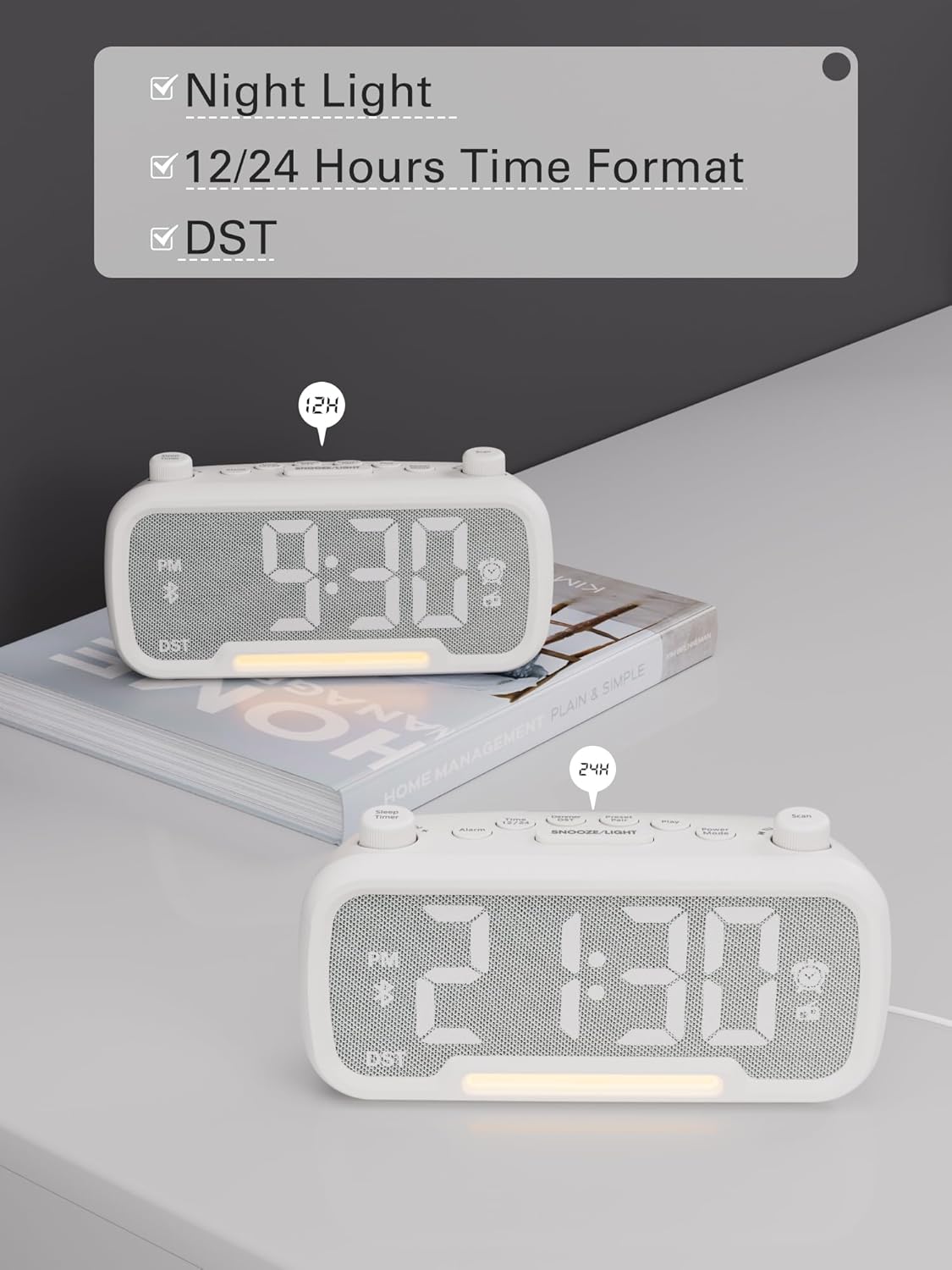
Image: The alarm clock displaying time in both 12-hour (with PM indicator) and 24-hour formats, also showing the DST indicator.
Daylight Saving Time (DST) Mode
To activate or deactivate Daylight Saving Time (DST), press the Dimmer DST button. The time will adjust by one hour forward or backward, and the "DST" indicator will appear or disappear on the display.
Video: Demonstrates how to activate or deactivate DST mode by pressing the DST button, showing the time adjustment.
Istruzioni per l'uso
Impostazione allarme
- Premere e tenere premuto il tasto Allarme per 2 secondi. Le cifre delle ore lampeggeranno.
- Rotate the left knob (Sleep Timer) to adjust the hour.
- Premere il tasto Allarme nuovamente il pulsante. Le cifre dei minuti lampeggeranno.
- Rotate the left knob (Sleep Timer) to adjust the minute.
- Premere il tasto Allarme button again to select the alarm sound: bell or last radio channel.
- Rotate the left knob (Sleep Timer) to adjust the alarm volume (L01-L16).
- Premere il tasto Allarme button once more to complete the alarm setting.
Video: Illustrates the steps to set the alarm time, choose the alarm sound (bell or radio), and adjust the alarm volume.
Annullamento dell'allarme
Per annullare l'allarme, premere il tasto Allarme button. The alarm icon on the display will turn off, indicating that the alarm has been canceled.
Funzione snooze
Quando suona la sveglia, premere il tasto SNOOZE / LIGHT pulsante per attivare la funzione snooze. La sveglia si metterà in pausa per 9 minuti e poi suonerà di nuovo.

Image: The alarm clock with the SNOOZE/LIGHT button clearly marked, explaining its 9-minute snooze function.
Funzionamento dell'altoparlante Bluetooth
- Premere il tasto Modalità di alimentazione button repeatedly until "bt" appears on the display. The Bluetooth icon will start flashing, indicating it's ready for pairing.
- On your mobile device, search for Bluetooth devices and select "CR1025" to connect.
- Once connected, the Bluetooth icon will stop flashing. You can now stream audio from your device.
Video: Shows how to enter Bluetooth mode and pair the alarm clock with a mobile device, indicated by the flashing and solid Bluetooth icon.

Image: The alarm clock wirelessly connected to a smartphone, demonstrating its Bluetooth 5.0 audio streaming capability.
Funzionamento della radio FM
- Premere il tasto Modalità di alimentazione button repeatedly until the radio icon lights up and a frequency is displayed.
- Scansione automatica: Premere il tasto Scansione button to automatically search for and store up to 20 FM stations (P01-P20).
- Ricerca manuale: Rotate the right knob (Scan) to browse frequencies manually.
- Salvataggio di una stazione: Durante l'ascolto della stazione desiderata, tenere premuto il tasto Coppia preimpostata button for 2 seconds. Use the right knob (Scan) to select a preset number (P01-P20), then press Coppia preimpostata di nuovo per salvare.
- Richiamo di un preset: Premere brevemente il tasto Coppia preimpostata pulsante per scorrere le stazioni salvate.
- Regola volume: Rotate the left knob (Sleep Timer) to control the volume (16 levels).
Video: Demonstrates how to operate the FM radio, including auto-scanning, manual tuning, saving presets, and adjusting volume.

Image: The alarm clock showing an FM radio frequency, illustrating its use as a radio.
Impostazione del timer di spegnimento
When using the FM radio or Bluetooth speaker functions, you can set a sleep timer to control playback duration before the device automatically turns off.
- Premere il tasto Timer di spegnimento button on the top left.
- Rotate the left knob (Sleep Timer) to select the desired duration: 15, 30, 60, 90, or 120 minutes. You can also select "OFF" to disable the sleep timer.
Video: Demonstrates how to set the sleep timer for the FM radio or Bluetooth speaker, showing available duration options.
Dimmer del display
The LED display has 5 levels of brightness. To adjust the brightness, press the Dimmer DST button repeatedly to cycle through the levels (L01-L05).
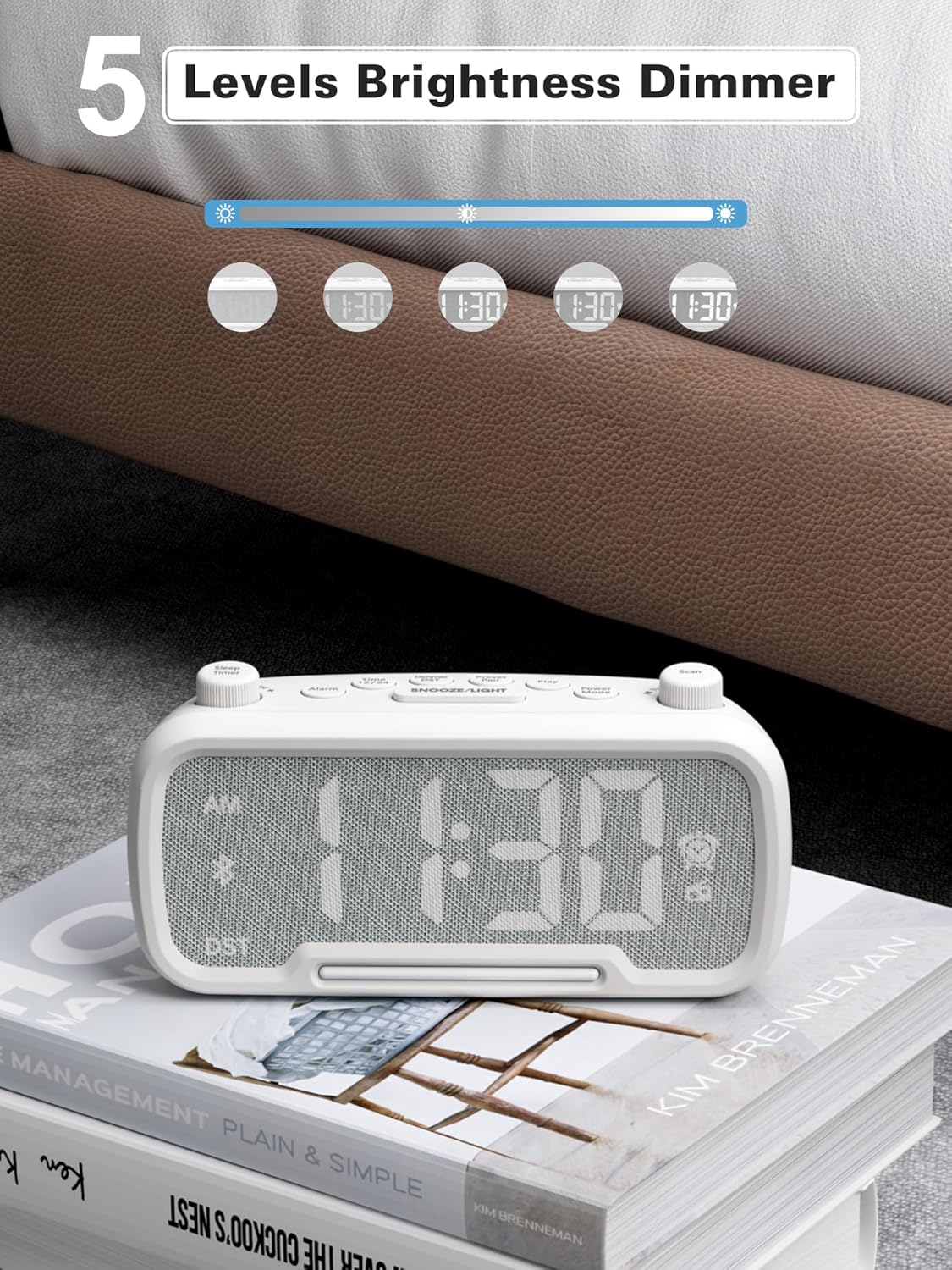
Image: The alarm clock illustrating the five different brightness levels for its LED display.
Luce notturna
The alarm clock features a gentle fixed night light. To turn the night light on or off, press the SNOOZE / LIGHT button. This light creates a sleep-friendly environment.

Image: The alarm clock's warm night light glowing, positioned next to a teddy bear, suggesting its use in a child's room.
Porte di ricarica USB
The device includes two USB charging ports: one Type-C and one USB-A. Both ports provide 5V/1A output, allowing you to conveniently charge your smartphone, tablet, or other USB-powered devices simultaneously.

Image: The alarm clock with a smartphone connected to its Type-C port and a smartwatch to its USB-A port, demonstrating simultaneous charging.
Manutenzione
- Pulizia: Utilizzare un panno morbido e asciutto per pulire la superficie della sveglia. Non utilizzare detergenti liquidi o materiali abrasivi.
- Magazzinaggio: Se si conserva il dispositivo per un periodo prolungato, scollegarlo dall'alimentazione e rimuovere la batteria di backup. Conservare in un luogo fresco e asciutto.
- Evitare l'umidità: Keep the device away from water, high humidity, and direct sunlight to prevent damage.
Risoluzione dei problemi
| Problema | Possibile causa | Soluzione |
|---|---|---|
| Nessun display/Dispositivo non si accende | Adattatore di alimentazione non collegato o presa difettosa. | Ensure the power adapter is securely plugged into the device and a working wall outlet. Test the outlet with another device. |
| L'allarme non suona | Alarm not set, alarm volume too low, or alarm canceled. | Verify alarm time is set correctly, alarm icon is visible, and volume is adequate. Ensure the alarm was not accidentally canceled. |
| Il Bluetooth non si connette | Dispositivo non in modalità di associazione, fuori portata o già connesso a un altro dispositivo. | Ensure the clock is in Bluetooth pairing mode ("bt" flashing). Move your mobile device closer. Disconnect from other Bluetooth devices. |
| Scarsa ricezione della radio FM | Segnale debole, antenna non estesa. | Fully extend the FM antenna. Try repositioning the clock for better reception. Perform an auto-scan again. |
| La ricarica USB non funziona | Cable issue, device not compatible, or device already fully charged. | Check the USB cable for damage. Ensure your device is compatible with 5V/1A charging. Verify the device requires charging. |
Specifiche
- Marca: Mesqol
- Numero modello: CR1025
- Colore: Bianco
- Tipo di visualizzazione: GUIDATO
- Fonte di energia: Corded Electric (AC power)
- Batteria di backup: 1 batteria AAA (inclusa)
- Dimensioni del prodotto: 3.31"W x 2.32"H (Note: Length is 6.61" from feature bullets)
- Peso dell'articolo: 7.7 once
- Materiale: Fabric, Acrylonitrile Butadiene Styrene
- Frequenza radio FM: Frequenza 87.5-108 MHz
- Uscita USB: Type-C & USB-A, 5V/1A each
- Suoni di allarme: Bell, FM Radio
- Luminosità dello schermo: 5 livelli
- Formato ora: 12 ore/24 ore
- Caratteristiche speciali: Bluetooth 5.0, Night Light, DST adjustment, Snooze
Garanzia e supporto
For warranty information or technical support, please refer to the contact details provided with your purchase or visit the official Mesqool webluogo. Conserva la ricevuta di acquisto per eventuali richieste di garanzia.