
1. Introduzione
This manual provides detailed instructions for the installation, operation, and maintenance of the EVERSECU CP12-5A-EG UPS Power Supply. This unit is designed to provide stable and uninterrupted power for door access entry systems and related security peripherals.
The EVERSECU UPS Power Supply converts AC 110-240V input to a stable DC 12V, 5A output. It includes a battery link feature to ensure continuous operation during power outages. Please note that the backup battery is not included and must be purchased separately.
This power supply is compatible with various access control components, including electric/magnetic locks, access controllers, exit push buttons, and RFID readers, ensuring seamless integration into diverse security setups.
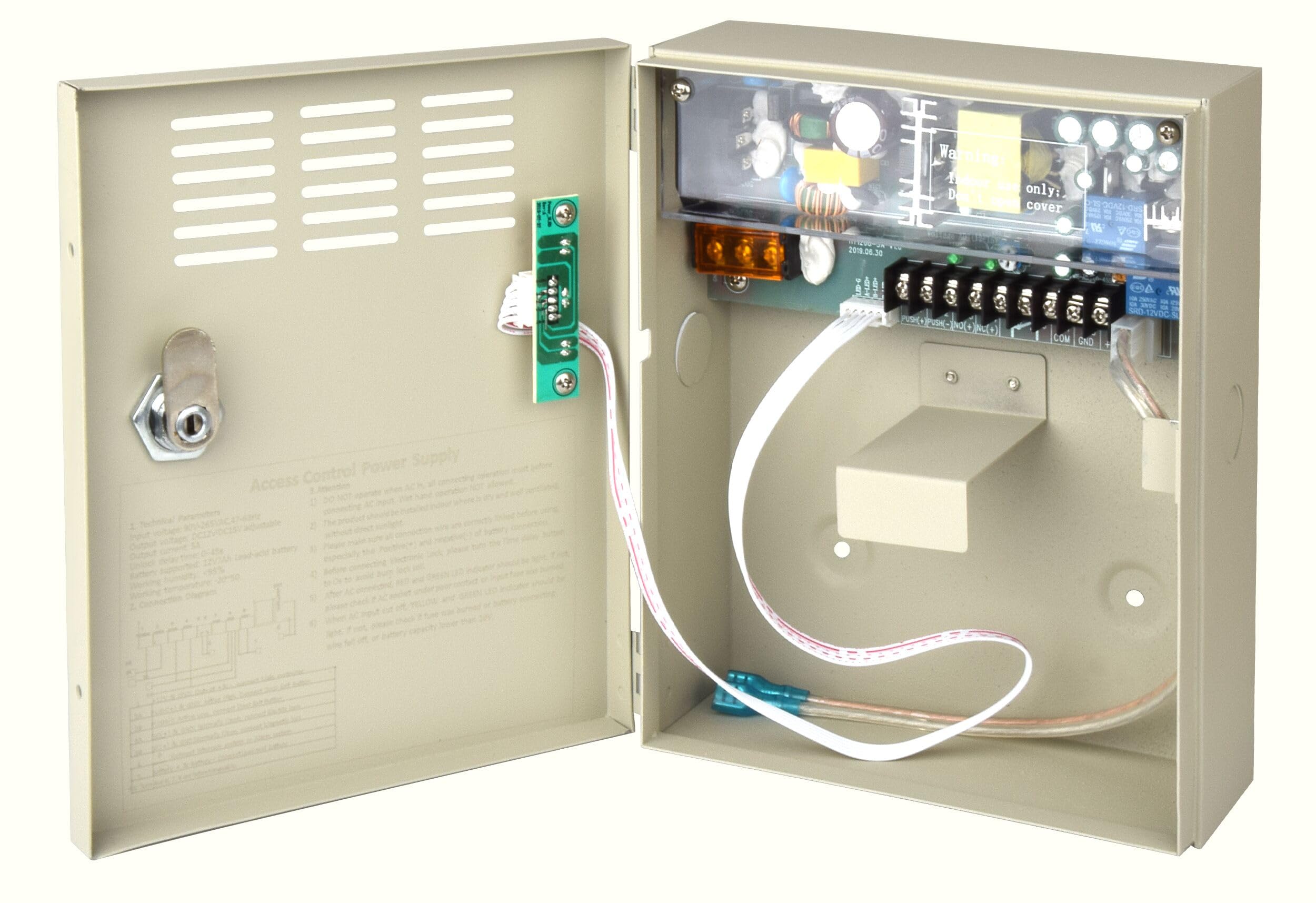
Figure 1: EVERSECU CP12-5A-EG UPS Power Supply Unit
2. Caratteristiche principali
- Uscita ad alta potenza da 60 W: Provides 12VDC nominal (adjustable 12-15VDC) with 5A rated current (max 7.5A) to support various access control devices.
- Intelligent Battery Charging: Features 0.15A constant current (CC) and 13.8V constant voltage (CV) floating charge, with anti-reverse connection and short circuit protection for battery safety.
- Protezione completa: Include sovravoltage (18V), short circuit, overcurrent (7.7A), and overtemperature (120-150℃) protection with auto-recovery.
- Efficienza energetica: Achieves 89.0% average efficiency and ≤0.5W standby power, meeting RoHS and IEC/EN/UL62368/GB4943 safety certifications.
- Vol. globaletage Compatibilità: Supports 90-264VAC input (47-63Hz) for worldwide use.
- Flexible Output Configuration: Capable of configuring both Normally Closed (NC) and Normally Open (NO) outputs for compatibility with a wide range of electric lock systems.
- External Battery Support: Designed to support an external 12V, 7AH backup battery (not included) for extended power continuity.
3. Installazione e configurazione
Follow these guidelines for proper installation and initial setup of your EVERSECU UPS Power Supply.
3.1 Considerazioni ambientali
- Install the unit indoors in a dry, well-ventilated area.
- Avoid direct sunlight and high moisture environments.
- Ensure operating temperature is between -20℃ and 50℃ (4°F to 122°F).
3.2 Precauzioni di cablaggio
- Always connect all wires, especially the battery positive (+) and negative (-) terminals, correctly before connecting the AC input.
- Non azionare mai l'unità con le mani bagnate.
- For electronic locks, set the time delay button to 0 seconds before connecting to prevent coil burnout.
3.3 Componente suview e connessioni

Figure 2: Internal Components and Connection Points
Fare riferimento alla Figura 2 per un sopraview of the internal components and connection terminals. Ensure all connections are secure and correctly polarized.
- Alloggiamento in metallo: Provides protection for internal components. Features fire retardant paint and knockouts for wiring.
- LED Indicator Plate: Visualizza lo stato operativo.
- Protezioni di sicurezza: Integrated circuits for overvoltage, short circuit, overcurrent, and overtemperature protection.
- Smart Circuit: High efficiency power conversion with adjustable output voltage (12-15 V CC).
- Protezione della batteria: Independent DC13.8V charging circuit with reverse polarity and overcharge/discharge protection.
- Regolazione del ritardo temporale: Allows adjustment of lock delay from 0 to 45 seconds.
4. Funzionamento
4.1 indicatori di stato a LED
The LED indicator plate provides visual feedback on the power supply's status:
- RED + GREEN LEDs ON: Indicates AC power is connected and the unit is operating normally.
- YELLOW + GREEN LEDs ON: Indicates the unit is in battery backup mode (AC power is off).
- If LEDs fail to light, check all connections and the internal fuse.
4.2 Battery Charging and Backup
The power supply features a smart charging mode for the connected backup battery:
- Automatically switches from constant current (0.15A, ≤13.8V) to constant voltage floating charge (13.8V) to prevent overcharging.
- Includes anti-reverse connection and short circuit protection for battery safety.
- Seamlessly switches to battery power when AC input is lost, ensuring continuous operation of connected access control systems.
5. Manutenzione e cura
To ensure the longevity and optimal performance of your EVERSECU UPS Power Supply, observe the following maintenance guidelines:
- Regularly inspect the unit for any signs of physical damage or loose connections.
- Mantenere l'unità pulita e priva di polvere. Per la pulizia, utilizzare un panno asciutto e morbido.
- Assicurare un'adeguata ventilazione attorno all'unità per evitare il surriscaldamento.
- If a backup battery is installed, periodically check its condition and replace it according to the battery manufacturer's recommendations.
- Do not attempt to open the unit or perform repairs yourself. Refer to qualified service personnel.
6. Risoluzione Dei Problemi
This section addresses common issues you might encounter with the EVERSECU UPS Power Supply.
6.1 No Power / LEDs Not Lighting Up
- Check AC Input: Ensure the power cord is securely plugged into a functional AC outlet and the power supply unit.
- Check Internal Fuse: If accessible, inspect the internal fuse for continuity. Replace if blown (use only a fuse of the same rating).
- Verifica connessioni: Ensure all internal wiring connections are secure, especially the main power input.
6.2 System Not Switching to Battery Backup
- Controllare la connessione della batteria: Ensure the backup battery is correctly connected to the power supply unit with correct polarity.
- Controllare la carica della batteria: Verify the backup battery is charged. A completely discharged battery may not engage immediately.
- Stato della batteria: If the battery is old, it may no longer hold a charge. Consider replacing the battery.
6.3 Vol. di uscitatage Problemi
- Sovraccarico: Ensure the total current draw of connected devices does not exceed the 5A nominal (7.5A max) output capacity. Disconnect some devices to test.
- Voltage Regolazione: Il volume di uscitatage is adjustable between 12-15VDC. Use a multimeter to check the output and adjust if necessary using the internal potentiometer (VR1).
7. Specifiche tecniche
| Categoria | Specificazione |
|---|---|
| Marca | EVERSECU |
| Numero di modello | CP12-5A-EG |
| Ingresso volumetage | 90-264VAC (Nominal: 115VAC/230VAC) |
| Frequenza di ingresso | 47-63Hz (Nominal: 50/60Hz) |
| Corrente di ingresso massima | 1.5A (minimum input voltage, full load) |
| Potenza di standby | ≤0.5W |
| Volume di uscitatage | 12-15VDC (adjustable) |
| Corrente di uscita | 5A nominal, 7.5A maximum |
| Increspatura e rumore | ≤2% of output voltage (mVp-p @25℃) |
| Efficienza | ≥89.0% (rated input, full/max load) |
| Protezione da sovracorrente (OCP) | 7.7A |
| Sovravoltage Protezione (OVP) | 18V (hiccup mode, auto-recovery) |
| Protezione da cortocircuito | Triggers at output impedance <0.1Ω |
| Protezione da sovratemperatura | 120-150℃ (auto-recovery) |
| Temperatura di esercizio | -20 ℃ ~ 50 ℃ (4 ° F ~ 122 ° F) |
| Temperatura di conservazione | -20 ℃ ~ 85 ℃ (4 ° F ~ 185 ° F) |
| Umidità | 25%-90% RH (Operating, non-condensing) / 0%-95% RH (Storage, non-condensing) |
| Altitudine | 2000 meters (Operating & Storage) |
| Dimensioni del prodotto | 2.76"P x 6.54"L x 2.76"A |
| Materiale | Metallo |
| Certificazioni di sicurezza | RoHS, IEC/EN/UL62368/GB4943 |
8. Informazioni sulla garanzia
The EVERSECU CP12-5A-EG UPS Power Supply comes with a Garanzia limitata di 1 anni dalla data di acquisto. Questa garanzia copre difetti di materiali e lavorazione in condizioni di normale utilizzo.
La garanzia non copre danni causati da uso improprio, incidenti, modifiche non autorizzate o installazione non corretta. Si prega di conservare la prova d'acquisto per eventuali reclami in garanzia.
9. Assistenza clienti
If you encounter any issues or have questions regarding the EVERSECU CP12-5A-EG UPS Power Supply that are not covered in this manual, please contact EVERSECU customer support for assistance.
For the most up-to-date support information, please visit the official EVERSECU websito o fare riferimento alla documentazione relativa all'acquisto.