
1. Introduzione
Thank you for choosing the KESIEME Intelligent Touch Screen Open Ear Earbuds. These wireless headphones are designed for comfort and awareness, featuring an open-ear design, Bluetooth 5.4 connectivity, and a touch-screen charging case for intuitive control. This manual provides detailed instructions to help you get the most out of your device.

Image 1.1: KESIEME Open Ear Earbuds and their intelligent touch screen charging case.
2. Contenuto della confezione
Si prega di selezionare la casella per i seguenti elementi:
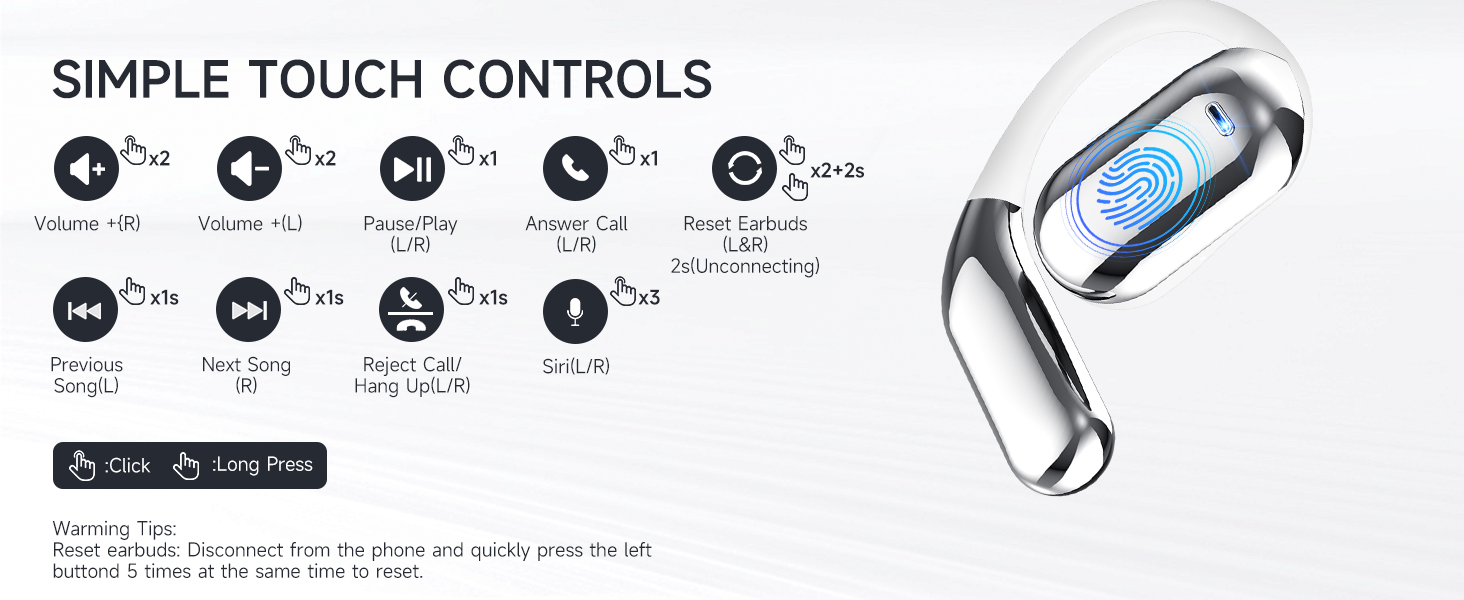
Image 2.1: Illustration of items included in the product package.
- Open Air Conduction Earphones (2 units)
- Custodia di ricarica (1 unità)
- Manuale dell'utente (1 unità)
- Cavo di ricarica di tipo C (1 unità)
3. Prodotto finitoview e Caratteristiche
3.1 Design dell'orecchio aperto
The KESIEME earbuds feature an open-ear design that rests gently on the ear, providing comfort for extended wear and allowing you to remain aware of your surroundings. This design minimizes pressure in the ear canal and reduces the risk of hearing damage compared to in-ear headphones.

Image 3.1: Comparison of open-ear design comfort versus traditional in-ear designs.
3.2 Qualità audio premium
Equipped with dual 14.2mm air conduction dynamic drivers, these headphones deliver clear sound, powerful volume, and stereo audio. The design addresses sound leakage, ensuring a private listening experience.

Immagine 3.2: Dettagliata view of the 14.2mm dynamic drivers for enhanced audio.
3.3 Tecnologia Bluetooth 5.4
The earbuds utilize Bluetooth 5.4 for a stable, fast, and low-latency wireless connection. This advanced technology ensures an uninterrupted audio experience with a connection range of up to 33 feet (10 meters).

Image 3.3: Benefits of upgraded Bluetooth 5.4 technology.
3.4 Comfort e vestibilità
Designed with ergonomic ear hooks and skin-friendly materials, the earbuds are lightweight and provide a secure, comfortable fit for various activities.

Image 3.4: Features contributing to the ultimate comfort and fit of the earbuds.
4. Configurazione e ricarica
4.1 Carica iniziale
Before first use, fully charge the earbuds and the charging case. Connect the provided Type-C charging cable to the charging case and a power source. The smart LED power display on the case will indicate the charging status and battery levels.
A single full charge provides up to 20 hours of earbud playtime. The charging case can recharge the earbuds multiple times, extending total playtime to approximately 48 hours.
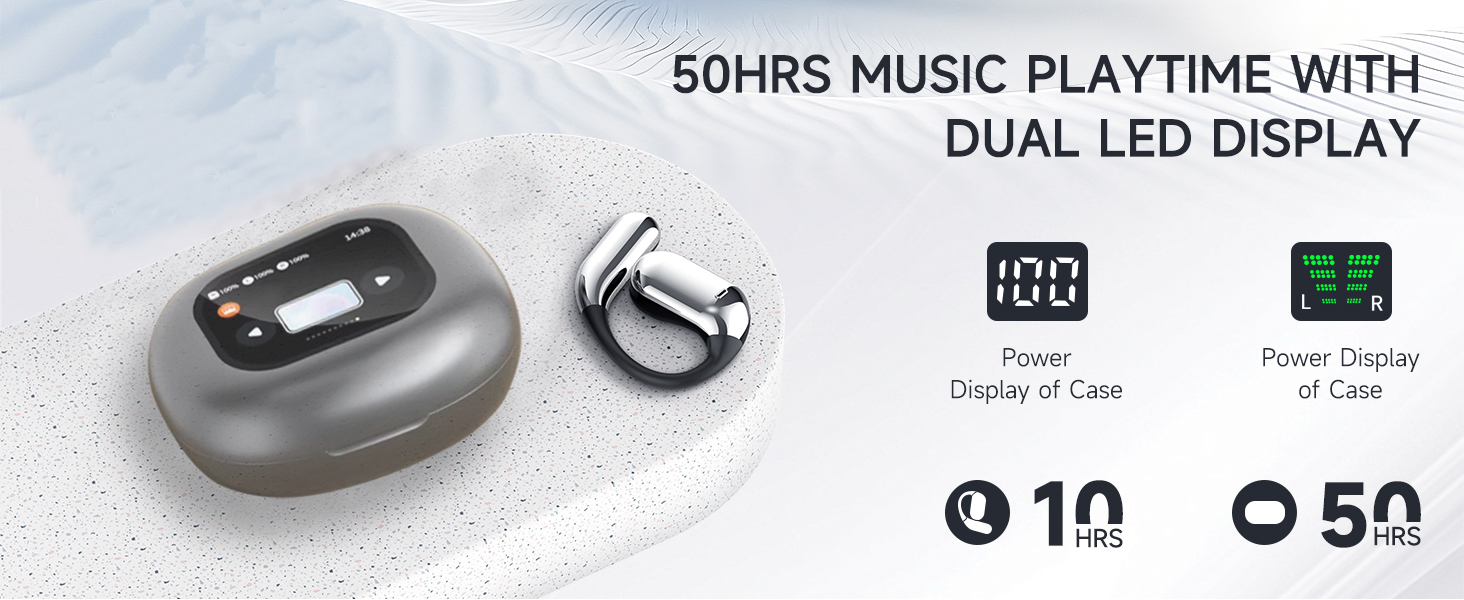
Image 4.1: Charging case with LED display showing battery status and total playtime.
4.2 Associazione con un dispositivo
- Assicurati che gli auricolari siano carichi.
- Aprire la custodia di ricarica. Gli auricolari si accenderanno automaticamente ed entreranno in modalità di associazione.
- Sul tuo dispositivo (smartphone, tablet, computer), attiva il Bluetooth e cerca i dispositivi disponibili.
- Select "KESIEME YYK" (or similar model name) from the list to connect.
- Una volta effettuata la connessione, sentirai un tono di conferma e gli auricolari saranno pronti per l'uso.
Nota: gli auricolari si riconnetteranno automaticamente all'ultimo dispositivo associato quando vengono estratti dalla custodia, se il Bluetooth è abilitato sul dispositivo.
5. Istruzioni per l'uso
5.1 Indossare gli auricolari
Per una vestibilità comoda e sicura, segui questi passaggi:
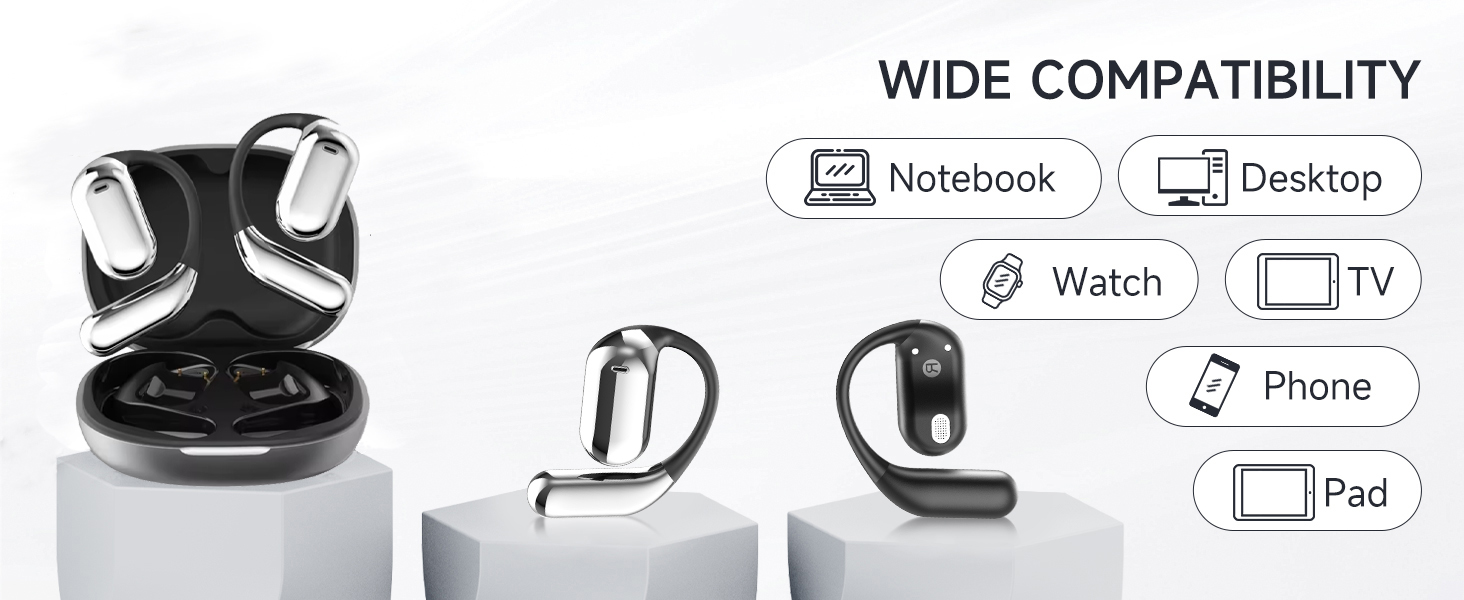
Image 5.1: Step-by-step instructions for correctly wearing the earbuds.
- Estrarre gli auricolari dalla custodia di ricarica.
- Appendere l'estremità degli auricolari all'osso dell'orecchio.
- Ruotare gli auricolari e farli scorrere dietro l'orecchio.
- Regolare il gancio auricolare, indossarlo e abbassarlo per una vestibilità sicura.
5.2 Comandi touch
The earbuds feature intuitive touch controls for managing audio playback, calls, and voice assistant functions. The charging case also has a touch screen for additional controls.
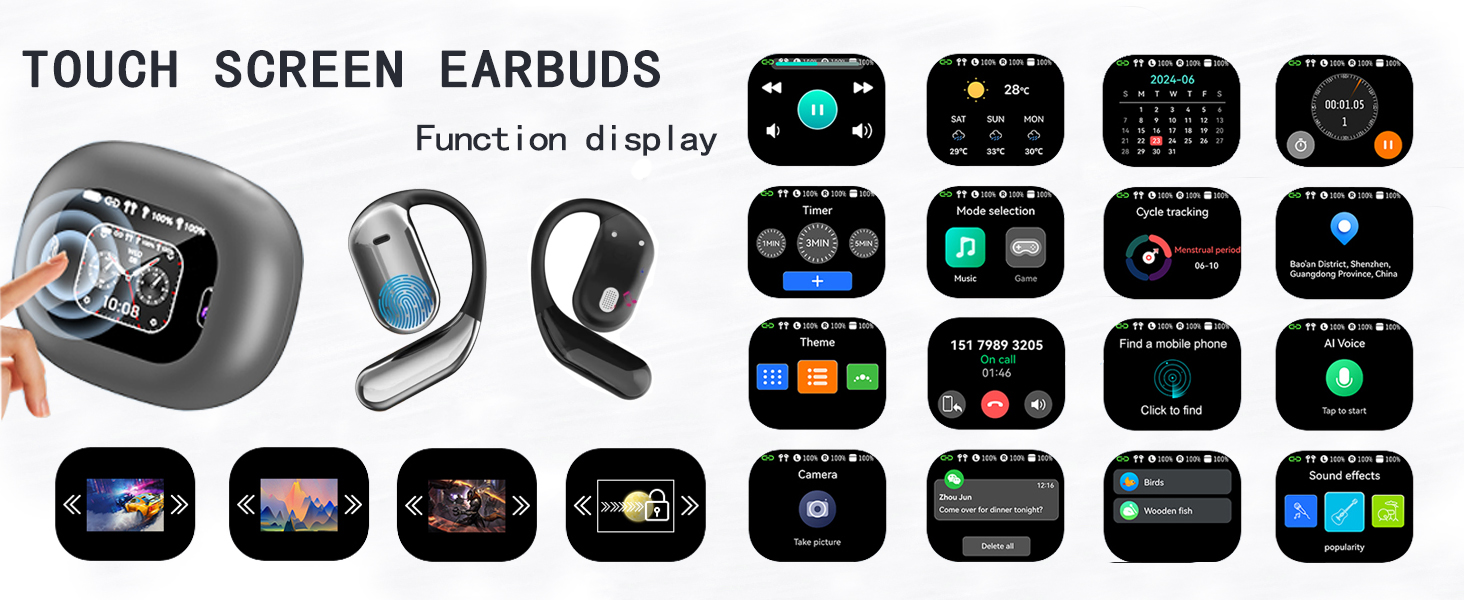
Immagine 5.2: Passoview dei controlli touch degli auricolari.
| Azione | Funzione |
|---|---|
| Double Click (L/R) | Volume + (Right Earbud), Volume - (Left Earbud) |
| Single Click (L/R) | Riproduci/Metti in pausa la musica, Rispondi alla chiamata |
| Pressione prolungata 1 secondi (S/D) | Previous Song (Left Earbud), Next Song (Right Earbud) |
| Pressione prolungata 2 secondi (S/D) | Rifiuta chiamata / Riaggancia chiamata |
| Triplo clic (S/D) | Attiva l'Assistente Vocale (Siri/Assistente Google) |
| Double Click + Long Press 2s (L/R) | Reset Earbuds (Disconnect from phone, then quickly press left button 5 times to reset) |
5.3 Funzioni del touch screen della custodia di ricarica
The charging case features an LCD full-color touch screen, providing access to various functions directly from the case.
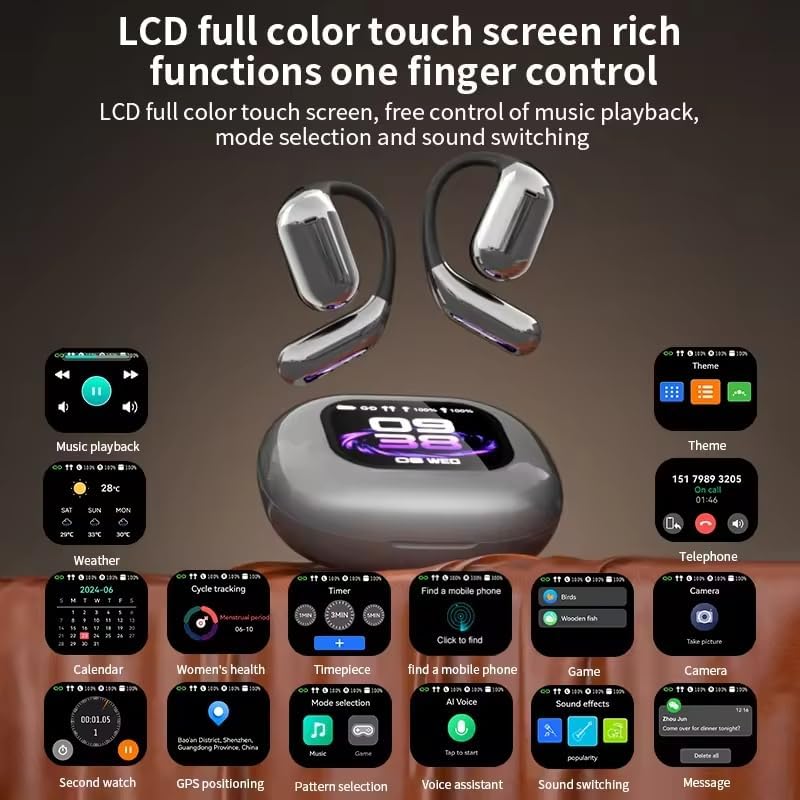
Immagine 5.3: Passoview of the charging case's touch screen interface and available functions.
- Riproduzione musicale: Control tracks and volume.
- Tempo atmosferico: View informazioni meteo aggiornate.
- Calendario: Access date and time.
- Timer: Set countdowns.
- Selezione della modalità: Switch between different audio modes (e.g., Music, Game).
- Monitoraggio del ciclo: (Potentially for fitness, details not specified).
- Trova un telefono cellulare: Individua lo smartphone associato.
- Temi: Personalizza il tema di visualizzazione.
- Telefono: View call history or dial.
- Telecamera: Controllo remoto per la fotocamera del tuo telefono.
- Voce AI: Attiva l'assistente vocale.
- Effetti sonori: Adjust audio equalization.
- Messaggi: View notifiche.
6. Manutenzione
To ensure the longevity and optimal performance of your KESIEME earbuds, follow these maintenance guidelines:
- Pulizia: Regularly wipe the earbuds and charging case with a soft, dry, lint-free cloth. Avoid using abrasive materials, alcohol, or chemical cleaners.
- Magazzinaggio: Quando non li usi, riponi gli auricolari nella loro custodia di ricarica per proteggerli da polvere e danni. Tieni la custodia chiusa.
- Ricarica: Use only the provided Type-C cable for charging. Avoid exposing the charging port to moisture.
- Resistenza all'acqua: Gli auricolari sono resistenti all'acqua, ma non impermeabili. Evitare di immergerli in acqua o di esporli a forti piogge. Asciugarli accuratamente se si bagnano.
- Temperatura: Do not expose the earbuds or charging case to extreme temperatures (hot or cold) or direct sunlight for prolonged periods.
7. Risoluzione Dei Problemi
Se riscontri problemi con gli auricolari, fai riferimento alle seguenti soluzioni comuni:
| Problema | Soluzione |
|---|---|
| Gli auricolari non si associano/connettono |
|
| Nessun suono o volume basso |
|
| La custodia di ricarica non si ricarica |
|
| I controlli touch non rispondono |
|
8. Specifiche
| Caratteristica | Dettaglio |
|---|---|
| Marca | KESIEME |
| Nome del modello | Open Ear Earbuds (YYK) |
| Tecnologia di connettività | Wireless (Bluetooth) |
| Tecnologia di comunicazione wireless | Bluetooth 5.4 |
| Portata Bluetooth | 33 piedi (10 metri) |
| Posizionamento dell'orecchio | Orecchio aperto |
| Fattore di forma | ORECCHIO APERTO |
| Tipo di driver audio | Driver dinamico |
| Dimensioni del driver audio | 14.2 millimetri |
| Gamma di frequenza | 20 Hz - 20,000 Hz |
| Impedenza | 32 Ohm |
| Durata della batteria (auricolari) | Fino a 20 ore (carica singola) |
| Tempo di riproduzione totale (con custodia) | Fino a 48 ore |
| Tipo di controllo | Tocco |
| Livello di resistenza all'acqua | Resistente all'acqua |
| Peso dell'articolo | 6.7 once (0.19 chilogrammi) |
| Dimensioni del prodotto | 6 x 4.2 x 1.5 pollici |
| Dispositivi compatibili | Desktops, Laptops, Tablets, Mobile Phones |
9. Garanzia e supporto
KESIEME products are designed for reliability and performance. For warranty information, please refer to the documentation included with your purchase or contact KESIEME customer support.
If you require further assistance or have questions not covered in this manual, please contact KESIEME customer support through their official website or the retailer where you purchased the product. Please have your model number (YYK) and purchase details ready.