
1. Introduzione
The LEOBOG HI75C Pro is a 75% TKL mechanical wireless keyboard designed for versatility and performance. It features an aluminum alloy case, tri-mode connectivity (Bluetooth 5.0, 2.4GHz wireless, and USB-C wired), RGB backlighting, a multi-functional knob, and hot-swappable switches. This manual provides detailed instructions for setting up, operating, and maintaining your keyboard.

Figure 1: LEOBOG HI75C Pro Mechanical Wireless Keyboard Overview
2. Contenuto della confezione
Verifica che tutti gli articoli siano presenti nel tuo pacco:
- LEOBOG HI75C Pro Mechanical Wireless Keyboard
- Estrattore per tasti
- Cavo USB (tipo C)
- Replace Switch (Spare Switches)
3. Caratteristiche del prodotto
The LEOBOG HI75C Pro keyboard incorporates several advanced features for an enhanced user experience:
- Aluminium Alloy Cover: Provides superior heat dissipation, robustness, and durability. Features an exquisite powder coating process for a luxurious feel and fingerprint resistance.
- Gasket Design: Significantly reduces cavity noise and improves typing sound for a satisfying low-noise experience.
- Connessione a 3 modalità: Supports Bluetooth 5.0, 2.4GHz wireless, and USB wired connections, allowing connection to up to five devices simultaneously.
- Disposizione al 75%: An 81-key layout that balances concise design with full functionality, saving desk space.
- Retroilluminazione RGB: Features 16.8 million RGB lighting colors with 17 lighting effects and 10 music rhythm modes.
- Manopola a doppia modalità: A multi-functional knob for precise control over volume (office mode) and lighting brightness (game mode).
- High Speed Response: Equipped with an advanced gaming keyboard chip for a response speed of up to 2.8ms.
- Interruttori sostituibili a caldo: Consente la facile sostituzione degli interruttori senza saldature.
- Batteria da 4000 mAh: Provides extended usage time, approximately one month without backlighting.

Figure 2: Key features of the LEOBOG HI75C Pro keyboard.

Figure 3: Diagram illustrating the multi-layered gasket structure for sound damping.

Figure 4: Ergonomic keycap height design for comfortable typing.
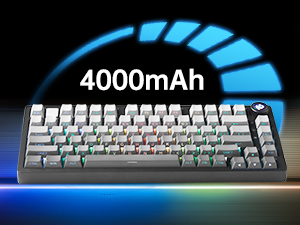
Figure 5: The keyboard is equipped with a 4000mAh battery.
4. Configurazione e connettività
The LEOBOG HI75C Pro offers three connection modes: wired, 2.4GHz wireless, and Bluetooth. Use the switch on the side of the keyboard to select your desired mode.
4.1 Connessione cablata
- Ensure the mode switch on the side of the keyboard is set to the wired (USB-C) position.
- Connect the provided USB-C cable to the keyboard and to an available USB port on your computer.
- La tastiera verrà riconosciuta automaticamente e sarà pronta all'uso.
4.2 Connessione wireless a 2.4 GHz
- Ensure the mode switch on the side of the keyboard is set to the 2.4GHz wireless position.
- Collega il ricevitore USB da 2.4 GHz a una porta USB disponibile sul tuo computer.
- La tastiera dovrebbe connettersi automaticamente. In caso contrario, premere FN + ~ per avviare l'accoppiamento.
Connessione Bluetooth 5.0 4.3
- Ensure the mode switch on the side of the keyboard is set to the Bluetooth position.
- Sul tuo dispositivo (PC, Mac, Android, iOS), attiva il Bluetooth e cerca nuovi dispositivi.
- Premere e tenere premuto NV + 1, NV + 2, O NV + 3 for 3-5 seconds to enter pairing mode for BT1, BT2, or BT3 respectively. The indicator light will flash.
- Select "LEOBOG HI75C Pro" from the list of available Bluetooth devices on your device.
- Once connected, the indicator light will stop flashing. You can switch between paired Bluetooth devices using FN + 1/2/3.

Figure 6: The keyboard supports Type-C wired, 2.4GHz wireless, and Bluetooth connections.
Video 1: Official LEOBOG overview of the HI75C Pro Mechanical Gaming Keyboard, showcasinil suo design e le sue caratteristiche.
5. Funzionamento
5.1 Retroilluminazione RGB
The keyboard features extensive RGB backlighting with 17 preset lighting effects. Additionally, it offers 10 music rhythm RGB lighting modes that synchronize with audio output. You can adjust lighting effects and brightness using the multi-functional knob or dedicated key combinations. To turn off the lights, use the knob in game mode.
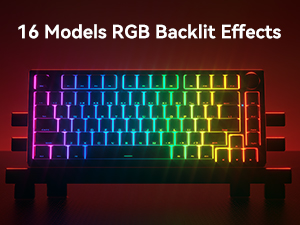
Figure 7: The keyboard offers 16 models of RGB backlit effects.
5.2 Dual-Mode Knob Control
The multi-functional knob allows for quick adjustments based on the selected mode:
- Modalità di commutazione: Press and hold the knob to toggle between Office Mode and Game Mode.
- Modalità ufficio: When the indicator light is continuously on, the keyboard is in office mode. Rotate the knob to adjust the system volume.
- Modalità di gioco: When the indicator light is breathing, the keyboard is in game mode. Rotate the knob to adjust the lighting brightness.

Figure 8: The multi-functional knob for volume and lighting control.
5.3 Switch sostituibili a caldo
The LEOBOG HI75C Pro supports hot-swappable 3-pin/5-pin mechanical switches, allowing you to easily change switches without soldering. This feature enables customization of typing feel and sound.

Figure 9: The keyboard features hot-swappable switches for customization.
6. Manutenzione
6.1 Pulizia
Per mantenere prestazioni e aspetto ottimali, pulire regolarmente la tastiera:
- Prima di pulire la tastiera, scollegarla da tutte le fonti di alimentazione.
- Utilizzare un panno morbido e privo di lanugine leggermente dampPulire i tasti e la custodia con acqua o una soluzione detergente delicata.
- Per una pulizia più approfondita, utilizzare l'estrattore per tasti in dotazione per rimuovere i tasti e pulire la parte inferiore con aria compressa o una piccola spazzola.
- Assicurarsi che la tastiera sia completamente asciutta prima di ricollegarla.
6.2 Sostituzione dei tasti e degli interruttori
Il design hot-swap consente di sostituire facilmente i tasti e gli interruttori:
- Utilizzare l'estrattore per tasti in dotazione per rimuovere delicatamente i tasti.
- Use a switch puller (not included, but often comes with replacement switches) to carefully remove switches. Grip the switch firmly and pull straight up.
- Allineare i pin del nuovo interruttore con i fori sul PCB e premere delicatamente fino a sentire uno scatto. Assicurarsi che i pin non siano piegati.
- Place the desired keycap onto the new switch stem.
7. Risoluzione Dei Problemi
7.1 Problemi di connettività
- Nessuna connessione: Ensure the mode switch on the side of the keyboard is set correctly for wired, 2.4GHz, or Bluetooth.
- 2.4GHz Disconnection: Re-plug the USB receiver. Try pairing again by pressing FN + ~.
- Disconnessione Bluetooth: Ensure Bluetooth is enabled on your device. Re-enter pairing mode on the keyboard (FN + 1/2/3) and re-select the keyboard on your device.
- Interferenza: Move the keyboard closer to the receiver/device or away from other wireless devices that might cause interference.
7.2 Software e firmware
For advanced customization, macro programming, and firmware updates, please visit the official LEOBOG website or authorized distributors' websites. Ensure you download the correct software/firmware version specifically for the LEOBOG HI75C Pro model to avoid compatibility issues.
7.3 L'illuminazione RGB non funziona
- Check if the keyboard is in Game Mode, where the knob controls brightness. Rotate the knob to increase brightness.
- Ensure the battery is sufficiently charged if using wireless mode.
- If using software, verify that lighting effects are enabled and configured correctly.
8. Specifiche
| Caratteristica | Dettaglio |
|---|---|
| Numero di modello | HI75C PRO |
| Dimensioni del prodotto | 12.97 x 5.35 x 1.74 pollici |
| Peso dell'articolo | 3.41 libbre |
| Tecnologia di connettività | Bluetooth, USB-C, wireless a 2.4 GHz |
| Descrizione della tastiera | Meccanico |
| Dispositivi compatibili | Console di gioco, laptop, PC, smartphone, tablet |
| Caratteristiche speciali | Customizable Display Keys, Ergonomic, Hot-Swappable, Hotkeys and Media Keys, Programmable Keys |
| Retroilluminazione della tastiera | Colore RGB |
| Batteria | 1 A battery required (included), 4000mAh |
9. Garanzia e supporto
LEOBOG provides a Garanzia di 2 anno for the HI75C Pro Mechanical Wireless Keyboard, covering manufacturing defects from the date of purchase. For warranty claims, technical assistance, or product inquiries, please contact LEOBOG customer support through their official websito o rivenditore presso cui è stato acquistato il prodotto.

Figure 10: LEOBOG customer service is available for support.


