
1. Prodotto finitoview
The HUANUO Single Monitor Mount is designed to enhance your workspace by providing a stable, adjustable, and ergonomic solution for your monitor. Constructed from solid aluminum die-cast, this monitor arm offers robust support for monitors ranging from 13 to 32 inches and weighing up to 17.6 lbs. It features versatile adjustment options including swivel, tilt, and rotation, allowing you to achieve optimal viewing angoli e ridurre lo sforzo.
This mount offers two installation methods: a C-clamp for desks with a thickness of 0.39" to 3.07", and a grommet base for desks 0.39" to 2.36" thick with a hole diameter of 0.43" to 0.87". Integrated cable management clips help maintain a tidy and organized desk environment.

Figura 1.1: Oltreview of the HUANUO Single Monitor Mount, showing the arm, VESA plate, C-clamp, and grommet base components.
2. Configurazione e installazione
Before beginning installation, ensure your monitor meets the compatibility requirements: screen size between 13-32 inches, weight up to 17.6 lbs, and VESA mounting holes at 75x75mm or 100x100mm. Verify your desk compatibility for C-clamp o montaggio con occhiello.
2.1 Compatibilità con la scrivania
The mount supports two installation types:
- C-Clamp: For desks with a thickness between 0.39" (10mm) and 3.07" (78mm).
- Grommet Base: For desks with a thickness between 0.39" (10mm) and 2.36" (60mm), and a pre-drilled hole diameter of 0.43" (11mm) to 0.87" (22mm).
Ensure your desk is made of wood and is free of cross beams or obstructions underneath the mounting area. For desks with edge frames, panels, or back panels, ensure sufficient clearance as indicated in the diagram below.

Figure 2.1: Desk compatibility guidelines for C-clamp montaggio.
2.2 Choosing Your Mounting Option
Select the appropriate mounting method based on your desk type and preference.
C-Clamp Installazione

Figura 2.2: C-Clamp mounting, ideal for desks without pre-drilled holes.
Allega il C-clamp to the edge of your desk and tighten the knob until secure. Ensure the clamp è saldamente fissato per impedirne il movimento.
Installazione della base dell'anello di tenuta

Figure 2.3: Grommet base mounting, utilizing an existing desk hole.
Insert the grommet base through a pre-drilled hole in your desk and secure it from underneath with the provided hardware.
2.3 Fissaggio del monitor
Once the base is securely installed, attach your monitor to the VESA plate. The mount supports VESA patterns of 75x75mm and 100x100mm. Use the appropriate screws provided to secure your monitor to the VESA plate. Ensure all connections are tight before releasing il monitor.

Figure 2.4: Utilize the integrated cable management clips to route monitor cables neatly along the arm.
3. Funzionamento e regolazioni
The HUANUO Single Monitor Mount offers a range of adjustments to customize your viewing experience for optimal comfort and productivity.
3.1 Regolazione dell'altezza
The monitor arm allows for vertical height adjustment up to 16 inches (40.6 cm) along the pole. Loosen the collar on the pole, adjust the arm to your desired height, and then re-tighten the collar to secure the position.
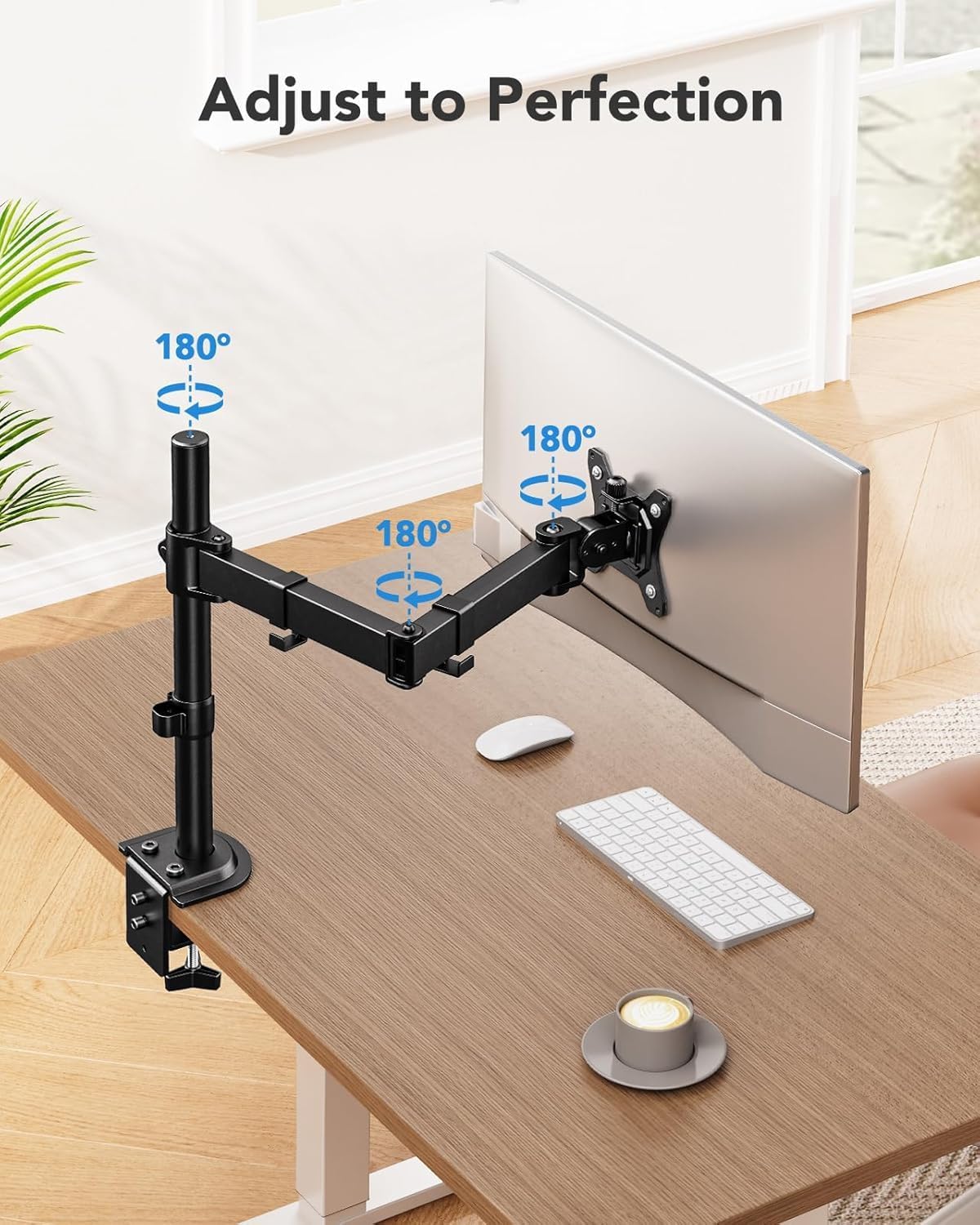
Figure 3.1: Adjusting the monitor height for ergonomic viewing.
3.2 Inclinazione, rotazione e rotazione
Achieve your preferred viewing angle with the following movements:
- Inclinazione: Adjust the monitor +/-45° vertically to reduce glare or find a comfortable angle.
- Girevole: Pivot the monitor +/-90° horizontally to share your screen or change viewdirezione.
- Rotazione: Rotate the monitor 360° from landscape to portrait orientation without removing it.

Figure 3.2: Dynamic screen adjustments for optimal viewflessibilità.
The arm also features 180° rotation points at the base and arm joints, allowing for flexible positioning of your monitor across your desk space.

Figure 3.3: Flexible motion of the monitor arm.
4. Manutenzione
Regular maintenance ensures the longevity and optimal performance of your HUANUO Single Monitor Mount.
- Pulizia: Pulisci il supporto con un panno morbido eamp panno. Evitare detergenti abrasivi o solventi che potrebbero danneggiare la finitura.
- Controllare le connessioni: Periodically check all screws and bolts to ensure they remain tight, especially those securing the mount to the desk and the monitor to the VESA plate. Over time, vibrations or frequent adjustments can loosen connections.
- Lubrificazione: The moving parts are designed for smooth operation and generally do not require lubrication. If you notice any stiffness, ensure no debris is obstructing the joints.
5. Risoluzione Dei Problemi
If you encounter issues with your monitor mount, refer to the following common solutions:
- Il monitor si abbassa o non mantiene la posizione:
- Ensure your monitor's weight is within the specified limit of 17.6 lbs.
- Verify that all adjustment screws and bolts are sufficiently tightened. For tilt adjustments, ensure the tension bolt on the VESA plate is tightened appropriately for your monitor's weight.
- Il monte sembra instabile:
- Ricontrollare il C-clamp or grommet base installation. Ensure it is securely fastened to the desk and the desk surface is stable.
- Confirm your desk meets the compatibility requirements (thickness, material, absence of obstructions).
- Difficoltà nella regolazione della posizione del monitor:
- Ensure no cables are snagged or obstructing movement.
- Check if any locking mechanisms or tension screws are overly tightened. Loosen them slightly to allow for smoother movement, then re-tighten to hold position.
- Monitor Not Attaching to VESA Plate:
- Confirm your monitor has VESA mounting holes (75x75mm or 100x100mm).
- Ensure you are using the correct size and length of screws for your monitor.
- If your monitor lacks VESA holes, a separate VESA adapter (not included) may be required.
If issues persist, please contact HUANUO customer support for further assistance.
6. Specifiche del prodotto
| Caratteristica | Specificazione |
|---|---|
| Marca | HUANUO |
| Numero di modello | HN-B0DCN2FN1V |
| Dimensioni del monitor compatibili | 13" - 32" |
| Capacità di carico massima | 17.6 libbre (8 kg) |
| Compatibilità VESA | 75x75mm, 100x100mm |
| Tipo di montaggio | Desk Mount (C-Clamp or Grommet Base) |
| C-Clamp Spessore scrivania | 0.39" - 3.07" (10 mm - 78 mm) |
| Grommet Base Desk Thickness | 0.39" - 2.36" (10 mm - 60 mm) |
| Diametro del foro del passacavo | 0.43" - 0.87" (11 mm - 22 mm) |
| Massima regolazione in altezza | 16" (40.6 cm) |
| Angolo di inclinazione | +/-45° |
| Angolo di rotazione | +/-90° |
| Rotazione | 360° |
| Materiale | Alluminio |
| Colore | Nero |
| Peso dell'articolo | 4.29 libbre (1.95 kg) |
| Codice UPC | 810174342550 |
7. Garanzia e assistenza clienti
For detailed warranty information, please refer to the product packaging or contact HUANUO customer service directly. HUANUO is committed to providing high-quality products and support.
If you have any questions, require technical assistance, or need to report an issue, please contact our customer support team. You can also refer to the official user manual PDF for more detailed instructions and diagrams:
Scarica il manuale utente (PDF)
Visitare il HUANUO Store on Amazon per ulteriori prodotti e informazioni.