
Introduzione
This manual provides detailed instructions for the installation, operation, and maintenance of your darkFlash DB330M Micro-ATX PC Case. Please read this manual thoroughly before beginning assembly to ensure proper setup and safe usage. The DB330M case features a 270° panoramic tempered glass panel, pre-installed PWM ARGB fans, and a high-speed I/O panel.
Informazioni sulla sicurezza
- Scollegare sempre l'alimentatore dalla presa a muro prima di installare o effettuare la manutenzione di qualsiasi componente all'interno del case del PC.
- Handle tempered glass panels with care to prevent breakage. Avoid impacts or sharp objects.
- Indossare guanti antistatici o utilizzare un braccialetto antistatico per evitare danni causati dalle scariche elettrostatiche (ESD) ai componenti sensibili.
- Tenere le parti di piccole dimensioni e le viti lontano dalla portata dei bambini.
- Assicurare una corretta ventilazione attorno al case del PC per evitare il surriscaldamento.
Contenuto della confezione
Verificare che tutti gli articoli siano presenti nel pacco:
- darkFlash DB330M Micro-ATX PC Case
- 3 x Pre-installed PWM ARGB Fans
- Scatola degli accessori (viti, fascette, ecc.)
- Manuale dell'utente (questo documento)
Caratteristiche oltreview
- 270° Panoramic Tempered Glass: Fornisce un'ampia view di componenti interni e illuminazione RGB.
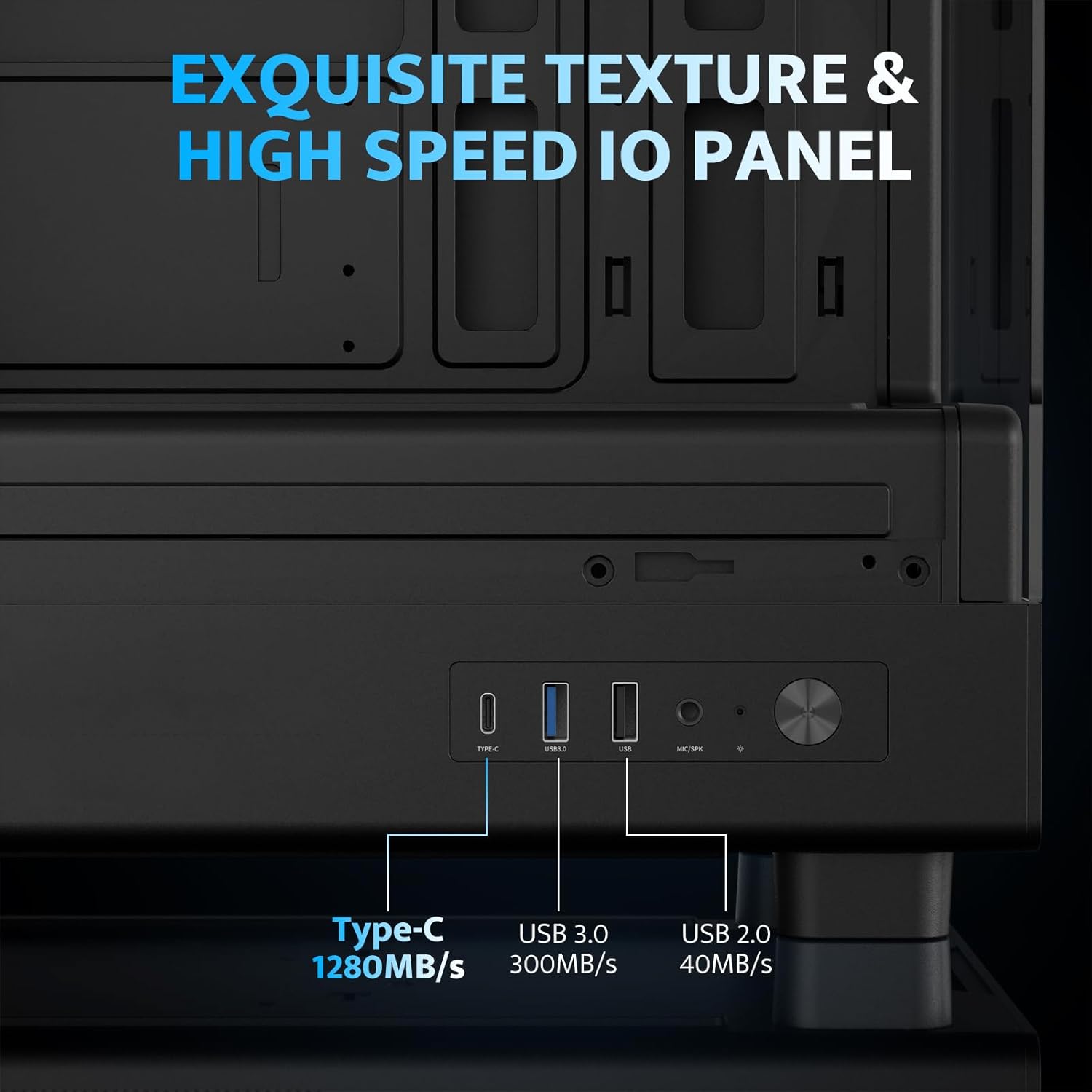
- Pannello I/O ad alta velocità: Includes USB 3.0 and Type-C ports for fast data transfer.
- Vertical Airflow Cooling: Optimized design with pre-installed fans for efficient heat dissipation.
- Filtri antipolvere magnetici: Located on top and bottom to keep components clean.
- Installazione semplice: User-friendly design for hassle-free assembly and maintenance.
Specifiche
| Caratteristica | Specificazione |
|---|---|
| Nome del modello | DB330M PC CASE |
| Dimensioni (LxWxH) | 8.58"P x 13.11"L x 15.75"A (218 mm x 333 mm x 400 mm) |
| Compatibilità della scheda madre | Micro ATX, ITX |
| Tipo di caso | Torre Midi |
| Materiale | Plastica, vetro temperato |
| Ventole preinstallate | 3 ventole ARGB PWM da 120 mm |
| Altezza massima del dissipatore della CPU | 180mm |
| Spazio massimo per la GPU | 305mm |
| Supporto radiatore (superiore) | Fino a 240 mm |
| Tipo di montaggio dell'alimentatore | Bottom Mount (Max 140mm PSU length) |
| Porte I/O | 1 x USB 3.0, 1 x Type-C, Audio In/Out |
Configurazione e installazione
1. Accessing the Interior (Quick Release Design)
The darkFlash DB330M features a quick-release design for easy access to internal components. The tempered glass panels can be removed by gently pulling them away from the chassis. The top panel also detaches for fan/radiator installation.

2. Installazione della scheda madre
Install your Micro-ATX or ITX motherboard into the designated area. Ensure standoffs are correctly aligned and secured. The case supports CPU coolers up to 180mm in height and GPUs up to 305mm in length.

3. Fan and Cooling System Installation
The case comes with three pre-installed 120mm PWM ARGB fans. Two fans are located at the top, and one at the rear. Additional fan mounts are available at the bottom (up to 2 x 120mm) for enhanced airflow. The case supports a 240mm AIO radiator on the top panel.
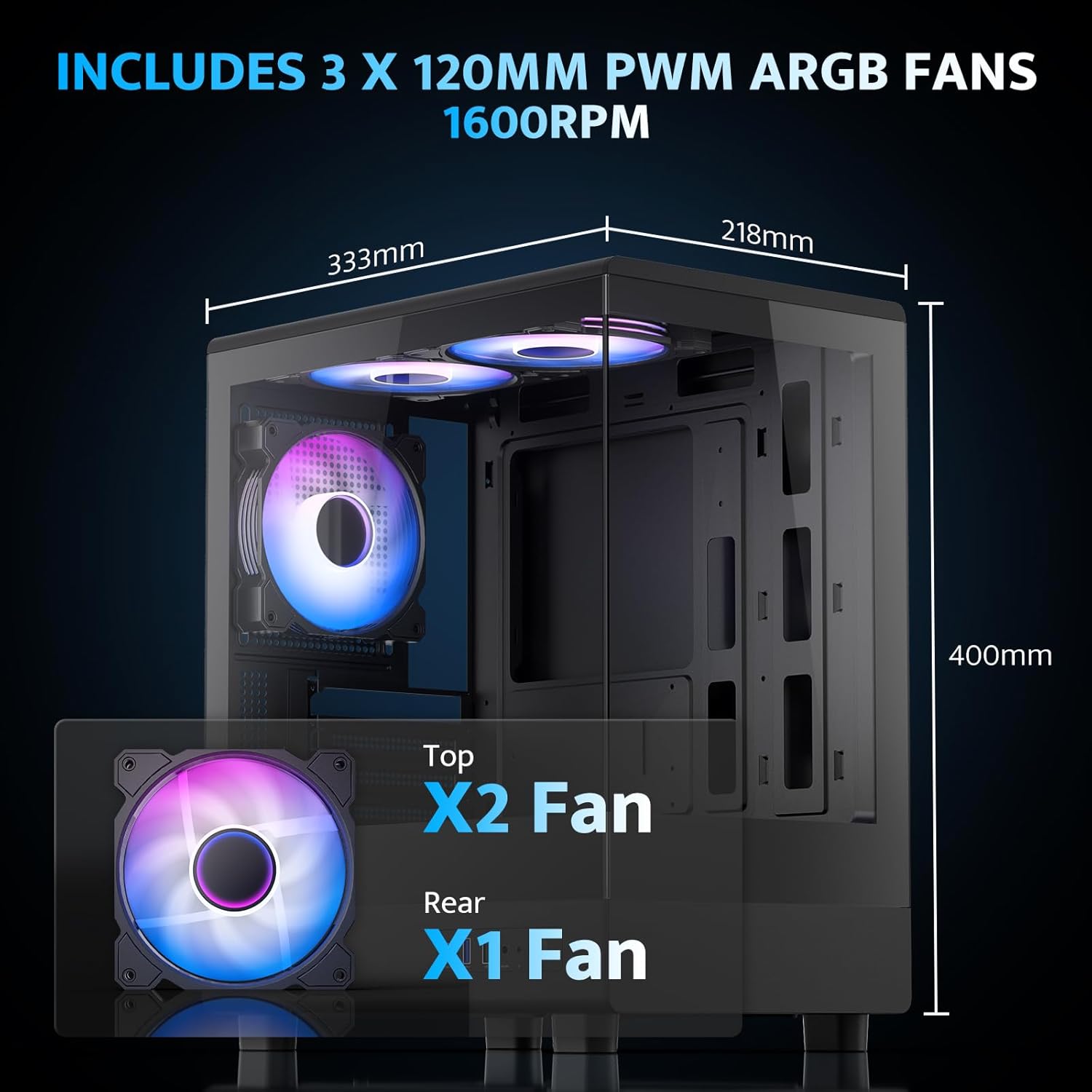
The pre-installed fans are PWM ARGB type, offering speed adjustment and rich lighting modes with motherboard synchronization. Note: An RGB hub controller is not included.

4. Power Supply and Storage Installation
Install your power supply unit (PSU) in the bottom mount. The case supports PSUs up to 140mm in length. Utilize the standard hard drive cage for storage devices.
5. Connecting Front I/O Panel
Connect the front I/O panel cables to your motherboard. The panel includes a Type-C port, USB 3.0 port, and USB 2.0 port for various connectivity needs.
6. Gestione dei cavi
Utilize the cable routing options and tie-downs behind the motherboard tray to ensure clean cable management. This improves airflow and aesthetics.
Istruzioni per l'uso
1. Accensione
After all components are securely installed and connected, plug in the power cable to your PSU and press the power button on the front I/O panel to start your system.
2. Controllo della ventola ARGB
The pre-installed ARGB fans can be controlled via compatible motherboard software (if connected to an ARGB header) to customize lighting effects and fan speeds. Refer to your motherboard manual for specific software instructions.
3. Airflow Configuration
The DB330M is designed with optimized airflow channels. The pre-installed fans facilitate vertical airflow, with the fan above the PSU directing air towards the graphics card. Ensure no obstructions block the airflow paths.


Manutenzione
1. Pulizia del filtro antipolvere
Regularly clean the magnetic dust filters located on the top and bottom of the case. Gently remove the filters and clean them with compressed air or a soft brush. Reattach them securely after cleaning.
2. Pulizia generale
Use a soft, dry cloth to wipe down the exterior of the case. For tempered glass panels, use a glass cleaner and a microfiber cloth. Avoid abrasive cleaners or solvents.
Risoluzione dei problemi
- Il PC non si accende:
- Ensure the power supply is properly connected to the wall and the PSU switch is in the 'ON' position.
- Verificare che tutti i cavi di alimentazione dell'alimentatore siano collegati saldamente alla scheda madre e ai componenti.
- Controllare il collegamento dell'interruttore di alimentazione del pannello frontale alla scheda madre.
- Le ventole non girano/RGB non funziona:
- Verificare che i cavi di alimentazione della ventola siano collegati alla scheda madre o al controller della ventola.
- Ensure ARGB cables are connected to a compatible ARGB header on the motherboard or an ARGB controller.
- Controllare le impostazioni del software della scheda madre per la velocità della ventola e il controllo RGB.
- Porte USB non funzionanti:
- Verify the front panel USB 3.0 and Type-C cables are correctly plugged into the corresponding headers on your motherboard.
- Assicurarsi che i driver della scheda madre siano aggiornati.
Garanzia e supporto
darkFlash fornisce un Garanzia di 1 anno for this computer case. For technical support, warranty claims, or further assistance, please contact darkFlash customer service through their official webo al rivenditore presso cui è stato acquistato il prodotto. Si prega di conservare la prova d'acquisto per la convalida della garanzia.
DarkFlash ufficiale Websito: www.darkflash.com