
Tangxi Tangxigie8uha6zp
Tangxi MIDI Pad Controller User Manual
Model: Tangxigie8uha6zp
Brand: Tangxi
1. Introduzione
The Tangxi MIDI Pad Controller is a versatile and portable device designed for music production and performance. It offers intuitive control over your digital audio workstation (DAW) with its responsive pads, assignable knobs, and seamless connectivity options. This manual provides detailed instructions to help you set up, operate, and maintain your MIDI controller.
2. Caratteristiche principali
- 16 pad RGB sensibili alla velocità: Pads with aftertouch for expressive control.
- 8 Assignable 360-Degree Rotating Encoders: Customizable knobs for fine-tuning parameters.
- Nota Funzione Ripeti: For rhythmic effects.
- Full Level Buttons: For consistent velocity output.
- Ampia compatibilità: Works with popular DAWs like Ableton Live, FL Studio, Cubase, Logic Pro X, Bitwig, Reason, Studio One, and GarageBand (iOS). Compatible with OS X, Android, and iOS.
- Stable and Low Latency Connectivity: Supports both Bluetooth and wired USB connections.
- Batteria ricaricabile integrata: Provides up to 16 hours of working time for portability.
- Design compatto e portatile: Easy to carry for on-the-go music creation.
- Soft Backlit Silicone Buttons: Designed for quiet operation and comfortable touch.
3. Contenuto della confezione
Si prega di selezionare la casella per i seguenti elementi:
- Tangxi MIDI Pad Controller
- Manuale d'uso
- Cavo USB-C (per la ricarica e la connessione cablata)
4. Prodotto finitoview
Familiarize yourself with the layout of your Tangxi MIDI Pad Controller.

Figura 4.1: in alto view of the Tangxi MIDI Pad Controller.

Figure 4.2: Labeled diagram of the MIDI Pad Controller's main components.
- USB-C Port and Power Switch: Posizionato lateralmente per la ricarica e la connessione via cavo.
- Assignable Knobs (1-8): Eight 360-degree rotating encoders for parameter control.
- 16 RGB Backlight Pads: Velocity-sensitive pads with aftertouch.
- Pulsanti di controllo: Including BT (Bluetooth), PAD BANK, KNOB BANK, navigation arrows, Play/Pause, Stop, Shift, and Note Repeat.
5. Impostazione
5.1 Ricarica del dispositivo
The controller has a built-in rechargeable battery. To charge, connect the included USB-C cable to the USB-C port on the device and the other end to a power source (e.g., computer USB port, USB wall adapter).

Figure 5.1: USB-C port for charging and wired connection.
The device will automatically charge when connected via USB. A full charge provides approximately 16 hours of working time.
5.2 Connessione al dispositivo
The Tangxi MIDI Pad Controller supports both wired and wireless connections.
5.2.1 Connessione cablata (USB)
Connect the USB-C cable from the controller to a USB port on your computer (OS X) or compatible Android/iOS device (with appropriate adapter, not included). The device is plug-and-play and does not require driver installation. It will be automatically recognized by your operating system and DAW.
5.2.2 Connessione wireless (Bluetooth)
Per connettersi tramite Bluetooth:
- Turn on the MIDI Pad Controller.
- Premere il tasto BT button on the controller to activate Bluetooth pairing mode. The BT indicator light will blink.
- On your computer (OS X), Android, or iOS device, go to Bluetooth settings and search for available devices.
- Select "Tangxi MIDI Controller" (or similar name) from the list to pair.
- Once connected, the BT indicator light on the controller will become solid.

Figure 5.2: The BT button for wireless connection.
5.3 Compatibilità software
The controller is designed for seamless integration with various Digital Audio Workstations (DAWs) and music software. It is compatible with:
- Ableton Live
- Studio FL
- Cubase
- Logica Pro X
- Bitwig
- Motivo
- Studio Uno
- GarageBand (for iOS)
- E altro ancora.
Ensure your DAW's MIDI settings are configured to recognize the Tangxi MIDI Pad Controller as an input device.
6. Funzionamento del controller
6.1 16 RGB Backlight Pads
The 16 RGB pads are velocity-sensitive, meaning they respond to how hard you strike them, allowing for dynamic and expressive performances. They also feature aftertouch, providing additional control by pressing down on the pad after the initial strike.

Figure 6.1: The 16 RGB backlight pads.
Video 6.1: Demonstration of the MIDI Pad Controller in use, showcasing pad responsiveness and RGB lighting.
Utilizzare il BANCO PAD button to switch between different pad banks, expanding the number of assignable sounds or functions.
6.2 8 Assignable Knobs
The 8 assignable 360-degree rotating encoders can be customized to control various parameters within your DAW, such as volume, pan, effects sends, or filter cutoff. Each knob set has an indicator light for visual feedback.

Figure 6.2: The 8 assignable stepless knobs.

Figure 6.3: Adjusting the assignable knobs for fine-tuning parameters.
Different message sending types (e.g., AfterTouch, MIDI CC) can be adjusted through software settings. Use the BANCA A MANOPOLA button to switch between different knob banks.
6.3 pulsanti di controllo
The controller features several dedicated control buttons for enhanced workflow:
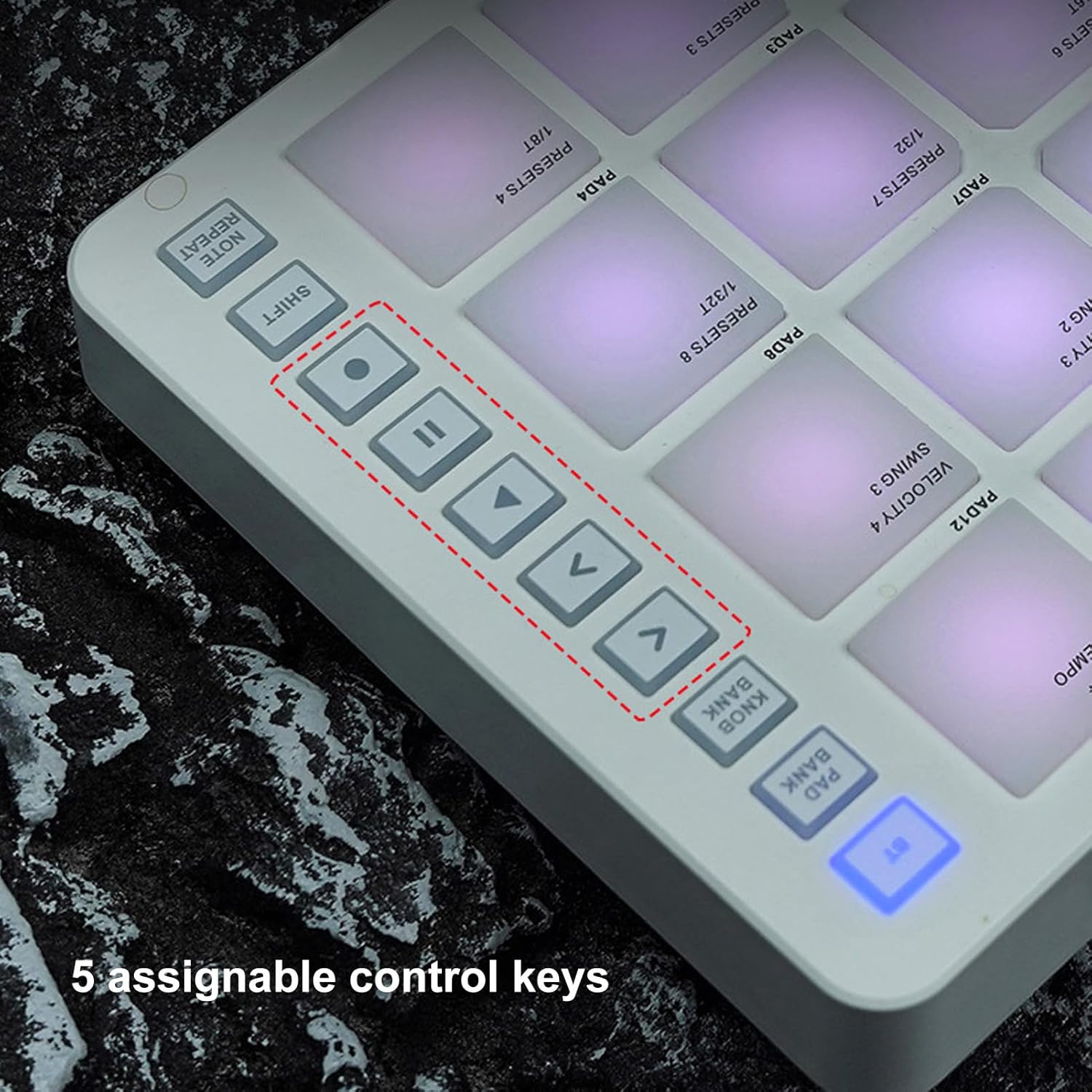
Figure 6.4: The 5 assignable control keys.
- Play/Pause and Stop: Standard transport controls for your DAW.
- Navigation Arrows (<, >, ^, v): Used for navigating menus or selecting parameters within your software.
- Spostare: Activates secondary functions for pads and knobs. Hold down the Shift button while pressing another button or turning a knob to access its alternate function.
- Nota Ripeti: When activated, holding down a pad will repeatedly trigger the note at a set tempo. Hold down the Note Repeat function key while turning knobs 1-4 to adjust the Note Repeat function parameters (e.g., rate).
- Livello completo: Ensures that all pad strikes send a maximum velocity value (127), regardless of how hard you hit them.
7. Manutenzione
To ensure the longevity and optimal performance of your Tangxi MIDI Pad Controller, follow these maintenance guidelines:
- Pulizia: Utilizzare un panno morbido e asciutto per pulire la superficie del controller. Per lo sporco ostinato, leggermente dampImmergere il panno in acqua. Evitare l'uso di prodotti chimici aggressivi, solventi o detergenti abrasivi, poiché possono danneggiare la finitura e i componenti.
- Magazzinaggio: Conservare il controller in un luogo fresco e asciutto, lontano dalla luce solare diretta, da temperature estreme e da elevata umidità.
- Gestione: Evitare di far cadere il dispositivo o di sottoporlo a forti urti. Non posizionare oggetti pesanti sopra il controller.
- Esposizione al liquido: Keep the controller away from liquids. If liquid spills on the device, immediately power it off and disconnect it from any power source. Allow it to dry completely before attempting to use it again. If issues persist, contact customer support.
8. Risoluzione Dei Problemi
If you encounter issues with your Tangxi MIDI Pad Controller, refer to the following common troubleshooting steps:
| Problema | Possibile causa | Soluzione |
|---|---|---|
| Il dispositivo non si accende. | Batteria scarica o interruttore di alimentazione spento. | Ensure the power switch is in the ON position. Connect the USB-C cable to charge the device. |
| Nessun suono o input MIDI nella DAW. | Incorrect MIDI settings, wrong input selected, or connection issue. |
|
| Pads or knobs are not responding. | Software mapping issue, incorrect bank selected, or hardware malfunction. |
|
| La connessione Bluetooth è instabile. | Interferenze, distanza o batteria scarica. |
|
If the problem persists after trying these steps, please contact Tangxi customer support for further assistance.
9. Specifiche
| Caratteristica | Dettaglio |
|---|---|
| Nome del modello | Tangxigie8uha6zp |
| Marca | Tangxi |
| Numero di pastiglie | 16 (RGB, Velocity Sensitive, Aftertouch) |
| Numero di manopole | 8 (Assignable, 360-degree rotating) |
| Tecnologia di connettività | Bluetooth, USB |
| Interfaccia Hardware | USB |
| Dispositivi compatibili | Tablet, Smartphone, PC/Mac |
| Software supportato | Ableton Live, FL Studio, Cubase, Logic Pro X, Bitwig, Reason, Studio One, GarageBand (iOS) |
| Tipo di materiale | Silicon, Acrylonitrile Butadiene Styrene (ABS) |
| Peso dell'articolo | 1.56 libbre (circa 0.71 kg) |
| Dimensioni del prodotto | 5.8 x 8.9 x 1.5 pollici (circa 14.7 x 22.6 x 3.8 cm) |
| Durata della batteria | Fino a 16 ore (ricaricabile) |
| Paese di origine | Cina |
10. Garanzia e supporto
For warranty information or technical support, please refer to the documentation included with your purchase or visit the official Tangxi website. You can also contact Tangxi customer service through the platform where you purchased the product.
Tangxi Store Link: Visit the Tangxi Store on Amazon
Ask a question about this manual
Ask about setup, troubleshooting, compatibility, parts, safety, or missing instructions. Manuals+ will review the question and use this page’s manual context to help answer it.