
Introduzione
This manual provides comprehensive instructions for the ECONTROLLY EUR7729KE0 Replacement Remote Control. This remote is designed to function as a direct replacement for various Panasonic DVD HDD TV Recorders, offering full functionality without the need for complex programming.
Modelli compatibili:
- UR7729KE0
- EUR7721X10
- DMR-EH50
- DMR-E55K
- DMR-EH50S
- DMR-E55P9
- DMR-E55S
- DMR-ES10
- DMR-EH50P
- DMR-EH60
This replacement remote control covers all functions of the original remote, ensuring a seamless user experience.
Impostare
Installazione della batteria
The EUR7729KE0 remote control requires two AAA batteries (not included) for operation. Please follow these steps to install the batteries:
- Individuare il vano batterie sul retro del telecomando.
- Far scorrere il coperchio del vano batteria verso il basso e sollevarlo.
- Inserire due batterie AAA, assicurandosi che i terminali positivo (+) e negativo (-) siano allineati correttamente con le marcature all'interno del vano.
- Richiudere il coperchio del vano batteria facendolo scorrere in posizione finché non scatta in posizione.

Posteriore view of the ECONTROLLY EUR7729KE0 remote control with the battery cover removed, showing the compartment for two AAA batteries.
Nota: Sostituisci sempre entrambe le batterie contemporaneamente con batterie nuove. Non mischiare batterie vecchie e nuove o tipi diversi di batterie.
Istruzioni per l'uso
To operate the remote control, point it directly at the infrared sensor on your Panasonic DVD HDD TV Recorder. Ensure there are no obstructions between the remote and the device.
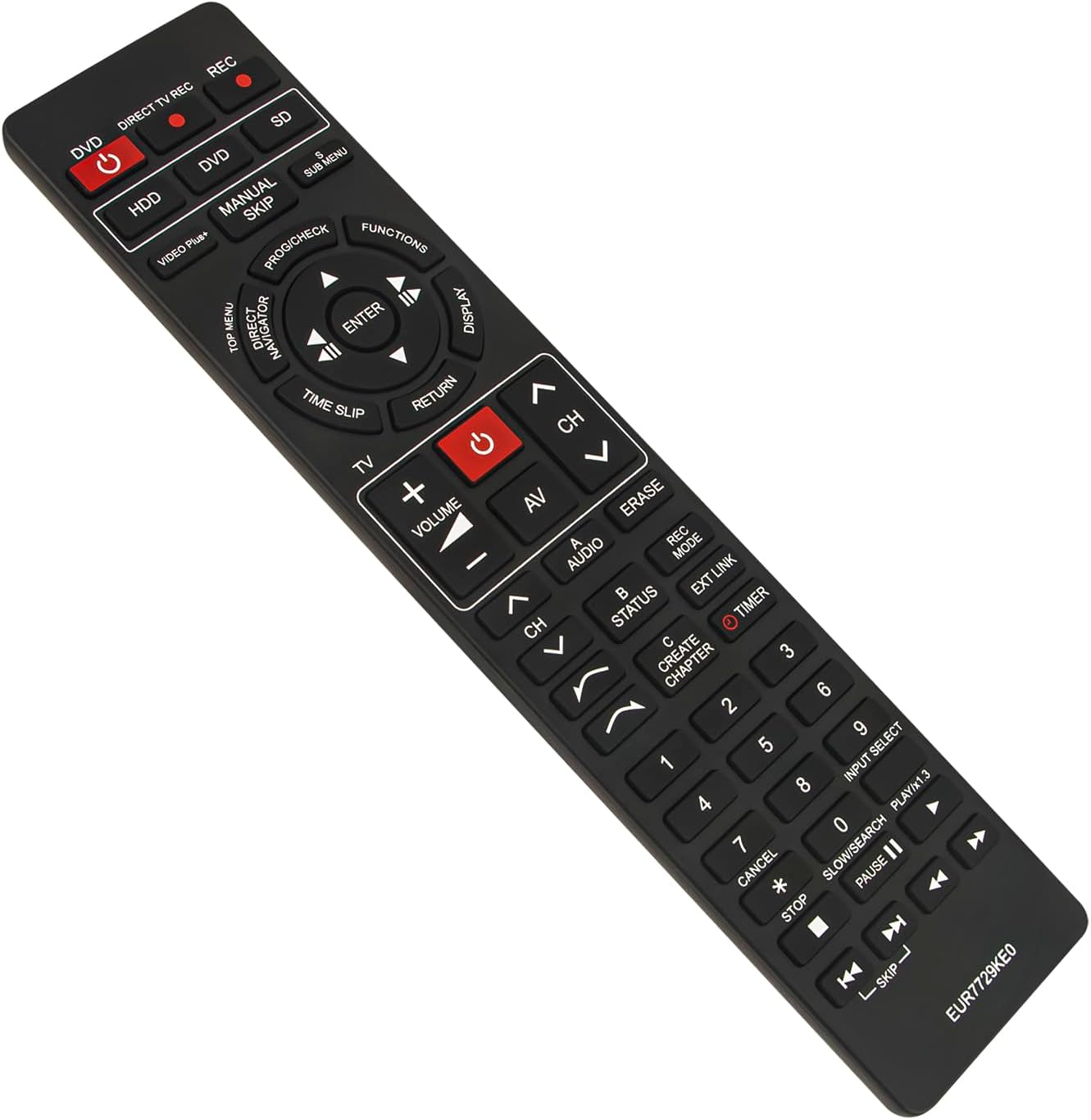
Davanti view of the ECONTROLLY EUR7729KE0 replacement remote control, showing all buttons and their labels.
Funzioni chiave finiteview:
- Power Buttons (DVD, HDD, DIRECT TV REC, REC, SD): Used to power on/off or select specific modes for the respective components.
- Tasti numerici (0-9): For direct channel selection, inputting numbers, or menu navigation.
- Volume (+/-): Regola il volume dell'audio.
- Canale (CH ^/v): Cambia canale in su o in giù.
- Tasti di navigazione (su, giù, sinistra, destra, INVIO): Utilizzato per navigare nei menu e confermare le selezioni.
- Playback Controls (PLAY/x1.3, PAUSE, STOP, SKIP, SLOW/SEARCH): Controlli standard per la riproduzione multimediale.
- MENU Buttons (TOP MENU, SUB MENU, DIRECT NAVIGATOR): Access various menu options for DVD, HDD, or TV functions.
- Special Function Buttons (PROG/CHECK, FUNCTIONS, DISPLAY, TIME SLIP, RETURN, AV, AUDIO, ERASE, STATUS, REC MODE, EXT LINK, CREATE CHAPTER, TIMER): These buttons provide access to advanced features specific to your Panasonic recorder, such as recording options, chapter creation, and display settings. Refer to your recorder's manual for detailed use of these functions.

Comparison image showing the ECONTROLLY EUR7729KE0 replacement remote control on the left and an original Panasonic remote control on the right, highlighting their similar button layouts.
Manutenzione
Pulizia
Per pulire il telecomando, utilizzare un panno morbido e asciutto. Per lo sporco ostinato, utilizzare un panno leggermente dampPulisci il panno con acqua o una soluzione detergente delicata. Evita di utilizzare detergenti abrasivi, alcol o solventi, poiché potrebbero danneggiare la superficie del telecomando o i componenti interni.
Magazzinaggio
Conservare il telecomando in un luogo fresco e asciutto, lontano dalla luce solare diretta e da temperature estreme. Se il telecomando non viene utilizzato per un periodo prolungato, si consiglia di rimuovere le batterie per evitare perdite e potenziali danni.
Risoluzione dei problemi
- Il telecomando non risponde:
- Controllare che le batterie siano inserite correttamente con la polarità corretta (+/-).
- Sostituire le batterie con batterie nuove.
- Assicurarsi che non vi siano ostacoli tra il telecomando e il sensore a infrarossi del dispositivo.
- Make sure you are pointing the remote directly at the device.
- Alcuni pulsanti non funzionano:
- This remote is designed to replicate all functions of the original. If specific buttons are not working, ensure your device is in the correct mode (e.g., DVD mode for DVD functions).
- Clean the remote's surface, as dirt or debris might be interfering with button presses.
If the issue persists after following these steps, please refer to the support section for further assistance.
Specifiche
| Marca | ECONTROLLO |
| Nome del modello | EUR7729KE0 |
| Colore | Nero |
| Caratteristica speciale | Nessuna programmazione richiesta |
| Dispositivi compatibili | DVD HDD TV Recorder (Panasonic DMR-EH50, etc.) |
| Tecnologia di connettività | Infrarossi |
| Tipo di controllore | Controllo dei pulsanti |
| Portata massima | 33 piedi |
| Peso dell'articolo | 1 once |
| Dimensioni articolo (L x P x A) | 5"L x 2"W x 0.6"H (circa 22.4 cm x 5 cm x 1.5 cm) |

Image displaying the dimensions of the ECONTROLLY EUR7729KE0 remote control: approximately 22.4 cm (8.82 inches) in length and 5 cm (1.97 inches) in width.
Garanzia e supporto
This ECONTROLLY product has been tested to ensure proper functionality before shipping. As a replacement remote control, it is designed for immediate use without additional setup.
For further assistance, compatibility inquiries, or troubleshooting that is not covered in this manual, please contact ECONTROLLY customer support through the retailer's platform where the product was purchased. Provide your product model number (EUR7729KE0) and a detailed description of your issue for efficient support.


