
1. Introduzione
This manual provides detailed instructions for the installation, operation, and maintenance of your Mcezdy M7C-2-5-Pin Ebike LCD Display. This display is designed to enhance your electric bike experience by providing essential riding data and control functions. Please read this manual thoroughly before using the product to ensure correct operation and to prevent damage.
2. Informazioni sulla sicurezza
- Always ensure your ebike controller is compatible with the UART No. 2 protocol and the 5-pin connector of this display. Incompatibility can lead to malfunction.
- Non tentare di smontare o modificare il display. Ciò potrebbe invalidare la garanzia e causare danni.
- Ensure all connections are secure and waterproof before riding, especially in wet conditions. The display has an IPX65 waterproof rating, but proper connection is crucial.
- Regularly check the display and its mounting for any signs of damage or looseness.
- Evitare di esporre il display a temperature estreme o alla luce solare diretta per periodi prolungati.
- Always prioritize road safety. Do not operate display functions that distract you from riding.

Figure 1: Compatibility Reminder. This image highlights the critical need to verify your ebike's compatibility with the UART No. 2 protocol before installation.
3. Contenuto della confezione
Dopo aver aperto la confezione, verificare che siano presenti tutti i seguenti elementi:
- Mcezdy M7C-2-5-Pin Ebike LCD Display
- Manuale dell'utente (questo documento)
- Fault Code Description sheet
4. Caratteristiche del prodotto
The Mcezdy M7C-2-5-Pin Ebike LCD Display offers a range of features designed for an optimized riding experience:
- Display LCD a colori avanzato: Provides clear, vibrant visuals of riding data.
- Costruzione robusta: Crafted with ABS+PC housing, tempered glass screen, and a durable nylon bracket for longevity and scratch resistance.
- Grado di impermeabilità IPX65: Offers protection against water splashes and rain.
- UART No. 2 Protocol: Ensures seamless communication with compatible ebike controllers.
- Ampio volumetage Compatibilità: Supports 24V, 36V, 48V, and 60V ebike battery systems.
- Porta di ricarica USB integrata: Features a 5V/500mA USB port for charging mobile devices.
- Universal Handlebar Fit: Compatible with handlebar diameters of 22.2mm, 25.4mm, and 31.8mm.
- Visualizzazione completa dei dati: Shows speed, PAS level, battery status, odometer (ODO), trip distance (TRIP), voltage (VOL), current (CUR), and error codes.
- Parametri personalizzabili: Allows modification of wheel diameter and speed limit settings.
- Modalità aggiuntive: Includes walk-assist mode and cruise control.

Figura 2: Caratteristiche del display. This image illustrates the advanced color LCD, the control keypad, and the various cable connector types available for the display.
5. Configurazione e installazione
5.1 Controllo di compatibilità
Before installation, confirm that your ebike controller uses the Protocollo UART n. 2 and has a compatible Connettore a 5 pin. This display is specifically designed for this protocol and connector type. Refer to your ebike's controller manual for verification.
5.2 Montaggio del display
- Choose a suitable position on your ebike's handlebar. The display's flexible bracket is compatible with handlebar diameters of 22.2mm, 25.4mm, and 31.8mm.
- Allentare le viti sulla staffa del display.
- Position the display on the handlebar and tighten the screws securely. Ensure the display is stable and does not rotate freely.

Figure 3: Handlebar Mounting. This image demonstrates the display mounted on a handlebar, highlighting its adjustable bracket for different handlebar diameters.
5.3 Collegamento dei cavi
- Locate the 5-pin waterproof cable (JL-F-Z509AG) extending from the display. The exposed cable length is approximately 150mm.
- Connect this cable to the corresponding 5-pin connector on your ebike's controller. Ensure the connectors are aligned correctly before pushing them together.
- Secure the connection firmly. If it is a waterproof connector, ensure the seal is properly engaged.
- Route the cable neatly along the ebike frame, securing it with cable ties if necessary, to prevent it from interfering with moving parts or getting damaged.
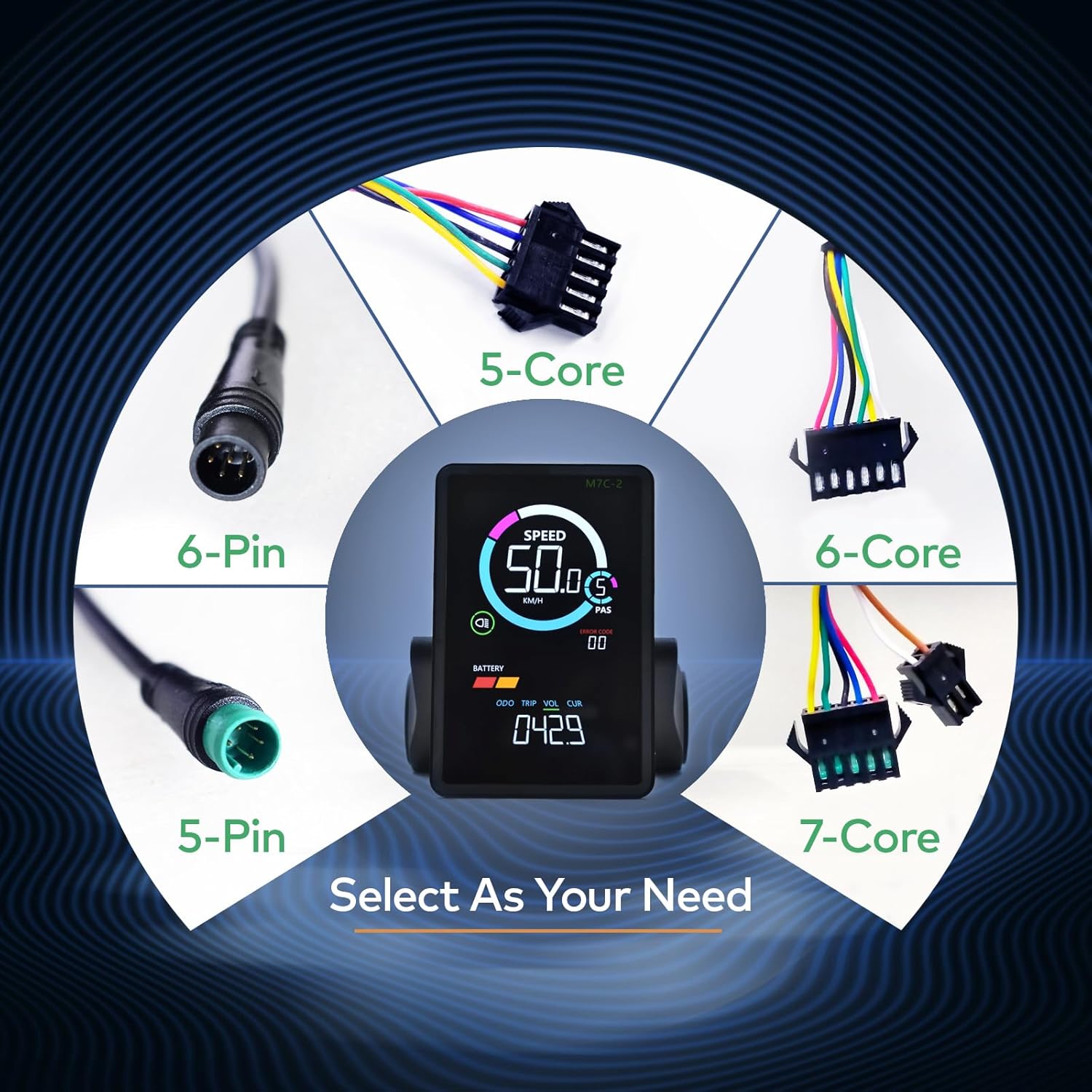
Figure 4: Cable Selection. This image displays different cable types, emphasizing the importance of selecting the correct 5-pin connector for this specific display model.
6. Istruzioni per l'uso
6.1 Accensione/Spegnimento
To power on the display, press and hold the power button on the keypad. To power off, press and hold the power button again.
6.2 Interfaccia di visualizzazioneview

Figure 5: Display Metrics. This image labels the various metrics shown on the display, including speed, PAS level, battery indicator, headlight indicator, error code, odometer, trip distance, voltage, e corrente.
Il display fornisce informazioni in tempo reale sulla tua corsa:
- Velocità: Velocità di guida attuale (km/h o mph).
- PAS (Sistema di pedalata assistita): Livello attuale di assistenza alla pedalata.
- Batteria: Remaining battery charge level.
- Indicatore dei fari: Shows if the ebike's headlight is active.
- Codice di errore: Displays numerical codes for system faults. Refer to the included "Fault Code Description" sheet for details.
- Area di visualizzazione multifunzionale: Cycles through Odometer (ODO), Trip Distance (TRIP), Battery Voltage (VOL), and Motor Current (CUR).
6.3 Navigating Settings
Use the keypad buttons (typically +, -, and power/mode) to navigate through display modes and adjust settings. Specific button functions may vary; refer to the detailed instructions in the included User's Manual for precise navigation.
6.4 Modifica dei parametri
The display allows you to modify key parameters to optimize your ebike's performance:
- Diametro ruota: Adjust this setting to match your ebike's wheel size for accurate speed and distance readings.
- Limite di velocità: Impostare la velocità massima assistita in base alle normative locali o alle preferenze personali.
Accessing and modifying these parameters typically involves entering a settings menu by holding specific buttons. Consult the included User's Manual for the exact procedure.
6.5 Modalità speciali
- Modalità di assistenza alla camminata: Provides low-speed assistance for pushing the ebike when walking.
- Controllo della velocità di crociera: Maintains a set speed without continuous throttle or pedal input.
Activation of these modes is usually done via specific button combinations. Refer to the comprehensive User's Manual for detailed instructions.
6.6 porta di ricarica USB
The display includes a 5V/500mA USB port on its side, allowing you to charge mobile devices while riding. Ensure the port cover is securely closed when not in use to maintain its waterproof integrity.
7. Manutenzione
- Pulizia: Pulisci lo schermo e il corpo del display con un panno morbido e asciutto.amp cloth. Do not use abrasive cleaners or solvents, as these can damage the screen or housing.
- Protezione dell'acqua: While the display is IPX65 waterproof, avoid submerging it in water. Ensure the USB port cover is always closed when not in use to prevent water ingress.
- Magazzinaggio: When not in use for extended periods, store the ebike and display in a dry, cool place away from direct sunlight.
- Verifica della connessione: Periodically inspect the cable connections for any signs of wear, corrosion, or looseness.
8. Risoluzione Dei Problemi
If you encounter issues with your Mcezdy Ebike LCD Display, consider the following common troubleshooting steps:
- Il display non si accende:
- Controllare che la batteria della bici elettrica sia carica e collegata correttamente.
- Assicurarsi che tutti i cavi del display siano collegati saldamente al controller.
- Verify that the display's power button is being pressed and held correctly.
- Letture errate di velocità/distanza:
- Check the wheel diameter setting in the display's parameters. Adjust it to match your ebike's actual wheel size.
- Ensure the speed sensor on your ebike is clean and properly aligned.
- Codici di errore visualizzati:
If an error code appears on the display, refer to the dedicated "Fault Code Description" sheet included with your product. This sheet provides specific meanings for each code and recommended actions.
- Ricarica USB non funzionante:
- Ensure the ebike is powered on.
- Check the USB cable and the device being charged for proper connection.
Se questi passaggi non risolvono il problema, contattare l'assistenza clienti per ulteriore assistenza.
9. Specifiche
| Numero di modello | M7C-2-5-Pin |
| Marca | Mcezdy |
| Tipo di visualizzazione | LCD (a colori) |
| Tecnologia di connettività | UART NO.2 (Wired, 5-Pin Connector) |
| Volume di lavorotage | Corrente continua 24 V, 36 V, 48 V, 60 V |
| Valutazione internazionale di protezione | Grado di protezione IPX65 |
| Tipo di montaggio | Handlebar Mount (22.2mm, 25.4mm, 31.8mm) |
| Porta di ricarica USB | 5V/500mA |
| Lunghezza del cavo esposta | 150mm (Waterproof Cable) |
| Materiale | ABS+PC Housing, Tempered Glass Screen, Nylon Bracket |
| Peso dell'articolo | 249 grammi |

Figure 6: Product Dimensions and Electrical Specifications. This image provides key physical dimensions, cable length, compatible product models, and operating voltage range for the display.
10. Garanzia e supporto
For warranty information and customer support, please refer to the specific warranty card or documentation included with your purchase. You may also contact the retailer or manufacturer directly for assistance with product inquiries, technical support, or warranty claims.
Conservare la prova d'acquisto per eventuali servizi di garanzia.