
1. Introduzione
Thank you for choosing the FLEXISPOT QB2W-2080-IE Height Adjustable Standing Desk. This electric standing desk is designed to provide a versatile and ergonomic workspace, allowing you to easily switch between sitting and standing positions. Featuring a robust dual-motor lift system, intelligent control panel with memory functions, and an anti-collision system, this desk offers stability, efficiency, and safety for your daily work.
2. Informazioni sulla sicurezza
Please read all safety instructions carefully before assembly and use to prevent injury or damage to the product. Keep this manual for future reference.
- Capacità di peso massima: Non superare la capacità di carico statico massima di 120 kg (264 libbre) or dynamic load capacity of 100 kg (220 libbre)Il sovraccarico può causare instabilità e danni.
- Intervallo di regolazione dell'altezza: Ensure the desk operates within its specified height range of Da 70 cm a 119 cm (da 27.6 pollici a 46.9 pollici) for optimal stability and safety.
- Bambini e animali domestici: Per evitare incidenti, tenere bambini e animali domestici lontani dalla scrivania durante il funzionamento.
- Alimentazione elettrica: Connect the desk only to a properly grounded power outlet. Do not use damaged power cords or adapters.
- Liquidazione: Ensure there are no obstructions above or below the desk during height adjustments to allow the anti-collision system to function effectively.
- Montaggio: Assembly requires two people. Ensure all components are securely fastened before use.
- Fuoriuscite di liquidi: Avoid spilling liquids on the control panel or electrical components. In case of a spill, immediately disconnect power and allow to dry completely before reconnecting.
3. Contenuto della confezione
Prima di iniziare il montaggio, verificare che tutti i componenti siano presenti e integri. Se qualche componente risulta mancante o danneggiato, contattare l'assistenza clienti.
- Desktop (4 parti)
- Gambe per scrivania (2)
- Componenti del telaio
- Dual Motor Lift System
- Pannello di controllo
- Adattatore di alimentazione e cavo
- All necessary assembly tools and connection elements
- Manuale d'uso
4. Installazione e assemblaggio
Assembly of the FLEXISPOT QB2W-2080-IE desk requires approximately 2 people and includes all necessary tools. Follow these general steps:
- Disimballare i componenti: Estrarre con cautela tutti i componenti dall'imballaggio e disporli su una superficie pulita e morbida per evitare graffi.
- Assemblare il telaio: Attach the crossbars to the lifting columns (desk legs) using the provided hardware. Ensure all screws are tightened securely.
- Fissare le gambe della scrivania: Fissare i piedi alla parte inferiore delle colonne di sollevamento.
- Montare il desktop: Place the desktop sections onto the assembled frame. The desktop is made of 4 parts and includes connection elements for stability. Align the pre-drilled holes and secure the desktop to the frame using the provided screws.
- Collegare il pannello di controllo e l'alimentazione: Connect the control panel cable to the motor control box. Then, connect the power adapter to the control box and plug it into a grounded power outlet.
- Gestione dei cavi: Use the included cable ties or management accessories to organize cables neatly under the desk.
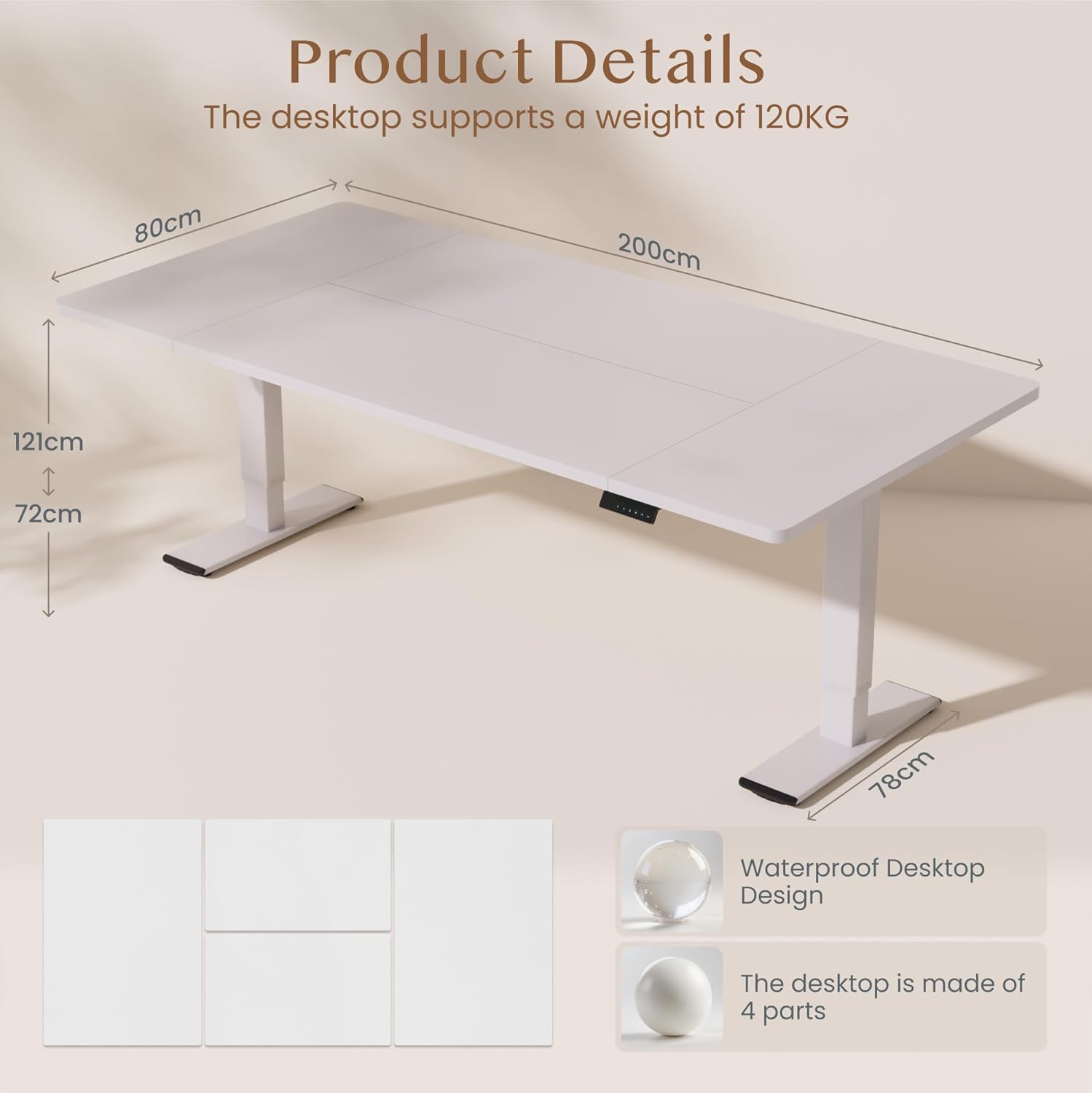
Immagine: Product details of the FLEXISPOT standing desk, illustrating its dimensions (200cm length, 80cm width, 72-121cm height range) and the four-part, waterproof desktop design. The desktop supports a weight of 120KG.

Immagine: The FLEXISPOT standing desk shown at its minimum (72cm) and maximum (121cm) height, demonstrating its height adjustability for both sitting and standing positions.
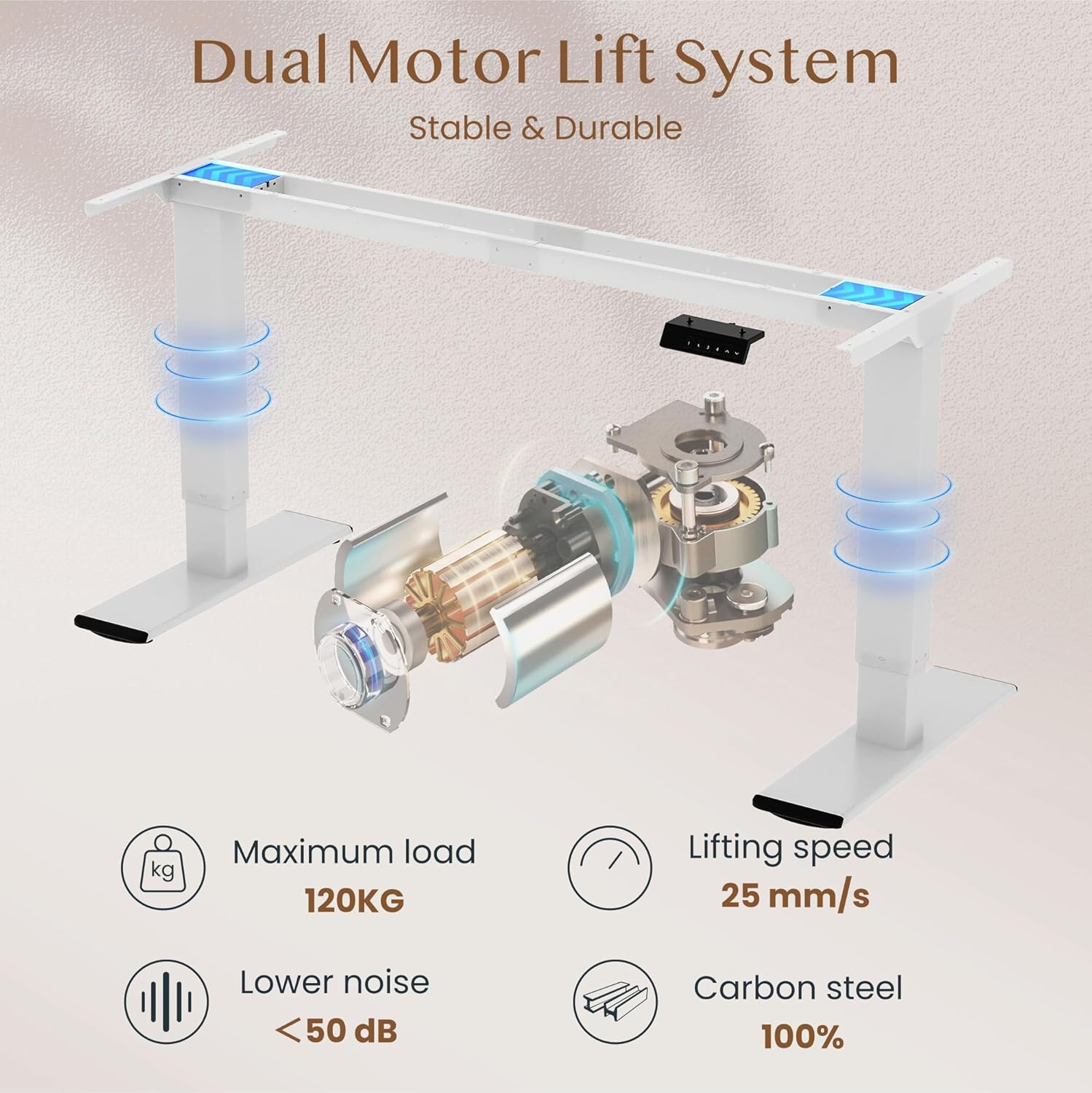
Immagine: Diagram illustrating the FLEXISPOT dual motor lift system, highlighting its stable and durable design. Key specifications like maximum load (120KG), lifting speed (25 mm/s), lower noise (<50 dB), and 100% carbon steel construction are visible.
5. Istruzioni per l'uso
The FLEXISPOT QB2W-2080-IE desk features an intuitive control panel for easy height adjustment and memory functions.
5.1. Regolazione base dell'altezza
- Premere il tasto "^" (Up) pulsante per sollevare la scrivania.
- Premere il tasto "v" (Down) pulsante per abbassare la scrivania.
- Release the button to stop the desk at the desired height.
5.2. Preimpostazioni di memoria
Il pannello di controllo consente di salvare fino a quattro impostazioni di altezza preferite.
- Regolare la scrivania all'altezza desiderata utilizzando i pulsanti Su/Giù.
- Premere il tasto "M" (Memory) button (often represented by a 'f' symbol). The LED display will show "S-".
- Premere immediatamente uno dei pulsanti numerici ("1", "2", "3", or "4") to save the current height to that preset. The display will show "S-1", "S-2", etc., to confirm.
- To recall a saved height, simply press the corresponding number button. The desk will automatically move to the saved position.
5.3. Funzione anticollisione
The desk is equipped with an anti-collision system that automatically stops and slightly reverses the desk's movement if it encounters an obstruction during height adjustment. This feature enhances safety and prevents damage to the desk or other objects.

Immagine: Close-up of the FLEXISPOT intelligent control panel, showing buttons for Up & Down adjustment, 4 Memory Heights, an LED Screen, and the Anti-Collision Function indicator.

Immagine: The FLEXISPOT standing desk in an office setting, illustrating its smooth and quiet operation with a lifting speed of 25mm/s and noise levels below 50 dB. The control panel is visible under the desk.

Immagine: A visual comparison demonstrating the FLEXISPOT safety collision avoidance system. One side shows an object being avoided by the desk's upward movement (WITH Anti-Collision Function), while the other side implies a collision without the function.
6. Manutenzione
Una manutenzione regolare garantisce la longevità e le prestazioni ottimali della scrivania in piedi FLEXISPOT.
- Pulizia: Pulisci la superficie e le gambe della scrivania con un pannoamp panno. Evitare l'uso di prodotti chimici aggressivi o detergenti abrasivi che potrebbero danneggiare la finitura.
- Controllare le connessioni: Controllare periodicamente tutte le viti e i bulloni per assicurarsi che siano ben serrati. Serrarli nuovamente se necessario.
- Gestione dei cavi: Ensure all cables are neatly organized and not pinched or tangled, which could affect desk operation or cause damage.
- Evitare il sovraccarico: Do not place items exceeding the maximum weight capacity on the desk.
7. Risoluzione Dei Problemi
Se riscontri problemi con la tua scrivania, fai riferimento ai seguenti passaggi comuni per la risoluzione dei problemi:
- La scrivania non si muove:
- Controllare che il cavo di alimentazione sia collegato saldamente sia alla scrivania sia alla presa a muro.
- Assicurarsi che non vi siano ostacoli che impediscano il movimento.
- Prova a resettare la scrivania scollegandola per 10 secondi e poi ricollegandola.
- Codici di errore sul display:
- If an error code appears, consult the specific error code section in the full manual (if available) or contact customer support. Often, a reset (unplugging and replugging) can clear minor errors.
- Uneven Movement/Instability:
- Assicurarsi che la scrivania sia su una superficie piana.
- Controllare che tutte le viti di montaggio siano serrate.
- Verify that the weight on the desk is evenly distributed and does not exceed the maximum capacity.
- Anti-Collision System Triggering Unnecessarily:
- Ensure there are no loose cables or objects near the desk's path that could be mistaken for an obstruction.
Se questi passaggi non risolvono il problema, contattare l'assistenza clienti FLEXISPOT per ulteriore assistenza.
8. Specifiche
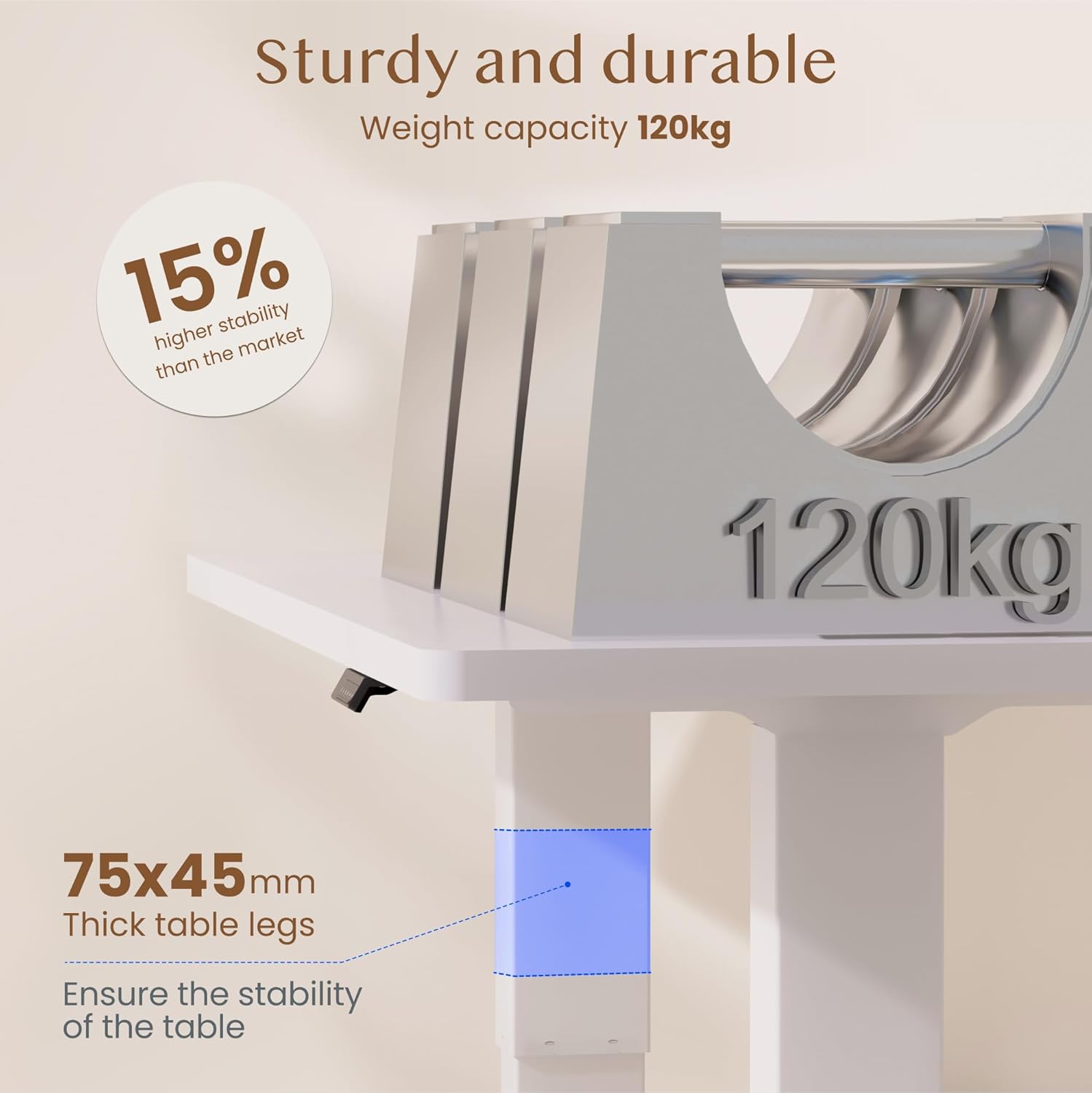
Immagine: The FLEXISPOT standing desk highlighting its sturdy and durable construction, specifically the 75x45mm thick table legs designed to ensure stability and support a weight capacity of 120kg.

Immagine: Un primo piano view of the FLEXISPOT desk's thickened table legs, illustrating the adjustable height range from 70cm to 119cm, providing unmatched stability.
| Caratteristica | Specificazione |
|---|---|
| Numero di modello | QB2W-2080-IE |
| Marca | FLESSIBILE |
| Dimensioni (L x P x A) | 200 x 80 x 72 cm (altezza minima) |
| Gamma di regolazione dell'altezza | 70 cm - 119 cm (27.6 pollici - 46.9 pollici) |
| Spessore della scrivania | 25 millimetri |
| Maximum Load Capacity (Static) | 120 kg (264 libbre) |
| Maximum Load Capacity (Dynamic) | 100 kg (220 libbre) |
| Sistema di sollevamento | Doppio motore |
| Velocità di sollevamento | 25 millimetri/secondo |
| Livello di rumore | < 50 dB |
| Materiale | Alloy Steel (Base and Top Material) |
| Colore | Bianco |
| Assemblaggio richiesto | Yes (2 people recommended, tools included) |
| Caratteristiche speciali | Electric, 4 Memory Presets, Anti-Collision System |
| Peso del prodotto | 40.9 kg |
| Codice UPC | 810072889508 |
9. Garanzia e supporto
For warranty information, product support, or to report any issues, please contact FLEXISPOT customer service. Keep your purchase receipt and model number (QB2W-2080-IE) handy when contacting support.
The seller for this product is FLEXISPOT GmbH. Please refer to their official websito o nella documentazione di acquisto per i termini di garanzia specifici e i dettagli di contatto.