
Techmade TM-URI01
Techmade Universal 3-in-1 Remote Control (Model TM-URI01) Instruction Manual
Introduzione
This manual provides comprehensive instructions for the setup, operation, and maintenance of your Techmade Universal 3-in-1 Remote Control, Model TM-URI01. This remote is designed to consolidate control of up to three infrared devices, including televisions, set-top boxes (digital terrestrial and satellite), and DVD players, offering broad compatibility with brands such as Samsung, LG, and Sony.
1. Impostazione
1.1 Installazione della batteria
Il telecomando richiede due batterie AAA (non incluse). Per installarle, segui questi passaggi:
- Individuare il coperchio del vano batterie sul retro del telecomando.
- Premere la linguetta e far scorrere il coperchio verso il basso.
- Inserire due batterie AAA, assicurandosi che i terminali positivo (+) e negativo (-) siano allineati correttamente con le marcature all'interno del vano.
- Riposizionare il coperchio del vano batteria finché non scatta in posizione.
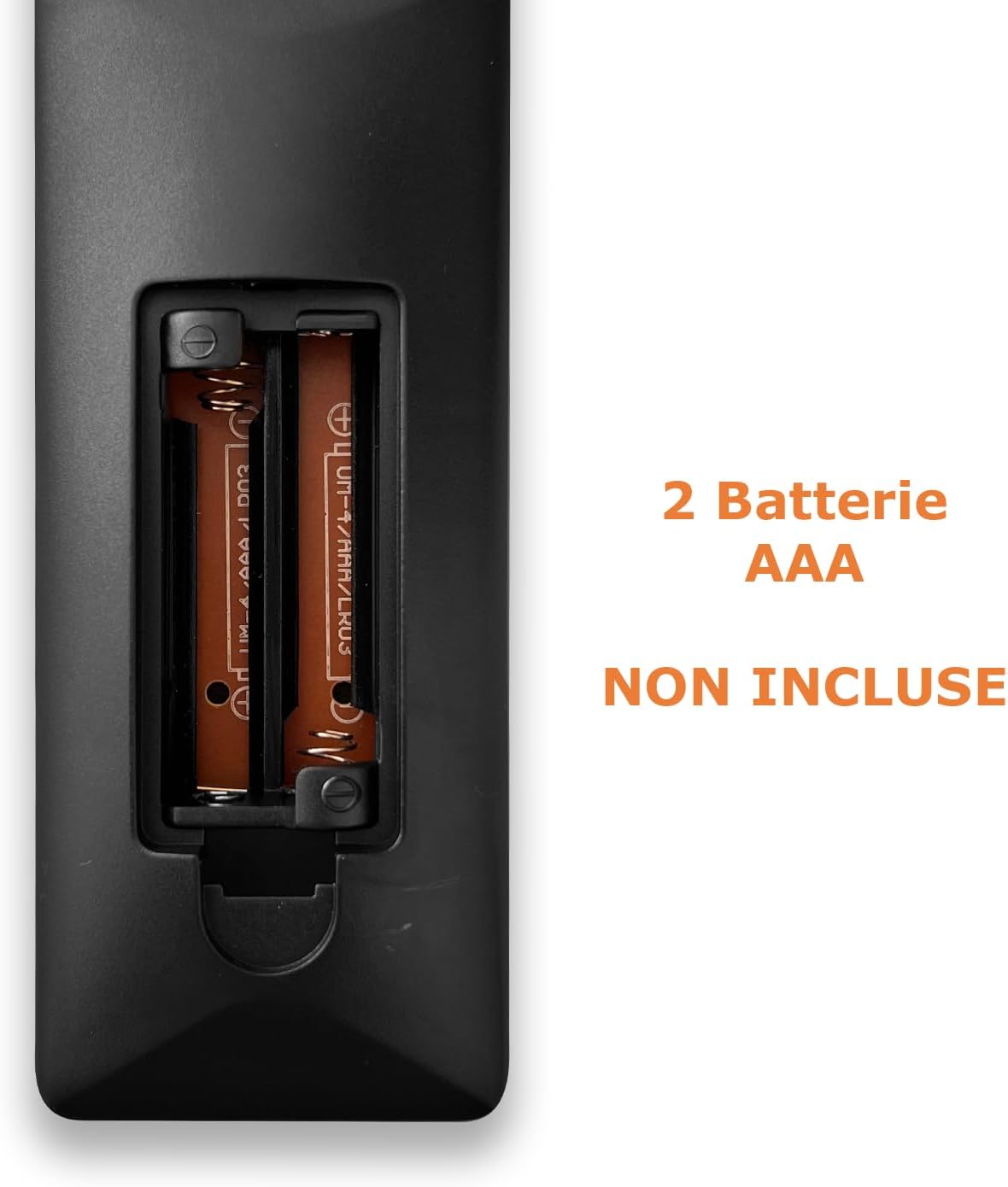
Image: Back of the remote control with the battery compartment open, indicating where to insert two AAA batteries.
1.2 Programmazione del telecomando
The Techmade TM-URI01 remote control can be programmed to operate up to three different devices (TV, SAT/DVB-T, DVD). The remote retains its settings even when batteries are removed, thanks to its permanent memory.
Method 1: Direct Code Entry (Recommended)
- Turn on the device you wish to control (e.g., TV, Set-top box, DVD player).
- Premere e tenere premuto il pulsante del dispositivo corrispondente sul telecomando (ad esempio, TV, SAB, DVD) for approximately 3 seconds until the indicator light (usually the power button LED) illuminates and stays on.
- Enter the 4-digit code for your device's brand. A list of common codes is typically provided in a separate code booklet (not included in this manual). For example, for Samsung TVs, try codes like 0001, 0002, etc.
- If the indicator light turns off, the code has been accepted. Test the remote by pressing the Power button. If the device turns off, the programming was successful.
- Se il dispositivo non risponde, ripetere la procedura con il codice successivo per la propria marca.
Method 2: Auto Code Search
- Accendi il dispositivo che desideri controllare.
- Press and hold the corresponding device button (e.g., TV, SAB, DVD) for approximately 3 seconds until the indicator light illuminates and stays on.
- Premere il tasto Energia button once. The indicator light will start flashing, indicating the remote is searching for a code.
- Point the remote at your device. When the device turns off, immediately press the device button (e.g., TV) again to save the code.
- Test the remote's functions. If not all functions work, repeat the auto-search process to find a more compatible code.

Image: The remote control's button layout, highlighting device selection and power buttons for programming.
2. Utilizzo del telecomando
Once programmed, your Techmade TM-URI01 remote control functions similarly to your original device remotes. Here are the basic operations:

Immagine: Frontale view of the Techmade TM-URI01 remote control, showing its complete 48-button layout.
- Selezione del dispositivo: Premere il tasto TV, SAB, O DVD button to select the device you wish to control. The remote will then send commands to that specific device.
- Energia: IL Energia button (usually red) turns the selected device on or off.
- Controllo del volume: Utilizzare il Volume+ E vol- Pulsanti per regolare il volume.
- Controllo del canale: Utilizzare il CH+ E CH- pulsanti per cambiare canale.
- Tastiera numerica: Utilizzare i pulsanti numerici (0-9) per immettere direttamente i numeri dei canali o altre selezioni numeriche.
- Navigazione: The directional arrow buttons (UP, GIÙ, SINISTRA, GIUSTO) E OK I pulsanti vengono utilizzati per la navigazione e la selezione del menu.
- Menù/Guida: Pulsanti come MENU E GUIDA access the respective functions on your device.
- Controlli di riproduzione: Pulsanti come Giocare, Pausa, Fermare, Avanti veloce, E Riavvolgere are available for DVD or media player control.
Per le funzioni specifiche che potrebbero essere assegnate ai pulsanti del telecomando universale, fare riferimento al manuale originale del dispositivo.
3. Manutenzione
Per garantire la longevità e le prestazioni ottimali del tuo telecomando, segui queste linee guida per la manutenzione:
- Pulizia: Pulire regolarmente il telecomando con un panno morbido e asciutto. Per lo sporco ostinato, pulire leggermenteampLavare il panno con acqua o una soluzione detergente delicata, quindi asciugarlo immediatamente. Evitare l'uso di detergenti abrasivi o solventi.
- Sostituzione della batteria: Replace batteries when the remote's response becomes sluggish or the indicator light fails to illuminate. Always replace both batteries at the same time with new AAA batteries. Do not mix old and new batteries, or different types of batteries.
- Magazzinaggio: Conservare il telecomando in un luogo fresco e asciutto, lontano dalla luce solare diretta e da temperature estreme. Se il telecomando non viene utilizzato per un periodo prolungato, si consiglia di rimuovere le batterie per evitare perdite.
- Evitare gocce: Proteggere il telecomando da cadute e urti, poiché potrebbero danneggiare i componenti interni.
4. Risoluzione Dei Problemi
If you experience issues with your Techmade TM-URI01 remote control, consult the following troubleshooting tips:
- Il telecomando non funziona:
- Assicurarsi che le batterie siano installate correttamente con la polarità corretta (+/-).
- Sostituisci le vecchie batterie con nuove batterie AAA.
- Make sure you have selected the correct device (TV, SAT, DVD) using the device selection buttons.
- Point the remote directly at the device's infrared receiver, ensuring no obstructions are in the way.
- Verify that the remote is within the effective operating range (up to 10 meters).
- Il dispositivo non risponde dopo la programmazione:
- The code entered may be incorrect or not fully compatible. Try another code from the code list for your device's brand.
- Perform the auto code search method again.
- Ensure the device was turned on before starting the programming process.
- Alcune funzioni non funzionano:
- Not all functions of your original remote may be available or mapped to the universal remote.
- Try programming the remote with a different code for your device, as some codes offer better compatibility for specific functions.
- La spia luminosa non si illumina:
- Controllare l'installazione delle batterie e sostituirle se necessario.
- Se il problema persiste dopo aver sostituito le batterie, il telecomando potrebbe essere difettoso.
5. Specifiche
| Caratteristica | Dettaglio |
|---|---|
| Marca | Techmade |
| Numero di modello | TM-URI01 |
| Tecnologia di connettività | Infrarossi |
| Numero di dispositivi supportati | Up to 3 (TV, SAT/DVB-T, DVD) |
| Dispositivi compatibili | TVs (Samsung, LG, Sony, and others), Set-top boxes, DVD/Blu-ray players |
| Numero di pulsanti | 48 |
| Portata massima | 10 metri |
| Tipo di batteria | 2 x AAA alcaline (non incluse) |
| Peso | 200 grammi |
| Caratteristica speciale | Lightweight, Permanent Memory (retains settings without batteries) |
| Colore | Nero |
6. Informazioni sulla garanzia
Specific warranty details for the Techmade Universal 3-in-1 Remote Control (Model TM-URI01) are not provided within this instruction manual. Please refer to the retailer's purchase terms or the official Techmade websito per informazioni sulla copertura e sui termini della garanzia.
7. Assistenza clienti
For further assistance, technical support, or inquiries regarding your Techmade Universal 3-in-1 Remote Control, please visit the official Techmade website or contact your retailer. Contact information is not provided directly in this manual.
Ask a question about this manual
Ask about setup, troubleshooting, compatibility, parts, safety, or missing instructions. Manuals+ will review the question and use this page’s manual context to help answer it.