
SNAKOL SK216
SNAKOL SK216 Pen Type Digital Multimeter Instruction Manual
Model: SK216 | Brand: SNAKOL
Your comprehensive guide to operating and maintaining your SNAKOL SK216 Pen Type Digital Multimeter.
1. Introduzione
The SNAKOL SK216 is a versatile 2-in-1 pen-type digital multimeter designed for electrical equipment testing and maintenance. It features True RMS measurement capabilities for AC voltage, resistance, diodes, and continuity. Additionally, it includes functions such as Non-Contact Voltage (NCV) detection, live/null wire identification, and a clear LCD backlit screen for easy readings in various lighting conditions. Its compact and portable design makes it an essential tool for both professional electricians and home users.
2. Informazioni sulla sicurezza
Always observe safety precautions when using electrical testing equipment. Failure to do so may result in injury or damage to the device. Read all instructions carefully before use.
- Non superare i valori massimi di input specificati per ciascuna funzione di misurazione.
- Prima di effettuare qualsiasi misurazione, assicurarsi che i puntali siano in buone condizioni e correttamente collegati.
- Non utilizzare il dispositivo se appare danneggiato o non funziona correttamente.
- Prestare la massima attenzione quando si lavora su circuiti sotto tensione.
- Scollegare sempre l'alimentazione dal circuito prima di misurare la resistenza, la continuità o i diodi.
- Durante le misurazioni, tenere le mani e le dita dietro le barriere della sonda.
- Per garantire letture accurate, sostituire tempestivamente le batterie quando compare l'indicatore di batteria scarica.
3. Contenuto della confezione
Verifica che tutti gli articoli siano presenti nel tuo pacco:
- 1 x SNAKOL SK216 Pen-type Multimeter
- 1 x Probe (removable multimeter lead)
- 1 x Manuale utente (questo documento)
- 2 batterie AAA da 1.5 V
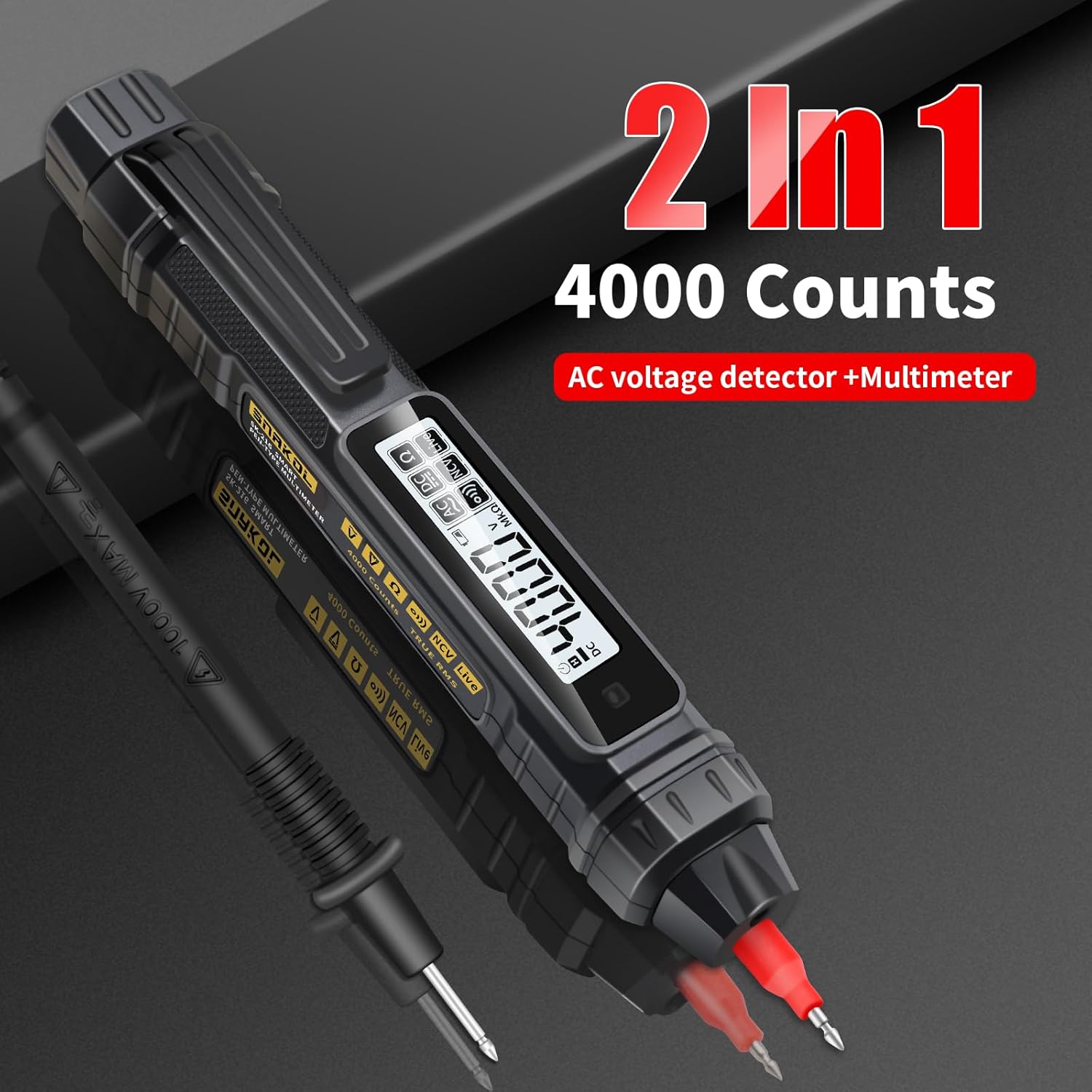
Image: Contents of the SNAKOL SK216 package, including the multimeter, probe, and batteries.
4. Impostazione
4.1 Installazione della batteria
The SNAKOL SK216 requires two 1.5V AAA batteries. These are included in the package.
- Individuare il coperchio del vano batteria sul retro del multimetro.
- Per aprire il vano, far scorrere o sganciare il coperchio.
- Inserire due batterie AAA, assicurandosi della corretta polarità (+ e -).
- Chiudere saldamente il coperchio del vano batterie.
Video: Demonstrates the battery installation process for the SNAKOL SK216 multimeter.

Image: Close-up of the SNAKOL SK216 multimeter with the battery compartment open, showing two AAA batteries inserted.
4.2 Collegamento della sonda
The included probe can be connected to the multimeter for various measurements.
- Identify the input jack on the top of the multimeter.
- Insert the plug end of the probe cable firmly into the input jack.
- The probe tip can be removed or attached as needed for different measurement scenarios.
Video: Demonstrates how to connect the removable multimeter leads and probes to the device.
5. Istruzioni per l'uso
The SNAKOL SK216 features automatic ranging and function switching for ease of use. Press the power button to turn the device on or off. The device will typically start in auto-ranging mode.
5.1 Function Switching and Auto-Range
The multimeter automatically detects the measurement type (AC/DC voltage, resistance, continuity) when powered on. You can cycle through different measurement modes by pressing the function button (often labeled 'FUNC' or similar, or indicated by a specific icon).
Video: Shows the function switching and auto-ranging capabilities of the multimeter.

Image: Illustrates the one-touch measurement capabilities for resistance, AC voltage, DC voltage, and continuity (on-off test).
5.2 Volume CCtage Misurazione
Per misurare DC voltage:
- Ensure the multimeter is powered on and in DC voltage mode (often auto-detected).
- Connect the black probe to the negative terminal and the red probe to the positive terminal of the DC source.
- Leggi il vol.tage valore visualizzato sullo schermo LCD.
Video: Shows the process of measuring DC voltage using the multimeter on a battery.
5.3 Volume ACtage Misurazione
Per misurare AC voltage:
- Ensure the multimeter is powered on and in AC voltage mode (often auto-detected).
- Carefully touch the probes to the live and neutral terminals of the AC source.
- Leggi il vol.tage valore visualizzato sullo schermo LCD.
Video: Demonstrates measuring AC voltage su un interruttore automatico.
5.4 Misurazione della resistenza
Per misurare la resistenza:
- Prima di misurare la resistenza, assicurarsi che il circuito o il componente siano disattivati.
- Select resistance mode (Ω) or allow auto-detection.
- Collegare le sonde al componente da misurare.
- Leggere il valore di resistenza sul display.
Video: Illustrates how to measure resistance on a circuit board component.
5.5 Prova di continuità
The continuity test checks for an unbroken path in a circuit. A buzzer will sound if resistance is below approximately 50Ω.
- Assicurarsi che il circuito sia disattivato.
- Select continuity mode (often indicated by a speaker icon) or allow auto-detection.
- Mettere in contatto le sonde con i due punti di cui si desidera verificare la continuità.
- A beep indicates continuity.
Video: Demonstrates the continuity test with an audible beep.
5.6 Senza contatto voltage (NCV) Rilevamento
La funzione NCV consente il rilevamento della tensione alternatatage senza contatto diretto, aumentando la sicurezza.
- Select NCV mode (often indicated by a wave icon).
- Bring the tip of the multimeter close to the conductor or electrical outlet.
- An analog bar on the LCD screen, accompanied by beeps of varying rhythms, indicates the presence and strength of the electric field.

Image: Shows the multimeter performing NCV detection, with the screen displaying an analog bar and an indicator light.
Video: Demonstrates NCV AC Voltage Test in an electrical panel.
5.7 Live/Null Wire Identification (Firewire/Zero Line)
This function helps distinguish between live (fire) and neutral (zero) wires.
- Touch the multimeter's tip to the wire.
- For a live wire (firewire), the indicator light will illuminate, the screen will display "----", and a "beep beep beep" sound will be emitted.
- For a neutral wire (zero line), the indicator light will not illuminate, the screen will display "L iUE", and no sound will be emitted.
Image: Illustrates the multimeter detecting a live (firewire) and neutral (zero line) wire, showing distinct screen indicators and sounds.
Video: Demonstrates Zero Fire Wire Identification in an electrical panel.
5.8 Breakpoint Finder
The breakpoint finder function helps locate breaks in a cable.
- Apply the multimeter tip along the length of the cable.
- Il dispositivo indicherà la presenza di voltage up to the point of the break. The signal will cease or change significantly past the break.
Video: Shows the breakpoint finder function being used on a cable.
5.9 Funzione di conservazione dei dati
Premere il pulsante 'HOLD' per bloccare la lettura corrente sul display. Premerlo nuovamente per disattivare la funzione di blocco.
5.10 Torcia elettrica
The built-in flashlight can be activated to illuminate dimly lit work areas. Refer to the device's buttons for flashlight activation (often a long press on a specific button or a dedicated button).
Video: Demonstrates the flashlight lighting feature of the multimeter.
6. Manutenzione
6.1 Cura generale
- Mantenere il dispositivo pulito e asciutto. Pulire con un panno morbido e asciutto.amp panno se necessario. Non utilizzare detergenti abrasivi o solventi.
- Conservare il multimetro in un luogo fresco e asciutto, lontano dalla luce solare diretta e da temperature estreme.
- Evitare di far cadere il dispositivo o di sottoporlo a forti impatti.
6.2 Sostituzione della batteria
When the low-battery indicator appears on the display, replace the batteries immediately to ensure accurate measurements and proper device function. Follow the steps outlined in Section 4.1 Battery Installation.
7. Risoluzione Dei Problemi
| Problema | Possibile causa | Soluzione |
|---|---|---|
| Il dispositivo non si accende. | Batterie scariche o installate in modo errato. | Controllare la polarità delle batterie e sostituirle se necessario. |
| Letture imprecise. | Low battery, incorrect mode selection, or damaged probes. | Replace batteries, ensure correct measurement mode, inspect and replace probes if damaged. |
| NCV function gives false positives/negatives. | Environmental interference or proximity to other electrical fields. | Test in a different location or use direct contact measurement for verification. |
| Il cicalino di continuità non suona. | Open circuit or resistance too high. | Verify the circuit path; the resistance might be above the continuity threshold. |
8. Specifiche
| Caratteristica | Dettaglio |
|---|---|
| Modello | SK216 |
| Produttore | SNAKOL |
| Peso dell'articolo | 109 grammi |
| Dimensioni del prodotto | Dimensioni: 18.49 x 2.54 x 3.05 cm |
| Batterie | Sono necessarie 2 batterie AAA (incluse) |
| Precisione della misurazione | +/-1.2% |
| min. Operativo Voltage | 2 Volt |
| Funzioni | Volume AC/DCtage, Resistance, Diode, Continuity, NCV, Null/Live Wire Detection, Auto-Ranging, Backlit Display, Flashlight |
| Volume massimotage | 600V |
9. Garanzia e supporto
SNAKOL products are designed for reliability and performance. For warranty information or technical support, please refer to the contact details provided with your purchase or visit the official SNAKOL website. Customer services are always our top priority. If there are any concerns, please feel free to contact us for quick assistance.
Ask a question about this manual
Ask about setup, troubleshooting, compatibility, parts, safety, or missing instructions. Manuals+ will review the question and use this page’s manual context to help answer it.