
1. Prodotto finitoview
The MOES Smart WiFi Thermostat PJ02-GC is designed for controlling gas boiler and underfloor heating systems. It offers intelligent temperature regulation, remote control via a smartphone app, and voice control compatibility with popular assistants like Amazon Alexa and Google Home. This thermostat helps optimize energy consumption through programmable scheduling and user-friendly features.
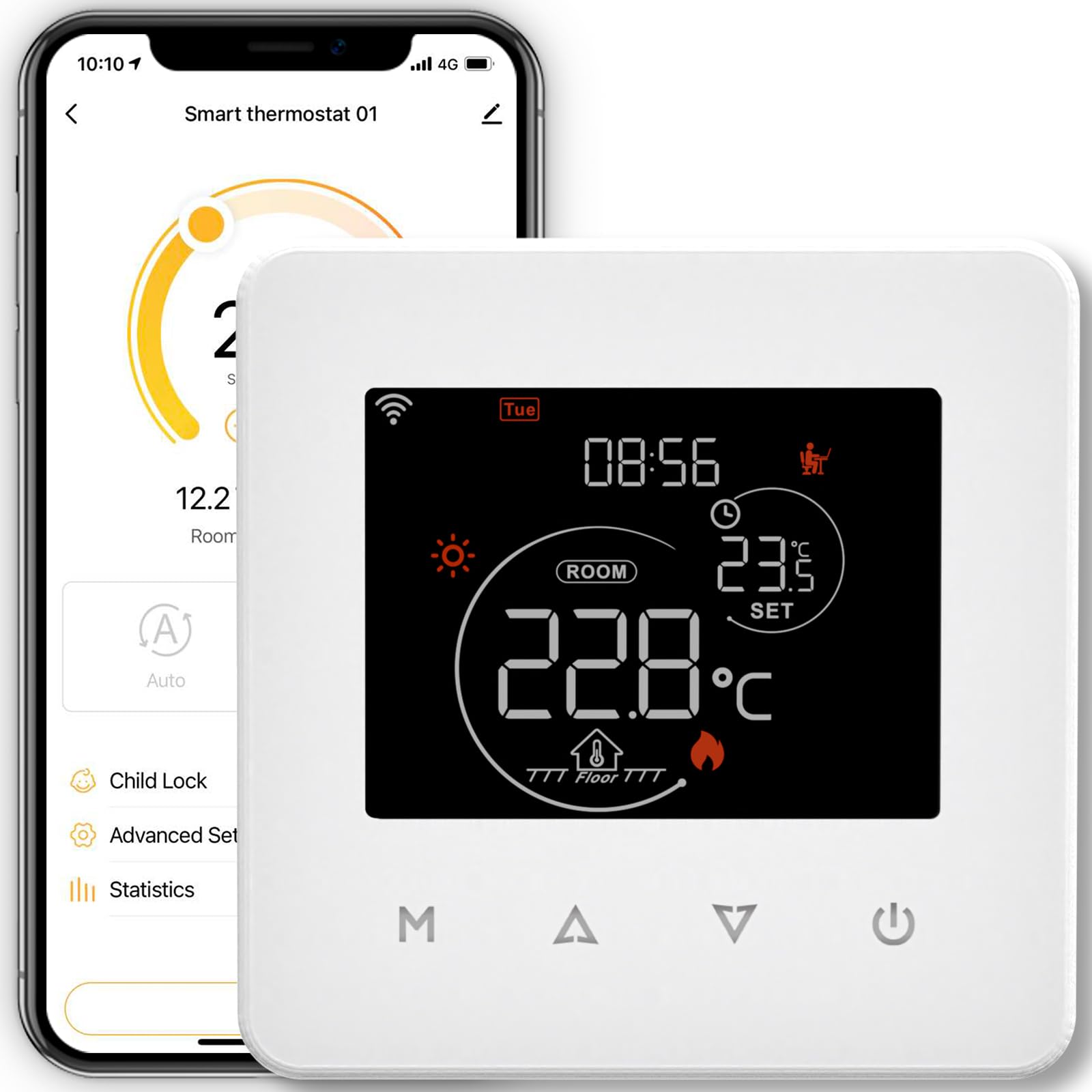
Questa immagine mostra la parte anteriore view of the MOES Smart WiFi Thermostat PJ02-GC, featuring its touch screen display.
Caratteristiche principali:
- Controllo intelligente: Wi-Fi enabled for remote management via Moes, Tuya, or Smart Life apps (2.4 GHz Wi-Fi required).
- Risparmio energetico: Supports 5+1+1 programmable schedules with six temperature periods per day to optimize energy use.
- Compatibilità con l'assistente vocale: Funziona con Amazon Alexa e Google Home per un comodo controllo vocale.
- Interfaccia intuitiva: Touch screen display with adjustable backlight and screen lock function to prevent accidental changes.
- Protezione da interruzione di corrente: All settings are securely stored in case of a power outage.
- Visualizzazione delle informazioni meteorologiche: Can retrieve and display local weather data.
2. Informazioni sulla sicurezza
Please read all safety instructions before installation and operation. Failure to follow these instructions may result in electric shock, fire, or other hazards.
- L'installazione deve essere eseguita da un elettricista qualificato.
- Prima dell'installazione o della manutenzione, scollegare l'alimentazione dall'interruttore automatico.
- Ensure the thermostat is compatible with your heating system (gas boiler or underfloor heating).
- Non esporre il dispositivo all'acqua o a umidità eccessiva.
- Tenere fuori dalla portata dei bambini.
3. Installazione e configurazione
3.1 Cosa c'è nella scatola
- MOES Smart WiFi Thermostat PJ02-GC
- Supporto di montaggio
- Cavo di alimentazione
- Manuale dell'utente (questo documento)
3.2 Schema elettrico
The thermostat operates on 230 Volts AC. Refer to the specific wiring diagram provided in the packaging for your heating system type (gas boiler or underfloor heating). Ensure all connections are secure and comply with local electrical codes. If you are unsure, consult a professional electrician.
3.3 Montaggio del termostato
Mount the thermostat in a central location away from direct sunlight, drafts, or heat sources that could affect temperature readings. Use the included mounting support to secure the thermostat to the wall. Ensure proper ventilation around the device.
3.4 Connessione all'App
- Download the Moes, Tuya Smart, or Smart Life app from your smartphone's app store.
- Registrati o accedi al tuo account.
- Ensure your smartphone is connected to a 2.4 GHz Wi-Fi network. The thermostat does not support 5 GHz Wi-Fi.
- Follow the in-app instructions to add a new device. This typically involves putting the thermostat into pairing mode.
3.5 Pairing with Wi-Fi
To put the thermostat into pairing mode, usually, you need to press and hold a specific button (often labeled 'M' or a Wi-Fi icon) on the thermostat until the Wi-Fi indicator starts blinking rapidly. Refer to the app's specific pairing guide for detailed steps, as the exact procedure may vary slightly.
4. Istruzioni per l'uso
4.1 Controlli di base
The thermostat features a touch screen for direct control. You can adjust the target temperature, switch between manual and automatic modes, and access settings directly from the display.
4.2 Programmazione
The thermostat supports a 5+1+1 weekly programming schedule, allowing you to set different temperature profiles for weekdays, Saturday, and Sunday. Each day can have up to six distinct time periods with corresponding temperature settings. This feature helps in energy saving by adjusting heating based on your daily routine.
- Access the scheduling menu via the app or directly on the thermostat.
- Set desired start times and temperatures for each of the six periods.
- Apply the schedule to weekdays (5 days), Saturday (1 day), and Sunday (1 day) as needed.
4.3 Integrazione del controllo vocale
Once connected to your smart home ecosystem (Amazon Alexa or Google Home), you can control the thermostat using simple voice commands. For exampon:
- "Alexa, imposta il termostato a 22 gradi."
- "Ehi Google, qual è la temperatura in soggiorno?"
4.4 Backlight and Screen Lock
- Regolazione della retroilluminazione: The brightness of the screen backlight can be adjusted in the settings. You can also configure the duration after which the backlight automatically turns off to save energy.
- Screen Lock (Child Lock): Activate the screen lock feature to prevent unauthorized or accidental changes to the thermostat settings, particularly useful in households with children.
5. Manutenzione
The MOES Smart WiFi Thermostat requires minimal maintenance. To ensure optimal performance and longevity:
- Pulisci lo schermo e l'esterno con un panno morbido e asciutto. Non utilizzare detergenti abrasivi o solventi.
- Ensure the area around the thermostat is free from dust and obstructions.
- Periodically check for firmware updates through the Moes/Tuya/Smart Life app to ensure you have the latest features and improvements.
6. Risoluzione Dei Problemi
If you encounter issues with your MOES Smart WiFi Thermostat, refer to the following table for common problems and solutions:
| Problema | Possibile causa | Soluzione |
|---|---|---|
| Il termostato non si connette al Wi-Fi | Incorrect Wi-Fi band (5GHz), weak signal, incorrect password, pairing mode not active. | Ensure your router is broadcasting a 2.4 GHz Wi-Fi signal. Move the thermostat closer to the router. Re-enter Wi-Fi password carefully. Activate pairing mode on the thermostat as per app instructions. |
| Inaccurate temperature readings or inconsistent heating | Thermostat placement, incorrect hysteresis (Switch Deviation) setting. | Ensure the thermostat is not in direct sunlight or near heat sources/drafts. Adjust the 'Switch Deviation' (hysteresis) setting in the advanced menu, typically to 0.5 degrees, to fine-tune temperature control. |
| Il controllo vocale non funziona | Not linked to voice assistant, incorrect device name, internet connectivity issues. | Ensure the Moes/Tuya/Smart Life skill/action is enabled in your Alexa or Google Home app. Verify the thermostat's name in the app. Check your home internet connection. |
| Lo schermo non risponde o si blocca | Problema temporaneo del software. | Prova a riavviare il termostato interrompendo temporaneamente l'alimentazione tramite l'interruttore automatico. Se il problema persiste, contatta l'assistenza. |
7. Specifiche tecniche
| Specificazione | Dettaglio |
|---|---|
| Marca | AVUTO |
| Numero di modello | PJ02-GC (3cc1548c-59eb-497b-a080-8b65aa8f3589) |
| Colore | Nero |
| Materiale | Plastica |
| Voltage | 230 Volt (CA) |
| Fonte di alimentazione | Cavo elettrico |
| Tecnologia di connettività | Wi-Fi (2.4 GHz) |
| Tipo di controllore | Amazon Alexa, Google Home |
| Tipo di controllo della temperatura | Riscaldamento |
| Usi specifici | Gas Boiler, Underfloor Heating |
| Peso dell'articolo | 220 grammi |
| Dimensioni del pacco | Dimensioni: 10.1 x 9.7 x 6.9 cm |
| Componenti inclusi | Mounting Support, Power Cable |
8. Garanzia e supporto
For warranty information and technical support, please refer to the documentation provided with your purchase or contact the seller directly. You can typically find support contact details on the manufacturer's official website or through the Moes/Tuya/Smart Life app.