
Introduzione
This manual provides comprehensive instructions for the setup, operation, and maintenance of your Nuroum C10 All-in-One Conference Webcam Speakerphone. Please read this manual thoroughly before using the device to ensure optimal performance and longevity.
Prodotto finitoview
The Nuroum C10 is a compact, integrated device designed to streamline your video conferencing and online communication experience. It combines a high-definition webcam, a multi-microphone array, and a powerful speaker into a single, portable unit. This all-in-one solution eliminates the need for multiple separate devices, simplifying your setup.

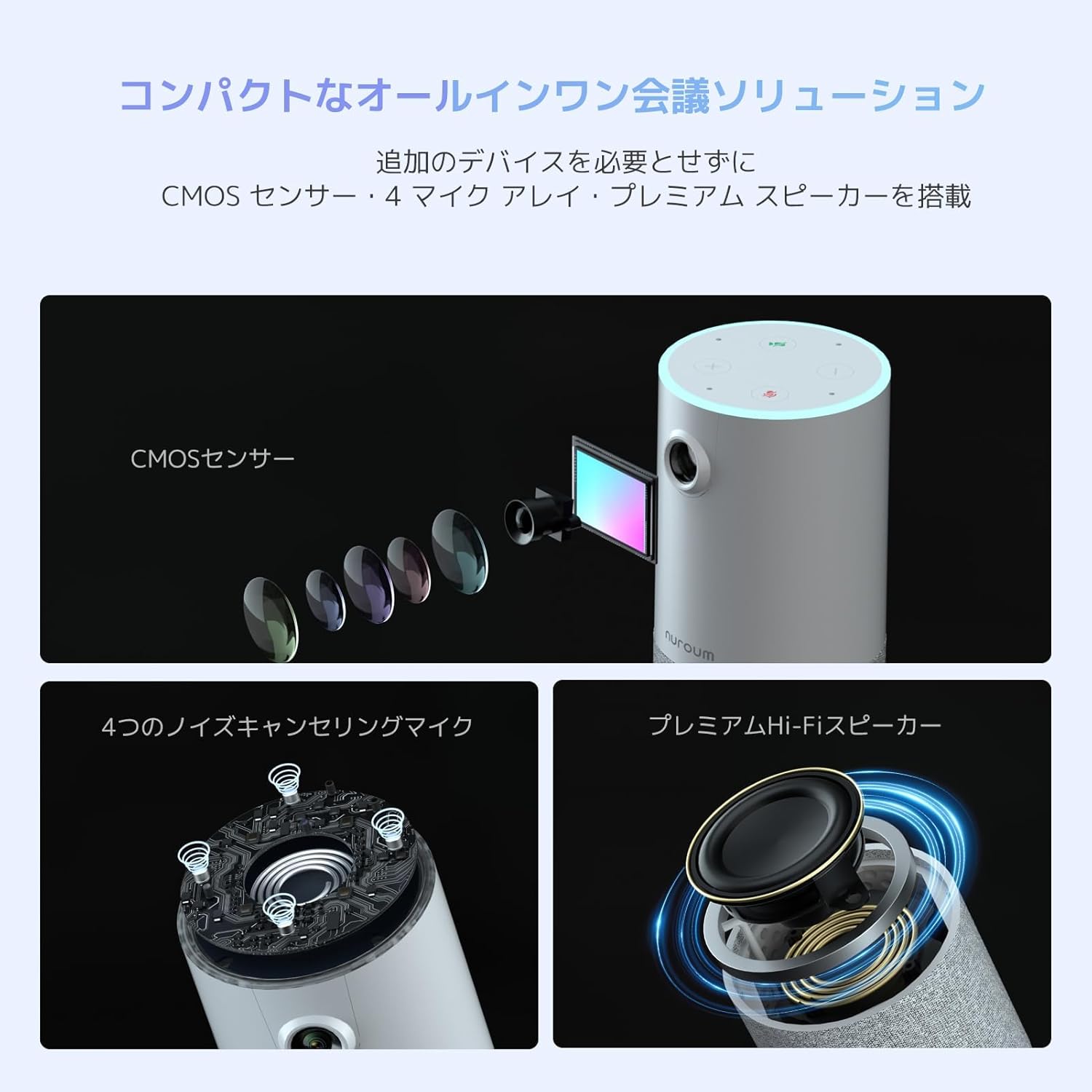
The Nuroum C10 integrates a CMOS sensor for video, a four-microphone array for audio input, and a premium speaker for audio output, providing a complete conference solution.

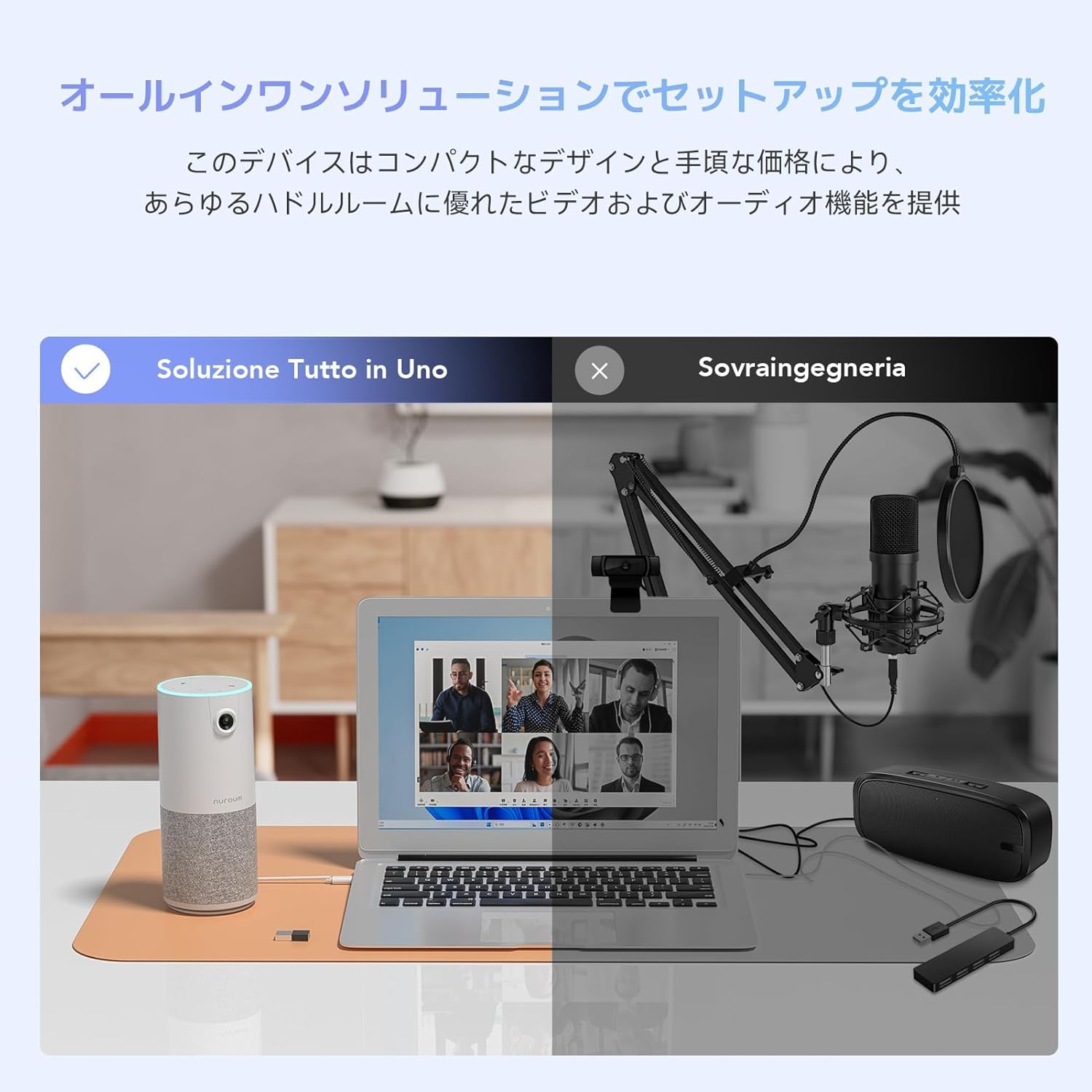
The Nuroum C10 simplifies your workspace by combining camera, microphone, and speaker functions into one device, contrasting with traditional setups requiring separate components.
Caratteristiche principali:
- Alta Definizione WebCamera: 1080P@60fps with HDR functionality and a 90° ultra-wide-angle lens.
- Microfoni omnidirezionali: Four built-in microphones with a 3-meter (approx. 10 feet) pickup radius, ensuring clear voice capture from all directions.
- Elaborazione audio avanzata: Features proprietary Properclean™ AI noise cancellation, echo cancellation, and automatic gain control for clear, natural sound.
- Altoparlante integrato: Provides clear audio output for all participants.
- Connettività plug-and-play: Simple USB connection with no driver installation required.
- Controlli touch intuitivi: Easy access to microphone mute, camera on/off, and volume adjustments.
- Automatic HD Light Correction: Adjusts video output for optimal brightness in various lighting conditions.
- Design compatto e portatile: Lightweight and easy to transport for use in various locations.
Contenuto della confezione
- Nuroum C10 Camera Unit
- Adattatore da USB-C a USB-A
- Cavo USB 2.0 tipo C
Impostare
The Nuroum C10 is designed for quick and easy setup, offering plug-and-play functionality.
- Collegare il cavo USB: Locate the USB Type-C port on the Nuroum C10 and connect one end of the provided USB cable.
- Connessione al computer: Plug the other end of the USB cable into an available USB port on your desktop or laptop computer. If your computer only has USB-A ports, use the included USB-C to USB-A adapter.
- Riconoscimento automatico: Your operating system (Windows, macOS, Linux, ChromeOS, Android) will automatically detect and install the necessary drivers for the Nuroum C10. No manual driver installation is typically required.
- Select Device in Application: Open your preferred video conferencing application (e.g., Zoom, Skype, Google Meet) and navigate to its audio and video settings. Select "Nuroum C10" as your camera, microphone, and speaker device.
Connect the Nuroum C10 to your computer using the provided USB cable for instant setup and use in video conferencing applications.
Istruzioni per l'uso
The Nuroum C10 features a user-friendly touch panel on its top surface for convenient control during meetings.
- Microfono Muto/Riattiva:
- Locate the microphone icon on the top panel.
- Tap the icon to toggle the microphone on or off.
- An indicator light will change color to show the microphone's status (e.g., blue for active, red for muted).
- Accensione/spegnimento della fotocamera:
- Locate the camera icon on the top panel.
- Tap the icon to toggle the camera on or off.
- An indicator light will show the camera's status.
- Controllo del volume:
- Use the '+' and '-' icons on the top panel to adjust the speaker volume.
- Tap '+' to increase volume, and '-' to decrease volume.
The top panel of the Nuroum C10 provides easy-to-use touch controls for managing microphone, camera, and speaker volume during calls.
Compatibilità
The Nuroum C10 is designed for broad compatibility with various operating systems and popular video conferencing platforms.
Sistemi operativi:
- Finestre
- sistema operativo macOS
- Linux
- ChromeOS
- Android (functionality may vary by device)
Piattaforme di videoconferenza:
- Ingrandire
- Chiamare Skype
- Allentare
- Google Hangouts/Classroom
- Vai a riunione
- Jeans blu
- Twitch/Facebook Live/xsplit/OBS
If you intend to use the device with software or systems not listed above, please contact our support center for compatibility verification.
Manutenzione
Proper maintenance ensures the longevity and optimal performance of your Nuroum C10.
- Pulizia:
- Pulisci il dispositivo con un panno morbido e asciutto.
- Non utilizzare detergenti liquidi, solventi o materiali abrasivi, poiché potrebbero danneggiare il dispositivo.
- Magazzinaggio:
- Conservare il dispositivo in un luogo fresco e asciutto, lontano dalla luce solare diretta e da temperature estreme.
- Cura del cavo:
- Evitare di piegare o torcere eccessivamente il cavo USB.
- Ensure the cable is not pinched or placed under heavy objects.
- Aggiornamenti del firmware:
- Periodically check the official Nuroum website for available firmware updates. Updates can improve performance and add new features.
Risoluzione dei problemi
If you encounter issues with your Nuroum C10, refer to the following common solutions.
- Nessuna uscita video o audio:
- Controllare la connessione USB: Ensure the USB cable is securely connected to both the Nuroum C10 and your computer. Try a different USB port.
- Verify Device Selection: In your video conferencing application's settings, confirm that "Nuroum C10" is selected as the primary camera, microphone, and speaker device.
- Check Device Controls: Ensure the microphone and camera are not muted or turned off using the touch controls on the device's top panel.
- Ricomincia: Restart your computer and the Nuroum C10.
- Poor Audio Quality (Echo or Background Noise):
- Posizionamento del dispositivo: Position the Nuroum C10 centrally in your meeting area, away from walls or other reflective surfaces that might cause echoes.
- Aggiornamento del firmware: Check the official Nuroum website for the latest firmware updates, which often include audio performance improvements.
- Ambiente: Minimize background noise in your environment. The device's noise cancellation feature works best with consistent background sounds.
- Video Image Too Dark or Bright:
- The Nuroum C10 features automatic HD light correction. Ensure there is adequate and balanced ambient lighting in your meeting space. Avoid strong backlighting.
- Dispositivo non riconosciuto dal computer:
- Try Another USB Port/Cable: Test with a different USB port on your computer or a different USB cable if available.
- Aggiornamenti del sistema operativo: Assicurati che il sistema operativo del tuo computer sia completamente aggiornato.
- Contatta l'assistenza: If the issue persists, contact Nuroum customer support.
Specifiche
Detailed technical specifications for the Nuroum C10 All-in-One Conference Webcam Speakerphone.
| Caratteristica | Specificazione |
|---|---|
| Marca | Nuroum |
| Numero di modello del prodotto | C10-JP |
| Lunghezza focale (grandangolo) | 2.74 |
| Lunghezza focale (teleobiettivo) | 2.95 |
| Configurazione dell'obiettivo | Grandangolo |
| Accessori inclusi | Camera unit, USB-C to A adapter, USB 2.0 Type-C cable |
| Funzione di scatto | Auto |
| Tipo di motore | Digitale |
| Colore | Bianco |
| Dispositivi compatibili | PC portatile |
| Dimensioni del pacco | 22.9 x 12.9 x 10.9 cm; 500 g |
| ASIN | B0D2L7GR5L |
| Tecnologia del sensore fotografico | CMOS |
| Risoluzione di acquisizione video | Formato: 1080p |
| Lunghezza focale massima | 2.95 |
| Tipo di memoria flash | Memoria flash incorporata |
| Formato di acquisizione video | Formato JPEG |
| Formato audio supportato | PCM |
| Tecnologia di connettività | USB |
| Caratteristiche speciali | Funzione muto |
Garanzia e supporto
Nuroum is committed to providing high-quality products and excellent customer service.
- Garanzia di qualità: The Nuroum C10 comes with a one-year quality warranty from the date of purchase.
- Aggiornamenti del firmware: Regular firmware updates are released to improve device performance (e.g., audio pickup, speaker EQ) and introduce new functionalities. These updates are available on the official Nuroum websito.
- Applicazione software: A dedicated application for Windows and macOS is available for download from the official Nuroum website, offering additional control and settings.
- Assistenza clienti: For any inquiries, technical assistance, or warranty claims, please contact our 7*24 hour service team. Contact details can be found on the official Nuroum websito o la documentazione di acquisto.