
Segway F2 Pro
Manuale utente del monopattino elettrico Segway Ninebot F2 Pro e del lucchetto con cavo
Modello: F2 Pro
Introduzione
This manual provides essential information for the safe operation, maintenance, and troubleshooting of your Segway Ninebot F2 Pro Electric KickScooter and the accompanying 5-Digit Combination Cable Lock. Please read this manual thoroughly before using the product to ensure proper usage and to maximize your riding experience.
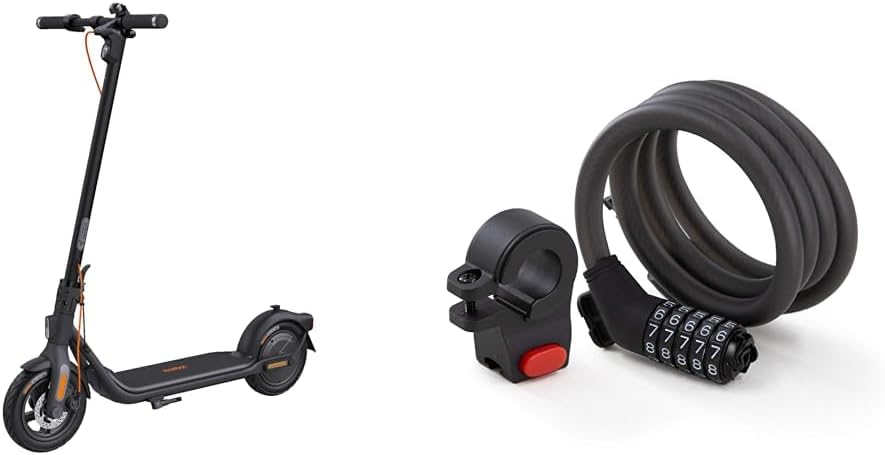
Image: The Segway Ninebot F2 Pro Electric KickScooter shown alongside the 5-Digit Combination Cable Lock, illustrating the complete product bundle.
Informazioni sulla sicurezza
Operating an electric kickscooter carries inherent risks. To reduce the risk of injury, it is crucial to follow all instructions and warnings in this manual. Always wear a helmet and other protective gear (knee pads, elbow pads) when riding. Ensure you are familiar with local laws and regulations regarding electric scooter usage.
- Always check the scooter before each ride for loose parts, tire pressure, and brake functionality.
- Non guidare in condizioni di bagnato, su superfici scivolose o sotto una pioggia battente.
- Avoid riding on uneven terrain, potholes, or over obstacles.
- Mantenere una distanza di sicurezza dagli altri veicoli e dai pedoni.
- Non eseguire acrobazie o manovre improvvise.
- Ensure the kickscooter is fully charged before long rides.
- The cable lock is a deterrent and does not guarantee absolute security against theft.
Contenuto della confezione
Verifica che tutti gli articoli siano presenti nel tuo pacco:
- Segway Ninebot F2 Pro Electric KickScooter
- Lucchetto con cavo a combinazione a 5 cifre
- Adattatore di ricarica
- Manuale dell'utente (questo documento)
- Guida rapida
- Mounting Bracket for Cable Lock
- Necessary Screws and Hex Wrench
Impostare
1. KickScooter Assembly
- Aprire lo stelo: Carefully lift the stem until it locks into place.
- Fissare il manubrio: Connect the handlebar to the stem. Ensure the cables are not pinched. Secure it with the provided screws and hex wrench.
- Carica iniziale: Fully charge the scooter before its first use. Connect the charging adapter to the charging port on the scooter and then to a power outlet. The indicator light on the charger will change when fully charged.

Immagine: Lato A view of the Segway Ninebot F2 Pro Electric KickScooter, illustrating its assembled form and overall design.
2. Cable Lock Setup
- Installazione della staffa di montaggio: Attach the cable lock's mounting bracket to a suitable location on your scooter's stem or frame using the provided hardware.
- Impostazione della combinazione:
- Il codice predefinito è 00000.
- Align the default code with the indicator marks.
- With the keyhole facing up, turn the number setting knob 90 degrees clockwise.
- Set your desired 5-digit combination.
- Turn the knob back 90 degrees counter-clockwise to its original position. Your new combination is now set.

Image: The Segway 5-Digit Combination Cable Lock, showing its coiled cable and the combination dial mechanism.
Istruzioni per l'uso
1. KickScooter Operation
- Accensione/spegnimento: Per accendere o spegnere lo scooter, tenere premuto il pulsante di accensione sul cruscotto.
- Modalità di guida: Short press the power button to cycle through riding modes (e.g., ECO, Drive, Sport). Each mode offers different speed and power characteristics.
- Accelerazione: Push off with your foot to gain initial speed, then press the throttle lever to accelerate.
- Frenata: Use the hand brake lever to slow down or stop. The scooter features a dual braking system for effective stopping.
- Luci: Double-press the power button to turn the headlight and taillight on or off.
- Cruscotto intelligente: The dashboard displays speed, battery level, riding mode, and light status.

Image: A close-up of the Segway Ninebot F2 Pro's smart dashboard and power button, highlighting indicators for speed, battery, speed mode, lights, and cruise control.

Image: An illustration detailing the Segway Ninebot F2 Pro's motor performance, showing 900W Max Output, 20 Mph Max Speed, and 22% Hill Grade capability.
2. Cable Lock Usage
- Blocco: Dial your personal combination to open the lock. Wrap the cable around your scooter and a secure fixed object (e.g., a bike rack, pole). Insert the locking head into the mechanism and scramble the numbers to secure.
- Sblocco: Dial your personal combination to align with the indicator marks. The lock will open, allowing you to remove the cable.

Image: The Segway 5-Digit Combination Cable Lock shown attached to the handlebar of the KickScooter, demonstrating how it can be stored or used for security.

Immagine: un primo piano view of the Segway 5-Digit Combination Cable Lock's dial mechanism while attached to the KickScooter's handlebar, showing the numbers.
Manutenzione
Regular maintenance ensures the longevity and optimal performance of your Segway Ninebot F2 Pro KickScooter and Cable Lock.
- Pulizia: Wipe the scooter and lock with a damp cloth. Do not use alcohol, gasoline, kerosene, or other corrosive chemical solvents. Do not wash with a high-pressure water jet.
- Pressione degli pneumatici: Check tire pressure regularly and inflate to the recommended PSI (usually found on the tire sidewall).
- Freni: Periodically inspect brake pads and cables for wear and tear. Adjust or replace as needed.
- Cura della batteria: Store the scooter in a dry place between 0°C and 40°C (32°F and 104°F). Charge the battery at least once every 30 days if not in use to prevent over-discharge.
- Elementi di fissaggio: Controllare regolarmente tutte le viti e i bulloni per assicurarsi che siano ben serrati.
- Blocco cavo: Keep the cable and locking mechanism clean. Lubricate the locking mechanism periodically with a silicone-based lubricant.
Risoluzione dei problemi
| Problema | Possibile causa | Soluzione |
|---|---|---|
| Scooter non si accende | Batteria scarica; Collegamenti allentati; Malfunzionamento del pulsante di accensione | Caricare la batteria; controllare tutti i collegamenti dei cavi; contattare l'assistenza se il problema persiste. |
| Autonomia/velocità ridotte | Bassa pressione degli pneumatici; Sovraccarico; Degrado della batteria; Salita frequente | Inflate tires to recommended pressure; Reduce load; Ensure full charge; Adjust riding style. |
| I freni sembrano deboli | Pastiglie dei freni usurate; Cavo del freno allentato | Ispezionare e sostituire le pastiglie dei freni; regolare la tensione del cavo del freno. |
| Cable lock not opening | Incorrect combination; Mechanism jammed | Ensure correct combination is entered precisely; Apply light pressure while turning dials; Lubricate if stiff. |
Specifiche
| Caratteristica | Dettaglio |
|---|---|
| Nome del modello | F2 Pro |
| Marca | Segway |
| Colore | Nero |
| Motor Power (Rated/Max) | 450W / 900W |
| Velocità massima | Fino a 20 mph (32 km/h) |
| Gamma massima | Up to 34 miles (55 km) (in ECO mode) |
| Inclinazione massima | Fino al 22% |
| Materiale della ruota | Gomma |
| Materiale del telaio | Acciaio legato |
| Stile del freno | Hand brake (Dual braking system) |
| Caratteristiche speciali | Portable, App-Enabled, Smart Dashboard |
| Cable Lock Type | Lucchetto con cavo a combinazione a 5 cifre |
| Cable Lock Material | Braided Steel with PVC coating |
Garanzia e supporto
Segway products come with a limited warranty. Please refer to the warranty card included in your package or visit the official Segway websito per termini e condizioni di garanzia dettagliati specifici per la tua regione.
For technical support, spare parts, or service inquiries, please contact Segway customer service through their official website or the contact information provided in your product documentation. When contacting support, please have your product model number (F2 Pro) and purchase date ready.
Official Segway Websito: www.segway.com
Ask a question about this manual
Ask about setup, troubleshooting, compatibility, parts, safety, or missing instructions. Manuals+ will review the question and use this page’s manual context to help answer it.