
1. Introduzione
This manual provides instructions for the SNOODU Trackpad Keyboard Case, designed to enhance the functionality of your 2024 iPad Pro 11-inch (M4). Please read this manual thoroughly before use to ensure proper operation and care.
1.1 Compatibilità
Questa custodia con tastiera è progettata specificamente per 2024 iPad Pro 11.0 inch M4 with model numbers A2837, A3006, A2836. It is not compatible with other iPad models. Please verify your iPad's model number on the back of the device before installation.

Immagine 1.1: Compatibility Notice. This image illustrates the specific iPad Pro 11-inch M4 models (A2837, A3006, A2836) that are compatible with this keyboard case, alongside visual examples of incompatible iPad models marked with an 'X'.
1.2 Contenuto della confezione
Assicurarsi che tutti gli articoli siano presenti nel pacco:
- SNOODU Wireless Keyboard Case with Pencil Holder
- Cavo di ricarica USB-C
- Manuale dell'utente (questo documento)
Note: The iPad tablet and Apple Pencil are NOT included.
2. Impostazione
2.1 Installing the iPad
- Gently align your iPad Pro 11-inch (M4) with the protective shell of the case.
- Press the iPad firmly into the case, ensuring all edges are securely seated. The case provides 360° protection.
2.2 Ricarica della tastiera
The keyboard is powered by a built-in Lithium Polymer battery. Before first use, fully charge the keyboard.
- Individuare la porta di ricarica USB-C sul lato della tastiera.
- Collegare il cavo USB-C in dotazione alla tastiera e a un adattatore di alimentazione USB compatibile (non incluso).
- Una carica completa richiede in genere circa 2 ore.
- The keyboard offers over 6 hours of continuous use and up to 3 months of standby time on a single charge.
2.3 Connessione tramite Bluetooth
The keyboard connects wirelessly to your iPad via Bluetooth 5.1.
- Ensure the keyboard is charged and powered on using the power switch.
- Sul tuo iPad, vai a Impostazioni > Bluetooth e attiva il Bluetooth.
- The iPad will search for nearby Bluetooth devices. Select the keyboard (e.g., "Bluetooth Keyboard") from the list of available devices.
- Once connected, the status indicator on the keyboard will confirm successful pairing.
3. Istruzioni per l'uso
3.1 Retroilluminazione della tastiera
The keyboard features a 3-zone, 7-color backlit display with 3 adjustable brightness modes.
- To change backlight colors: Press the Fn+S keys simultaneously. Repeat to cycle through the 7 available colors.
- To adjust backlight brightness: Press the Fn + RE keys simultaneously. Repeat to cycle through the 3 brightness levels.

Immagine 3.1: Backlight Control. This diagram illustrates how to use the Fn + S keys to change backlight colors and Fn + D keys to adjust backlight brightness.
Trackpad multi-touch 3.2
The integrated trackpad supports various iPadOS gestures for efficient navigation and interaction.
- Dito singolo: Tap to click, drag to move the cursor.
- Double Finger: Swipe to scroll content (up/down/left/right).
- Pinch Gestures: Per ingrandire o ridurre la visualizzazione, usa due dita.
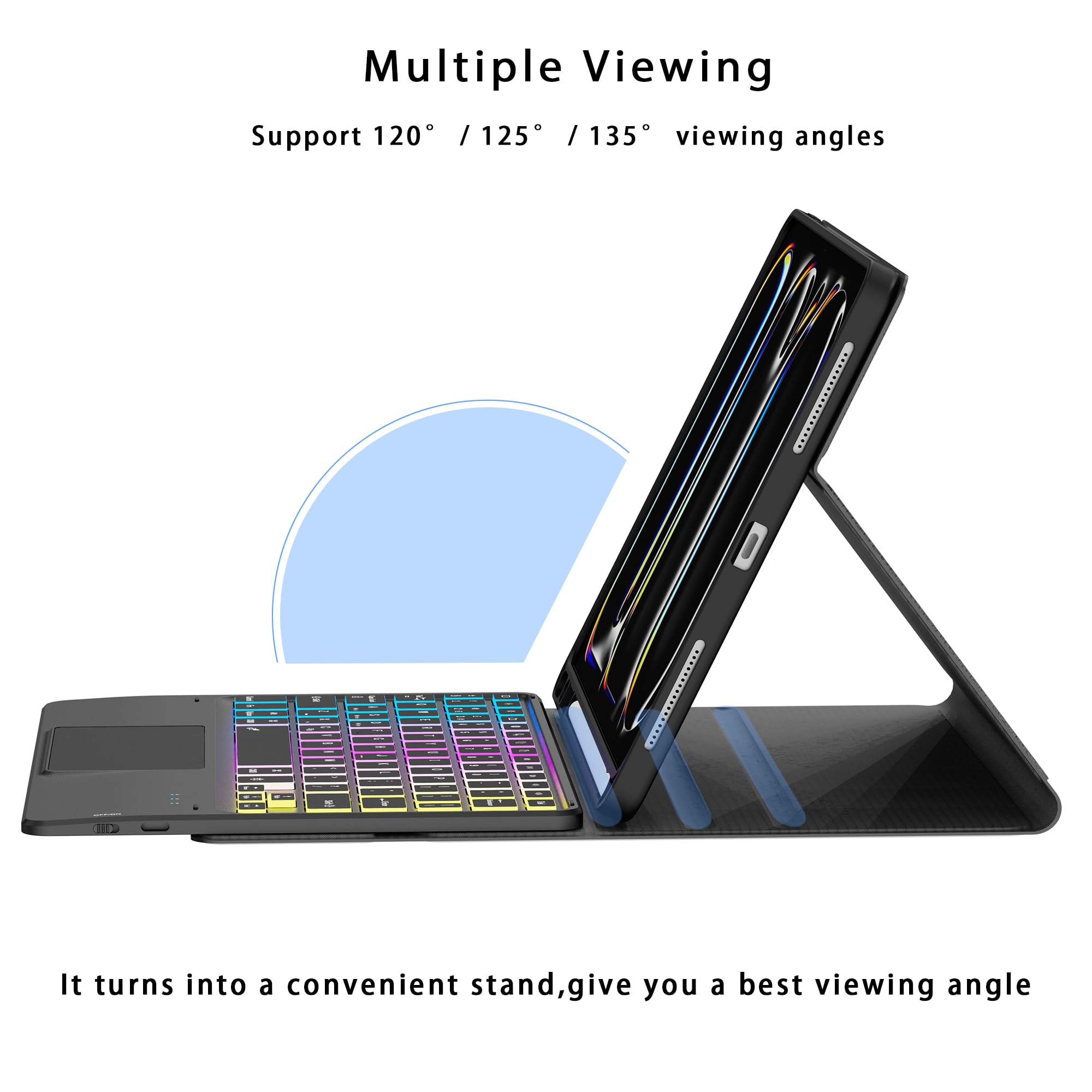
Immagine 3.2: Trackpad Gestures. This image demonstrates common multi-touch gestures for the trackpad, including single-finger tap/drag, two-finger scrolling, and pinch-to-zoom.
3.3 regolabile Viewing angoli
Il caso consente più viewing angles to suit various activities such as typing, watching videos, or reading.
- Adjust the iPad's position within the case to achieve angles of 120°, 125°, or 135°.
- The magnetic design ensures stability at your chosen angle.

Immagine 3.3: Multiplo Viewing Angles. This image displays the keyboard case configured to support various viewing angles, highlighting its versatility for different uses.
3.4 Portapenne
A dedicated slot is integrated into the case to securely hold your Apple Pencil, preventing loss and ensuring it's always accessible.

Immagine 3.4: Pencil Holder. A detailed view of the case's integrated slot for securely storing an Apple Pencil.
3.5 Caratteristiche principaliview

Immagine 3.5: Key Features Diagram. This image provides a labeled overview of the keyboard case's main components and features, including the trackpad, shortcut keys, pencil holder, and charging port.
4. Manutenzione
To ensure the longevity and optimal performance of your SNOODU keyboard case, follow these maintenance guidelines:
- Pulizia: Use a soft, dry, lint-free cloth to clean the exterior of the case and keyboard. Avoid using abrasive cleaners, solvents, or harsh chemicals.
- Magazzinaggio: Quando non si utilizza la custodia con tastiera per lunghi periodi, conservarla in un luogo fresco e asciutto.
- Protezione: Keep the device away from liquids, extreme temperatures, and direct sunlight.
5. Risoluzione Dei Problemi
Se riscontri problemi con la custodia della tastiera, fai riferimento alle seguenti soluzioni comuni:
5.1 La tastiera non si connette tramite Bluetooth
- Controlla la potenza: Assicurarsi che la tastiera sia accesa e che la batteria sia sufficientemente carica.
- Bluetooth attivato: Verifica che il Bluetooth sia abilitato sul tuo iPad (Impostazioni > Bluetooth).
- Riparazione: If previously paired, try forgetting the device on your iPad's Bluetooth settings and then re-pairing it.
- Riavvia i dispositivi: Restart both your iPad and the keyboard, then attempt to connect again.
5.2 Backlight Not Working or Dim
- Livello della batteria: Low battery can affect backlight performance. Ensure the keyboard is fully charged.
- Regolazione della luminosità: Utilizzare il Fn + RE keys to cycle through brightness levels and ensure it's not set to the lowest setting or off.
5.3 I tasti non rispondono
- Connessione: Verificare che la tastiera sia correttamente connessa tramite Bluetooth.
- Batteria: Ensure the keyboard has adequate battery power.
- Ricomincia: Riavvia l'iPad e la tastiera.
6. Specifiche
| Caratteristica | Dettaglio |
|---|---|
| Numero di modello | for iPad Pro 11.0" 2024(M4) |
| Dispositivi compatibili | iPad Pro 11.0" 2024(M4) (Models: A2837, A3006, A2836) |
| Tecnologia di connettività | Bluetooth 5.1 |
| Descrizione della tastiera | Multi Functional, Detachable |
| Caratteristiche speciali | Backlit (3 Zone, 7 Colors, 3 Brightness Modes), Hotkeys, Media Keys, Portable, Rechargeable, Multi-Touch Trackpad, Pencil Holder |
| Tipo di batteria | 1 batteria ai polimeri di litio (inclusa) |
| Tempo di ricarica | Circa 2 ore |
| Tempo di utilizzo continuo | Oltre 6 ore |
| Tempo di standby | Fino a 3 mesi |
| Peso dell'articolo | 1.76 libbre |
| Dimensioni del pacco | 11.14 x 8.58 x 1.22 pollici |
7. Garanzia e supporto
For detailed warranty information, product registration, or technical assistance, please visit the official SNOODU website or contact SNOODU customer support directly. Keep your purchase receipt for warranty claims.