
Introduzione
This manual provides detailed instructions for the assembly, operation, and maintenance of your GABRYLLY GY1108 Ergonomic Mesh Office Chair. Please read this guide thoroughly before use to ensure proper function and longevity of your chair. This chair is designed to provide ergonomic support and comfort for users up to 280 lbs, with a recommended height range of 5'1" to 5'9".
1. Installazione e assemblaggio
The GABRYLLY GY1108 office chair is designed for straightforward assembly. All necessary tools, including an Allen wrench, are provided. For a visual guide, scan the QR code provided in the packaging for an installation video.
Fasi di assemblaggio:
- Disimballare i componenti: Carefully remove all parts from the packaging. Verify that all components listed in the parts diagram are present.
- Fissare le rotelle alla base: Insert the five casters into the holes at the end of each leg of the chair base. Ensure they are securely seated.
- Inserire il pistone a gas: Posizionare il cilindro del pistone a gas nel foro centrale della base della sedia.
- Montare il sedile e lo schienale: Follow the specific instructions in your package to attach the seat mechanism to the seat cushion, and then connect the backrest to the seat assembly. Pay attention to left and right components, which may be color-coded for ease of identification.
- Attacca braccioli: Secure the flip-up armrests to the seat assembly using the provided screws and Allen wrench.
- Installare il poggiatesta: Attach the adjustable headrest to the top of the backrest.
- Collegare il sedile al pistone a gas: Carefully place the assembled seat and backrest onto the gas lift cylinder. Apply gentle downward pressure to secure it.

Immagine: Fronte e retro view of the assembled GABRYLLY GY1108 Ergonomic Mesh Office Chair in white mesh.
2. Istruzioni per l'uso
Your GABRYLLY GY1108 chair offers several adjustable features to customize your seating experience for optimal comfort and support.
- Regolazione dell'altezza del sedile: Locate the lever on the right side beneath the seat. Pull the lever up while seated to lower the chair, or pull it up while standing to raise the chair. Release the lever at your desired height. The seat height ranges from 17.3 inches to 21 inches.
- Braccioli ribaltabili: The armrests can be flipped up by 45 degrees. This feature allows for easy movement under desks or for activities requiring more space, such as playing an instrument. Simply lift the armrests to engage the flip-up mechanism.
- Poggiatesta regolabile: The 2D headrest can be adjusted in height by 3.5 inches and tilted to provide personalized neck support. Gently push or pull the headrest to adjust its position.
- Tilt and Rock Mechanism: The backrest reclines from 95° to 115° and features a 2-locking position mechanism. Pull the lever on the left side beneath the seat to unlock the tilt function, allowing the chair to rock. Push the lever in to lock the backrest at your desired angle.
- Supporto lombare: The chair features integrated ergonomic lumbar support designed to conform to the natural curve of your spine, providing comfort during extended use.

Immagine: Primo piano view of the chair's flip-up armrests, demonstrating their upward movement for space-saving and flexibility.

Image: Illustration showing the height and tilt adjustments of the chair's headrest for personalized comfort.

Image: Diagram illustrating the reclining range of the chair's backrest, from 90 degrees for work to 110 degrees for relaxation.

Image: Visual representation of the ergonomic lumbar support system within the chair's backrest, highlighting its supportive and breathable design.
3. Manutenzione
To ensure the longevity and optimal performance of your GABRYLLY GY1108 office chair, follow these simple maintenance guidelines:
- Pulizia: Pulisci con un annuncioamp cloth. Avoid using harsh chemicals or abrasive cleaners, as these can damage the mesh fabric and other components.
- Ispezione: Controllare periodicamente tutte le viti e i bulloni per assicurarsi che siano ben serrati. Serrarli nuovamente se necessario per mantenere la stabilità.
- Cura delle rotelle: Keep the casters free of hair and debris to ensure smooth movement. If the chair struggles to roll on certain surfaces, consider cleaning the caster wheels or replacing them with appropriate alternatives (e.g., rollerblade-style wheels for carpets).
4. Risoluzione Dei Problemi
If you encounter any issues with your GABRYLLY GY1108 office chair, refer to the following common solutions:
| Problema | Possibile causa | Soluzione |
|---|---|---|
| La sedia non si regola in altezza | Malfunzionamento del cilindro di sollevamento a gas o problema alla leva. | Assicurarsi che la leva di regolazione dell'altezza sia completamente innestata. Se il problema persiste, potrebbe essere necessario sostituire il pistone a gas. Contattare l'assistenza clienti. |
| La sedia traballa o sembra instabile | Viti allentate o montaggio non corretto. | Check all assembly screws and re-tighten them. Ensure the chair base and gas lift are correctly seated. |
| Le rotelle non girano fluidamente | Debris in casters or unsuitable casters for floor type. | Clean any hair or debris from the caster wheels. For carpeted surfaces, consider replacing standard casters with rollerblade-style wheels for improved mobility. |
| Lo schienale non si reclina o non si blocca | Tilt mechanism engaged incorrectly or malfunction. | Ensure the tilt lock lever is disengaged to allow reclining. If it still doesn't work, inspect the tilt mechanism for any obstructions. |
5. Specifiche del prodotto
Detailed specifications for the GABRYLLY GY1108 Ergonomic Mesh Office Chair:
| Caratteristica | Dettaglio |
|---|---|
| Nome del modello | GY1108W |
| Marca | GABRYLLY |
| Colore | White Mesh |
| Dimensioni del prodotto | 19.7"D x 24.8"W x 44.6"H (Overall height 44.9" to 48.6") |
| Gamma di altezza del sedile | Da 17.3 pollici a 21 pollici |
| Profondità del sedile | 19.3 pollici |
| Lunghezza del sedile | 20.1 pollici |
| Larghezza dello schienale della sedia | 24 pollici |
| Peso massimo raccomandato | 280 libbre |
| Altezza consigliata per l'utente | Da 1,33 m a 2,08 m |
| Stile posteriore | Aprire la schiena |
| Caratteristiche speciali | Adjustable Headrest, Adjustable Lumbar, Flip-Up Armrests, Ergonomic Design, Tilting (95°-115°), Rocking Function |
| Materiale | Mesh (Breathable, Skin-friendly), Foam (Seat Fill) |
| Ruote | High-grade PU Wheels |
| Certificazioni | SGS, BIFMA Certified |
| Istruzioni per la cura del prodotto | Pulisci Pulire |
| Peso dell'articolo | 32 libbre |

Image: Detailed dimension diagram of the GABRYLLY GY1108 Ergonomic Mesh Office Chair, including height, width, and depth measurements.
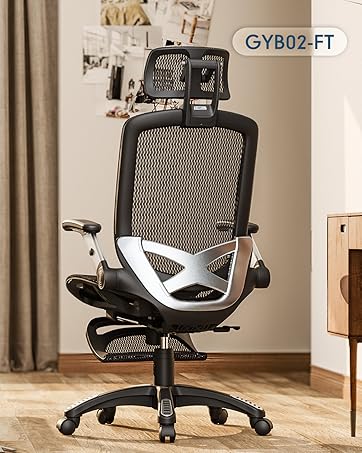
Image: Visual guide showing recommended user heights (5'1" to 5'9") and weight capacity (280 lbs) for the GABRYLLY GY1108 chair.
6. Informazioni sulla garanzia
The GABRYLLY GY1108 Ergonomic Mesh Office Chair comes with a 2 anni di garanzia gratuita from the date of purchase. This warranty covers manufacturing defects and material failures under normal use. Please retain your proof of purchase for warranty claims.
For warranty service or inquiries, please contact our customer support team.
7. Assistenza clienti
For any questions, assistance with assembly, troubleshooting, or warranty claims, please contact the GABRYLLY customer service team. Our dedicated team is available to provide effective and fast support.
Informazioni sui contatti: Refer to the contact details provided in your product packaging or visit the official GABRYLLY websito.
For a quick assembly guide, scan the QR code found in your product box to access the installation video.