
AlfaBot GLS400
Manuale utente del robot lavavetri AlfaBot GLS400
Modello: GLS400
1. Introduzione
Thank you for choosing the AlfaBot GLS400 Robot Window Cleaner. This intelligent device is designed to simplify window cleaning with its advanced features and efficient operation. Please read this manual thoroughly before using the robot to ensure safe and optimal performance.
Caratteristiche principali:
- Intelligent AI planning with multiple trajectory modes (N, Z, N+Z).
- Automatic and manual dual-direction water spray system with 50ml capacity.
- Automatic detection of window frames and edges.
- Suitable for various surfaces including glass, walls, and tiles.
- Efficient cleaning speed of 1.1 min/sqm.
- Low noise level below 65dB.
- Automatic return to starting position after cleaning.
- Intelligent memory function for convenience.
2. Prodotto finitoview
Familiarize yourself with the components and design of your AlfaBot GLS400.

The AlfaBot GLS400 Robot Window Cleaner, a square-shaped device with integrated water spray nozzles and a central handle.

Illustration of the robot's double intelligent spray system, highlighting the dual ultrasonic atomization nozzles and two 50ml water tanks for cleaning up to 60 square meters.

Diagram showing the three automatic cleaning modes: Z-mode, N-mode, and Z&N-mode, which can be selected via remote control for optimal cleaning paths.
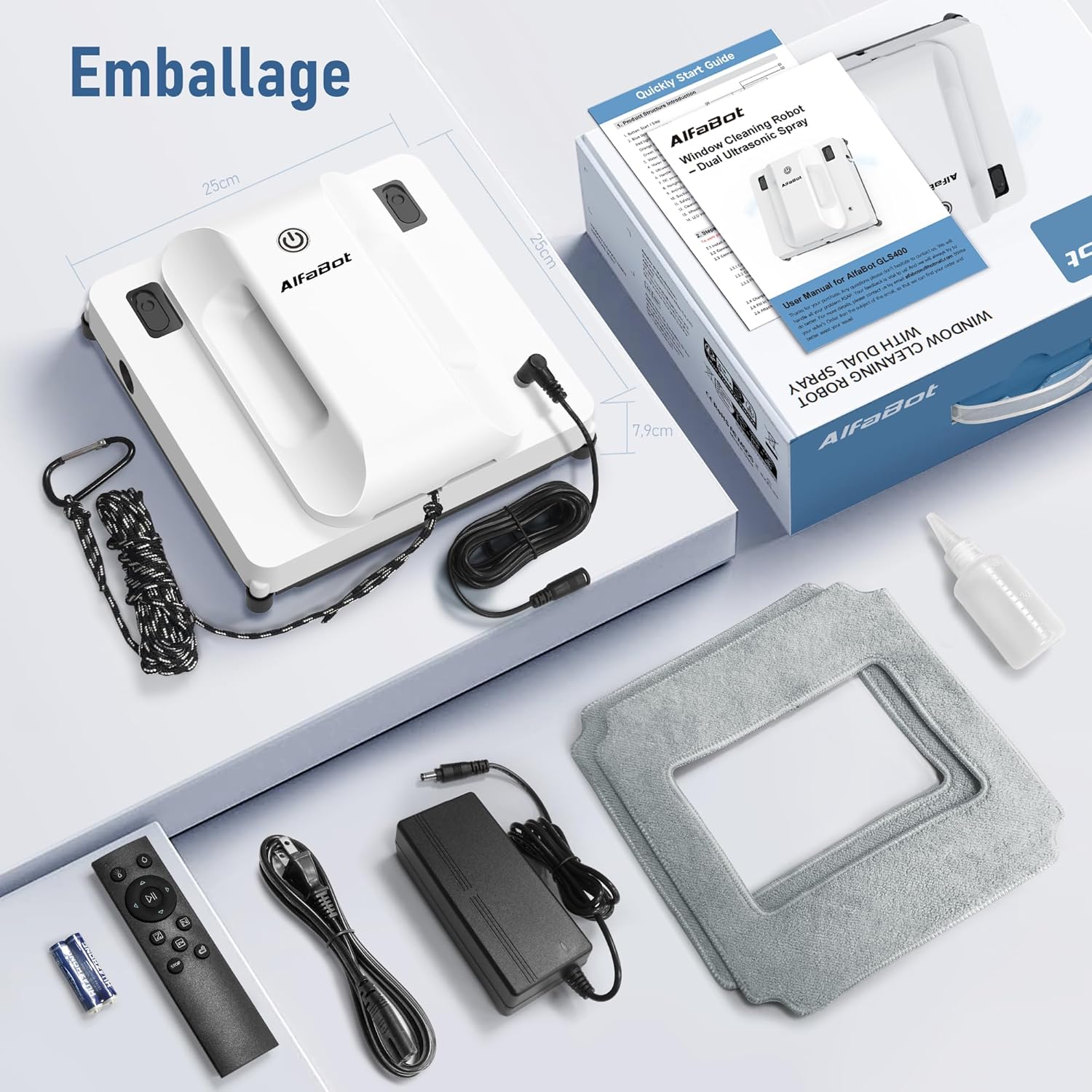
The complete package contents of the AlfaBot GLS400, including the robot, remote control, power adapter, safety rope, cleaning pads, and a small water bottle.
3. Guida all'installazione
3.1 Disimballaggio e controllo dei contenuti
Carefully remove all components from the packaging. Verify that all items listed in the 'Packaging Contents' section (refer to Product Overview) are present and undamaged.
3.2 Caricamento della batteria
Before first use, fully charge the robot's internal battery. Connect the power adapter to the robot and a power outlet. The charging indicator light will show the charging status. A full charge typically takes a few hours.
3.3 Applicazione dei tamponi di pulizia
Attach the clean microfiber cleaning pads to the bottom of the robot. Ensure they are securely fastened and cover the entire cleaning surface.
3.4 Riempimento del serbatoio dell'acqua
Open the water tank cap and fill the tank with clean water or a recommended window cleaning solution. Do not overfill. Close the cap securely.
3.5 Collegamento della fune di sicurezza
For safety, always attach the safety rope to a sturdy fixture indoors before placing the robot on the window. This prevents the robot from falling in case of power loss or suction failure.
3.6 Accensione
Connect the robot to a power outlet using the provided power cable. Press the power button on the robot to turn it on. The robot will perform a self-check.
4. Istruzioni per l'uso
4.1 Posizionamento del robot sulla finestra
Ensure the window surface is relatively clean of large debris. Place the robot on the window, ensuring it is flat against the glass. The robot will automatically activate its suction.
4.2 Inizio della pulizia
You can start the cleaning process in two ways:
- On-robot button: Press the start button on the robot.
- Telecomando: Use the remote control to select a cleaning mode (N, Z, or N+Z) and press start.
4.3 Understanding Cleaning Modes
- Modalità N: The robot cleans in an N-shaped path, suitable for tall and narrow windows.
- Modalità Z: The robot cleans in a Z-shaped path, suitable for wide and short windows.
- N+Z mode: The robot performs both N and Z patterns for comprehensive cleaning, ideal for large surfaces.

Visual representation of the N, Z, and N+Z cleaning paths the AlfaBot GLS400 can follow for optimal coverage.
4.4 Ritorno automatico
Upon completion of the cleaning cycle, the robot will automatically return to its starting position, making it convenient to retrieve.
4.5 Utilizzo del telecomando
Il telecomando consente di:
- Avvia/Arresta la pulizia.
- Select cleaning modes (N, Z, N+Z).
- Controllare manualmente il movimento del robot.
- Activate/deactivate water spray.
5. Manutenzione
Regular maintenance ensures the longevity and optimal performance of your AlfaBot GLS400.
5.1 Pulizia dei panni in microfibra
After each use, remove the microfiber cleaning pads. They can be hand-washed or machine-washed with mild detergent. Allow them to air dry completely before reattaching or storing.

Avvicinamento view of the highly absorbent microfiber cleaning pads and how they attach to the robot, designed for streak-free cleaning and 99% coverage.
5.2 Refilling and Cleaning Water Tank
Empty any remaining water from the tank after use. Periodically clean the water tank to prevent residue buildup. Use clean water to rinse it out.
5.3 Pulizia dei sensori e delle ruote
Wipe the sensors and wheels on the underside of the robot with a clean, dry cloth to remove any dust or debris. This ensures proper navigation and adherence.
5.4 Conservazione
Store the robot in a cool, dry place away from direct sunlight and extreme temperatures. Ensure the battery is partially charged before long-term storage.
6. Risoluzione Dei Problemi
If you encounter issues with your AlfaBot GLS400, refer to the following common problems and solutions:
| Problema | Possibile causa | Soluzione |
|---|---|---|
| Il robot non si attacca alla finestra | Dirty cleaning pads; Insufficient suction; Uneven surface; Power issue. | Clean or replace pads; Ensure power cable is securely connected; Check for cracks or unevenness on glass; Ensure safety rope is not pulling robot. |
| Robot not spraying water | Empty water tank; Clogged nozzles; Water tank cap not closed properly. | Refill water tank; Clean spray nozzles; Ensure water tank cap is tightly closed. |
| Robot not moving or stopping unexpectedly | Low battery; Obstruction; Sensor error; Power cable disconnected. | Charge battery; Remove any obstructions; Clean sensors; Reconnect power cable securely. |
| La spia di errore è accesa | Refer to specific error code in a more detailed manual (if available) or general malfunction. | Try restarting the robot. If the issue persists, contact customer support. |
7. Specifiche
Detailed technical specifications for the AlfaBot GLS400 Robot Window Cleaner:
| Caratteristica | Specificazione |
|---|---|
| Marca | AlfaBot |
| Numero di modello | Codice articolo: GLS400 |
| Colore | Bianco |
| Dimensioni del prodotto (L x P x A) | 24.5L x 24.5W x 7.5H centimetri |
| Peso | 1.36 chilogrammi |
| Capacità del serbatoio dell'acqua | 50 millilitri |
| Voltage | 230 Volt |
| Livello di rumore | 65 dB |
| Autonomia della batteria | 40 minuti |
| Velocità di pulizia | 1.1 min/sqm |
| Caratteristiche speciali | 2-pass cleaning mode, Double automatic water spray, Square shape, Returns to initial position after cleaning |
| Componenti inclusi | Battery, Remote Control, Safety Rope |
| Fonte di alimentazione | Elettrico con cavo |
8. Garanzia e supporto
Specific warranty details are not provided in the product information. For warranty claims, technical support, or further assistance, please contact AlfaBot customer service through their official websito o rivenditore presso cui è stato acquistato il prodotto.
Always refer to the official AlfaBot support channels for the most accurate and up-to-date information regarding your product.