
1. Introduzione
This manual provides instructions for the proper use and maintenance of the SUNMI V2SE Smart Mobile Terminal. The V2SE is a versatile device designed for various business applications, featuring an integrated 58mm thermal printer, 1D/2D barcode recognition, NFC capabilities, and running on Android 12.0.
Le caratteristiche principali includono:
- Integrated 58mm thermal printer with 80mm/s print speed.
- 1D/2D Barcode recognition for efficient scanning.
- NFC for contactless transactions.
- Android 12.0 operating system with a Quad Core 2.0 GHz CPU.
- 2 GB RAM and 8 GB ROM for smooth operation.
- Connectivity: 4G/3G/2G, 2.4G/5G Wi-Fi, Bluetooth 2.1/3.0/4.2.
- Removable Lithium Ion battery.
2. Componenti del dispositivo
Familiarize yourself with the main components of your SUNMI V2SE terminal.
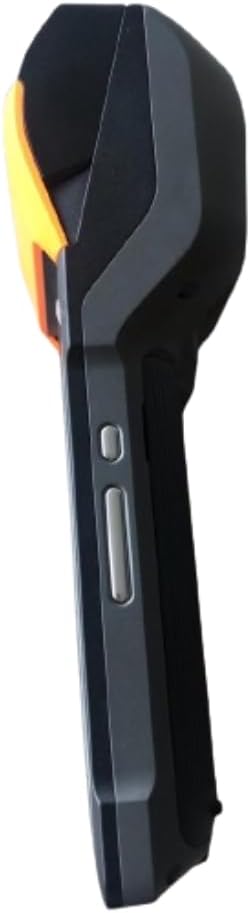
Figura 2.1: Anteriore e laterale View. This image displays the device's screen, the integrated barcode scanner at the top, and the power and volume buttons located on the side.

Figura 2.2: Lato ViewQuesta immagine mostra il lato profile of the terminal, including the cover for the SIM card slot and additional buttons.

Figura 2.3: Indietro View. This image illustrates the rear of the device, featuring the thermal printer cover, the 0.3 MP camera, and the charging contact points.
Elenco dei componenti:
- Schermo di visualizzazione: Touch-sensitive LCD for user interaction.
- Lettore di codici a barre: Integrated 1D/2D scanner for data capture.
- Stampante termica: For printing receipts and other documents.
- Pulsante di accensione: To turn the device on/off or wake/sleep.
- Pulsanti del volume: Per regolare i livelli audio.
- Telecamera: 0.3 MP front photo sensor.
- Slot per scheda SIM: Supports 1 Nano SIM.
- Vano batteria: Houses the removable Lithium Ion battery.
- Charging Port/Contacts: Per caricare il dispositivo.
3. Configurazione iniziale
3.1. Installazione della batteria
- Assicurarsi che il dispositivo sia spento.
- Individuare il coperchio del vano batteria sul retro del dispositivo (fare riferimento alla Figura 2.3).
- Rimuovere il coperchio facendolo scorrere o sollevandolo secondo le indicazioni.
- Insert the provided Lithium Ion battery, ensuring the contacts align correctly.
- Riposizionare saldamente il coperchio del vano batteria.
3.2. Installazione della scheda SIM
- Ensure the device is powered off and the battery is installed.
- Locate the SIM card slot cover on the side of the device (refer to Figure 2.2).
- Aprire il coperchio.
- Insert a Nano SIM card into the designated slot with the gold contacts facing down and the notched corner aligned.
- Close the SIM card slot cover firmly.
3.3. Thermal Paper Loading
- Locate the printer cover release latch, typically on the top or side of the printer compartment (refer to Figure 2.3).
- Aprire il coperchio della stampante.
- Insert a 58mm thermal paper roll into the compartment, ensuring the paper feeds from the bottom and the leading edge extends out of the printer slot.
- Close the printer cover firmly until it clicks into place. Ensure there is no slack in the paper roll.
3.4. Ricarica iniziale e accensione
- Collegare l'adattatore di alimentazione in dotazione alla porta di ricarica del dispositivo.
- Plug the adapter into a power outlet. Allow the device to charge fully before first use.
- To power on, press and hold the Power button (refer to Figure 2.1) until the SUNMI logo appears on the screen.
4. Istruzioni per l'uso
4.1. Accensione/spegnimento e modalità di sospensione
- Accensione: Tenere premuto il pulsante di accensione finché il dispositivo non vibra e lo schermo non si illumina.
- Spegni: Tenere premuto il pulsante di accensione finché non viene visualizzato il menu di accensione. Selezionare "Spegni" e confermare.
- Sonno-veglia: Premere brevemente il pulsante di accensione per mettere il dispositivo in modalità sospensione o riattivarlo.
4.2. Using the Thermal Printer
The integrated 58mm thermal printer can be used to print receipts, tickets, and other documents.
- Ensure thermal paper is correctly loaded (refer to Section 3.3).
- Open the application that requires printing (e.g., POS software).
- Initiate the print command within the application. The device will automatically print the content.
- Tear off the printed paper against the serrated edge.
4.3. Scansione del codice a barre
The V2SE supports 1D and 2D barcode recognition.
- Open an application that requires barcode input.
- Point the scanner window (located at the top of the device, refer to Figure 2.1) at the barcode.
- Press the dedicated scan button (if available) or trigger the scan function within the application.
- Assicurarsi che il codice a barre sia all'interno del campo di lettura dello scanner view and well-lit for optimal performance.
4.4. Funzionalità NFC
The device supports Near Field Communication (NFC) for contactless operations.
- Ensure NFC is enabled in the device settings (Settings > Connected devices > NFC).
- Open an application that utilizes NFC (e.g., payment app, data transfer app).
- Hold the NFC-enabled card or device close to the NFC detection area on your terminal (typically near the top or back of the device).
- Follow the on-screen prompts to complete the transaction or data transfer.
4.5. Connettività di rete
- Wifi: Vai su Impostazioni > Rete e Internet > Wi-Fi per connetterti alle reti wireless disponibili.
- Dati mobili (4G/3G/2G): Ensure a valid SIM card is installed and mobile data is enabled in Settings > Network & internet > Mobile network.
- Bluetooth: Vai su Impostazioni > Dispositivi connessi > Bluetooth per associarlo ad altri dispositivi Bluetooth.
5. Manutenzione
5.1. Pulizia del dispositivo
- Spegnere il dispositivo prima della pulizia.
- Utilizzare un panno morbido e privo di lanugine leggermente dampPulire l'esterno con acqua o con un detergente delicato e non abrasivo.
- Per il display, utilizzare un detergente specifico per schermi e un panno in microfibra.
- Do not use harsh chemicals, solvents, or abrasive materials. Avoid spraying liquids directly onto the device.
5.2. Cura della batteria
- Charge the battery regularly, avoiding complete discharge whenever possible.
- Non esporre la batteria a temperature estreme.
- Se il dispositivo non verrà utilizzato per un periodo prolungato, caricare la batteria a circa il 50% e conservarla in un luogo fresco e asciutto.
- Utilizzare solo il caricabatterie e la batteria originali o approvati.
5.3. Printer Head Cleaning
Regular cleaning of the printer head can prevent print quality issues.
- Power off the device and open the printer cover.
- Utilizzare un batuffolo di cotone leggermenteampened with isopropyl alcohol to gently wipe the thermal print head.
- Lasciare asciugare completamente la testina di stampa prima di chiudere il coperchio e accendere il dispositivo.
6. Risoluzione Dei Problemi
| Problema | Possibile causa | Soluzione |
|---|---|---|
| Il dispositivo non si accende | Low battery; Faulty battery; Power button issue | Charge the device for at least 30 minutes. Ensure battery is correctly installed. Try a different charger. |
| La stampante non stampa | No paper; Paper jammed; Printer head dirty; Application error | Check and load paper. Clear any paper jams. Clean the printer head (Section 5.3). Restart the application or device. |
| Lo scanner del codice a barre non funziona | Scanner window obstructed; Barcode damaged; Application error | Ensure scanner window is clean. Try scanning a different barcode. Restart the application or device. |
| Nessuna connessione Wi-Fi | Wi-Fi off; Incorrect password; Out of range | Enable Wi-Fi in settings. Re-enter password. Move closer to the Wi-Fi router. |
| Nessun dato mobile | SIM card not installed; Mobile data off; No network coverage | Check SIM card installation. Enable mobile data in settings. Check for network coverage in your area. |
7. Specifiche
| Caratteristica | Dettaglio |
|---|---|
| Modello | V2SE |
| Sistema operativo | Androide 12.0 |
| processore | Quad-core da 2.0 GHz |
| Memoria RAM | 2 GB |
| ROM | 8 GB |
| Display | LCD, 1920 x 1080 resolution, 16:9 Aspect Ratio |
| Stampante | 58 mm thermal printer, 80 mm/s print speed |
| Barcode Recognition | 1D / 2D Barcode recognition |
| Telecamera | 0.3 MP Front Photo Sensor |
| Slot SIM | 1 Nano SIM (Dual SIM support) |
| Connettività | 4G/3G/2G Cellular, Wi-Fi (2.4G/5G), Bluetooth 2.1/3.0/4.2, NFC |
| GPS | True, Supports GPS satellite navigation system |
| Batteria | 1 batteria agli ioni di litio (rimovibile, inclusa) |
| Dimensioni | Dimensioni: 22 x 9 x 9 cm |
| Peso | 400 grammi |
| Produttore | SUNMI |
8. Garanzia e supporto
For warranty information and technical support, please refer to the documentation provided with your purchase or contact your vendor. Keep your proof of purchase for warranty claims.