
1. Introduzione
The LAUNCH Millennium Master 2.0 is an advanced OBD2 diagnostic scan tool designed to assist vehicle owners and technicians in identifying and resolving automotive issues. This device offers comprehensive diagnostics for four main vehicle systems: Engine, Anti-lock Braking System (ABS), Supplemental Restraint System (SRS), and Transmission. It also includes 13 commonly used reset service functions and supports battery health, starting, and charging tests. Featuring a 5-inch touchable HD screen and Auto VIN capabilities, the Millennium Master 2.0 provides clear data display and efficient vehicle information retrieval. This manual provides essential information for setting up, operating, maintaining, and troubleshooting your device.
2. Informazioni sulla sicurezza
Before operating the LAUNCH Millennium Master 2.0, please read and understand all safety instructions. Failure to do so may result in injury or damage to the device or vehicle. Always perform diagnostic tests in a well-ventilated area. Ensure the vehicle is in Park (P) or Neutral (N) with the parking brake engaged. Do not wear loose clothing or jewelry that could get caught in moving engine parts. Keep the device away from heat, sparks, and open flames. This device is intended for use by qualified individuals or under their supervision. Always refer to your vehicle's service manual for specific procedures and warnings.
3. Prodotto finitoview
The LAUNCH Millennium Master 2.0 is a versatile diagnostic tool equipped with a 5-inch touchscreen and an intuitive interface. It is designed to provide accurate and efficient vehicle diagnostics.
3.1 Caratteristiche principali
- Diagnostica a 4 sistemi: Comprehensive scanning for Engine, ABS, SRS, and Transmission systems.
- 13 Funzioni di reset: Includes Oil Reset, ETS Reset, SAS Reset, Brake Reset, Injector Coding, BMS Reset, TPMS Reset, A/F Reset, ABS Bleeding, IMMO Reset, AFS Reset, AdBlue Reset.
- Funzioni OBD2 complete: Leggi/cancella i codici, view live data, freeze frame, I/M readiness, On-board monitor test, EVAP test, Auto VIN, and built-in DTC lookup library.
- Test batteria: Supports battery health, starting, and charging system tests via Bluetooth with BST360 battery tester.
- Aggiornamenti gratuiti a vita: Online software updates via Wi-Fi to ensure compatibility with the latest vehicle models and features.
- Ampia copertura del veicolo: Compatible with most 1996 and newer American, European, and Asian vehicles supporting OBD2 Protocol.
3.2 Componenti del dispositivo

Figure 1: 4-System Diagnostics Overview. This image illustrates the device's capability to diagnose four critical vehicle systems: Engine, Transmission, SRS (Supplemental Restraint System), and ABS (Anti-lock Braking System). The screen shows options to Read Fault Codes, Clear Fault Codes, Read Data Stream, and Read ECU Information.

Figure 2: 13 Hot Service Functions. This image highlights the 13 most frequently used special reset functions available on the device, such as Oil Reset, SAS Reset, BMS Reset, and TPMS Reset, designed to maintain various vehicle systems.

Figure 3: Full OBDII Diagnoses. The device's screen displays a comprehensive set of OBDII diagnostic functions, including reading and erasing fault codes, checking I/M readiness, and accessing live data streams.

Figure 4: Battery Test Functionality. This image shows the device's interface for performing battery health tests, including start system and charging health tests, with a detailed detection results report.

Figura 5: Funzionalità avanzateview. This composite image demonstrates several advanced features: lifetime free updates, automatic VIN scanning, DTC lookup, 4-in-1 live data stream display, diagnostic feedback, and multiple language support.
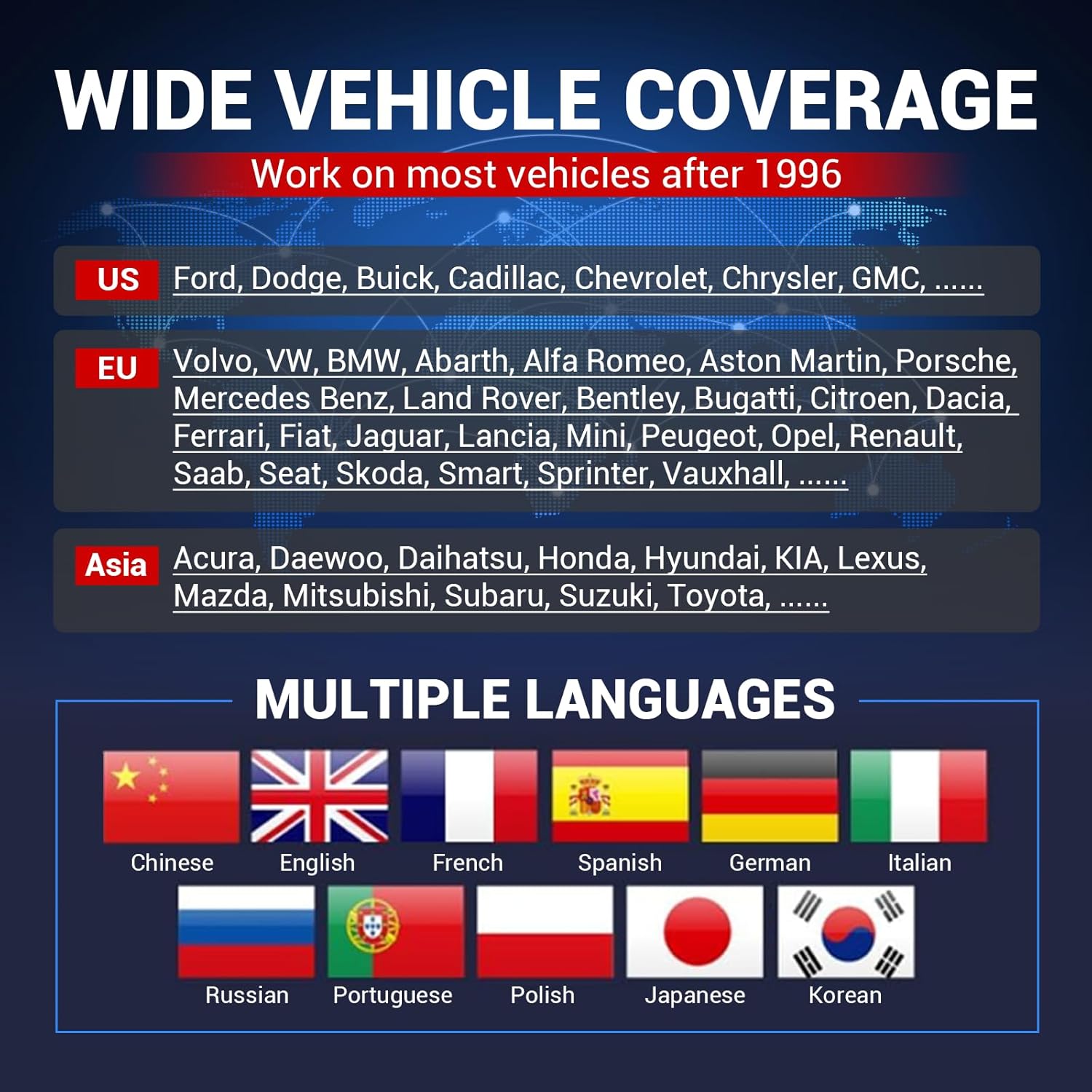
Figure 6: Vehicle Coverage and Language Support. This image highlights the extensive vehicle coverage for American, European, and Asian brands, along with the device's support for multiple languages, indicated by various national flags.
3.3 Unboxing e componenti
Video 1: What's in the box of LAUNCH CRP919E LITE? This video provides an unboxing experience, showcasing the contents of the product package, including the diagnostic tool, main cable, power adapters, and user manual. While the video title refers to a different model, the unboxing process and included accessories are generally representative of LAUNCH diagnostic tools.
4. Impostazione
4.1 Configurazione iniziale del dispositivo
- Accensione: Tieni premuto il pulsante di accensione per accendere il dispositivo.
- Selezione della lingua: Segui le istruzioni sullo schermo per selezionare la lingua preferita (ad esempio, inglese).
- Impostazione del fuso orario: Seleziona il tuo fuso orario locale.
- Connessione di rete: Connect the device to a Wi-Fi network to enable software updates and online features. Enter the Wi-Fi password when prompted.
- Contratto d'uso: Review and agree to the user agreement, privacy policy, and service agreement.
- Workshop Information: Optionally enter your workshop details.
4.2 Collegamento al veicolo
- Individuare la porta OBD2 del veicolo, solitamente situata sotto il cruscotto, sul lato del conducente.
- Connect the diagnostic cable to the device and then to the vehicle's OBD2 port.
- Portare l'accensione del veicolo in posizione "ON" (motore spento).
4.3 Registration and Updates
To ensure your device has the latest software and vehicle coverage, it is crucial to register and perform updates. The Millennium Master 2.0 offers lifetime free updates.
Video 2: LAUNCH CRP123X V2.0 How to Register & Upgrade. This video demonstrates the step-by-step process of registering your LAUNCH diagnostic tool and performing software updates via Wi-Fi. This ensures your device has the latest features and vehicle compatibility.
5. Istruzioni per l'uso
5.1 Esecuzione della diagnostica
- Scansione automatica VIN: From the main menu, select 'Diagnose' and then 'AutoDetect' to automatically identify the vehicle's VIN and retrieve basic information.
- Scansione del sistema: After Auto VIN, proceed with a full system scan to check for fault codes across Engine, ABS, SRS, and Transmission.
- Leggi/Cancella i codici di errore: Once the scan is complete, the device will display any detected Diagnostic Trouble Codes (DTCs). Select 'Read Fault Code' to view details and 'Clear Fault Code' to erase them after repairs.
- Flusso di dati in tempo reale: Seleziona 'Flusso di dati' per view real-time data parameters from various sensors in text or graph format. This helps in monitoring vehicle performance and identifying intermittent issues.
Video 3: Launch CRP129X Diagnostic Video. This video demonstrates the diagnostic capabilities of a LAUNCH CRP series tool, including VIN scanning, system scanning, and reading fault codes. The process shown is similar to the Millennium Master 2.0's diagnostic workflow.
Video 4: What does the AD500 do? Actual operation. This video illustrates the practical application of a diagnostic tool, showing how to perform a VIN scan, conduct a system scan, and interpret fault codes and live data streams. Although for a different model, the operational steps are comparable to the Millennium Master 2.0.
5.2 Funzioni di ripristino
The Millennium Master 2.0 supports 13 common reset functions. To access these, navigate to the 'Reset' menu from the home screen and select the desired function. Follow the on-screen instructions to complete the reset procedure.
5.3 Test della batteria
To perform a battery test, ensure the device is connected to the vehicle and a compatible BST360 battery tester (sold separately) is connected via Bluetooth. Select 'Battery Voltage' from the home screen and follow the prompts to conduct battery health, starting, and charging system tests.
6. Manutenzione
6.1 Aggiornamenti software
The device offers lifetime free software updates. Connect the device to a stable Wi-Fi network. From the home screen, select 'Upgrade' to check for and download available updates. Regular updates ensure optimal performance and compatibility with new vehicle models.
6.2 Pulizia e conservazione
Pulisci il dispositivo con un panno morbido eamp cloth. Do not use abrasive cleaners or solvents. Store the device in a cool, dry place away from direct sunlight and extreme temperatures. Disconnect all cables when not in use.
7. Risoluzione Dei Problemi
If you encounter issues with your LAUNCH Millennium Master 2.0, refer to the following common troubleshooting steps:
- Il dispositivo non si accende: Ensure the device is properly connected to the vehicle's OBD2 port or a power source. Check the power button.
- Errore di comunicazione: Verify that the diagnostic cable is securely connected to both the device and the vehicle. Ensure the vehicle's ignition is in the 'ON' position. Try restarting the device and the vehicle.
- Problemi tecnici del software: Perform a software update to resolve potential bugs. If issues persist, consider a firmware fix.
Video 5: Firmware Fix. This video demonstrates how to perform a firmware fix on a LAUNCH diagnostic tool. If you experience technical problems such as device prompt code errors or incorrect VIN recognition, a firmware update can often resolve these issues.
8. Specifiche
- Numero modello: 301050822
- Dimensioni dello schermo: 5 pollici
- Sistema operativo: Androide 8.1
- Fonte di energia: Alimentato a batteria
- Produttore: LANCIO
- Dimensioni del pacco: 25.4 x 20.32 x 7.62 cm; 997.9 g
9. Garanzia e supporto
Per informazioni sulla garanzia e supporto tecnico, fare riferimento alla documentazione inclusa con il prodotto o visitare il sito ufficiale LAUNCH website. Online feedback options are available through the device's interface to submit diagnostic reports or seek assistance from LAUNCH technicians.