
1. Prodotto finitoview
The CYCLAMI S2 Nylon Out Front Bike Computer Mount is designed to securely hold your cycling computer and compatible accessories, positioning them conveniently in front of your handlebars. This mount is constructed from reinforced nylon for durability and features a low wind drag design.
Caratteristiche principali:
- Wide Compatibility: Supports XOSS, iGPSPORT, CooSpo, and Garmin Edge series cycling computers (e.g., Edge Touring, Edge 830, Edge 130 Plus, Edge 530).
- Handlebar Fit: Designed for circular bike handlebars with diameters between 1" and 1.25" (25.4mm-31.8mm).
- Out Front Positioning: Places your device forward for improved visibility and reduced distraction.
- Durable Construction: Made from reinforced nylon for strength and longevity.
- Water Resistance: Designed to withstand various weather conditions.

Image 1.1: The CYCLAMI S2 mount showcasing its multifunctionality with a bike computer and a headlight.

Image 1.2: Illustration of the mount's low wind drag design, optimizing aerodynamics.
2. Cosa c'è nella scatola
Dopo aver aperto la confezione, verificare che siano presenti tutti i componenti:
- 1 x CYCLAMI S2 Out Front Bike Computer Mount (Nylon)
- 1 x Allen Wrench (for installation)
- Various adapters for different cycling computers (e.g., Garmin, XOSS, iGPSPORT)
- Viti e hardware di montaggio
3. Guida all'installazione
Follow these steps to correctly install your CYCLAMI S2 Out Front Bike Computer Mount:
- Preparare il manubrio: Ensure your bike handlebar is clean and free of obstructions in the desired mounting area. The mount is compatible with circular handlebars of 1" to 1.25" (25.4mm-31.8mm) diameter.
- Posizionare il supporto: Place the mount around your handlebar, ensuring the CYCLAMI logo faces forward and the computer interface is positioned correctly.
- Metti in sicurezza il Clamp: Use the provided Allen wrench to tighten the screws on the mount's clamp. Tighten evenly until the mount is secure and does not rotate freely. Do not overtighten.
- Regola l'angolo (facoltativo): The mount allows for slight angle adjustment. Loosen the main screw slightly, adjust to your preferred viewing angle, and then re-tighten securely.
- Attach Computer Adapter: Select the appropriate adapter for your cycling computer (Garmin, XOSS, iGPSPORT). Attach it to the top of the mount using the small screws provided. Rotate left to tighten the adapter.
- Attach Bottom Extension (Optional): If you plan to attach a headlight or action camera below the computer, use the bottom extension piece and secure it with the provided screws.
- Monta il tuo dispositivo: Twist your cycling computer onto the adapter until it locks into place. If using a headlight, attach it to the bottom extension.

Image 3.1: Visual guide for installing the CYCLAMI S2 mount, detailing each step from overview to completion.
Video 3.1: This video demonstrates the installation process of the CYCLAMI S2 bike computer mount, including attaching the mount to the handlebar, adjusting its angle, and securing various compatible cycling computers and headlights.
4. Istruzioni per l'uso
Once installed, the CYCLAMI S2 mount provides a stable platform for your devices.
- Attaching a Device: Align your compatible cycling computer or accessory with the installed adapter on the mount. Gently push down and twist clockwise until it clicks securely into place.
- Detaching a Device: To remove your device, twist it counter-clockwise until it releases from the adapter, then lift it off.
- Headlight/Camera Attachment: If using the bottom extension, ensure your headlight or action camera is compatible with the mounting interface and securely fastened.
5. Caratteristiche del prodotto
The CYCLAMI S2 mount offers several design advantages:
- Visibilità migliorata: Positions your bike computer further forward, allowing for easier viewing of data without diverting attention from the road.
- Ottimizzazione dello spazio: Frees up valuable handlebar space by integrating multiple devices (computer and light) into one streamlined mount.
- Materiale robusto: Constructed from reinforced nylon, providing a strong and stable platform for your electronics, even on challenging terrain.
- Design aerodinamico: Engineered to minimize wind resistance, contributing to a smoother ride.
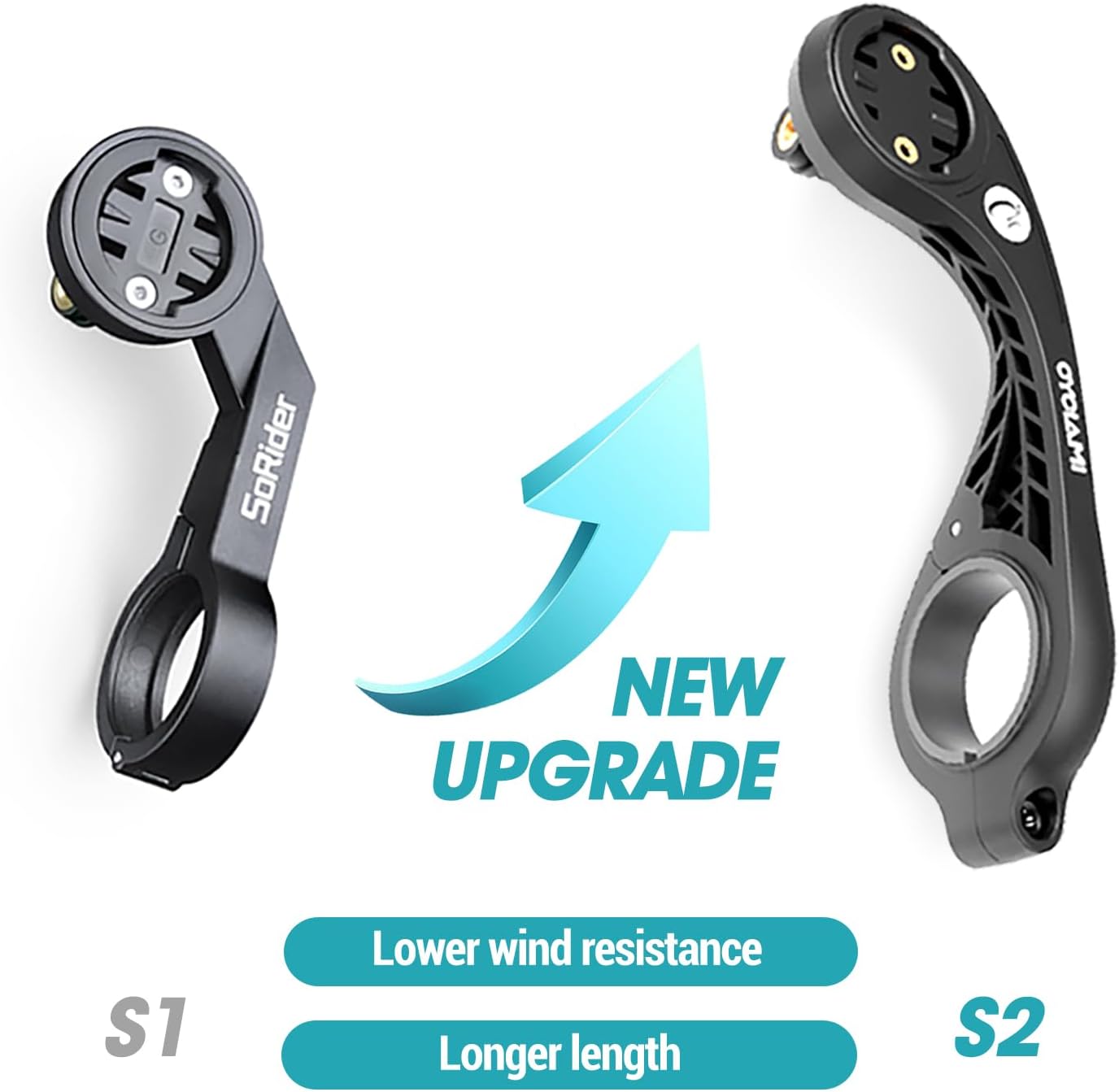
Image 5.1: A visual comparison between the S1 and S2 mounts, illustrating the S2's improved design for lower wind resistance and increased length.

Image 5.2: The mount demonstrating its excellent water resistance, suitable for various weather conditions.
6. Specifiche
| Attributo | Dettaglio |
|---|---|
| Marca | CICLAMI |
| Nome del modello | S2 |
| Colore | Nero |
| Materiale | Reinforced Nylon |
| Tipo di montaggio | Manubrio |
| Diametro del manubrio compatibile | 1" - 1.25" (25.4 mm - 31.8 mm) |
| Dispositivi compatibili | Garmin Edge (Touring, 830, 130 Plus, 530), XOSS, iGPSPORT, CooSpo |
| Livello di resistenza all'acqua | Impermeabile |
| Peso dell'articolo | 0.07 chilogrammi |
Note: Not compatible with Wahoo/Bryton devices or handlebars outside the specified diameter range.
7. Manutenzione
To ensure the longevity and optimal performance of your CYCLAMI S2 mount, follow these simple maintenance guidelines:
- Pulizia: Pulire regolarmente il supporto con un pannoamp cloth to remove dirt and grime. Avoid using harsh chemicals or abrasive cleaners, which can damage the nylon material.
- Ispezione: Periodically check all screws and connections to ensure they are tight. Vibrations from cycling can sometimes loosen fasteners. Re-tighten with the Allen wrench if necessary.
- Magazzinaggio: Quando non viene utilizzato per lunghi periodi, conservare il supporto in un luogo fresco e asciutto, lontano dalla luce solare diretta.
8. Risoluzione Dei Problemi
If you encounter any issues with your CYCLAMI S2 mount, refer to the following common problems and solutions:
| Problema | Possibile causa | Soluzione |
|---|---|---|
| Montare le slitte sul manubrio | Clamp screws are loose. | Stringere la clamp screws evenly with the Allen wrench. Ensure the handlebar diameter is within the compatible range. |
| Device does not attach securely | Incorrect adapter used or adapter not fully tightened. | Verify you are using the correct adapter for your device. Ensure the adapter is twisted fully and locked onto the mount. |
| Mount feels flimsy | Le viti non sono completamente serrate. | Check all mounting screws, including those for the computer adapter and bottom extension, and tighten them securely. |
Se il problema persiste, contattare l'assistenza clienti.
9. Garanzia e supporto
The CYCLAMI S2 Out Front Bike Computer Mount comes with a Garanzia di 1 anno as specified in the product details. For any warranty claims or technical support, please refer to your purchase documentation or contact the seller directly.
Per ulteriore assistenza, puoi visitare il CYCLAMI Store on Amazon.