
1. Introduzione
This manual provides detailed instructions for the operation and maintenance of your SWOFY M4 MP3 Player. Please read this manual thoroughly before using the device to ensure proper functionality and to maximize your user experience.
2. Prodotto finitoview
The SWOFY M4 is a versatile digital audio player featuring Bluetooth 5.3 connectivity, a 2.4-inch touch screen, and a range of functions including FM radio, e-book reader, video playback, and voice recording. It comes with 64GB of built-in storage, expandable up to 128GB with a Micro SD card.
2.1 Contenuto della confezione
- 1x SWOFY 64GB Bluetooth MP3 Player
- 1x auricolari cablati
- 1x cavo USB di tipo C
- 1x custodia protettiva in silicone
- 1x Manuale utente
2.2 Disposizione del dispositivo
Familiarize yourself with the physical components of your SWOFY M4 MP3 Player.
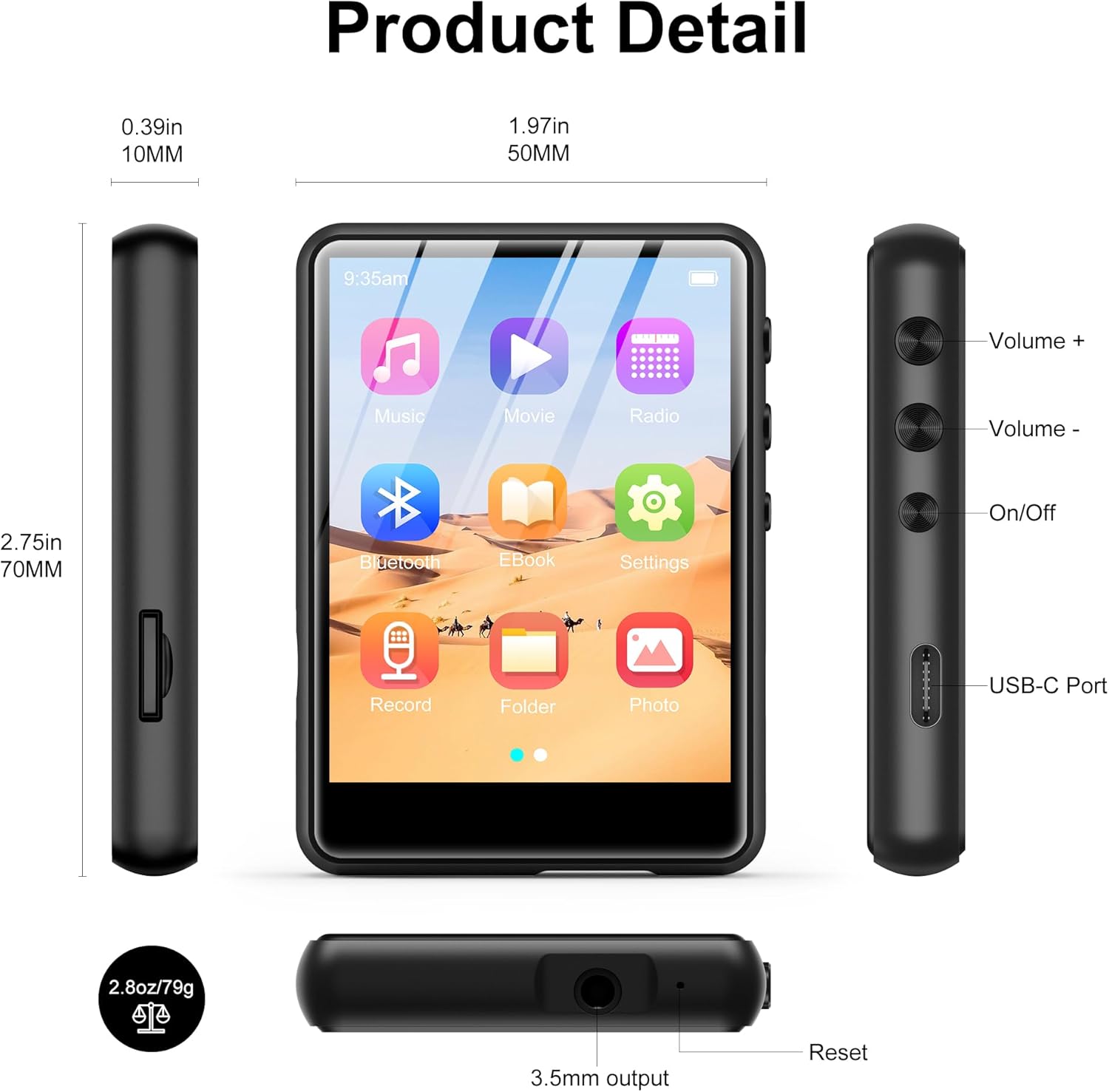
Immagine 2.2.1: Front, side, and top views of the SWOFY M4 MP3 Player, highlighting the 2.4-inch screen, Volume +/-, On/Off buttons, USB-C Port, 3.5mm output, Reset button, and Micro SD card slot.
- Schermo touch IPS da 2.4 pollici: For navigation and display.
- Pulsanti Volume +/-: Regola il livello di uscita audio.
- Pulsante On/Off: Accendi o spegni il dispositivo.
- Porta USB-C: Per la ricarica e il trasferimento dei dati.
- Jack stereo da 3.5 mm: Collegare cuffie cablate o altoparlanti esterni.
- Slot per scheda microSD: Per espandere la memoria fino a 128 GB.
- Pulsante di reset: To restart the device if it becomes unresponsive.
- Altoparlante HD: Altoparlante integrato per la riproduzione audio.
3. Impostazione
3.1 Ricarica del dispositivo
Before first use, fully charge the MP3 player. Connect the provided USB Type-C cable to the device's USB-C port and the other end to a USB power adapter (not included) or a computer's USB port. The battery indicator on the screen will show charging status.

Immagine 3.1.1: The SWOFY M4 MP3 Player connected via USB Type-C cable, illustrating its 300mAh battery capacity for long playback.
3.2 Accensione/Spegnimento
- Per accendere: Press and hold the On/Off button located on the side of the device until the screen illuminates.
- Per spegnere: Press and hold the On/Off button until a power-off prompt appears on the screen. Select "Power Off" or continue holding until the screen turns off.
3.3 Loading Music and Files
Per trasferire fileal tuo lettore MP3:
- Collega il lettore MP3 al computer utilizzando il cavo USB Type-C in dotazione.
- Il dispositivo apparirà come un disco rimovibile sul tuo computer.
- Drag and drop your music, video, image, or e-book filenelle cartelle appropriate sul lettore MP3.
- Prima di scollegare il cavo, espellere in modo sicuro il dispositivo dal computer.

Immagine 3.3.1: Trasferimento di musica files (MP3, WMA, APE, FLAC, WAV, OGG, DRM, ACELP) from a computer to the SWOFY M4 MP3 Player via USB-C.
The device supports various audio formats including MP3, WMA, APE, FLAC, WAV, OGG, DRM, and ACELP. For video and image files, ensure they are in compatible formats to avoid "unsupported format" errors.
3.4 Espansione dello spazio di archiviazione
The SWOFY M4 has 64GB of internal storage. You can expand this by inserting a Micro SD card (up to 128GB) into the dedicated slot on the side of the device.
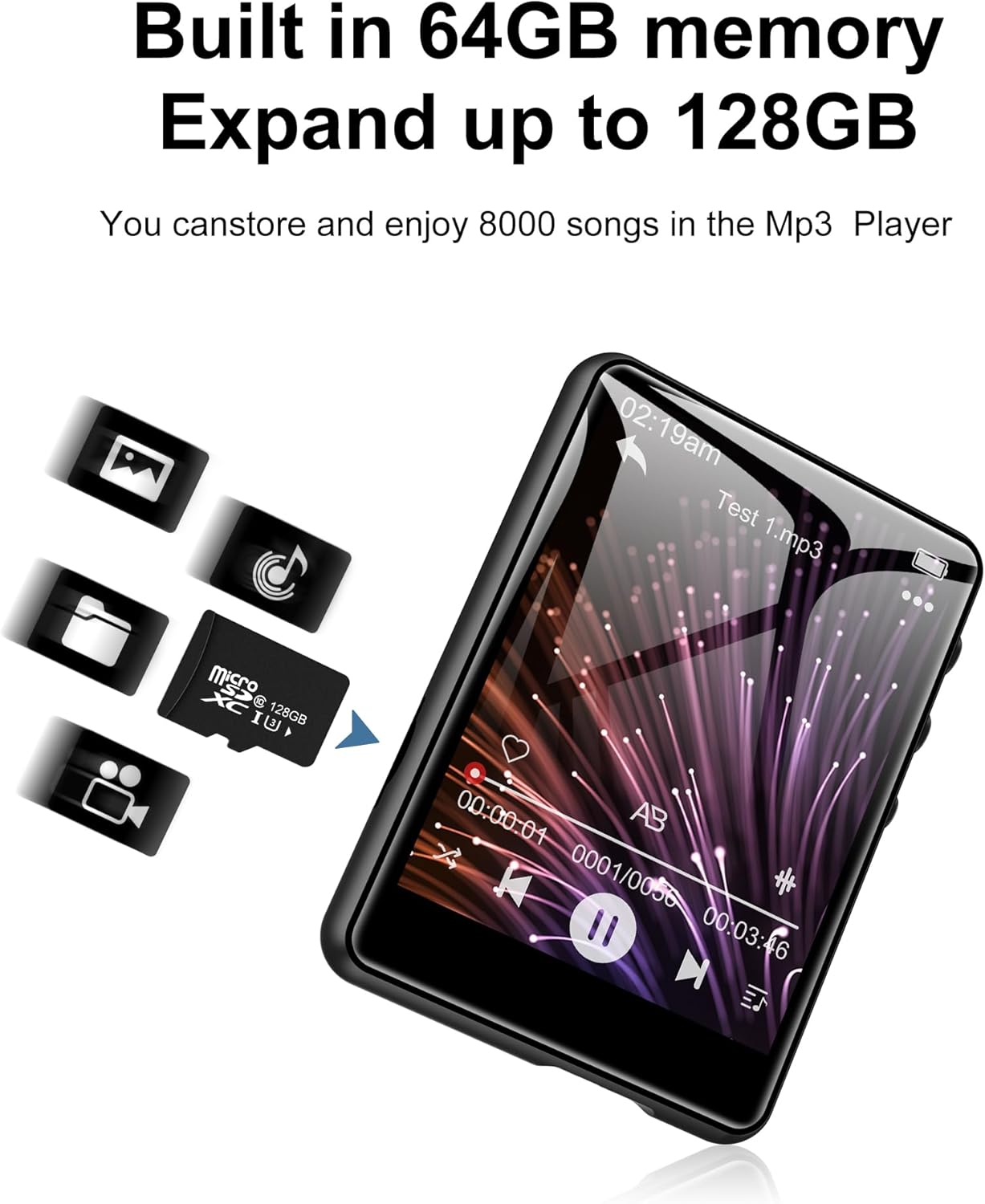
Immagine 3.4.1: The SWOFY M4 MP3 Player with a Micro SD card, illustrating the expandable storage capability up to 128GB.
4. Istruzioni per l'uso
4.1 Navigazione sul touch screen
The 2.4-inch touch screen allows for intuitive navigation. Tap icons to open applications, swipe to scroll, and use the back arrow icon to return to the previous screen.

Immagine 4.1.1: A finger interacting with the 2.4-inch IPS touch screen of the SWOFY M4 MP3 Player, demonstrating its convenient operation.
4.2 Riproduzione di musica
- Dal menu principale, tocca l'icona "Musica".
- Sfoglia la tua libreria musicale per artista, album, genere o cartella.
- Tocca un brano per avviarne la riproduzione.
- Use the on-screen controls (play/pause, skip, volume) or physical volume buttons to manage playback.
- Access equalizer settings and playback modes (repeat, shuffle) from the music playback screen.

Immagine 4.2.1: The music playback interface of the SWOFY M4, showing options for AB Repeat, 8-speed playback, two playback modes, and equalizer settings.
4.3 Connettività Bluetooth
The SWOFY M4 features Bluetooth 5.3 for wireless audio streaming.
- From the main menu, tap the "Bluetooth" icon or go to "Settings" and select "Bluetooth".
- Turn Bluetooth on. The device will scan for available Bluetooth devices.
- Assicurati che le cuffie o gli altoparlanti Bluetooth siano in modalità di associazione.
- Seleziona il dispositivo dall'elenco per associarlo. Una volta associato, l'audio verrà riprodotto in streaming wireless.

Immagine 4.3.1: The SWOFY M4 MP3 Player demonstrating Bluetooth 5.3 connectivity with both Bluetooth earbuds and a Bluetooth speaker for wireless audio.
4.4 Radio FM
Per utilizzare la funzione Radio FM:
- Connect wired headphones to the 3.5mm jack; they act as the antenna.
- Dal menu principale, tocca l'icona "Radio".
- Perform an auto-scan to find available stations or manually tune to a frequency.

Immagine 4.4.1: The SWOFY M4 MP3 Player showing the FM radio interface with wired headphones connected, which are necessary for antenna reception.
4.5 Lettore di e-book
To read e-books:
- Transfer compatible e-book files to the device (e.g., TXT format).
- Tap the "E-Book" icon from the main menu.
- Select an e-book to open it. Use the touch screen to turn pages.

Immagine 4.5.1: The SWOFY M4 MP3 Player displaying an e-book, with a hand demonstrating page-turning via the touch screen.
4.6 Riproduzione video
Il dispositivo supporta la riproduzione video. Assicurati che il video files are in a compatible format for optimal performance.
- Trasferisci video compatibile files al dispositivo.
- Tap the "Movie" icon from the main menu.
- Seleziona un video da riprodurre.

Immagine 4.6.1: The SWOFY M4 MP3 Player displaying a video in full-screen mode, demonstrating its video playback capability.
4.7 Registratore vocale
Per registrare l'audio:
- Tocca l'icona "Registra" dal menu principale.
- Tocca il pulsante di registrazione per avviare la registrazione.
- Tap again to pause/resume, and tap the stop button to end and save the recording.

Immagine 4.7.1: The SWOFY M4 MP3 Player showing the voice recorder interface, indicating active recording with sound wave visualization.
4.8 Foto Viewer
A view foto:
- Transfer compatible image files (e.g., JPEG) to the device.
- Tap the "Photo" icon from the main menu.
- Seleziona un'immagine per view. Swipe left or right to navigate through photos.

Immagine 4.8.1: The SWOFY M4 MP3 Player displaying images, with a hand demonstrating swiping gestures to browse through photos.
5. Manutenzione
- Pulizia: Utilizzare un panno morbido e asciutto per pulire il dispositivo. Evitare detergenti liquidi o materiali abrasivi.
- Magazzinaggio: Conservare il lettore MP3 in un luogo fresco e asciutto, lontano dalla luce solare diretta e da temperature estreme.
- Cura della batteria: Per prolungare la durata della batteria, evitare di scaricarla completamente frequentemente. Caricare il dispositivo regolarmente, anche se non viene utilizzato per periodi prolungati.
- Protezione: Utilizzare la custodia protettiva in silicone fornita per proteggerla da graffi e piccoli urti.
6. Risoluzione Dei Problemi
- Il dispositivo non si accende:
- Ensure the device is fully charged. If the issue persists, try pressing the reset button with a thin object (like a paperclip) and then attempt to power on again.
- "Unsupported format" error for files:
- Verifica che il tuo files (music, video, image) are in compatible formats. For music, MP3, WMA, APE, FLAC, WAV, OGG, DRM, ACELP are supported. For videos and images, specific formats may be required; refer to the product specifications or try converting files to common formats like JPEG for images or MP4 for videos.
- Impossibile connettersi al computer:
- Ensure the USB Type-C cable is securely connected to both the device and the computer. Try a different USB port or cable. Restart both the MP3 player and the computer. Ensure the device is powered on when connecting.
- Dispositivo Bluetooth non associato:
- Ensure Bluetooth is enabled on both the MP3 player and the target device (headphones/speaker). Make sure the target device is in pairing mode and within range. Try turning Bluetooth off and on again on both devices.
- Scarsa qualità del suono:
- Controlla l'audio file quality. Ensure headphones or speakers are properly connected and functioning. Adjust equalizer settings on the device. For wired connections, ensure the 3.5mm jack is fully inserted.
7. Specifiche
| Caratteristica | Dettaglio |
|---|---|
| Numero di modello | M4 |
| Dimensioni | 2.75 x 1.97 x 0.4 pollici |
| Peso dell'articolo | 7.4 once |
| Dimensioni dello schermo | 2.4 pollici |
| Memoria interna | 64 GB |
| Archiviazione espandibile | Fino a 128 GB (scheda Micro SD) |
| Versione Bluetooth | 5.3 |
| Connettività | Bluetooth, USB tipo C |
| Batteria | Polimeri di litio da 300 mAh (inclusi) |
| Playback Time (wired earbuds) | Fino a 50 ore |
| FM Radio Recording Time | Circa 7.5 ore |
| Formati audio supportati | MP3, WMA, FLAC, APE, OGG, DRM, ACELP, WAV |
| Caratteristiche speciali | Equalizzatore, radio FM, touch screen, riproduzione video, registratore vocale |
8. Video ufficiale del prodotto
8.1.1 video: An official product video from SWOFY Direct showcasing the features and design of the SWOFY M4 MP3 Player. This video demonstrates the device's multi-colored options, package contents, 2.4-inch touch screen, various ports, Bluetooth 5.3, and overall functionality.
9. Garanzia e supporto
Per informazioni sulla garanzia e supporto tecnico, fare riferimento ai recapiti forniti sulla confezione del prodotto o visitare il sito ufficiale SWOFY webluogo. Conserva la ricevuta di acquisto per eventuali richieste di garanzia.


