
1. Introduzione
This manual provides detailed instructions for the safe and efficient use of your new Honor Magic 6 Lite Smartphone. Please read this manual thoroughly before using the device to ensure optimal performance and longevity.

Figure 1.1: The Honor Magic 6 Lite Smartphone, showcasinil suo design elegante e il modulo della fotocamera.
Caratteristiche principali:
- 1.5K Ultra-Bounce Anti-Drop Display: Certified with SGS five-star anti-drop protection for enhanced durability.
- 5300 mAh Super Durable Battery: High-density battery providing extended usage and supporting 35W fast charging.
- 108 MP Lossless Capture Camera: High-resolution main camera with 3x lossless zoom and a 16 MP front camera.
- Qualcomm Snapdragon 6 Gen 1 Processor: Powerful 4nm chipset for smooth performance.
- 8 GB RAM + 256 GB Storage: Enhanced memory with HONOR Turbo RAM for seamless multitasking.
- Android 13 with MagicOS 7.2: Full support for Google Mobile Services.
2. Guida all'installazione
2.1. Disimballaggio e ispezione iniziale
Rimuovere con attenzione tutti i componenti dall'imballaggio. Verificare che siano presenti tutti gli elementi:
- Honor Magic 6 Lite Smartphone
- Cavo USB di tipo C.
- Strumento di espulsione della SIM
- Guida rapida (se inclusa)
Inspect the device for any visible damage. If any damage is found, do not proceed with setup and contact customer support.
2.2. Inserimento della/e scheda/e SIM
- Individua il vassoio della scheda SIM sul lato del dispositivo.
- Inserire lo strumento di espulsione della SIM nel piccolo foro accanto al vassoio e premere con decisione finché il vassoio non fuoriesce.
- Place your Nano-SIM card(s) into the designated slots on the tray. Ensure the gold contacts face downwards. The Honor Magic 6 Lite supports dual SIM functionality.
- Spingere con attenzione il vassoio nuovamente nel dispositivo finché non scatta in posizione.
2.3. Carica del dispositivo
Prima del primo utilizzo, si consiglia di caricare completamente lo smartphone.
- Collega il cavo USB Type-C alla porta di ricarica nella parte inferiore del telefono.
- Connect the other end of the cable to a compatible 35W fast charger (sold separately or included in some regional packages) and plug it into a power outlet.
- L'indicatore di carica apparirà sullo schermo. Lasciare caricare il dispositivo finché l'icona della batteria non indica che è completamente carica.
2.4. Accensione e configurazione iniziale
- Press and hold the Power button (located on the right side of the device) until the Honor logo appears.
- Follow the on-screen instructions to complete the initial setup, which includes selecting your language, connecting to Wi-Fi, setting up your Google account, and configuring security features like fingerprint or face unlock.
3. Istruzioni per l'uso
3.1. Display e navigazione
The Honor Magic 6 Lite features a vibrant 6.78-inch AMOLED display with a 120Hz refresh rate, 1.5K Retina resolution (2652x1200 pixels), and 429 PPI, offering crisp visuals and smooth scrolling. It supports 1.07 billion colors and has a 92.8% screen-to-body ratio.

Figure 3.1: Detailed specifications of the Honor Magic 6 Lite's display.
The device incorporates a 360° Anti-Drop Display technology, providing comprehensive protection against drops and impacts, certified by SGS five-star anti-drop rating.
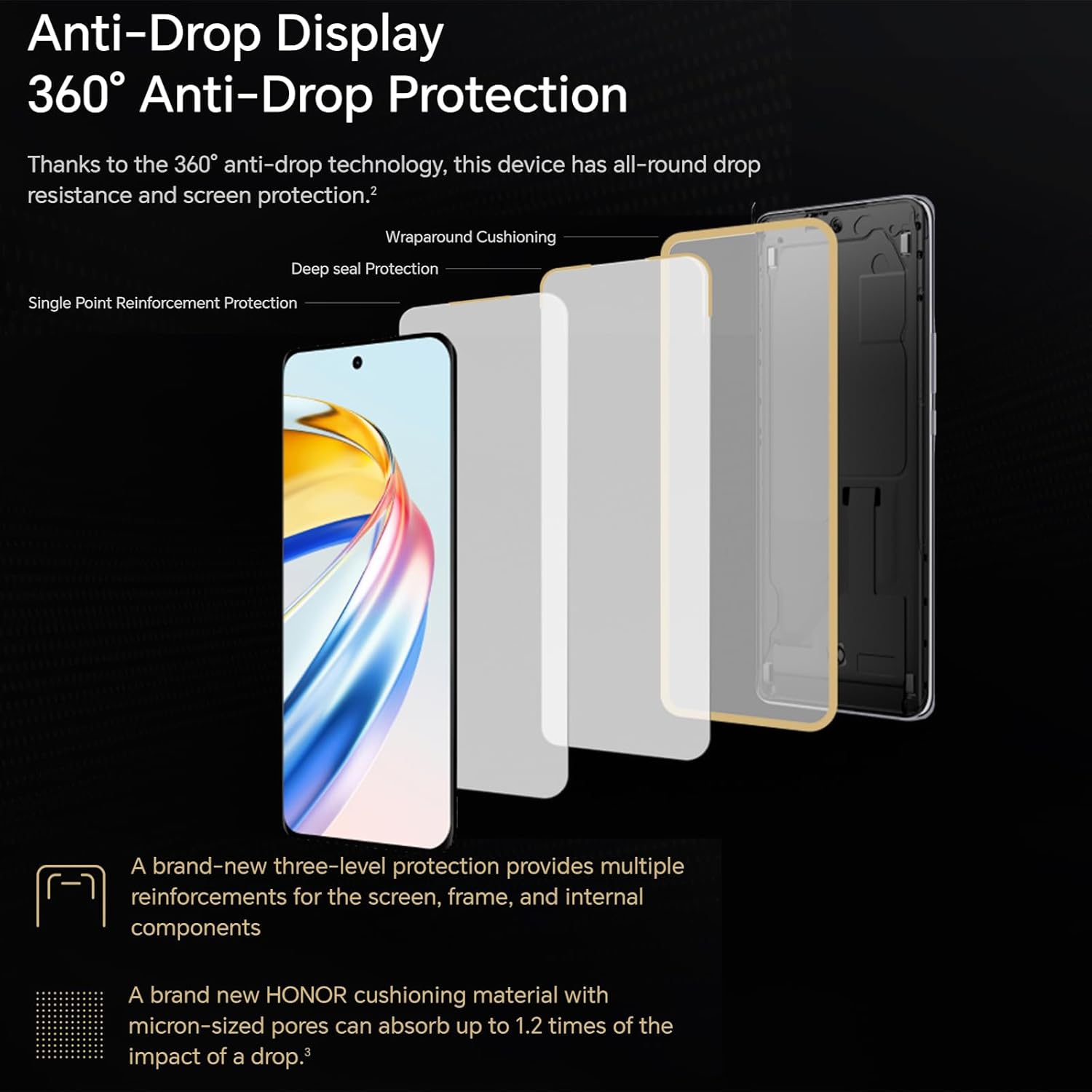
Figure 3.2: The multi-layered anti-drop protection system of the display.
3.2. Caratteristiche della fotocamera
The Honor Magic 6 Lite is equipped with a powerful 108 MP main camera and a 16 MP front camera, allowing you to capture high-quality photos and videos.

Figura 3.3: Esamples of image quality from the 108MP main camera and wide-angle lens.
The camera supports 3x lossless zoom, enabling you to capture distant subjects with clarity without compromising image quality. It also features a sports recording mode to capture fast-moving action.
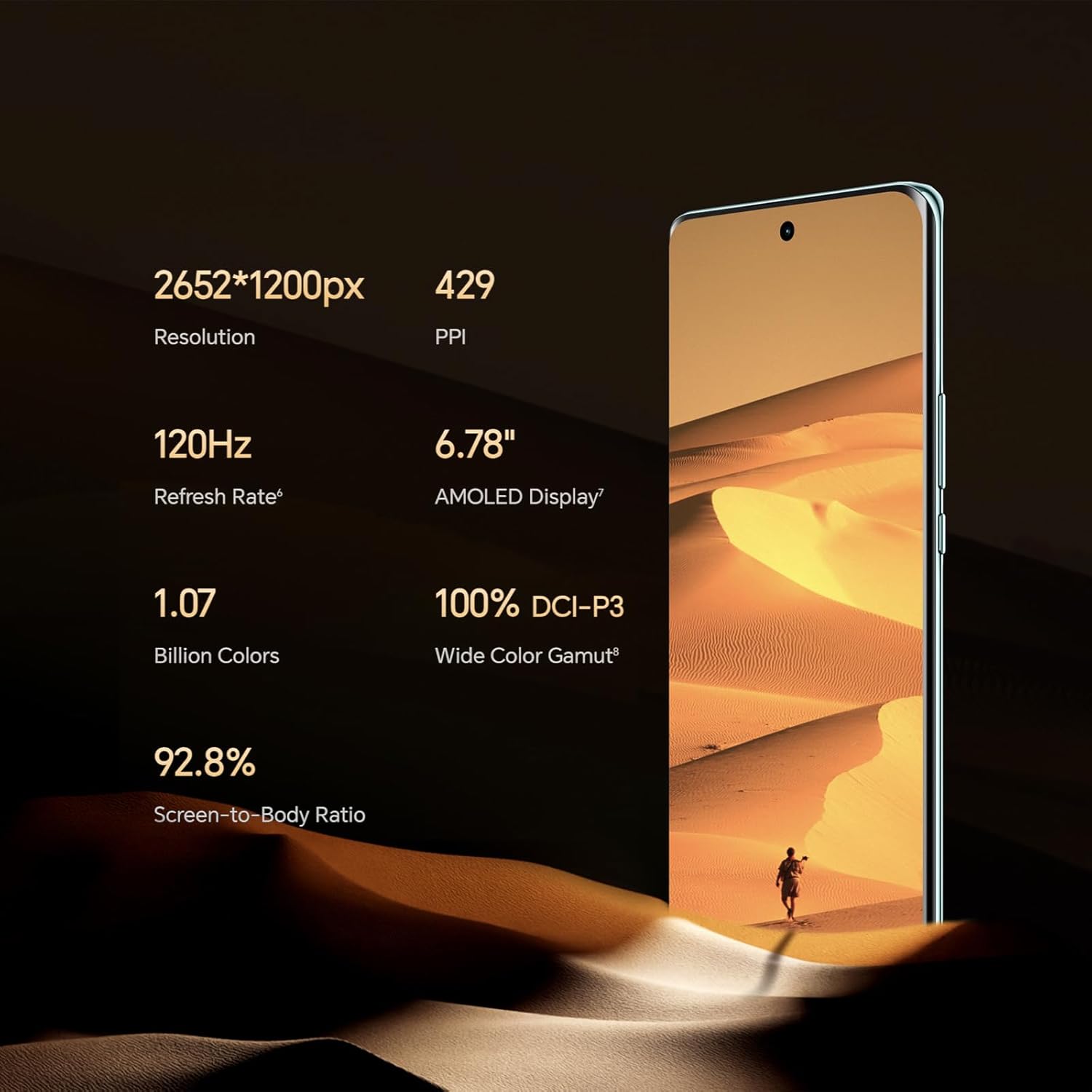
Figure 3.4: Illustration of the 3x lossless zoom feature.
3.3. Gestione della batteria
The 5300 mAh high-density battery provides exceptional endurance, designed to last through intensive use. With 35W fast charging support, you can quickly replenish the battery.

Figura 3.5: Oltreview of the 5300mAh battery's capacity and typical usage times.
3.4. Prestazioni e software
Powered by the Qualcomm Snapdragon 6 Gen 1 processor, built on a 4nm process, the Honor Magic 6 Lite delivers robust performance for demanding tasks and gaming. The device comes with 8 GB of RAM and 256 GB of internal storage, enhanced by HONOR Turbo RAM technology for smooth application launches and transitions.
The smartphone runs on MagicOS 7.2, based on Android 13, and fully supports Google Mobile Services, allowing access to all your favorite apps from the Google Play Store.
3.5. Connettività
The Honor Magic 6 Lite supports 5G cellular networks for high-speed internet access. It also includes standard connectivity options such as Wi-Fi and USB Type-C for data transfer and charging.
4. Manutenzione e cura
4.1. Pulizia del dispositivo
To keep your Honor Magic 6 Lite in optimal condition, follow these cleaning guidelines:
- Utilizzare un panno morbido e privo di lanugine per pulire lo schermo e il corpo del telefono.
- Avoid using abrasive materials, alcohol, or chemical cleaners, as these can damage the screen coating and finish.
- Per macchie ostinate, leggermente dampen the cloth with water, but ensure no liquid enters the ports.
4.2. Aggiornamenti software
Controlla e installa regolarmente gli aggiornamenti software per assicurarti che il tuo dispositivo disponga delle funzionalità più recenti, delle patch di sicurezza e dei miglioramenti delle prestazioni. Gli aggiornamenti vengono in genere distribuiti via etere (OTA).
- Vai a Impostazioni > Sistema e aggiornamenti > Aggiornamento software.
- Rubinetto Controlla gli aggiornamenti.
- If an update is available, follow the on-screen prompts to download and install it. Ensure your device has sufficient battery life and a stable internet connection before starting an update.
4.3. Cura della batteria
Per massimizzare la durata della batteria:
- Evitare di esporre il dispositivo a temperature estreme (molto caldo o molto freddo).
- Non lasciare che la batteria si scarichi completamente frequentemente.
- Utilizzare solo caricabatterie e cavi approvati.
5. Risoluzione Dei Problemi
This section addresses common issues you might encounter with your Honor Magic 6 Lite. If the problem persists, please contact customer support.
5.1. Il dispositivo non si accende
- Controllare la batteria: Ensure the device has sufficient charge. Connect it to a charger for at least 10-15 minutes before attempting to power on again.
- Forza il riavvio: Press and hold the Power button for about 10-15 seconds until the device vibrates and the Honor logo appears.
5.2. App che si bloccano o si bloccano
- Chiudi e riapri: Close the problematic app from recent apps and reopen it.
- Cancella cache: Vai a Impostazioni > Applicazioni > [Nome dell'app] > Magazzinaggio > Cancella cache.
- Aggiorna app: Assicurati che l'app sia aggiornata all'ultima versione disponibile sul Google Play Store.
- Riavvia dispositivo: Spesso un semplice riavvio può risolvere problemi temporanei del software.
5.3. Poor Wi-Fi or Cellular Connection
- Attiva/disattiva: Turn Wi-Fi or cellular data off and then on again from the Quick Settings panel.
- Riavviare il router/modem: Per problemi con il Wi-Fi, riavvia il router Wi-Fi.
- Controlla la potenza del segnale: Ensure you are in an area with good network coverage.
- Ripristina impostazioni di rete: Vai a Impostazioni > Sistema e aggiornamenti > Reset > Ripristina le impostazioni di rete. Note: This will erase all saved Wi-Fi passwords and Bluetooth connections.
5.4. La batteria si scarica rapidamente
- Identify Usage: Vai a Impostazioni > Batteria to see which apps are consuming the most power.
- Regola impostazioni: Ridurre la luminosità dello schermo, disattivare le funzioni non necessarie come il GPS o il Bluetooth quando non vengono utilizzate e chiudere le app in background.
- Aggiornamento software: Assicurati che il software del tuo dispositivo sia aggiornato.
6. Specifiche tecniche
| Caratteristica | Specificazione |
|---|---|
| Marca | ONORE |
| Nome del modello | Magic6 Lite |
| Colore | Nero |
| Sistema operativo | Android 13.0 (MagicOS 7.2) |
| Dimensioni dello schermo | 6.78 pollici |
| Risoluzione dello schermo | 2652 x 1200 pixel |
| Frequenza di aggiornamento | Frequenza 120 Hz |
| Processore | Qualcomm Snapdragon 6 Gen 1 |
| Velocità della CPU | 2.4 GHz |
| Dimensioni RAM | 8 GB |
| Capacità di archiviazione | 256 GB (interni) |
| Risoluzione della fotocamera principale | 108 Megapixel |
| Risoluzione della fotocamera frontale | 16 Megapixel |
| Composizione della batteria | Litio-polimero |
| Capacità della batteria | 5300 mAh |
| Caratteristiche speciali | High-resolution camera, Long battery life with fast charging, High-quality display |
| Connettività | USB Type-C, Wi-Fi, 5G |
| ASIN | B0CS6688HG |
| Paese di origine | Germania |
7. Garanzia e supporto
7.1. Garanzia del prodotto
Your Honor Magic 6 Lite Smartphone comes with a standard manufacturer's warranty. Please refer to the warranty card included in your product packaging for specific terms, conditions, and duration. Keep your proof of purchase for warranty claims.
Please note that information regarding the availability of spare parts and guaranteed software updates is not available at this time.
7.2. Assistenza clienti
For technical assistance, troubleshooting beyond this manual, or warranty inquiries, please contact Honor customer support through their official websito o le informazioni di contatto fornite nella documentazione del prodotto.
You can also visit the official Honor support page for FAQs, software downloads, and service center locations.