
Prodotto finitoview
The Avylet T93 is a portable 9.26-inch car display designed to enhance your driving experience with seamless smartphone integration. It features wireless Apple CarPlay and Android Auto, a 4K front dashcam, and an HD rear camera for comprehensive vehicle monitoring and navigation.

An image displaying the Avylet 9.26-inch portable car display mounted on a dashboard, highlighting its key features such as wireless CarPlay, Android Auto, 4K dashcam, and rear camera.
Contenuto della confezione
Verifica che tutti gli articoli siano inclusi nel tuo pacco:
- 9.26-inch Portable CarPlay Unit
- Supporto adesivo
- Rear Camera (7.5 m cable)
- Scheda di memoria da 64 GB (preinstallata)
- Supporto a ventosa
- Type-C Power Cable to Cigarette Lighter (3 m)
- AUX Audio Cable (1.5 m)
- Manuale utente (in 6 lingue)
- Accessori per l'installazione

An image showing all components included in the Avylet 9.26-inch CarPlay system package, such as the main unit, adhesive mount, rear camera, 64GB memory card, suction cup mount, power cable, AUX cable, and user manual.
Configurazione e installazione
The Avylet T93 is designed for quick and easy plug-and-play installation.
Opzioni di montaggio
Choose between the adhesive mount or the suction cup mount for securing the display to your dashboard or windshield. Both mounts offer 360-degree rotation for optimal viewangoli di inclinazione.

An image illustrating the two types of mounts included: an adhesive mount and a suction cup mount, both offering adjustable angles for flexible installation of the car display.
Collegamento di potenza
Connect the Type-C power cable to the display and plug the other end into your vehicle's 12V-32V cigarette lighter socket.
Installazione della telecamera posteriore
Install the IP67 waterproof HD rear camera. Ensure the red wire of the rear camera is connected to the positive terminal of your vehicle's reverse light. This activates the parking assist lines when reversing.

An image showing the rear camera and its connection, emphasizing its 170-degree view angle and IP67 waterproof rating.
Scheda di memoria
A 64GB memory card is pre-installed. For optimal performance, format the memory card before first use. The system supports up to 256GB memory cards.

An image illustrating the memory card slot on the device, indicating support for up to 256GB memory cards and the inclusion of a pre-installed 64GB card.
Istruzioni per l'uso
Connessione wireless Apple CarPlay
- Activate CarPlay mode on the car stereo.
- Activate Wi-Fi and Bluetooth on your iPhone. Ensure you have the latest version of Apple CarPlay.
- Select the device named "T93xxxx" to connect.
- Connessione riuscita.

A step-by-step visual guide demonstrating how to connect an iPhone to the Avylet display using wireless Apple CarPlay, showing phone and display screens.
Connessione wireless Android Auto
- Activate Android Auto mode on the stereo.
- Activate Bluetooth and Wi-Fi on your phone. Ensure the Android Auto app is installed.
- Select the device named "T93xxxx" for connection.
- The screen displays "Connect to device?". Tap "Connect".
- Connessione riuscita.

A step-by-step visual guide demonstrating how to connect an Android phone to the Avylet display using wireless Android Auto, showing phone and display screens.
Controllo vocale
Utilize built-in Siri or Google Assistant for hands-free operation.
- "Hey Siri, call Eliza."
- "Hey Google, play music."
- "Hey Siri, take me home."
- "Hey Google, send a message to Liam."

An image illustrating the use of voice commands (Siri/Google Assistant) for navigation, calls, and music playback on the Avylet display, with example commands shown.
Navigazione
The 9.26-inch screen supports Apple Maps, Google Maps, and Waze for real-time navigation, traffic alerts, and accurate ETAs.

An image showing the Avylet display running a navigation application (e.g., Google Maps or Waze) with a clear route displayed, emphasizing real-time guidance.
Modalità di uscita audio
Il sistema offre quattro opzioni flessibili di uscita audio:
- Altoparlanti incorporati: Per l'uscita audio diretta dall'unità.
- Bluetooth senza fili: Connect to your car's existing Bluetooth system (ensure your car has Bluetooth functionality).
- FM transmission: Trasmetti l'audio alla radio FM della tua auto sintonizzandoti su una frequenza specifica.
- Wired AUX connection: Connect via the included AUX cable for optimal lossless audio quality.
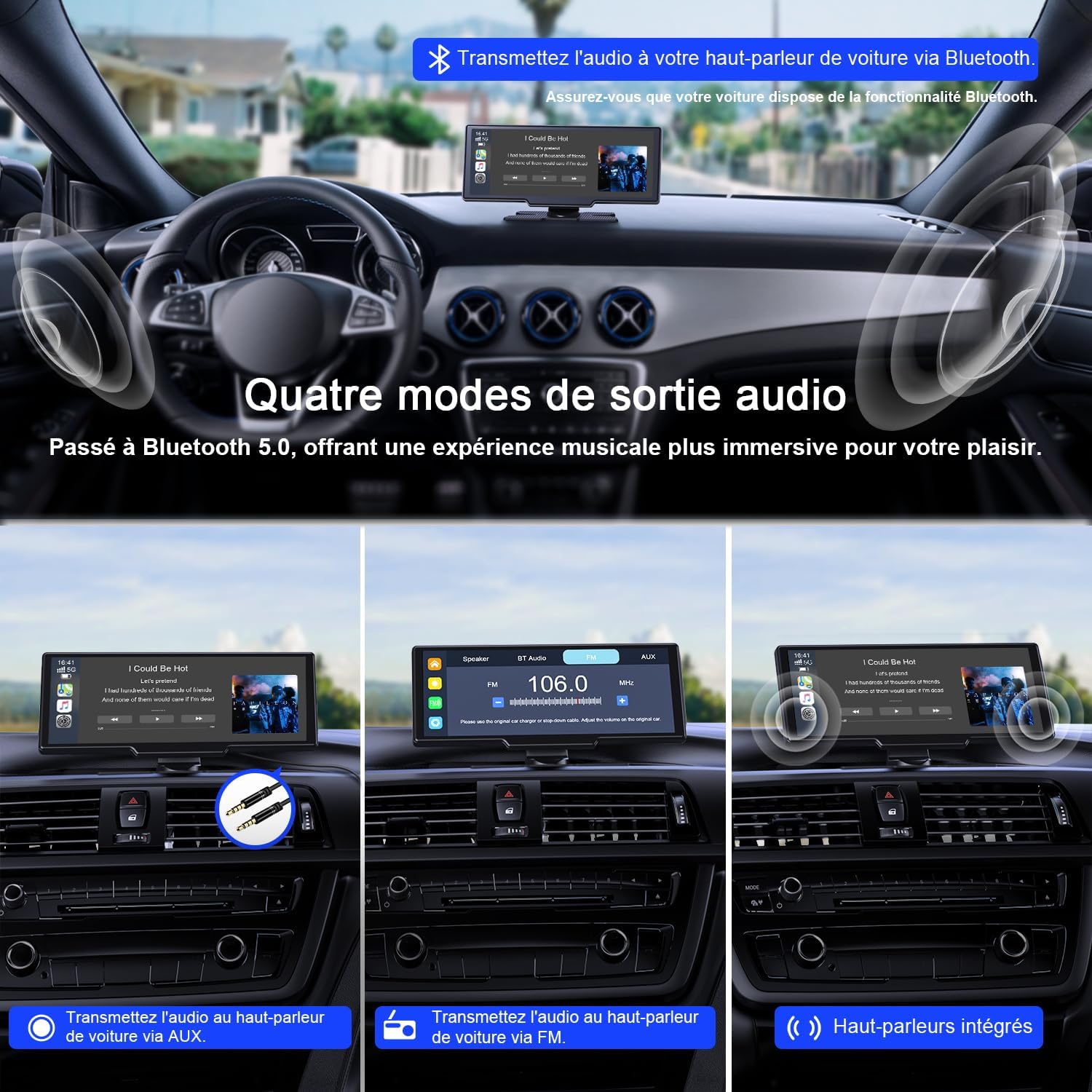
An image demonstrating the four audio output modes: built-in speakers, Bluetooth, FM transmission, and AUX connection, with visual cues for each.
Screen Mirroring (Mirror Link)
Connect via Wi-Fi for instant screen mirroring (AirPlay & Android Cast) to view your smartphone content on the larger display, enhancing your visual experience.

An image showing a smartphone screen being mirrored onto the Avylet display via AirPlay or Android Cast, illustrating the Mirror Link functionality.
Funzionalità della dashcam
The integrated 4K front camera and HD rear camera provide continuous recording. Features include loop recording, ensuring older files are overwritten by new ones, and a G-sensor for automatic collision detection and footage protezione.

An image displaying the dual dashcam views (front 4K and rear HD) on the screen, highlighting features like loop recording and parking assistance.
Modalità schermo diviso
The split-screen mode allows for efficient multitasking, enabling simultaneous use of multiple applications and camera feeds after connecting to Apple CarPlay or Android Auto. This allows you to view navigation and a camera feed concurrently.

An image demonstrating the split-screen display mode, showing two applications running simultaneously on the Avylet screen, such as navigation and music.
Manutenzione
Keep the screen clean using a soft, dry cloth. Avoid abrasive cleaners or solvents that could damage the display. Regularly check cable connections to ensure they are secure.
OTA Aggiornamenti
The system supports Over-The-Air (OTA) updates for continuous improvements and optimized performance. Connect via Wi-Fi to receive free lifetime updates, ensuring your device always has the latest features and security enhancements.

An image illustrating the Over-The-Air (OTA) update process, showing a smartphone and the car display receiving a software update wirelessly.
Risoluzione dei problemi
Screen Freezing
- Check for other electronic devices nearby that might interfere with the CarPlay signal (Bluetooth or Wi-Fi). Move them away from the phone and CarPlay unit.
- Try restoring CarPlay to factory settings in the device's "Settings" menu and clear phone and CarPlay connection records before reconnecting.
- Se il problema persiste, contattare il servizio clienti all'indirizzo service@avylet.com per assistenza professionale.
Android Auto Disconnection Issue
If you experience unstable or frequent disconnections with Android Auto after updating to Android 16, follow these steps:
- Install the latest version of the Evelink application from the Google Play Store.
- Switch to Android Cast mode on the smart screen.
- Connect to the smart screen: In the Evelink app, tap "Add", select "Wi-Fi Direct", tap the blue area at the top, then "Authorize".
- Once connected, your phone will display "Android 16 Auto Connect issue fixed", indicating the disconnection problem is resolved.

A four-step visual guide demonstrating how to resolve Android Auto disconnection issues using the Evelink app and Wi-Fi Direct connection.
Specifiche
| Marca | Avylet |
| Nome del modello | T93 |
| Dimensioni dello schermo | 9.26 pollici |
| Tipo di visualizzazione | Touchscreen IPS HD |
| Risoluzione | 1600x600 |
| Frequenza di aggiornamento | 60 Hz |
| Luminosità | 550 cd/m² |
| Rapporto di contrasto | 1000:1 |
| Tecnologia di connettività | AirPlay, Android Cast, Bluetooth 5.2, AUX, FM |
| Caratteristiche speciali | Voice control, Wireless Apple CarPlay, Wireless Android Auto, 4K Front Dashcam, 1080P HD Rear Camera, Mirror Link, OTA Updates, Split Screen Mode |
| Risoluzione di registrazione video | 4K (front), 1080p (rear) |
| Campo di View | 170 gradi |
| Scheda di memoria inclusa | 64 GB |
| Supporto massimo della scheda di memoria | 256 GB |
| Potenza in ingresso | 12V-32V (Cigarette Lighter) |
| Tipo di montaggio | Windshield Mount, Adhesive Mount |
| Tipi di veicoli compatibili | Car, SUV, Van, RV, Truck, Pickup |
| Dimensioni (L x P x A) | Dimensioni: 24 x 4.8 x 11 cm |
| Peso | 1.3 kg |
Garanzia e supporto
The Avylet T93 comes with a Garanzia di 2 anno dalla data di acquisto.
For technical support, warranty claims, or any inquiries, please contact us via the information provided on the product packaging or directly through our dedicated support channel. We guarantee a response within 12 hours.
E-mail: service@avylet.com

An image detailing customer support information, including 24/7 technical support and a 2-year warranty, with an email address for contact.


