
Introduzione
This manual provides detailed instructions for the safe and effective use of your pxton 666S two-way radio. Please read this manual thoroughly before operating the device to ensure optimal performance and to prevent damage. The pxton 666S is a reliable communication device designed for various applications, featuring 16 memory channels, 165 privacy codes, and multiple functions for enhanced usability.
Cosa c'è nella scatola

Image: Contents of the pxton PX-666S walkie talkie package, including two radios, chargers, batteries, belt clips, earphones, and a user manual.
- 2 x pxton 666S Two-Way Radios
- 2 x USB Charging Docks
- 2 batterie al litio da 1500 mAh
- 2 x cordini
- Clip 2 x cinghie
- 2 auricolari
- 1 x Manuale utente
Prodotto finitoview
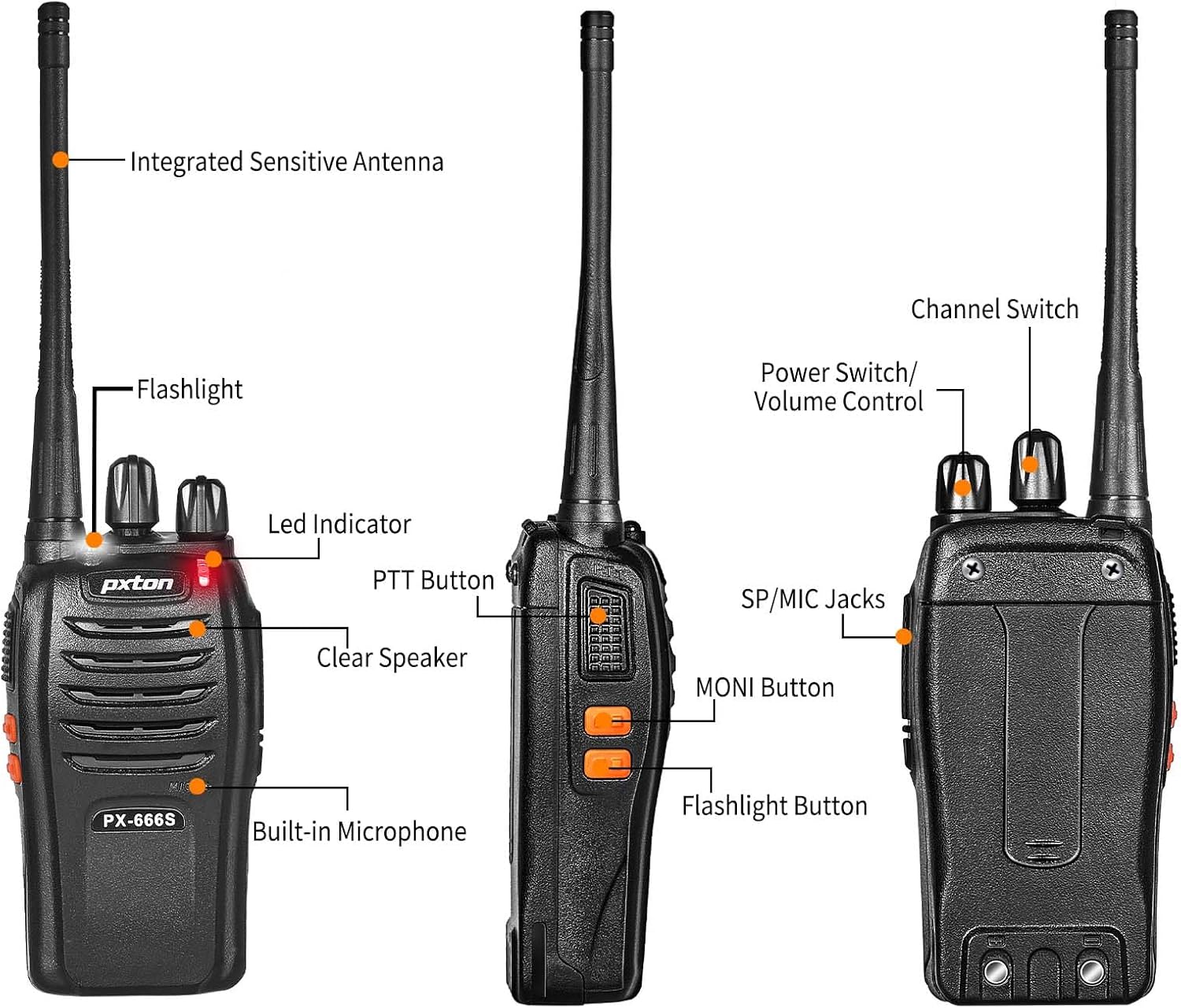
Image: Detailed diagram showing the labeled parts and controls of the pxton PX-666S two-way radio.
Parti e controlli:
- Integrated Sensitive Antenna: Per trasmettere e ricevere segnali.
- Torcia elettrica: Luce LED integrata per l'illuminazione.
- Indicatore LED: Displays operational status (e.g., transmitting, receiving, charging).
- Pulsante PTT (premi per parlare): Tenere premuto per trasmettere, rilasciare per ricevere.
- Clear Speaker: Per l'uscita audio.
- Microfono incorporato: Per input vocale.
- Cambio canale: Rotary knob to select communication channels (1-16).
- Interruttore di alimentazione/controllo del volume: Manopola rotante per accendere/spegnere la radio e regolare il volume.
- Jack SP/MIC: Ports for connecting external speaker/microphone or earpiece.
- MONI Button (Monitor): Used to temporarily disable squelch for weak signals.
- Pulsante torcia: Attiva la torcia LED.

Image: A pxton PX-666S walkie talkie shown next to a smartphone for size comparison, indicating its compact dimensions.
Impostare
1. Installazione della batteria
The pxton 666S uses a 1500mAh Li-ion battery. To install:
- Assicurarsi che la radio sia spenta.
- Individuare il vano batteria sul retro della radio.
- Align the battery with the compartment's contacts.
- Spingere delicatamente la batteria in posizione finché non scatta in modo sicuro.

Immagine: View of the pxton PX-666S battery compartment and the 1500mAh Li-ion battery, detailing battery life expectations.
2. Carica della batteria
Prima del primo utilizzo, caricare completamente la batteria. Una ricarica completa richiede in genere 3-4 ore.
- Posizionare la radio (con la batteria installata) nella base di ricarica.
- Connect the USB charging dock to a power source.
- The LED indicator on the radio or charging dock will show charging status (e.g., red for charging, green for fully charged).
- Once fully charged, remove the radio from the dock.
3. Fissaggio degli accessori
- Clip da cintura: Per un trasporto più comodo, fissare la clip da cintura sul retro della radio.
- Auricolare: Plug the earphone into the SP/MIC jacks for private listening and hands-free operation.
Istruzioni per l'uso
1. Accensione/spegnimento e controllo del volume
Ruotare il Interruttore di alimentazione/controllo del volume Ruotare la manopola in senso orario per accendere la radio. Continuare a ruotare in senso orario per aumentare il volume. Ruotare in senso antiorario per diminuire il volume e spegnere la radio.
2. Selezione del canale
Ruotare il Cambio canale knob to select one of the 16 available memory channels. Ensure all radios in your group are set to the same channel for communication.
3. Trasmissione e ricezione (PTT)
- A trasmettere, premere e tenere premuto il tasto Pulsante PTT. Speak clearly into the microphone. The LED indicator will typically glow red.
- A ricevere, rilasciare il Pulsante PTT. The LED indicator will typically glow green when receiving a signal.
4. Funzione VOX (trasmissione a comando vocale)
The VOX function allows for hands-free transmission. When activated, the radio will automatically transmit when it detects your voice, without needing to press the PTT button. The pxton 666S offers 5 levels of VOX sensitivity adjustment.

Image: A firefighter demonstrating the hands-free communication capability using the VOX function of the pxton walkie talkie.
5. Torcia elettrica
Premere il tasto Pulsante torcia to turn the built-in LED flashlight on or off. This is useful for low-light conditions.

Image: The pxton PX-666S walkie talkie's flashlight illuminating a dark camping scene, highlighting its utility.
6. Monitoring (MONI)
Premere e tenere premuto il tasto MONI Button to temporarily disable the squelch function. This allows you to listen to very weak signals that might otherwise be blocked by the squelch, or to check if a channel is clear before transmitting.
7. lettura
The scanning function allows the radio to automatically scan through all channels to detect active transmissions. Refer to the full user manual for specific instructions on activating and managing the scan feature.
8. Allarme di emergenza
The radio includes an emergency alarm feature. Consult the detailed user manual for activation and deactivation procedures for this function.
9. Noise Reduction and Automatic Squelch
These features work to reduce background noise and automatically mute the speaker when no signal is present, ensuring clearer communication and a more pleasant listening experience.
10. TOT (Time-Out Timer)
The Time-Out Timer prevents any single user from occupying a channel for too long by automatically stopping transmission after a preset period. This helps manage channel usage efficiently.
11. Raggio di comunicazione
The actual communication range can vary significantly based on terrain, obstructions, and electromagnetic interference.
- Open Areas (e.g., flat terrain, mountain peaks): Fino a 3 miglia.
- Suburban/Countryside: Approximately 1.2 miles.
- City Limits (with buildings and obstructions): Approximately 0.6 miles.

Image: Visual representation of the pxton PX-666S walkie talkie's communication range across different environments: open, suburban, and urban.
Manutenzione
1. Cura della batteria
- Evitare di sovraccaricare o scaricare completamente la batteria.
- Conservare le batterie in un luogo fresco e asciutto quando non vengono utilizzate.
- Se la radio non verrà utilizzata per un periodo prolungato, rimuovere la batteria.
2. Pulizia
- Pulire la radio con un panno morbido, damp stoffa. Non utilizzare prodotti chimici aggressivi o detergenti abrasivi.
- Assicurarsi che la radio sia asciutta prima dell'uso o della ricarica.
3. Conservazione
Store the radio in a dry, dust-free environment away from extreme temperatures. The radio features a rugged PC+ABS durable material for anti-fall and anti-vibration protection, contributing to a longer service life.

Image: A close-up of the pxton PX-666S walkie talkie resting on rocks, emphasizing its durable and rugged construction.
Risoluzione dei problemi
| Problema | Possibile causa | Soluzione |
|---|---|---|
| Nessun potere | Batteria scarica o non installata correttamente. | Caricare la batteria o reinstallarla correttamente. |
| Impossibile trasmettere o ricevere | Canale errato, fuori portata o batteria scarica. | Verify channel selection, move closer to other radios, or charge battery. |
| Scarsa qualità audio | Volume too low/high, interference, or out of range. | Adjust volume, move to a different location, or check for obstructions. |
| La radio trasmette continuamente (VOX) | VOX sensitivity too high or background noise. | Regolare la sensibilità VOX a un livello inferiore o disattivare VOX. |
Specifiche
- Numero modello: PX-666S-0001
- Marca: pxton
- Gamma di frequenza: Frequenza ultra-alta
- Numero di canali: 16
- Batteria: 1500mAh agli ioni di litio (inclusi)
- Voltage: 3.7 Volt
- Intervallo di conversazione massimo: 3 Miles (open areas)
- Peso dell'articolo: 1.41 libbre
- Dimensioni del prodotto: 9.9 x 2.2 x 6.9 pollici
- Caratteristiche speciali: Automatic Squelch, Battery Saver Mode, Long Range, Rechargeable, Voice Operated Transmission (VOX), Flashlight
- Livello di resistenza all'acqua: Resistente all'acqua
- ID FCC: 2AX68GTR8
Garanzia e supporto
Your pxton 666S two-way radio comes with a Politica di reso incondizionato di 30 giorni E servizio post-vendita a vita. If you encounter any issues or require assistance, please contact pxton customer support. We are committed to providing support and resolving any concerns you may have.


