
LEMNOI SG7
LEMNOI SG7 Educational Day/Night Alarm Clock for Children - User Manual
Modello: SG7
Introduzione
This manual provides detailed instructions for the setup, operation, and maintenance of your LEMNOI SG7 Educational Day/Night Alarm Clock. Please read it thoroughly to ensure proper use and to maximize the product's features.
Informazioni sulla sicurezza
- Tenere il dispositivo lontano da acqua e umidità.
- Non esporre a temperature estreme.
- Per la ricarica utilizzare solo il cavo USB-C in dotazione.
- Tenere fuori dalla portata dei bambini piccoli per evitare rischi di soffocamento dovuti a piccole parti.
- Non tentare di smontare o riparare il dispositivo da soli. In caso di problemi, contattare l'assistenza clienti.
Contenuto della confezione
Si prega di controllare la confezione per verificare la presenza dei seguenti elementi:
- LEMNOI SG7 Educational Day/Night Alarm Clock
- Cavo di ricarica USB-C
- Manuale d'uso
Prodotto finitoview
The LEMNOI SG7 is designed to assist children with sleep training and morning routines. It features:
- Day/Night Educational Icons: Green sun for wake-up, blue moon for sleep.
- Luce notturna a LED a 5 colori: Luminosità regolabile.
- 7 Musical Alarm Options: Gentle wake-up sounds.
- Doppia sveglia e funzione snooze: Customizable for weekdays and weekends.
- Digital Display with Temperature Monitor: 12/24 hour format, F/C conversion.
- Touch/Sound Activated Screen: Lo schermo si spegne dopo 20 secondi di inattività.
- Batteria al litio integrata da 2000 mAh: USB-C rechargeable.

Davanti view of the LEMNOI SG7 alarm clock, displaying time, temperature, and day/night icons.
Impostare
1. Ricarica iniziale
Before first use, fully charge the alarm clock. Connect the provided USB-C cable to the charging port on the back of the device and plug it into a compatible USB power adapter (not included).
- Durante la ricarica, la spia di carica si illuminerà.
- Una carica completa richiede in genere circa 3 ore.
- The battery icon on the display will show charging status.
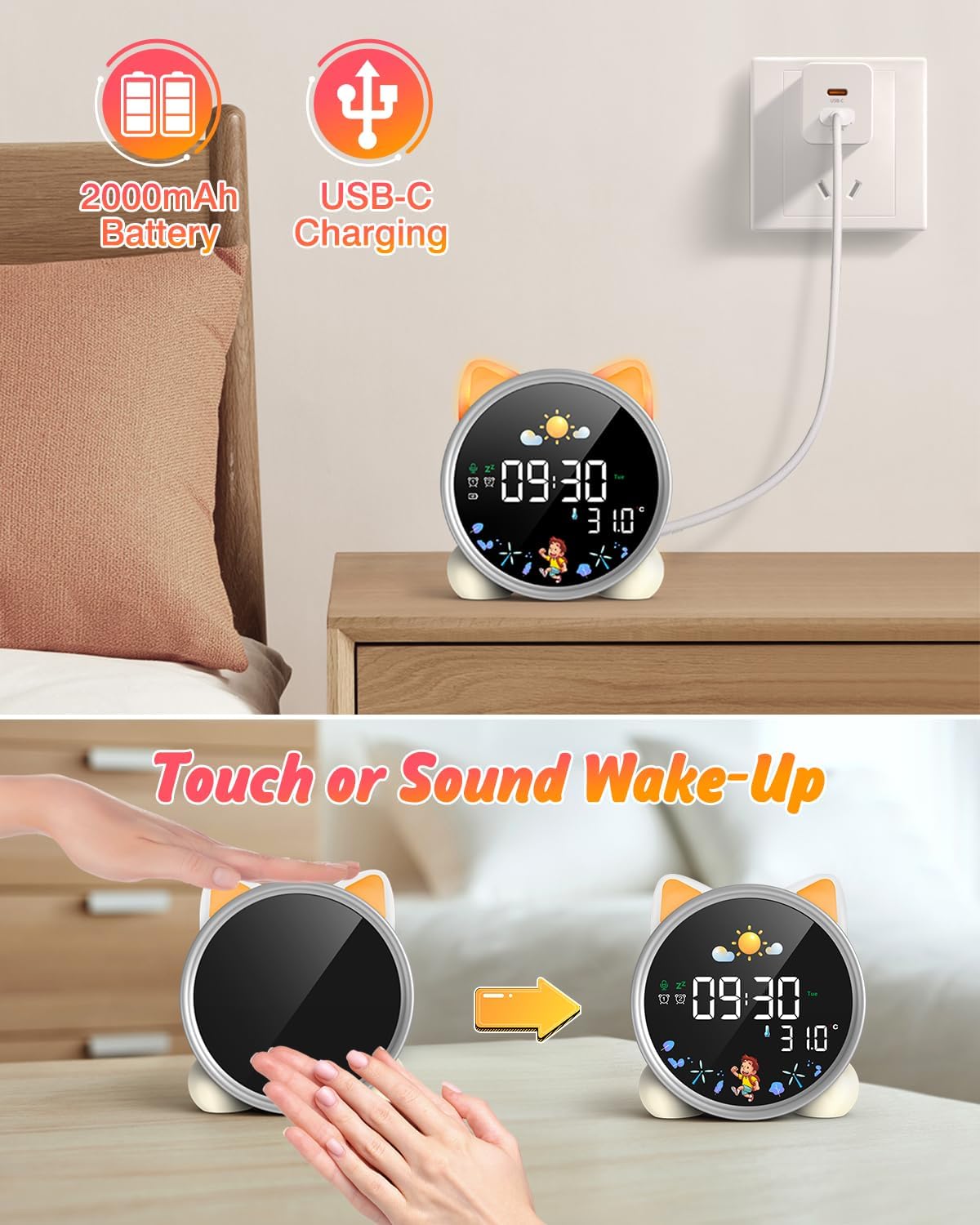
The alarm clock being charged via its USB-C port.
2. Accensione/spegnimento
The device powers on automatically when connected to power. To manually power on/off or wake the screen:
- Schermata di riattivazione: Tap the device or make a sound near it. The screen will illuminate for 20 seconds.
- Accensione/spegnimento: The device is designed to be always on for alarm functions.
Activating the screen by tapping the device.
Istruzioni per l'uso
1. Impostazione di ora e data
The alarm clock supports 12/24 hour format and displays the day of the week. Specific buttons for setting are not detailed in the provided text, but typically involve a "Set" or "Mode" button.
- Refer to the physical manual for exact button functions (e.g., "SET" button).
- Tenere premuto il pulsante "SET" per accedere alla modalità di impostazione dell'ora.
- Use "+" and "-" buttons to adjust hours, minutes, and other settings.
- Premere nuovamente "SET" per confermare ogni impostazione e passare a quella successiva.
2. Day/Night Educational Mode
This feature uses color-changing lights and icons to signal wake-up and sleep times.
- Svegliati: Green light and sun icon appear to indicate it's time to wake up.
- Sonno: Blue light and moon icon appear to indicate it's time to sleep.

Day/Night mode with green sun for wake-up and blue moon for sleep.
3. Dual Alarms and Snooze Function
Set two independent alarms for different routines.
- Impostazione degli allarmi: The dual alarms can be customized for any day from Monday to Sunday. Consult the full manual for specific steps to set Alarm 1 and Alarm 2.
- Posticipa: When an alarm sounds, press the "SNOOZE" button on top for an additional 9 minutes of sleep. This can be repeated up to 3 times.

Illustration of the snooze function and dual alarm capability.
4. Night Light (5 Colors & Brightness Levels)
The alarm clock functions as a night light with 5 color options and adjustable brightness.
- Opzioni colore: Yellow, Blue, Purple, White, and Gradient.
- Luminosità: 3 levels of brightness (0%, 30%, 70%, 100%) for the screen display. The night light itself also has adjustable brightness.
- Refer to the physical manual for instructions on cycling through colors and adjusting brightness.

The 5 available night light colors and screen brightness options.
5. Music and Sound Machine
The alarm clock offers 7 musical options for a gentle wake-up or soothing sleep environment.
- 7 musical options are available.
- Refer to the physical manual for instructions on selecting and setting music.

The 7 sound options available for the alarm clock.
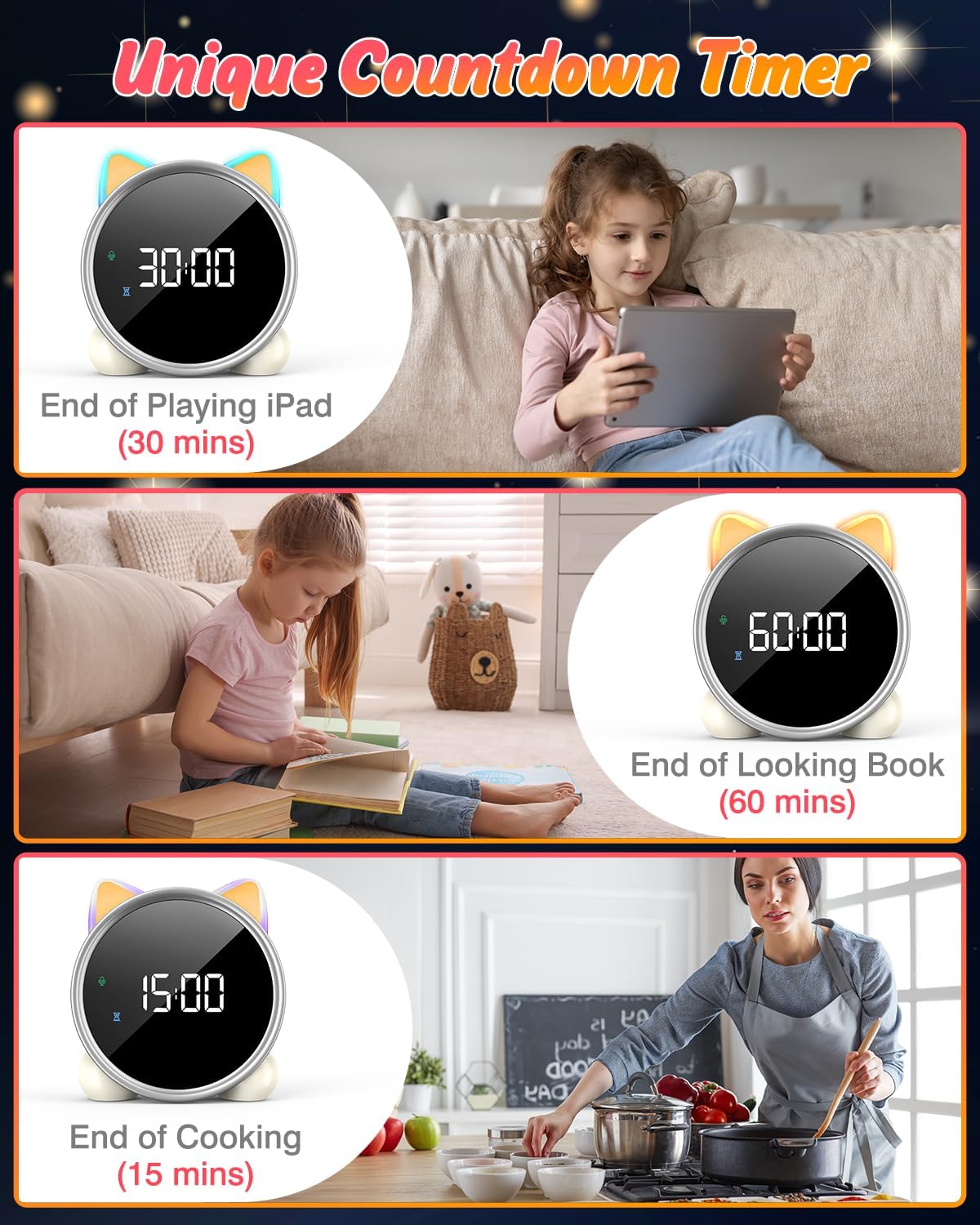
6. Conto alla rovescia
A unique countdown timer feature can be used for various activities.
- Useful for managing screen time, reading sessions, or cooking.
- Refer to the physical manual for instructions on setting the countdown timer.
Examples of the countdown timer in use for various activities.
7. Visualizzazione della temperatura
The alarm clock displays the ambient temperature and supports both Celsius and Fahrenheit units.
- Supports F/C temperature conversion.
- Refer to the physical manual for instructions on switching between units.
8. Screen Activation (Touch/Sound)
The screen can be activated by touch or sound and will automatically turn off after a period of inactivity to save power.
- Tap the device or make a sound to wake the screen.
- The screen will turn off after 20 seconds of no interaction.
Manutenzione
- Pulizia: Pulire il dispositivo con un panno morbido e asciutto. Non utilizzare detergenti abrasivi o solventi.
- Magazzinaggio: Conservare in luogo fresco e asciutto quando non si utilizza per lunghi periodi.
- Cura della batteria: To prolong battery life, avoid fully discharging the battery frequently. Recharge when the low battery indicator appears.
Risoluzione dei problemi
| Problema | Possibile causa | Soluzione |
|---|---|---|
| Lo schermo non si accende. | Batteria scarica o dispositivo spento. | Charge the device using the USB-C cable. Tap the device or make a sound to activate the screen. |
| La batteria si scarica rapidamente. | Night light mode consumes more power. | It is recommended to keep the device plugged in when using night light mode for extended periods. Ensure the screen brightness is not set too high if battery life is a concern. |
| Difficoltà nell'impostazione dell'ora/sveglie. | Sequenza di pulsanti errata o scarsa familiarità con i comandi. | Refer to the "Operating Instructions" section and the detailed physical manual for precise button functions and sequences. |
| Screen remains on constantly. | Possible setting error or malfunction. | Ensure the screen auto-off feature is enabled (if applicable, check manual). If the issue persists, try a soft reset (if available, check manual) or contact customer support. |
Specifiche
- Marca: LEMNOI
- Numero modello: SG7
- Colore: Rosa
- Dimensioni del prodotto (L x P x A): Dimensioni: 13.1 x 3.81 x 14.5 cm
- Materiale: Plastica
- Caratteristiche: Adjustable brightness, Snooze function
- Peso dell'articolo: 265 grammi
- Tipo di visualizzazione: Digitale
- Fonte di energia: Battery Powered (Built-in 2000mAh Lithium Battery, USB-C charging)
- Tipologia di camera: Camera da letto
- Forma: Gatto
- Uso interno/esterno: Al chiuso
Garanzia e supporto
For warranty information or technical support, please refer to the contact details provided with your purchase or visit the official LEMNOI websito. Conservare la prova d'acquisto per eventuali reclami in garanzia.
Ask a question about this manual
Ask about setup, troubleshooting, compatibility, parts, safety, or missing instructions. Manuals+ will review the question and use this page’s manual context to help answer it.